Listen to this Post
Introduction:
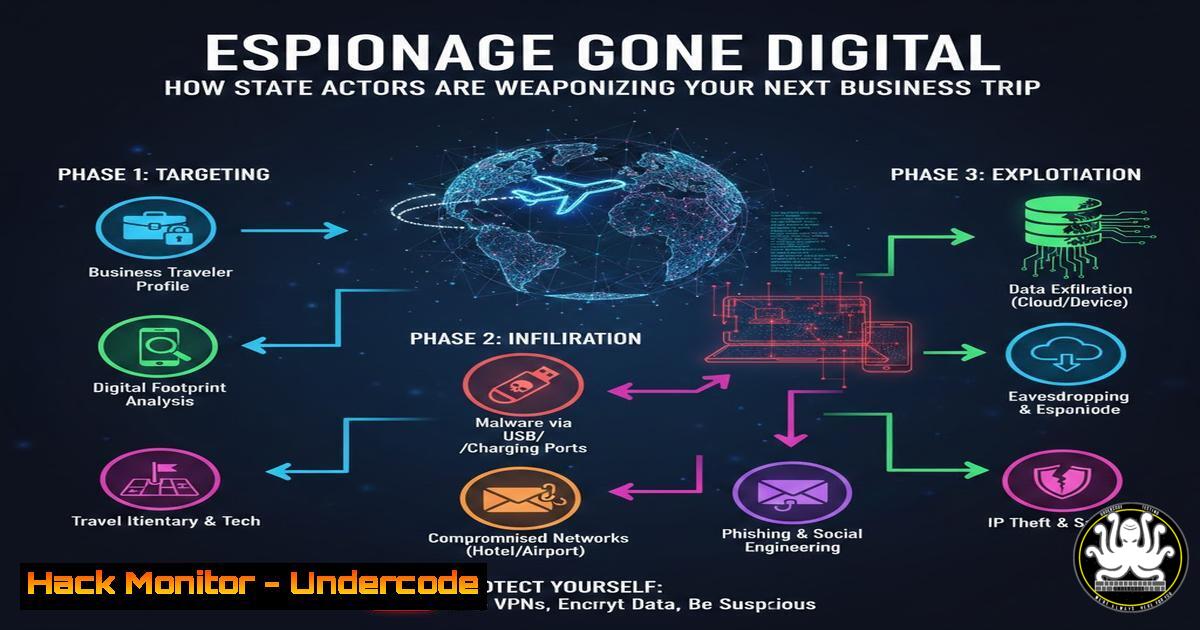
In an era where corporate secrets are as valuable as military intelligence, the French counter-intelligence agency (DGSI) has issued a stark warning regarding the targeting of business executives, researchers, and innovators abroad. The threat landscape has shifted from opportunistic cybercrime to structured state-sponsored information capture. This report details real-world cases of economic espionage, emphasizing that the vulnerability is not just in the cloud, but in the physical handling of devices during international travel.
Learning Objectives:
- Understand the specific methodologies used by state actors to extract data from traveling professionals.
- Implement a rigorous pre-travel, during-travel, and post-travel device security protocol.
- Learn to detect and mitigate tampering attempts on personal and corporate hardware.
You Should Know:
- The Anatomy of a Modern “Flash Ingérence” Attack
The DGSI report outlines three distinct attack vectors. The first involves the corruption of a researcher through anonymous meetings and financial诱饵, culminating in the physical theft or covert manipulation of a laptop. The second highlights border control as a threat vector, where devices are forcibly unlocked and tampered with to disable multi-factor authentication (MFA). The third case demonstrates the value of preparation: a startup CEO, pre-briefed by DGSI, used “clean” devices, neutralizing a surveillance attempt.
Step‑by‑step guide: Post-Incident Device Forensics (Linux)
If you suspect your device was accessed while out of your control (Case 1 & 2), do not reconnect to your corporate network. Perform a live analysis first.
1. Check for new user accounts: `sudo awk -F: ‘{ print $1}’ /etc/passwd`
2. Review authentication logs for unauthorized sudo usage or logins: `sudo grep “Accepted” /var/log/auth.log` or `sudo journalctl _COMM=sudo`
3. List recently modified files to find planted malware or altered configs:
`sudo find /home -type f -mmin -60 -ls` (Checks the last hour)
`sudo find /etc -type f -mmin -120 -ls` (Checks system configs)
4. Check for kernel modules or running processes that shouldn’t be there:
`lsmod | grep -i hide` (Rootkits often hide processes)
`ps aux –forest`
2. Countering the “Border Control” Attack (Case 2)
When a phone is returned after a customs interrogation with MFA disabled, it indicates the device was cloned or injected with spyware. Attackers often install profiles that route traffic through their servers or disable security features.
Step‑by‑step guide: Hardening Devices Against Border Searches (Windows & iOS)
Before travel, configure devices for “Travel Mode.”
1. Windows (PowerShell – Disable Biometrics Temporarily):
To prevent forced unlock, disable Windows Hello Pin and Fingerprint before the border:
`Set-MpPreference -DisableBiometrics $true`
(Note: You must have a complex password memorized, not written down.)
2. iOS Configuration Profile Check:
After a border encounter, immediately check for malicious Mobile Device Management (MDM) profiles.
– Go to Settings > General > VPN & Device Management.
– If you see a profile you did not install (especially one with “Supervision” enabled), remove it immediately.
3. Windows “Burner” Mode:
Create a temporary local user account with no access to corporate data for travel.
`New-LocalUser -Name “TravelUser” -Password (ConvertTo-SecureString “TempPass123!” -AsPlainText -Force) -FullName “Travel” -AccountNeverExpires`
`Add-LocalGroupMember -Group “Users” -Member “TravelUser”`
Only use this account at borders; never log into corporate accounts until returning to a safe zone.
3. Neutralizing Wi-Fi and USB Charging Threats
The DGSI warns specifically against public Wi-Fi and USB charging stations (“juice jacking”). These are prime vectors for man-in-the-middle attacks and data exfiltration.
Step‑by‑step guide: Securing Communications on the Road
1. Linux – Force VPN Kill Switch:
Ensure all traffic goes through VPN and stops if VPN drops.
`sudo ufw enable`
`sudo ufw default deny incoming`
`sudo ufw default deny outgoing`
`sudo ufw allow out on tun0 from any to any` (Allow VPN interface)
`sudo ufw deny out from any to any` (Block everything else)
2. Windows – Block USB Data (Allow Charging Only):
Use Registry Editor to disable USB data transfer while allowing power.
– Navigate to: `HKEY_LOCAL_MACHINE\SYSTEM\CurrentControlSet\Services\USBSTOR`
– Set `Start` DWORD value to 4.
To revert: set back to `3`.
3. Mobile – Enable USB Restricted Mode (iOS/Android):
Ensure your phone locks the USB port after a certain period of inactivity, preventing data transfer without unlocking the device.
4. The “Clean Device” Strategy (Case 3)
The successful defense in the third case involved a “clean” device. This means traveling with hardware that contains no sensitive data, no client lists, and no active sessions.
Step‑by‑step guide: Building a Secure Travel Laptop
1. Disk Encryption is Mandatory:
- Linux: Ensure LUKS is enabled. `sudo cryptsetup luksDump /dev/sda2` (to verify).
- Windows: Verify BitLocker is active. `manage-bde -status C:`
2. Application Allow-listing (Windows via AppLocker):
Create a rule to only allow pre-approved apps to run.
`New-AppLockerPolicy -RuleType Exe -User Everyone -Action Allow -Path “C:\Program Files\ApprovedAppFolder”`
(Export and deploy via GPEdit.msc)
3. Data Segmentation:
Never sync cloud storage (OneDrive, Google Drive) to the travel device. Use a temporary encrypted container (VeraCrypt) for any necessary files and delete them after use.
5. Post-Trip Compromise Assessment
Upon return, the DGSI mandates a password change and IT analysis. This is not just a formality; it is a forensic necessity.
Step‑by‑step guide: Network and System Integrity Scan
1. Check for Suspicious Outbound Connections (Linux):
Look for connections to unusual IPs (potential C2 servers).
`sudo netstat -tupn | grep ESTABLISHED`
`sudo ss -tupn`
- Windows – Check for Scheduled Tasks planted by attackers:
`schtasks /query /fo LIST /v` (Look for tasks with obscure names or run times correlating with travel)
3. Verify System File Integrity (Windows):
`sfc /scannow`
`DISM /Online /Cleanup-Image /RestoreHealth`
4. DNS Cache Check:
Look for DNS entries that redirect legitimate sites to phishing pages.
– Windows: `ipconfig /displaydns`
– Linux: `sudo systemd-resolve –statistics` (or check specific cache depending on service)
What Undercode Say:
- Physical Security is Cybersecurity: The DGSI report confirms that sophisticated espionage now targets the human and the hardware as aggressively as the network. The “air gap” is no longer safe if the device is physically seized.
- Defense in Depth for Travel: A single layer of defense (like a password) is insufficient. The combination of clean devices, VPN kill switches, USB data blockers, and rigorous post-trip analysis is the only effective countermeasure against state-level actors.
Analysis:
The tactics detailed by the DGSI highlight a convergence of physical and digital threats. For the average security professional, this means expanding the threat model. It is no longer enough to secure servers; the security of the executive’s smartphone during a customs check is now a corporate liability. The success in Case 3 came not from technology alone, but from awareness—the CEO knew the playbook. This underscores that technical controls (like encryption) fail if a user can be coerced into unlocking the device. Therefore, organizations must implement “deniable” or “clean” device policies for high-risk travel, where the device contains nothing that, if accessed, could compromise the enterprise. The future of corporate espionage defense lies in minimizing the value of data carried across borders.
Prediction:
As physical border checks become increasingly digitized, we will see a rise in “VPN-less” architectures and “ephemeral” computing environments for travelers. Future security protocols will likely involve remote virtual desktops (VDI) accessed via disposable thin clients, ensuring that even if a device is compromised, the corporate data remains in the data center. The arms race will shift towards biometric data extraction and AI-powered surveillance at border points.
▶️ Related Video (84% Match):
🎯Let’s Practice For Free:
IT/Security Reporter URL:
Reported By: Dgsi Cyberit – Hackers Feeds
Extra Hub: Undercode MoN
Basic Verification: Pass ✅


