Listen to this Post
Introduction
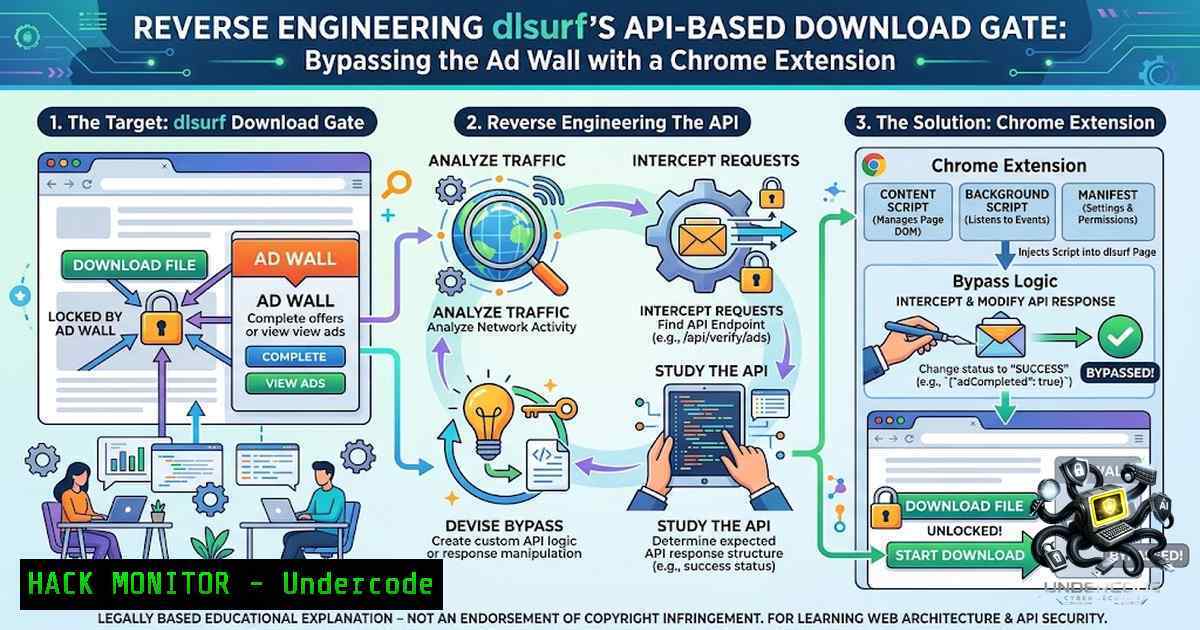
File hosting services often implement intricate ad-driven download gates to monetize content distribution, but these mechanisms frequently rely on client-side presentation layers that mask a simpler API-based authorization flow. The dl.surf platform exemplifies this pattern, using a multi-step ads modal with timers, video players, and CAPTCHA verification to obscure what is essentially a straightforward JWT-based file retrieval endpoint. By mapping the network and authentication boundaries rather than engaging with the UI presentation layer, security researchers can expose the underlying API architecture and develop efficient bypass mechanisms that eliminate the friction of intrusive advertising.
Learning Objectives & Secrets
- Objective 1: Map the complete API authorization flow for file download services, identifying the separation between client-side UI presentation and server-side authentication logic. Secret tip: Focus on network requests rather than DOM manipulation when reverse engineering session-based download gates.
-
Objective 2: Implement automated CAPTCHA handling using Turnstile token extraction while maintaining authenticated session state across API requests. Secret tip: Monitor the `turnstile.render` function calls to intercept token generation before submission.
-
Objective 3: Build a Chrome extension that intercepts and prefetches JWT tokens during the ad display phase, eliminating user interaction with the modal interface. Secret tip: The JWT is often generated server-side immediately after the initial page load, making it available long before the UI timer completes.
You Should Know
1. Mapping the Network Authorization Boundary
The dl.surf platform implements a two-step API handshake that occurs entirely independent of the client-side ad display. Understanding this network boundary is crucial for developing bypass techniques.
Step-by-step guide:
- Establish Authenticated Session: Begin by creating a session cookie through standard login or anonymous file access. The session token is typically stored in browser cookies and must be preserved across API calls.
-
Identify Initial File Request: Navigate to the file download page and open browser developer tools (F12) to monitor network traffic. Filter for XHR/Fetch requests to isolate API calls.
 Example cURL command to simulate initial file request
curl -X GET "https://dl.surf/file/{slug}" \
-H "Cookie: sessionid=YOUR_SESSION_TOKEN" \
-v
- Extract File Metadata: The initial page load returns a JSON payload containing file metadata and a `slug` identifier that serves as the reference for subsequent API calls.
-
Observe Request/Download Endpoint: Monitor for requests to
/api/file/request-download/file/{slug}. This endpoint returns a short-lived JWT token used to authorize the final download request.
// JavaScript interception of request-download endpoint
fetch(<code>/api/file/request-download/file/${slug}</code>, {
method: 'GET',
headers: {
'Content-Type': 'application/json',
'X-Requested-With': 'XMLHttpRequest'
}
}).then(response => response.json())
.then(data => console.log('JWT Token:', data.token));
- Analyze Token Structure: Decode the JWT using base64url decoding to understand expiration times and payload structure.
 Decode JWT payload using command line
echo "YOUR_JWT_TOKEN" | cut -d'.' -f2 | base64 -d 2>/dev/null | jq .
Key insight: The ad timer UI is entirely decoupled from the actual file authorization. The JWT is typically generated immediately after page load, not after the timer expires.
2. Turnstile CAPTCHA Integration and Token Extraction
Cloudflare Turnstile provides non-interactive CAPTCHA verification that runs in the background. Successful bypass requires understanding how the token is generated and transmitted.
Step-by-step guide:
- Locate Turnstile Script: In the page source, identify the Turnstile script inclusion and configuration parameters.
<!-- Typical Turnstile integration -->
<script src="https://challenges.cloudflare.com/turnstile/v0/api.js" async defer></script>

<div class="cf-turnstile" data-sitekey="YOUR_SITE_KEY" data-callback="captchaCallback"></div>
- Intercept Token Generation: Set up an event listener to capture the Turnstile token when it becomes available.
// Inject this script to intercept Turnstile token
window.captchaCallback = function(token) {
console.log('Turnstile Token:', token);
window.captchaToken = token;
// Store token for later use in download request
};
- Automate Token Retrieval: For automated scripts, use the Turnstile API to request tokens programmatically.
 Python example using cloudscraper for Turnstile
import cloudscraper
import json

scraper = cloudscraper.create_scraper()
response = scraper.get('https://dl.surf/file/example-slug')
 Extract turnstile sitekey from HTML
sitekey = extract_sitekey(response.text)
 Request token (simplified)
token = get_turnstile_token(sitekey, 'https://dl.surf')
- Submit Token with Request: Include the Turnstile token alongside the JWT in the final download request.
// Final download request with both tokens
fetch('/api/file/new-download-file/', {
method: 'POST',
headers: {
'Content-Type': 'application/json',
'X-CSRFToken': csrfToken
},
body: JSON.stringify({
token: jwtToken,
captcha_token: turnstileToken
})
}).then(response => response.json())
.then(data => {
if (data.download_url) {
console.log('Download URL:', data.download_url);
}
});
3. JWT Prefetching and State Management
Short-lived JWTs require careful timing to ensure they remain valid when submitted with the CAPTCHA token.
Step-by-step guide:
- Prefetch JWT Immediately: Send the request to `/api/file/request-download/file/{slug}` as soon as the page loads, rather than waiting for user interaction.
// Chrome extension background script for prefetching
chrome.webRequest.onBeforeRequest.addListener(
function(details) {
if (details.url.includes('/api/file/request-download/file/')) {
// Store timestamp for token expiration tracking
chrome.storage.local.set({
jwtPrefetchTime: Date.now()
});
}
},
{ urls: ['://dl.surf/api/file/request-download/file/'] },
['requestBody']
);
- Token Refreshing Logic: Implement logic to refresh the JWT if it expires before the final download request.
function ensureValidToken(slug) {
return new Promise((resolve) => {
chrome.storage.local.get(['jwtToken', 'jwtExpiry'], (data) => {
if (!data.jwtToken || Date.now() > data.jwtExpiry) {
// Refresh token
fetchToken(slug).then(resolve);
} else {
resolve(data.jwtToken);
}
});
});
}
- Session Persistence: Maintain authenticated session state using cookie management.
// Cookie management for session persistence
function setSessionCookie(name, value, days) {
const expires = new Date(Date.now() + days  864e5).toUTCString();
document.cookie = <code>${name}=${value}; expires=${expires}; path=/; domain=.dl.surf; Secure; SameSite=Lax</code>;
}
4. Chrome Extension Architecture for Automated Bypass
Building a robust Chrome extension requires understanding the WebRequest API and cross-origin communication patterns.
Step-by-step guide:
- Manifest Configuration: Define the extension manifest with appropriate permissions.
{
"manifest_version": 3,
"name": "dl.surf Download Bypass",
"version": "1.0",
"permissions": [
"webRequest",
"webRequestBlocking",
"storage",
"cookies",
"activeTab"
],
"host_permissions": [
"://dl.surf/",
"://dlsurf.com/"
],
"background": {
"service_worker": "background.js"
},
"content_scripts": [{
"matches": ["://dl.surf/"],
"js": ["content.js"],
"run_at": "document_start"
}]
}
- Background Script Implementation: Handle network interception and token management.
// background.js - Core logic
let pendingDownloads = new Map();

chrome.webRequest.onBeforeRequest.addListener(
function(details) {
if (details.url.includes('/api/file/request-download/file/')) {
const slug = details.url.split('/').pop();
// Extract JWT from response (using onCompleted listener)
return {};
}
},
{ urls: ['://dl.surf/api/file/request-download/file/'] },
['requestBody', 'extraHeaders']
);

chrome.webRequest.onCompleted.addListener(
function(details) {
if (details.url.includes('/api/file/request-download/file/')) {
const filter = chrome.webRequest.filterResponseData(details.requestId);
let data = '';
filter.ondata = (chunk) => {
data += chunk;
filter.write(chunk);
};
filter.onend = () => {
try {
const json = JSON.parse(data);
if (json.token) {
chrome.storage.local.set({
jwtToken: json.token,
jwtExpiry: Date.now() + 60000 // 60 second TTL
});
}
} catch (e) {
console.error('Failed to parse JWT response:', e);
}
filter.disconnect();
};
}
},
{ urls: ['://dl.surf/api/file/request-download/file/'] },
['responseHeaders']
);
- Content Script Injection: Automate the final download request once both tokens are available.
// content.js - UI automation
function autoDownload() {
chrome.storage.local.get(['jwtToken', 'captchaToken'], (data) => {
if (data.jwtToken && data.captchaToken) {
fetch('/api/file/new-download-file/', {
method: 'POST',
headers: {
'Content-Type': 'application/json',
'X-CSRFToken': getCsrfToken()
},
body: JSON.stringify({
token: data.jwtToken,
captcha_token: data.captchaToken
})
}).then(r => r.json())
.then(response => {
if (response.download_url) {
// Trigger download
window.location.href = response.download_url;
}
});
}
});
}
5. API Security Analysis and Mitigation Recommendations
Understanding the bypass reveals broader implications for API security in content delivery systems.
Step-by-step guide for security hardening:
- Implement Time-Based Token Expiration: Ensure the JWT has the shortest possible validity window, ideally matching the expected ad viewing duration.
// Server-side JWT generation with strict expiration
const token = jwt.sign(
{ file_id: fileId, session: sessionId },
SECRET_KEY,
{ expiresIn: '15s' } // Match ad timer duration
);
- Bind JWT to Session and IP: Include session and IP binding in the token payload to prevent token reuse across different users.
const token = jwt.sign(
{
file_id: fileId,
session_id: sessionId,
ip_hash: hashIP(request.ip),
user_agent_hash: hashUA(request.headers['user-agent'])
},
SECRET_KEY,
{ expiresIn: '60s' }
);
- Validate Token Usage Count: Implement a server-side token usage counter that invalidates tokens after a single use.
 Redis-based token invalidation
def validate_token(token):
if redis.exists(f"used_token:{token}"):
return False
redis.setex(f"used_token:{token}", 86400, "used")
 Additional validation logic
return True
- Monitor Rate Limiting: Implement per-IP and per-session rate limiting on the `/api/file/new-download-file/` endpoint.
 Flask example with rate limiting
from flask_limiter import Limiter

limiter = Limiter(app, key_func=lambda: request.remote_addr)

@app.route('/api/file/new-download-file/', methods=['POST'])
@limiter.limit("3 per minute")
def download_file():
 Implementation
- Implement Proof of Work: Add a challenge-response mechanism requiring client-side computation before issuing the final download URL.
 Server-side PoW challenge
import hashlib
import time

def generate_challenge():
challenge = f"{time.time()}:{secrets.token_hex(16)}"
return challenge

def verify_pow(challenge, nonce, difficulty=4):
return hashlib.sha256((challenge + nonce).encode()).hexdigest().startswith('0'  difficulty)
6. Command-Line Automation and Scripting
For system administrators and security researchers, command-line tools provide efficient automation options.
Step-by-step guide for CLI implementation:
1. Automated Session Management:
!/bin/bash
 dl-surf-automate.sh

SESSION_COOKIE="your_session_cookie"
FILE_SLUG="example-file-slug"

Step 1: Request JWT
JWT_RESPONSE=$(curl -s -X GET \
"https://dl.surf/api/file/request-download/file/${FILE_SLUG}" \
-H "Cookie: sessionid=${SESSION_COOKIE}" \
-H "X-Requested-With: XMLHttpRequest")

JWT_TOKEN=$(echo $JWT_RESPONSE | jq -r '.token')
echo "JWT Token: ${JWT_TOKEN}"

Step 2: Solve Turnstile (using automation tool)
CAPTCHA_TOKEN=$(python3 solve_turnstile.py --sitekey "YOUR_SITE_KEY" --url "https://dl.surf")
echo "CAPTCHA Token: ${CAPTCHA_TOKEN}"

Step 3: Request download URL
DOWNLOAD_RESPONSE=$(curl -s -X POST \
"https://dl.surf/api/file/new-download-file/" \
-H "Cookie: sessionid=${SESSION_COOKIE}" \
-H "Content-Type: application/json" \
-H "X-CSRFToken: ${CSRF_TOKEN}" \
-d "{\"token\":\"${JWT_TOKEN}\",\"captcha_token\":\"${CAPTCHA_TOKEN}\"}")

DOWNLOAD_URL=$(echo $DOWNLOAD_RESPONSE | jq -r '.download_url')
echo "Download URL: ${DOWNLOAD_URL}"

Step 4: Download file
wget -O "${FILE_SLUG}.zip" "${DOWNLOAD_URL}"
2. Python Automation Script:
 dl_surf_bypass.py
import requests
import json
import time
from selenium import webdriver
from selenium.webdriver.common.by import By

class DlsurfBypass:
def <strong>init</strong>(self, session_cookie):
self.session = requests.Session()
self.session.cookies.set('sessionid', session_cookie)
self.base_url = 'https://dl.surf'

def get_jwt_token(self, slug):
url = f'{self.base_url}/api/file/request-download/file/{slug}'
response = self.session.get(url, headers={'X-Requested-With': 'XMLHttpRequest'})
return response.json().get('token')

def get_turnstile_token(self, sitekey, page_url):
 Use Selenium to render page and extract Turnstile token
driver = webdriver.Chrome()
driver.get(page_url)
time.sleep(3)

token = driver.execute_script('''
return window.turnstileToken ||
document.querySelector('input[name="cf-turnstile-response"]')?.value;
''')
driver.quit()
return token

def get_download_url(self, slug):
jwt = self.get_jwt_token(slug)
captcha = self.get_turnstile_token('YOUR_SITEKEY', f'{self.base_url}/file/{slug}')

response = self.session.post(
f'{self.base_url}/api/file/new-download-file/',
json={'token': jwt, 'captcha_token': captcha}
)
return response.json().get('download_url')

if <strong>name</strong> == '<strong>main</strong>':
bypass = DlsurfBypass('your_session_cookie')
url = bypass.get_download_url('your-file-slug')
print(f'Download URL: {url}')
7. Network Analysis and Debugging Techniques
Effective reverse engineering requires robust network analysis methodology.
Step-by-step guide for network analysis:
1. Using Burp Suite for Request Interception:
 Configure Burp Suite to intercept dl.surf traffic
 Set up proxy in browser: localhost:8080
 Install Burp CA certificate for HTTPS inspection
2. Identify Critical API Calls:
 Using mitmproxy to log all API calls
mitmproxy --mode transparent --showhost --set flow_detail=3 \
-s "filter_script.py" -p 8080
3. Analyze Request Headers:
 Python script to analyze request patterns
import requests

response = requests.get('https://dl.surf/api/file/request-download/file/example-slug',
headers={'X-Requested-With': 'XMLHttpRequest'})

print("Headers:")
for key, value in response.request.headers.items():
print(f" {key}: {value}")
print("\nResponse Body:")
print(json.dumps(response.json(), indent=2))
What Undercode Say
- Key Takeaway 1: The separation between client-side UI presentation and server-side API authorization represents a fundamental architectural weakness in ad-driven download gates. When the UI is merely a decorative layer, the underlying API becomes the actual security boundary, and once mapped, the entire ads experience becomes bypassable without triggering any detection mechanisms.
-
Key Takeaway 2: The practice of issuing short-lived JWT tokens that can be prefetched independently of the CAPTCHA completion window creates a race condition in the security model. An attacker can request and store the JWT while simultaneously solving the CAPTCHA, then combine both components at the optimal moment, effectively decoupling the two security controls that were designed to operate sequentially.
-
Key Takeaway 3: Browser extension-based bypass techniques demonstrate that client-side security controls, including CAPTCHA implementation and timer-based waits, are ultimately ineffective when an attacker controls the client environment. Security researchers can manipulate DOM rendering, intercept network requests, and automate token extraction in ways that completely circumvent the intended user experience.
-
Key Takeaway 4: The Chrome extension developed for this bypass highlights the power of the WebRequest API for security research. By intercepting and modifying requests in flight, researchers can observe API behavior, extract tokens, and understand the complete authentication flow without needing to decompile or reverse engineer server-side code.
-
Key Takeaway 5: File hosting services must recognize that their monetization strategies are vulnerable to technical bypass. Revenue models based on forced ad viewing are fundamentally at odds with user experience and technical security, creating incentives for users to find or develop bypasses rather than engaging with the intended flow.
-
Key Takeaway 6: The bypass approach demonstrates a valuable methodology for security researchers: map the network boundary, identify the real authorization mechanism, separate presentation from logic, and exploit the time gap between token generation and consumption. This pattern applies broadly beyond file hosting to any system with a client-side “gate” or “wall” that doesn’t correspond to server-side enforcement.
-
Key Takeaway 7: From a defensive perspective, this case study emphasizes the importance of server-side session binding. By linking each JWT to specific session, IP, and user-agent combinations, services can prevent token reuse across different contexts, making it more difficult to develop generic bypass tools.
Prediction
-
+1: The techniques demonstrated in this analysis will increasingly be applied to other ad-driven platforms, creating pressure for content delivery services to adopt more sophisticated server-side security controls. This could accelerate the development of better monetization models that don’t rely on adversarial user interactions.
-
-1: File hosting services may respond to these bypass techniques by implementing more aggressive detection mechanisms, including behavior analysis and AI-powered anomaly detection that could inadvertently flag legitimate users as suspicious, degrading the user experience for non-technical customers.
-
-1: The cat-and-mouse dynamic between bypass developers and service operators will likely escalate, with services implementing more complex CAPTCHA challenges, IP reputation systems, and device fingerprinting that disproportionately impact privacy-conscious users and those in regions with shared IP addresses.
-
-1: As bypass tools become more accessible, services may pivot toward mandatory account verification and payment requirements for all file downloads, effectively eliminating the free tier that many users currently rely on. This could create accessibility barriers for users in developing countries or those without access to payment methods.
-
+1: Security researchers and browser extension developers who document these vulnerabilities contribute to the overall improvement of web security by highlighting architectural flaws in common patterns. Their work provides valuable case studies that can be incorporated into security training and development practices.
-
-1: The increasing sophistication of bypass tools may lead to legal responses from service operators, potentially resulting in DMCA takedown notices or legal threats against researchers who share their findings. This chilling effect could reduce the disclosure of security vulnerabilities in similar systems.
-
+1: Understanding these bypass mechanisms provides valuable insights for red team assessments and penetration testing, enabling security professionals to better evaluate the effectiveness of client-side security controls and recommend more robust server-side implementations.
-
-1: The long-term trend suggests that file hosting services will become increasingly locked down, with more content moving behind paywalls or requiring lengthy verification processes that reduce the overall usability of these platforms. This could disadvantage independent content creators who rely on free hosting services for distribution.
-
+1: The community-driven nature of bypass development fosters innovation in automation tools and security research, with techniques developed for one platform often being applicable to others with similar architectures. This cross-pollination of ideas drives the field forward and enhances the collective understanding of web security.
-
-1: As services adopt more sophisticated countermeasures, there is a risk of a technological arms race that diverts resources away from genuinely improving user experience and security. The most effective long-term solution would be for services to pivot toward ad models that users actually want to engage with, rather than forcing interaction through artificial gates that create perverse incentives for technical circumvention.
▶️ Related Video (80% Match):
https://www.youtube.com/watch?v=dJonKgg1sBQ
🎯Let’s Practice For Free:
🎓 Live Courses & Certifications:
Join Undercode Academy for Verified Certifications
🚀 Request a Custom Project:
Secure, high-velocity infrastructure and disruptive technological engineering. Contact our engineering team for high-tier development and proprietary systems:
[email protected]
💎 Smart Architecture | 🛡️ Secure by Design | ⭐ Trusted by Thousands
IT/Security Reporter URL:
Reported By: https://lnkd.in/p/e2xvFDgx – Hackers Feeds
Extra Hub: Undercode MoN
Basic Verification: Pass ✅


