
Listen to this Post
Introduction:
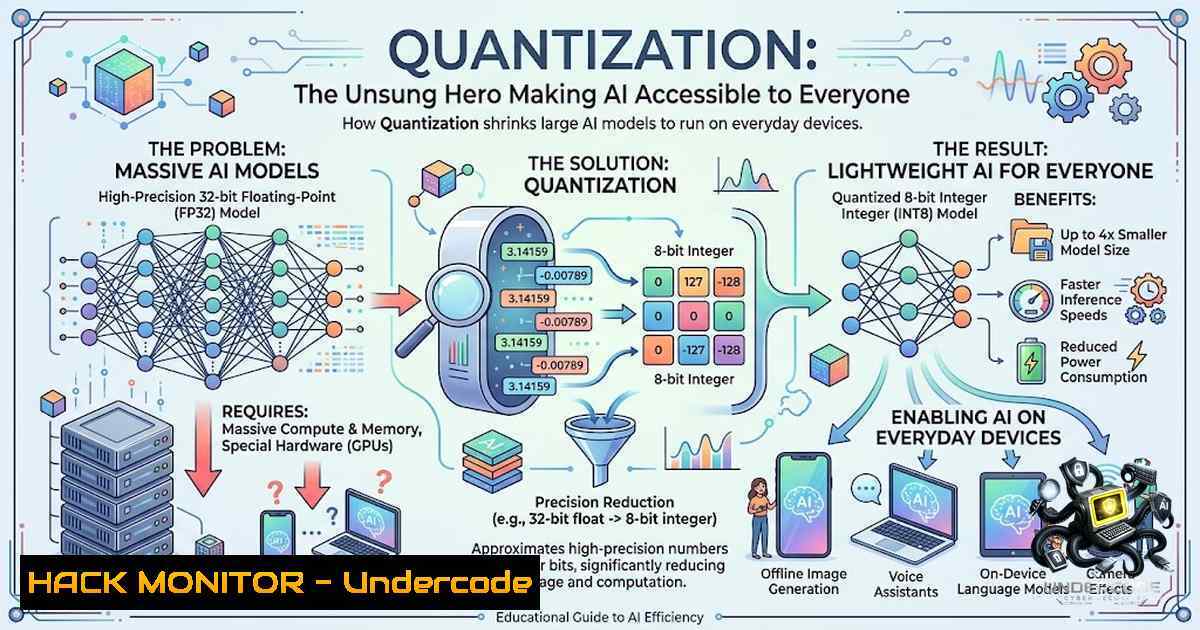
While the AI community obsesses over benchmark scores and the latest frontier model releases, a quieter, more impactful revolution is underway: model quantization. This powerful optimization technique drastically reduces the memory footprint and computational demands of large language models (LLMs). By converting high-precision parameters to lower-bit representations, quantization bridges the gap between theoretical AI capabilities and practical, real-world deployment, enabling powerful models to run on standard laptops, edge devices, and even within mobile phones. It is the foundational technology that democratizes access to AI, moving it from the cloud and into our hands.
Learning Objectives & Secrets:
- Objective 1: Maximize Memory Savings with 4-bit Quantization. Understand the fundamental math: a 13-billion parameter model in standard 16-bit precision requires approximately 26GB of memory. By applying 4-bit quantization, you can compress this to roughly 8GB. The secret tip? This significant reduction is achieved through a post-training process called `GPTQ` or using `bitsandbytes` libraries, which maps the model’s weights to a lower-precision data type without severely compromising performance. For most inference tasks, the performance hit is negligible, and the speed gains are substantial.
-
Objective 2: Enable Local Inference for Sensitive Data. The real power of quantization is the ability to run AI models entirely offline. The secret tip lies in using frameworks like `llama.cpp` or
Ollama. These tools are specifically designed to run quantized models on CPU or GPU. This is a game-changer for companies handling sensitive data, as it eliminates the need to send proprietary information to external APIs, ensuring data privacy and security while maintaining full control over the AI stack. -
Objective 3: Leverage Quantization for Rapid Prototyping and Deployment. For developers, quantization is a secret weapon for rapid iteration. By quantizing a model, you can test it locally on your development machine without needing expensive cloud GPU instances. The secret tip is to use a quantized version of a model (e.g., from TheBloke on Hugging Face) to validate your prompting, pipeline, and application logic. Once you are satisfied, you can then scale your deployment to a larger, unquantized model for production, confident that your application’s architecture is sound.
You Should Know:
- Getting Started with Quantized Models: A Quick Start Guide with `Ollama`
The easiest way to experience the power of quantization is to use a model runner like
Ollama. This tool handles the complexity of downloading and running quantized models, allowing you to get started in minutes.
- Step 1: Install
Ollama. Download and install the application from the official Ollama website. It is available for Windows, macOS, and Linux. -
Step 2: Pull a Quantized Model. Open a terminal or command prompt and use the `pull` command to download a quantized model. The default models on Ollama are already quantized for efficient performance.
Pull the Mistral 7B model (quantized to Q4_0 by default)
ollama pull mistral

Pull a smaller, faster model like TinyLlama
ollama pull tinyllama
- Step 3: Run the Model. Once the download is complete, you can start an interactive chat session. This runs completely locally on your machine.
ollama run mistral
- What this does: The command downloads a 4-bit quantized version of the Mistral 7B model to your local `.ollama` directory. It then loads this model into your system’s memory and provides a chat interface. This entire process consumes a fraction of the memory that a full 16-bit model would, making it feasible on a standard laptop.
2. Understanding Model Sizes and Quantization Parameters (Linux/Bash)
For more advanced users, it is helpful to understand the files you are working with. You can use basic Linux commands to inspect the size of a quantized model file and calculate its theoretical memory footprint.
 Navigate to the model directory (adjust path to your Ollama models folder)
cd ~/.ollama/models

Find the model file and display its size in human-readable format
ls -lh | grep -i "mistral"

Output example: -rw-r--r-- 1 user user 4.5G Apr 10 14:20 mistral-7b-instruct-v0.2.Q4_0.gguf
- What this does: This command lists the files in the Ollama models directory. The `-lh` flag displays the file size in a human-readable format (e.g., 4.5G for gigabytes). The `grep` command filters the output to show only lines containing “mistral”. The file extension `.gguf` indicates a quantized model file format. The `Q4_0` part of the file name specifies the quantization method. This inspection allows you to determine exactly how much storage space a quantized model requires and prepare your hardware accordingly.
3. Building a Simple AI-Powered Application Locally (Python)
You can easily integrate a quantized model into your own Python applications using libraries like llama-cpp-python. This example demonstrates setting up a simple local inference pipeline.
from llama_cpp import Llama

Load the quantized model (make sure the path is correct)
 Download a quantized model from Hugging Face, e.g., from TheBloke
model_path = "path/to/your/quantized-model.gguf"
llm = Llama(model_path=model_path)

Generate text based on a prompt
prompt = "Explain the concept of model quantization in simple terms."
output = llm(prompt, max_tokens=100, echo=True)

Print the result
print(output["choices"][bash]["text"])
- What this does: This script loads a quantized GGUF model file into memory using the `llama-cpp-python` library, which is a Python wrapper for the `llama.cpp` project. The `llm` object is an inference engine. When `llm()` is called with a prompt, it runs the quantized model entirely on your local hardware to generate a response. This is a fundamental template for creating offline AI tools, chatbots, or content summarizers that do not rely on any external APIs.
4. Deploying Quantized Models with NVIDIA TensorRT (Advanced)
For high-performance inference, especially on NVIDIA GPUs, TensorRT is the gold standard. You can use TensorRT to optimize and quantize models further for maximum throughput on specific hardware.
- Step 1: Convert the model to ONNX format. This is the intermediate step required to use TensorRT. Use a tool like `transformers.onnx` from Hugging Face or the `optimum.onnxruntime` library.
- Step 2: Run TensorRT Optimization. Use the `trtexec` command-line tool to build an optimized engine from the ONNX file, applying INT8 or FP16 quantization.
Example command for TensorRT optimization (Linux/Windows)
trtexec --onnx=model.onnx --saveEngine=model_int8.trt --int8 --fp16
- Step 3: Inference. Load the `model_int8.trt` engine in your application using the TensorRT Python API.
- What this does: TensorRT analyzes your model and performs layer fusion, kernel auto-tuning, and precision calibration to create a highly optimized inference engine. The `–int8` flag enables 8-bit integer quantization, which offers an even greater reduction in memory usage and latency than 4-bit quantization, albeit with a potential, more noticeable loss in accuracy. This is a crucial step for edge AI devices and production environments where speed is paramount.
- On-Device AI: Running Models on Mobile and Edge Devices
The impact of quantization is most profound in the mobile and edge computing space. Frameworks like Google’s MediaPipe and TensorFlow Lite (TFLite) are designed to run quantized models on phones and microcontrollers. This allows for features like real-time image classification, natural language processing, and audio analysis without sending data to the cloud.
- TFLite Quantization: TensorFlow Lite offers several quantization techniques, including post-training and quantization-aware training.
Example Python code to convert a TensorFlow model to a quantized TFLite model
import tensorflow as tf</li>
</ul>

converter = tf.lite.TFLiteConverter.from_saved_model('path/to/saved_model')
converter.optimizations = [tf.lite.Optimize.DEFAULT]
tflite_quant_model = converter.convert()

Save the quantized model
with open('model_quant.tflite', 'wb') as f:
f.write(tflite_quant_model)
– What this does: This script uses TensorFlow’s converter to apply default optimizations to a model, producing a `.tflite` file. This file is typically quantized to 8-bit integers, making it extremely compact and power-efficient. This is the technology behind offline voice assistants, smart camera features, and on-device translation apps, demonstrating a tangible shift towards privacy-preserving AI.
What Undercode Say:
- Key Takeaway 1: Accessibility Over Hype. The true progress in AI is not measured by benchmark scores but by accessibility. Quantization is the key enabler, allowing even small startups and individual developers to compete in the AI space without massive compute budgets.
- Key Takeaway 2: Security and Privacy as a Core Feature. The ability to run models offline is a massive security advantage. It mitigates the risks associated with data breaches and API dependencies, allowing organizations to adhere to strict data sovereignty laws and build trust with users by ensuring their data remains private.
Quantization is a masterclass in efficiency. It’s the shift from “Can we build it?” to “Can everyone run it?” This technology transforms AI from a centralized, cloud-dependent resource into a distributed, ubiquitous utility. It empowers developers to create resilient applications that are not bound by network latency or external service availability. As the AI landscape evolves, the focus will inevitably shift from the sheer size of models to their efficiency and deployability, making the mastery of quantization a critical skill for any AI engineer or security professional concerned with the future of data control and infrastructure.
Prediction:
- +1: A surge in “private AI” applications and startups will emerge, focusing on local-first, offline-capable solutions, offering a viable alternative to cloud-based giants.
- +1: The cost of running AI will continue to plummet, leading to an explosion of innovation in the mobile app and embedded systems sectors, where power and memory are constrained.
- +1: Security postures will improve as companies opt for on-device processing, drastically reducing their attack surface related to API key exposure and data-in-transit vulnerabilities.
- -1: The ease of deploying powerful models locally may lead to a proliferation of unsecured or vulnerable AI endpoints on personal devices and corporate networks, creating new attack vectors that security teams must address.
▶️ Related Video (90% Match):
🎯Let’s Practice For Free:
🎓 Live Courses & Certifications:
Join Undercode Academy for Verified Certifications
🚀 Request a Custom Project:
Secure, high-velocity infrastructure and disruptive technological engineering. Contact our engineering team for high-tier development and proprietary systems:
[email protected]
💎 Smart Architecture | 🛡️ Secure by Design | ⭐ Trusted by ThousandsIT/Security Reporter URL:
Reported By: https://lnkd.in/p/eJeybSxx – Hackers Feeds
Extra Hub: Undercode MoN
Basic Verification: Pass ✅🔐JOIN OUR CYBER WORLD [ CVE News • HackMonitor • UndercodeNews ]
📢 Follow UndercodeTesting & Stay Tuned:


