Listen to this Post
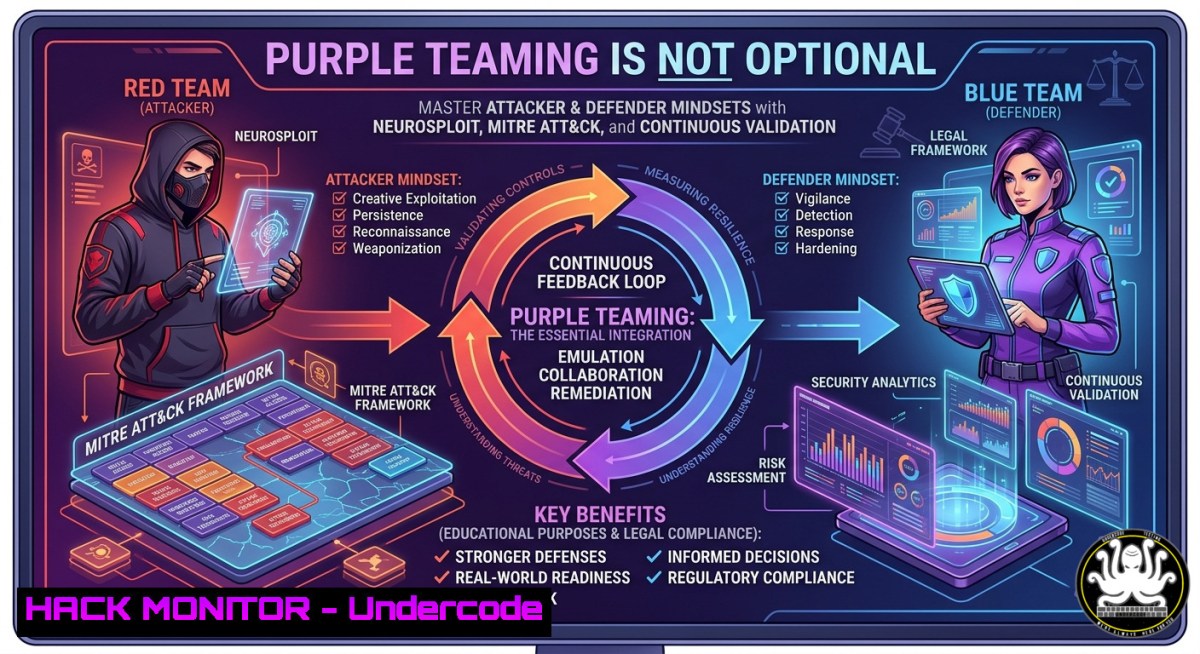
Introduction:
Purple Teaming bridges the adversarial creativity of Red Teams with the defensive rigor of Blue Teams, transforming isolated attack simulations into measurable security improvements. As cyber threats grow more sophisticated, organizations can no longer afford siloed testing; instead, they must adopt a collaborative model where every breach attempt directly fuels detection engineering, threat hunting, and automated response. This article extracts actionable technical content from Mohamed Hamdi Ouardi’s cybersecurity roadmap—including his NeuroSploit video and recommended certifications—to deliver a hands-on guide for building Purple Team capabilities from the ground up.
Learning Objectives:
- Implement adversary emulation using MITRE ATT&CK mappings and open-source tools like Atomic Red Team and Caldera.
- Build detection rules (Sigma, YARA) and validate them via SIEM log analysis (Elastic, Splunk) with Purple Team exercises.
- Automate continuous validation workflows using Linux/Windows commands, cloud hardening scripts, and API security testing.
You Should Know:
1. Adversary Emulation with MITRE ATT&CK and NeuroSploit
The post highlights “NueroSploit” (likely NeuroSploit, a conceptual AI-driven exploitation framework) as a new video resource. To emulate threats, start by mapping TTPs to MITRE ATT&CK. Use Atomic Red Team to execute single test cases.
Step‑by‑step guide (Linux):
 Install Atomic Red Team
git clone https://github.com/redcanaryco/atomic-red-team.git
cd atomic-red-team/atomics
 Run a specific technique (e.g., T1059.001 – Command and Scripting Interpreter)
./Invoke-AtomicTest T1059.001 -ShowDetails
For Windows (PowerShell as Admin):
Install-Module -Name AtomicRedTeam -Force
Import-Module AtomicRedTeam
Invoke-AtomicTest T1059.001 -TestNumbers 1
To emulate a full adversary campaign, deploy MITRE Caldera:
 Ubuntu/Debian
sudo apt install python3-pip
git clone https://github.com/mitre/caldera.git
cd caldera
pip3 install -r requirements.txt
python3 server.py
Access `http://localhost:8888` (default creds: admin/admin). Create a profile based on APT29 or FIN7, then run the operation while your SIEM captures telemetry.
2. Detection Engineering & Sigma Rule Creation
Purple Team requires converting attacker behavior into detections. Use Sigma (generic rule format) and translate to your SIEM’s query language.
Step‑by‑step (Linux + Windows):
- Write a Sigma rule for suspicious PowerShell download cradle:
title: Suspicious PowerShell Download Cradle
status: test
logsource:
product: windows
service: powershell
detection:
selection:
ScriptBlockText|contains|all:</li>
<li>'Invoke-Expression'</li>
<li>'New-Object Net.WebClient'
condition: selection
- Convert to Splunk or Elastic using
sigmac:pip install sigma-cli sigmac -t splunk rule.yml
- Deploy as detection in your SIEM. Validate by executing the Atomic test for T1059.001 – the rule should fire. Tune false positives by adding filters (e.g., exclude known admin scripts).
For Windows native: Use `Get-WinEvent` to query PowerShell logs:
Get-WinEvent -FilterHashtable @{LogName='Microsoft-Windows-PowerShell/Operational'; ID=4104} | Where-Object {$_.Message -match 'Invoke-Expression.WebClient'}
3. Threat Hunting with KQL and Sysmon
Hunt for lateral movement (T1021) using Sysmon logs. Install Sysmon on Windows with a standard config:
Sysmon64.exe -accepteula -i sysmonconfig.xml
Query Event ID 3 (network connections) for unusual RDP or SMB outbound:
“`kql (Kusto Query Language for Azure Sentinel)
Event
| where EventID == 3
| where DestinationPort in (3389, 445)
| where InitiatingProcess != “C:\\Windows\\System32\\svchost.exe”
| summarize count() by SourceIp, DestinationIp, InitiatingProcess
On Linux, hunt with `auditd` and <code>jq</code>:
[bash]
sudo auditctl -w /etc/passwd -p wa -k passwd_changes
ausearch -k passwd_changes --format raw | aureport -f -i
Correlate with Zeek logs (bro) for network anomalies.
4. SIEM & Log Analysis Automation (Elastic Stack)
Configure Elastic SIEM to receive Purple Team attack data. Deploy Elastic Agent on a test Windows VM.
Step‑by‑step:
 Linux (Elastic stack install)
wget -qO - https://artifacts.elastic.co/GPG-KEY-elasticsearch | sudo apt-key add -
sudo apt-get install elasticsearch kibana logstash
 Start services
sudo systemctl start elasticsearch kibana
On Windows, download and run Elastic Agent MSI, then enroll to Fleet. In Kibana, go to Security → Detection rules (SIEM). Create a custom rule based on Sigma from step 2. Trigger an Atomic test and verify the alert appears with a risk score.
For cloud hardening, ingest AWS CloudTrail logs:
 Configure Filebeat for S3
filebeat modules enable aws
filebeat setup
Then hunt for `AssumeRole` abuse or `CreateAccessKey` by attackers.
5. Continuous Validation & Purple Team Automation
Automate Purple Team ops using `PurpleSharp` or `Invoke-AtomicRedTeam` in CI/CD. Example pipeline using Azure DevOps:
– On a scheduled runner (Ubuntu), run:
git clone https://github.com/redcanaryco/invoke-atomicredteam
pwsh Invoke-AtomicRedTeam/Invoke-AtomicTest.ps1 -Technique T1003 -ShowDetails
– Parse output and post to Slack/Teams if detection missing.
– For Windows Defender hardening, validate that EDR blocks Mimikatz (T1003):
Invoke-AtomicTest T1003 -TestNumber 2 Mimikatz credential dumping
If not blocked, create custom ASR rules:
Add-MpPreference -AttackSurfaceReductionRules_Ids D4F940AB-401B-4EFF-AD8F-4C3B7E636CE0 -AttackSurfaceReductionRules_Actions Enabled
Use Sysinternals `PsExec` to simulate lateral movement and ensure Windows Firewall logs are sent to SIEM.
- API Security & Cloud Hardening (Purple in Cloud)
APIs are common attack vectors. Emulate API abuse using Postman or Burp Suite, then build WAF rules.
Step‑by‑step:
- Deploy a vulnerable API (e.g., crAPI) on a test Kubernetes cluster:
git clone https://github.com/OWASP/crAPI
kubectl apply -f deploy/docker-compose.yml  adjust for minikube
- Run `nuclei` for API misconfigurations:
nuclei -target https://testapi.local -tags api -severity high
- On cloud (AWS), harden IAM using
scoutsuite:git clone https://github.com/nccgroup/ScoutSuite scout --provider aws --profile purple
- Create a Lambda function that auto-remediates overly permissive roles (
deny public S3 ACL). Validate by attempting to write a public policy using AWS CLI:aws s3api put-bucket-acl --bucket test-bucket --acl public-read --profile attacker
Monitor CloudTrail events and ensure a detection fires within 5 minutes.
What Undercode Say:
- Purple Teaming is not a job title—it’s an operational model that demands fluency in both offense and defense, validated through continuous, automated exercises.
- Certifications like Security+ → CySA+ → GCIH → OSCP build foundational knowledge, but real elite status comes from live adversary emulation, detection tuning, and cross-team collaboration.
Expected Output:
Prediction:
Within 24 months, Purple Team capabilities will become a mandatory compliance requirement for SOC 2 Type II and ISO 27001:2025 (expected draft). Organizations that fail to implement continuous validation—using frameworks like MITRE ATT&CK, open-source emulation tools, and AI-driven platforms like NeuroSploit—will face uninsurable cyber risk. Roles will converge: the “Detection Engineer” will routinely execute Red Team tradecraft, and “Penetration Testers” will write Sigma rules. Automation via CI/CD pipelines (GitHub Actions invoking Atomic Red Team) will replace annual penetration tests, shifting cybersecurity from point-in-time audits to real-time resilience.
▶️ Related Video (74% Match):
🎯Let’s Practice For Free:
IT/Security Reporter URL:
Reported By: Ouardi Mohamed – Hackers Feeds
Extra Hub: Undercode MoN
Basic Verification: Pass ✅


