Listen to this Post
Introduction:
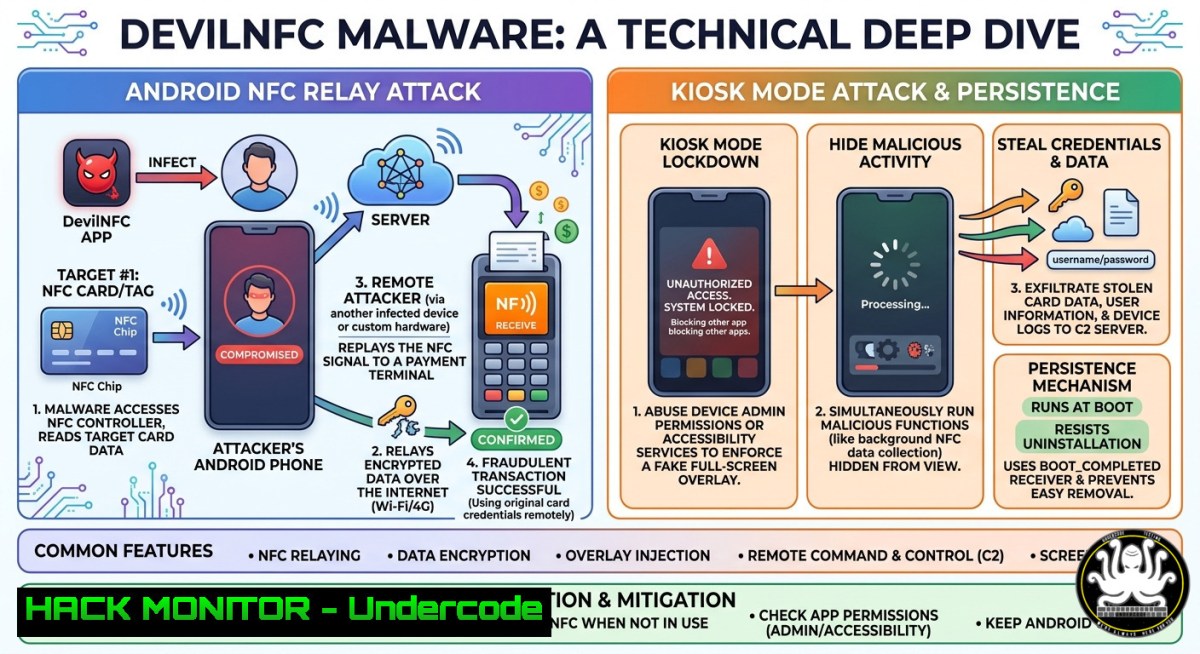
The emergence of DevilNFC malware represents a critical evolution in contactless payment fraud, leveraging Android’s Kiosk Mode to trap victims while performing advanced NFC relay attacks. This analysis dissects its asymmetric architecture, the AI-driven reduction in development barriers for criminal tooling, and provides hands-on security research techniques for detection and mitigation.
Learning Objectives:
- Objective 1: Understand the technical workflow of an NFC relay attack using asymmetrical malware architecture.
- Objective 2: Analyze how Kiosk Mode bypasses standard Android navigation controls to lock victims.
- Objective 3: Implement detection commands and network forensics to identify relay activity.
You Should Know:
1. Understanding the Asymmetric NFC Relay Attack
DevilNFC uses a single malicious APK that functions differently depending on privileges. On a victim’s standard device, it acts as a passive NFC reader; on a rooted attacker device, it emulates the victim’s card (HCE) using a system-level hooking framework. The attacker shares a relay server, and the malware intercepts low-level NFC data, bypassing standard Android APIs to capture card data, PIN, and OTPs, which are exfiltrated to Telegram or C2 servers.
Step‑by‑step guide to emulate (research) NFC relay:
- Setup Environment: Two Android devices (one rooted), install NFCGate (GitHub: vAHiD55555/NFC-Gate).
- Configure Relay Server: Deploy the open-source server (
github.com/nfcgate/server) as a traffic broker. - Victim Device: Launch NFCGate in “Reader” mode. This acts as the malicious reader that polls and captures the target contactless card.
- Attacker Device: Launch NFCGate in “Tag” mode via Host Card Emulation (HCE).
- Relay: Initiate the relay. The “reader” forwards captured frames to the server, which the “attacker” device uses to emulate the card at a POS terminal.
6. Linux Command (Network Detection):
 Monitor for unexpected NFC traffic relay patterns to suspicious IPs
sudo tcpdump -i eth0 -n 'port 8080 or port 5555' -v
 Check for outbound connections to uncommon ports established by system processes
netstat -tunap | grep 'ESTABLISHED' | grep -E ':(8080|5555|4443)'
- Kiosk Mode Lockdown: Abusing Android’s Lock Task Mode
To prevent the victim from interrupting the relay, DevilNFC activates Kiosk Mode, disabling navigation buttons and the back function. Malware achieves this via `DevicePolicyManager` APIs, locking the device into a single fake banking screen. This bypasses standard screen pinning and requires `SYSTEM_ALERT_WINDOW` or root privileges to disable.
Step‑by‑step guide to escape Kiosk Mode (Defensive):
- Emergency Keyboard Overlay: Attempt to swipe down the notification bar. If accessible, enter Settings > Security > Screen pinning to disable it.
- Keyboard Shortcuts: Press `Ctrl + Shift + Esc` or `Alt + F4` (if a physical keyboard is connected via OTG) to attempt breaking the overlay.
- ADB Debugging (if enabled): Connect via USB and run:
List active device admin apps
adb shell dumpsys device_policy | grep "Active admin"
Force remove the malicious package (replace com.malicious.app)
adb shell pm uninstall -k --user 0 com.malicious.app
- Safe Mode Boot: Hold Power + Volume Down during boot to enter Safe Mode, which disables third-party apps, allowing malware termination.
3. Detecting Host Card Emulation (HCE) Abuse
HCE allows any Android app to emulate a contactless card. DevilNFC uses a hooking framework (Xposed/LSPosed) to intercept NFC controller responses at the system level, bypassing HCE restrictions. This effectively turns the device into a relay proxy without requiring hardware modifications.
Step‑by‑step guide to audit HCE services (Hardening):
1. List HCE Services on Device:
adb shell dumpsys nfc | grep -A 10 "HCE Services"
 Look for unknown packages acting as "OffHostApduService" or "Payment"
2. Windows PowerShell Command (Registry Check): For Windows NFC integrations, check for unauthorized virtual smart card readers:
Get-WmiObject -Class Win32_PnPEntity | Where-Object {$<em>.Name -like "NFC" -or $</em>.Name -like "SmartCard"}
3. Network Forensics: Capture and analyze NFC traffic with Wireshark. NFCGate exports `.pcapng` files for review.
 Use tshark to filter for relay-specific payloads
tshark -r nfc_traffic.pcapng -Y "nfc"
4. AI-Lowered Barriers & MaaS Shift
The Cleafy report indicates both DevilNFC and NFCMultiPay exhibit AI-assisted development artifacts, such as over-engineered phishing templates and comments typical of open-source LLM output. This shift means local criminal groups no longer rely on Chinese-speaking MaaS but build custom tooling, increasing the speed of new variant emergence.
Step‑by‑step guide to analyze AI-assisted code fragments (Static Analysis):
1. Extract APK: `apktool d malicious.apk -o decompiled_src`
2. Search for LLM Patterns:
grep -r -E "<!-- Generated by (Copilot|Codex|Claude)" decompiled_src/
grep -r -E "This code was written by AI" decompiled_src/
3. Android Permissions Audit:
 Check for overlapping dangerous permissions used by AI-written code
grep -r "android.permission.NFC" decompiled_src/
grep -r "SYSTEM_ALERT_WINDOW" decompiled_src/
4. Decompile to Java: Use `jadx` to review suspicious relay logic.
jadx -d output_dir malicious.apk
5. Cloud Broker Architecture & Tokenization Mitigation
NFCMultiPay implements the relay using pure Java, no root, and a cloud broker to forward traffic. However, hardware tokenization (EMVco tokens stored in the secure element) neutralizes the attack because the relayed token is cryptographically bound to the original transaction context and useless elsewhere.
Step‑by‑step guide to simulate tokenization protection:
- Policy Enforcement: Enforce usage of Google Pay or Apple Pay which use dynamic security codes (cryptograms) instead of static magstripe data.
- Android OS Hardening: Disable “Unknown Sources” and block sideloading.
adb shell settings put secure install_non_market_apps 0
- Network Layer (DNS Sinkhole): Block known C2 domains using `/etc/hosts` or pi-hole.
echo "127.0.0.1 devilnfc-panel[.]com" | sudo tee -a /etc/hosts
- Enable Play Protect: Ensure real-time scanning is active to detect HCE abuse.
What Undercode Say:
- Key Takeaway 1: NFC Relay is accessible. Tools like NFCGate demonstrate that the fundamental relay technique is not complex; the innovation of DevilNFC lies in seamless social engineering (kiosk mode) and persistence.
- Key Takeaway 2: The shift to “Local AI Malware” is real. The barrier to building localized banking trojans has collapsed. We will see a surge in region-specific variants (Spanish, Portuguese, etc.) leveraging AI assistance for rapid iteration.
Analysis: The criminal ecosystem is decentralizing. While earlier NFC threats required deep knowledge of EMVCo protocols and Chinese-language forums, generative AI now allows lone actors to assemble functional attack chains. The most dangerous aspect of DevilNFC is the combination of remote NFC capture (bypassing proximity limits) with immediate PIN capture, enabling global ATM withdrawals.
Prediction:
Expect a surge in AI-augmented “NFC-Worm” hybrids that automatically scan for vulnerable POS devices and propagate via Bluetooth or NFC peer-to-peer. Future variants will target automotive NFC keys and access control badges. The only reliable defense is cryptographic transaction binding; legacy magstripe and unauthenticated NFC will be completely phased out within 36 months.
▶️ Related Video (80% Match):
🎯Let’s Practice For Free:
IT/Security Reporter URL:
Reported By: Mayura Kathiresh – Hackers Feeds
Extra Hub: Undercode MoN
Basic Verification: Pass ✅


