
Listen to this Post
Introduction
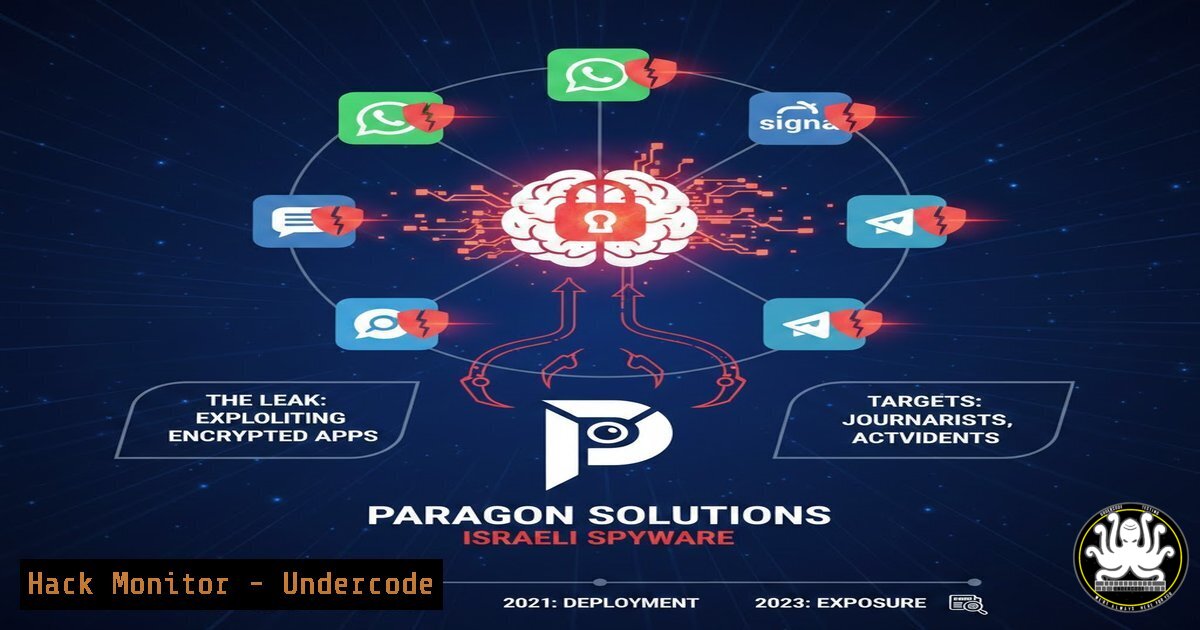
A recent leak of internal images from Paragon Solutions has exposed the sophisticated capabilities of modern mobile surveillanceware, revealing how threat actors can bypass end-to-end encryption on popular messaging platforms. This breach demonstrates that once a mobile device is compromised, even the strongest cryptographic protections become irrelevant, as attackers gain real-time access to conversations on WhatsApp, Telegram, Signal, and other secure applications.
Learning Objectives
- Understand how modern mobile spyware intercepts encrypted communications and captures sensitive banking data
- Identify the technical indicators of compromise associated with commercial surveillanceware infections
- Implement mobile application hardening techniques including RASP, SSL pinning validation, and anti-tampering mechanisms
- Master Android VAPT methodologies specifically targeting Android 13 and 14 security features
- Develop incident response procedures for mobile device compromise scenarios in financial environments
You Should Know
- Understanding the Paragon Spyware Capabilities: Technical Analysis of Mobile Surveillance Operations
The leaked Paragon interface reveals a sophisticated command-and-control dashboard designed for mass surveillance operations. The platform demonstrates several critical capabilities that security professionals must understand to defend against similar threats.
Core Technical Functions Exposed:
- Victim targeting system: Allows operators to input specific phone numbers for surveillance activation
- Real-time messaging interception: Captures messages from encrypted applications before or after encryption/decryption occurs
- Conversation browsing interface: Provides browsable chat histories with timestamps and metadata
- One-click exploitation framework: Automates the compromise process through multiple attack vectors
How Mobile Spyware Bypasses End-to-End Encryption:
The malware operates at the operating system level, capturing data directly from the device’s memory, keyboard inputs, and screen displays. For banking applications specifically, this means:
 Example of how malware might capture WhatsApp messages on Android
 Accessing WhatsApp database (requires root)
adb shell
su
cat /data/data/com.whatsapp/databases/msgstore.db | grep -a "message"

Capturing Signal's notification content
adb logcat | grep -i "signal" | grep -E "message|text|content"
For Windows-based mobile development environments or analysis workstations, security teams should monitor for:
 PowerShell script to check for suspicious mobile backup processes
Get-Process | Where-Object {$<em>.ProcessName -like "adb" -or $</em>.ProcessName -like "itunes" -or $<em>.ProcessName -like "mobile"}
Get-NetTCPConnection | Where-Object {$</em>.RemotePort -eq 5555}  ADB default port
- Banking Application Vulnerabilities: How Spyware Exploits Mobile Financial Services
The Paragon leak highlights seven critical vulnerabilities that directly impact banking applications. Financial institutions must understand these attack vectors to implement effective countermeasures.
Vulnerability Analysis:
- OTP Interception: Malware reads SMS messages or notification content containing one-time passwords
- Session Hijacking: Attackers extract session tokens from application storage or memory
- Credential Theft: Keyloggers capture usernames and passwords during input
- Post-Login Session Control: Maintains access even after password changes
- Screen Capture: Records sensitive transaction details and account balances
- Clipboard Monitoring: Captures copied data including account numbers
7. Authentication Bypass: Exploits biometric verification weaknesses
Technical Mitigation Commands for Android Banking Applications:
// Implement custom keyboard to prevent keylogging
public class SecureEditText extends AppCompatEditText {
@Override
public boolean onCheckIsTextEditor() {
// Disable third-party keyboards for sensitive fields
return false;
}
}

// AndroidManifest.xml protection flags
<activity
android:name=".MainActivity"
android:excludeFromRecents="true"
android:screenOrientation="portrait"
android:windowSoftInputMode="adjustPan"
android:allowTaskReparenting="false"
android:launchMode="singleInstance">
</activity>
iOS Security Hardening for Banking Apps:
// Prevent screen capture and recording
class SecureViewController: UIViewController {
override func viewDidLoad() {
super.viewDidLoad()
DispatchQueue.main.async {
UIApplication.shared.isIdleTimerDisabled = true
self.view.layer.setValue(true, forKey: "secureMode")
}
}
}
- Implementing Runtime Application Self-Protection (RASP) Against Mobile Spyware
RASP technology provides runtime defense mechanisms that detect and block spyware attempts during application execution. Based on the Paragon leak, financial institutions must deploy comprehensive RASP solutions.
RASP Detection Techniques:
- Hooking framework detection (Frida, Xposed, Cydia Substrate)
- Debugger detection and prevention
- Emulator and virtual environment identification
- Root/jailbreak detection with bypass countermeasures
- Code integrity verification
Implementation Commands for Android RASP:
 Check for common hooking frameworks during runtime
 Add to Application.onCreate() or main activity

Detect Frida
for line in $(ls /data/local/tmp); do
if [[ "$line" == "frida" ]]; then
echo "Frida detected - terminating"
exit 1
fi
done

Detect Xposed
if [ -d "/system/framework/XposedBridge.jar" ] || [ -d "/data/data/de.robv.android.xposed.installer" ]; then
echo "Xposed framework detected"
exit 1
fi

Check for suspicious processes
ps -A | grep -E "frida|gdb|lldb|android_server"
Windows-Based RASP Testing Tools:
 Install and use Frida for Windows mobile testing
pip install frida-tools
frida-ps -U  List USB devices and processes

Test application against common hooking attempts
frida -U -f com.example.bankingapp -l hook_detection.js --no-pause

Sample hook_detection.js content:
/
Interceptor.attach(Module.findExportByName(null, "open"), {
onEnter: function(args) {
var path = Memory.readCString(args[bash]);
if(path.indexOf("frida") !== -1 || path.indexOf("gum") !== -1) {
console.log("Frida detection attempt: " + path);
}
}
});
/
4. SSL Pinning Validation and Bypass Detection Techniques
The Paragon spyware likely bypasses SSL pinning to intercept encrypted traffic. Security teams must implement robust certificate validation and monitor for bypass attempts.
Android SSL Pinning Implementation:
// Using OkHttp for certificate pinning
OkHttpClient client = new OkHttpClient.Builder()
.certificatePinner(
new CertificatePinner.Builder()
.add("api.bank.com", "sha256/AAAAAAAAAAAAAAAAAAAAAAAAAAAAAAAAAAAAAAAAAAA=")
.add("api.bank.com", "sha256/BBBBBBBBBBBBBBBBBBBBBBBBBBBBBBBBBBBBBBBBBBB=")
.build())
.build();

// Network security configuration for Android 7+
// res/xml/network_security_config.xml
<?xml version="1.0" encoding="utf-8"?>
<network-security-config>
<domain-config>
<domain includeSubdomains="true">api.bank.com</domain>
<pin-set expiration="2025-12-31">
<pin digest="SHA-256">AAAAAAAAAAAAAAAAAAAAAAAAAAAAAAAAAAAAAAAAAAA=</pin>
<pin digest="SHA-256">BBBBBBBBBBBBBBBBBBBBBBBBBBBBBBBBBBBBBBBBBBB=</pin>
</pin-set>
<trust-anchors>
<certificates src="@raw/ca_bundle"/>
</trust-anchors>
</domain-config>
</network-security-config>
Detecting SSL Pinning Bypass Attempts:
 Linux command to monitor for common bypass tools
sudo tcpdump -i any -A -s 0 port 443 | grep -E "ssl|tls|certificate|pinning"

Check for proxy tools that enable bypass
netstat -tulpn | grep -E "8080|8888|8081|9090"

Android runtime detection
adb shell dumpsys package com.example.bankingapp | grep -E "trust|ssl|certificate"
- Android 13 and 14 VAPT: Advanced Mobile Penetration Testing Methodologies
With the Paragon spyware targeting modern Android versions, security testers must adapt their VAPT approaches for Android 13 and 14’s enhanced security features.
Android 13-14 Security Changes:
- Restricted access to `/data/local/tmp`
– Enhanced runtime permission controls - Improved sandboxing for Work Profile
- Background activity restrictions
- Photo picker and media access limitations
VAPT Commands for Modern Android:
 Setup testing environment for Android 13/14
adb shell settings put global hidden_api_policy_pre_p_apps 1
adb shell settings put global hidden_api_policy_p_apps 1

Check for exported components vulnerability
adb shell dumpsys package com.example.bankingapp | grep -A 20 "Activity Resolver Table"

Test intent redirection vulnerabilities
adb shell am start -n com.example.bankingapp/.MainActivity -a android.intent.action.VIEW -d "bankapp://deeplink"

Check for insecure file permissions
adb shell run-as com.example.bankingapp ls -la /data/data/com.example.bankingapp/

Test against Android 14's foreground service restrictions
adb shell dumpsys activity services com.example.bankingapp
Advanced Exploitation Testing for Banking Apps:
 Python script to test for insecure data storage
import subprocess
import re

def check_insecure_storage(package_name):
 Check SharedPreferences
result = subprocess.run(['adb', 'shell', 'run-as', package_name, 'cat', f'/data/data/{package_name}/shared_prefs/.xml'],
capture_output=True, text=True)
if 'password' in result.stdout or 'token' in result.stdout:
print(f"Insecure SharedPreferences found in {package_name}")

Check databases
result = subprocess.run(['adb', 'shell', 'run-as', package_name, 'ls', f'/data/data/{package_name}/databases/'],
capture_output=True, text=True)
for db in result.stdout.split('\n'):
if db.strip():
db_content = subprocess.run(['adb', 'shell', 'run-as', package_name, 'sqlite3',
f'/data/data/{package_name}/databases/{db}', '.dump'],
capture_output=True, text=True)
if 'credit' in db_content.stdout or 'account' in db_content.stdout:
print(f"Sensitive data found in {db}")

check_insecure_storage('com.example.bankingapp')
6. Overlay Attack Prevention and Screen Capture Protection
The Paragon interface demonstrated the ability to intercept screen content and potentially perform overlay attacks—a critical threat for banking applications.
Android Overlay Protection Implementation:
// Prevent overlay attacks on Android
public class SecureActivity extends AppCompatActivity {
@Override
protected void onCreate(Bundle savedInstanceState) {
super.onCreate(savedInstanceState);

// Detect overlay attacks
if (Build.VERSION.SDK_INT >= Build.VERSION_CODES.M) {
if (Settings.canDrawOverlays(this)) {
// Potential overlay attack capability detected
showSecurityWarning();
}
}

// Prevent screen capture
getWindow().setFlags(WindowManager.LayoutParams.FLAG_SECURE,
WindowManager.LayoutParams.FLAG_SECURE);
}

private void showSecurityWarning() {
AlertDialog.Builder builder = new AlertDialog.Builder(this);
builder.setTitle("Security Risk Detected")
.setMessage("Another app may be drawing over this screen. Continue with caution?")
.setPositiveButton("Continue", (dialog, which) -> {
// Log security event
logSecurityEvent("OVERLAY_DETECTED_USER_CONTINUED");
})
.setNegativeButton("Exit", (dialog, which) -> {
finish();
})
.show();
}
}
Testing for Overlay Vulnerabilities:
 Linux command to check for installed overlay-capable apps
adb shell dumpsys package | grep -A 5 "android.permission.SYSTEM_ALERT_WINDOW"

Check currently displayed overlays
adb shell dumpsys window windows | grep -E "mCurrentFocus|mFocusedApp"

Windows PowerShell to analyze overlay permissions
$packages = adb shell pm list packages -f
foreach ($pkg in $packages) {
$perms = adb shell dumpsys package $pkg.Split('=')[bash] | Select-String "SYSTEM_ALERT_WINDOW"
if ($perms) {
Write-Host "Overlay-capable package: $pkg"
}
}
7. Incident Response for Mobile Device Compromise
When a Paragon-style spyware infection is suspected, financial institutions must follow a structured incident response procedure.
Immediate Response Commands:
 Linux/Mac: Extract forensic data from compromised device
adb backup -f backup.ab -apk -shared -all -system
dd if=/dev/block/mmcblk0 of=/tmp/device_dump.img bs=4096

Check for suspicious background services
adb shell dumpsys activity services | grep -E "Running|Active" | grep -v "com.android"

Analyze network connections for C2 communication
adb shell netstat -tn | grep -E "ESTABLISHED|SYN_SENT" | grep -v "127.0.0.1"

Extract installed applications for analysis
for pkg in $(adb shell pm list packages -3 | cut -d':' -f2); do
adb shell pm path $pkg | cut -d':' -f2 | xargs -I {} adb pull {} /tmp/apks/
done
Windows Forensics for Compromised Devices:
 Use ADB for Windows-based forensics
$device = adb devices | Select-String -Pattern "device$" | ForEach-Object {($_ -split '\s+')[bash]}
adb -s $device shell "su -c 'dmesg'" | Out-File -FilePath C:\forensics\dmesg_$device.txt
adb -s $device shell "su -c 'logcat -d'" | Out-File -FilePath C:\forensics\logcat_$device.txt

Check for recently installed suspicious packages
$packages = adb shell pm list packages -3
$installTimes = @()
foreach ($pkg in $packages) {
$time = adb shell dumpsys package $pkg.Split(':')[bash] | Select-String "firstInstallTime"
$installTimes += [bash]@{
Package = $pkg.Split(':')[bash]
InstallTime = $time.Line.Split('=')[bash]
}
}
$installTimes | Sort-Object InstallTime -Descending | Select-Object -First 10
What Undercode Say
Key Takeaway 1: Device-Layer Security is Non-Negotiable
The Paragon leak confirms that endpoint security can no longer rely solely on encryption or traditional antivirus solutions. Financial institutions must implement device-layer protection including RASP, runtime integrity checking, and behavioral analysis that operates continuously rather than at scan intervals. The malware operates at the OS level, meaning detection must occur at the same depth.
Key Takeaway 2: Banking Apps Must Assume Compromise
Modern mobile banking architecture must be designed with the assumption that the device may be compromised. This requires implementing transaction verification out-of-band, maintaining session integrity through continuous authentication, and ensuring that even if credentials are stolen, additional verification layers prevent unauthorized access.
Analysis: The Paragon leak represents a watershed moment in mobile security awareness. What makes this particularly dangerous is the commercial availability—these aren’t nation-state exclusive tools but products sold to various government and law enforcement agencies. The leak of internal interfaces provides defenders with unprecedented insight into surveillance capabilities, but also arms malicious actors with knowledge of exactly how these systems operate. Financial institutions face the perfect storm: increasing mobile banking adoption, sophisticated surveillanceware availability, and users who cannot distinguish between a compromised and clean device. The path forward requires fundamental shifts in application architecture, continuous security monitoring, and user education about the risks of mobile device compromise. Banking apps must evolve to treat the mobile operating system as an untrusted environment, implementing security controls that function regardless of underlying device integrity. This incident demonstrates that the arms race between surveillance and security has reached a critical juncture where traditional defenses are no longer sufficient.
Prediction
Within the next 12-18 months, we will witness a significant escalation in mobile surveillance capabilities targeting financial applications, driven by both commercial spyware vendors and cybercriminal groups reverse-engineering leaked tools like those from Paragon. Banking trojans will evolve to incorporate real-time communication interception capabilities, specifically targeting OTP messages and encrypted chat content. This will force regulatory bodies to mandate enhanced mobile security requirements for financial applications, potentially including mandatory RASP implementation, continuous authentication mechanisms, and real-time transaction verification systems. The leaked Paragon interface will likely serve as a blueprint for a new generation of Android and iOS malware, leading to increased infection rates among banking customers and forcing financial institutions to develop more sophisticated fraud detection systems that analyze behavioral patterns rather than relying on device trust signals.
▶️ Related Video (84% Match):
🎯Let’s Practice For Free:
IT/Security Reporter URL:
Reported By: Sanadhya K – Hackers Feeds
Extra Hub: Undercode MoN
Basic Verification: Pass ✅


