Listen to this Post
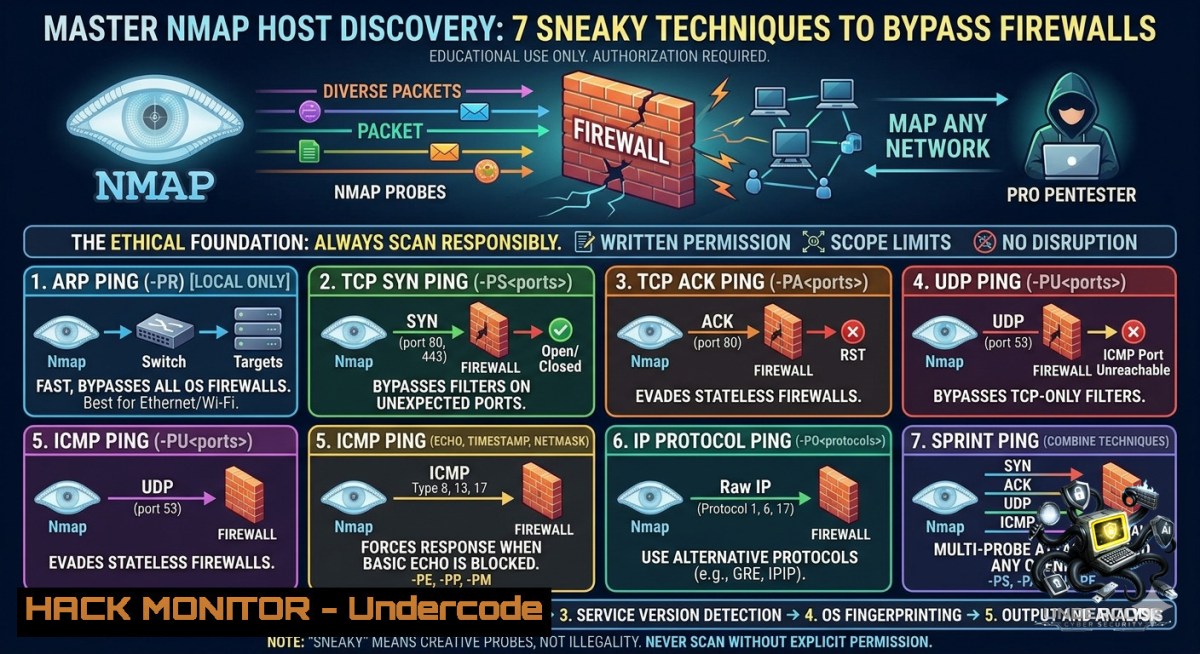
Introduction:
Host discovery is the reconnaissance phase where ethical hackers determine which systems are alive on a target network before launching deeper port scans or vulnerability assessments. Firewalls and intrusion prevention systems often block standard ICMP pings, forcing pentesters to employ alternative discovery techniques such as TCP SYN, TCP ACK, UDP, and ARP probes to evade filtering and accurately map the attack surface.
Learning Objectives:
- Execute various Nmap host discovery scans (ping sweep, TCP SYN/ACK, ICMP, UDP, ARP) to identify live hosts across local and remote networks.
- Analyze packet traces and employ evasion options like `–disable-arp-ping` to bypass firewall rules and ARP-based restrictions.
- Apply these techniques in real-world pentesting scenarios to reduce false negatives and improve information gathering efficiency.
You Should Know:
- Ping Sweep (–sn) – The Network Mapper’s First Blush
Ping sweep quickly identifies which IP addresses respond to probes without performing port scanning. By default, on a local Ethernet network, Nmap sends ARP requests for each target; on routed networks, it sends ICMP echo requests, TCP SYN to port 443, TCP ACK to port 80, and ICMP timestamp requests.
Step‑by‑step guide:
- Linux / Windows (with Nmap installed):
`nmap -sn 192.168.1.0/24` – Scans the entire /24 subnet for live hosts. - Verbose packet trace:
`nmap -sn 192.168.1.0/24 –packet-trace` – Shows each sent and received packet (ARP, ICMP, TCP). - Disable ARP discovery (to force IP‑level probes):
`nmap -sn 192.168.1.108 –disable-arp-ping` – Useful when scanning a local subnet but you want to test firewall rules or simulate a remote scan. - What it does: Without
--disable-arp-ping, Nmap on a local network uses ARP (Layer 2) which is almost never blocked. Adding `–disable-arp-ping` forces ICMP/TCP probes, revealing if IP‑level traffic is filtered.
- TCP SYN Ping (–PS) – Sneaking Past Stateful Firewalls
TCP SYN ping sends empty TCP SYN packets to a specified port (default 443). A live host responds with SYN/ACK (or RST if the port is closed), while filtered hosts drop the packet.
Step‑by‑step guide:
- Basic scan: `nmap -PS 443 192.168.1.100` – Probes port 443.
- Custom port list: `nmap -PS 22,80,443,8080 192.168.1.0/24` – Increases chances of hitting an open port.
- Combine with no port scan: `nmap -sn -PS 80 10.0.0.0/24` – Only host discovery using TCP SYN to port 80.
- How to interpret: SYN/ACK → host up; RST → host up (port closed but responsive); no response → filtered/down.
- Windows command (PowerShell with Nmap): Same syntax; ensure Nmap is in PATH or use
C:\Program Files (x86)\Nmap\nmap.exe.
- TCP ACK Ping (–PA) – Exploiting Stateful Filter Gaps
TCP ACK ping sends packets with the ACK flag set, which some stateless firewalls drop, but stateful firewalls may forward if they belong to an established connection. Since no session exists, most hosts reply with a RST packet, confirming they are alive.
Step‑by‑step guide:
- Probe on default port 80: `nmap -PA 192.168.1.10`
- Multiple ports: `nmap -PA 21,25,80,443 -sn 192.168.1.0/24`
- Bypass Linux kernel RST rate limiting: Use `–min-rate 100` to send probes faster than default.
- Why it works: Even if a firewall blocks SYN, it might permit ACK packets thinking they are part of an existing connection. The target’s TCP stack has no choice but to reply with RST (unless a strict drop rule exists).
- Verification with tcpdump: Run `sudo tcpdump -i eth0 ‘tcp[bash] & 0x10 != 0’` to see incoming ACK probes and outgoing RST replies.
- ICMP Echo Ping (–PE) – The Classic but Often Blocked
ICMP echo requests (ping) are the traditional way to check liveness. Many perimeter firewalls block ICMP, but internal networks or misconfigured hosts may still respond.
Step‑by‑step guide:
- Send ICMP echo requests only: `nmap -PE -sn 192.168.1.0/24`
- Combine with timestamp and address mask: `nmap -PE -PP -PM -sn 192.168.1.0/24` – Sends echo, timestamp, and address mask requests to maximise discovery.
- ICMP timestamp scan (–PP): `nmap -PP -sn 192.168.1.1` – Some hosts block echo but reply to timestamp requests.
- ICMP address mask scan (–PM): `nmap -PM -sn 192.168.1.1` – Rarely used but effective against older systems.
- Note on Windows: By default, Windows Firewall blocks ICMP echo requests. Use `-PE` inside a local network where Windows Firewall may be disabled, or combine with other techniques.
5. UDP Ping (–PU) – Finding Non‑TCP Services
UDP ping sends an empty UDP packet to a closed high port (default 40125). Most hosts respond with ICMP port unreachable, indicating they are live. Useful for discovering DNS, SNMP, or DHCP servers that may ignore TCP scans.
Step‑by‑step guide:
- Basic UDP discovery: `nmap -PU -sn 192.168.1.50`
- Custom port (e.g., 53 for DNS): `nmap -PU 53 -sn 10.0.0.0/24` – Probes DNS port; a DNS server may send a response if the port is open.
- Handling rate limits: Use `–min-rate 500 –max-retries 1` to avoid waiting for slow ICMP unreachable messages.
- Linux command to monitor ICMP unreachable: `sudo ip -s -s neigh show` or `watch -11 ‘netstat -s | grep “ICMP unreachable”‘`
- Caution: UDP scanning is slow and unreliable across the internet due to packet loss; best used on local networks.
- ARP Ping (–PR) – The Gold Standard for Local Networks
ARP ping is the fastest and most reliable host discovery technique within the same Ethernet broadcast domain. Nmap sends ARP requests, and any live host answers with its MAC address – no firewall can block ARP because it is needed for basic network communication.
Step‑by‑step guide:
- Default ARP scan (implicit with -sn on local net): `nmap -sn 192.168.1.0/24` – Nmap automatically uses ARP.
- Explicit ARP scan: `nmap -PR -sn 192.168.1.0/24`
- List ARP table after scan: On Linux,
arp -1; on Windows, `arp -a` – Shows discovered IP‑to‑MAC mappings. - Force no ARP (to simulate remote scan): `nmap -sn 192.168.1.0/24 –disable-arp-ping` – Useful when testing firewall rules from an internal position.
- Why ARP always works: Firewalls operate at Layer 3 and above; ARP is Layer 2, never filtered. Use this for internal network audits.
- No Ping Scan (–Pn) – When the Target Actively Hides
Sometimes a host is fully up but configured to drop all ICMP, TCP SYN, and UDP probes. Using `-Pn` tells Nmap to skip host discovery entirely and assume all targets are alive. This is essential for scanning hosts that block every probe but still have open ports.
Step‑by‑step guide:
- Blind port scan with no prior discovery: `nmap -Pn 192.168.1.100` – Treats the host as up and proceeds to port scanning.
- Against a whole subnet (slow): `nmap -Pn -p 80,443 192.168.1.0/24` – Probes all 256 IPs for web ports regardless of ping response.
- Combine with timing template: `nmap -Pn -T4 -F 10.0.0.0/16` – Fast mode but can be noisy; use `-T2` for stealth.
- Windows example (avoid ARP): `nmap -Pn –disable-arp-ping 192.168.1.10` – Forces a pure TCP port scan without any preliminary discovery.
- When to use: During a penetration test where you know a host exists (e.g., from a previous scan or log) but all probes are dropped. Also useful for scanning cloud instances that have ICMP disabled.
What Undercode Say:
- Key Takeaway 1: Mastery of multiple host discovery techniques – especially ARP for local nets and TCP SYN/ACK for routed environments – dramatically reduces false negatives when firewalls block traditional ICMP pings.
- Key Takeaway 2: Using `–packet-trace` and `–disable-arp-ping` together provides deep visibility into exactly which probes traverse the network, enabling pentesters to tailor evasion strategies for specific firewall rulesets.
Analysis (approx 10 lines):
The provided Nmap host discovery guide from Hacking Articles emphasises that modern network defences routinely block ICMP echo requests. A pentester cannot rely solely on ping. Instead, they must leverage a combination of TCP SYN, TCP ACK, UDP, and especially ARP for local segments. Understanding how each probe behaves – e.g., SYN gets SYN/ACK or RST, ACK gets RST, UDP gets ICMP unreachable – turns network enumeration from guesswork into precise reconnaissance. The inclusion of `–disable-arp-ping` is critical for testing whether a firewall actually blocks IP‑level probes versus relying on ARP’s inevitable success. Moreover, the `-Pn` option serves as a last resort when a target is known to exist but aggressively filters all discovery probes. For red team operations, chaining these techniques with timing options (-T4, --min-rate) and output logging (-oA scan) yields a robust, evidence‑based host inventory. The guide’s practical examples with Wireshark and `–packet-trace` reinforce learning by showing the actual packet exchange, turning abstract concepts into actionable skills. As networks adopt more intelligent firewalls (e.g., next‑gen with stateful inspection), combining ACK and SYN scans becomes even more valuable because stateful firewalls may allow ACK packets that appear to belong to an existing connection. Finally, for Windows‑based pentesters, the same Nmap commands work natively, but they should be aware that Windows often requires Administrator privileges for raw packet scans (-PS, -PA). Overall, this guide is a foundation every security professional must internalise.
Expected Output:
Prediction:
- +1 Adoption of AI‑driven firewall policies will increase, making static host discovery less reliable – pentesters will incorporate machine‑learning‑aware evasion techniques (e.g., randomising probe timing and ports) to avoid behavioural detection.
- -1 As more organisations migrate to zero‑trust network access (ZTNA) and micro‑segmentation, traditional ARP‑based host discovery may become ineffective inside segmented pods, forcing a shift toward agent‑based or API‑driven asset discovery.
- +1 Cloud providers like AWS and Azure will continue to block ICMP by default, but Nmap’s `-PS` and `-PA` techniques will remain effective for discovering exposed cloud VMs, keeping host discovery relevant for cloud security assessments.
- -1 Automated vulnerability scanners that rely solely on ping sweeps will miss an increasing number of live hosts, leading to false security assurances unless their host discovery modules are updated to include multi‑probe techniques as standard.
▶️ Related Video (72% Match):
🎯Let’s Practice For Free:
🎓 Live Courses & Certifications:
Join Undercode Academy for Verified Certifications
🚀 Request a Custom Project:
Secure, high-velocity infrastructure and disruptive technological engineering. Contact our engineering team for high-tier development and proprietary systems:
[email protected]
💎 Smart Architecture | 🛡️ Secure by Design | ⭐ Trusted by Thousands
IT/Security Reporter URL:
Reported By: Nmap For – Hackers Feeds
Extra Hub: Undercode MoN
Basic Verification: Pass ✅


