Listen to this Post
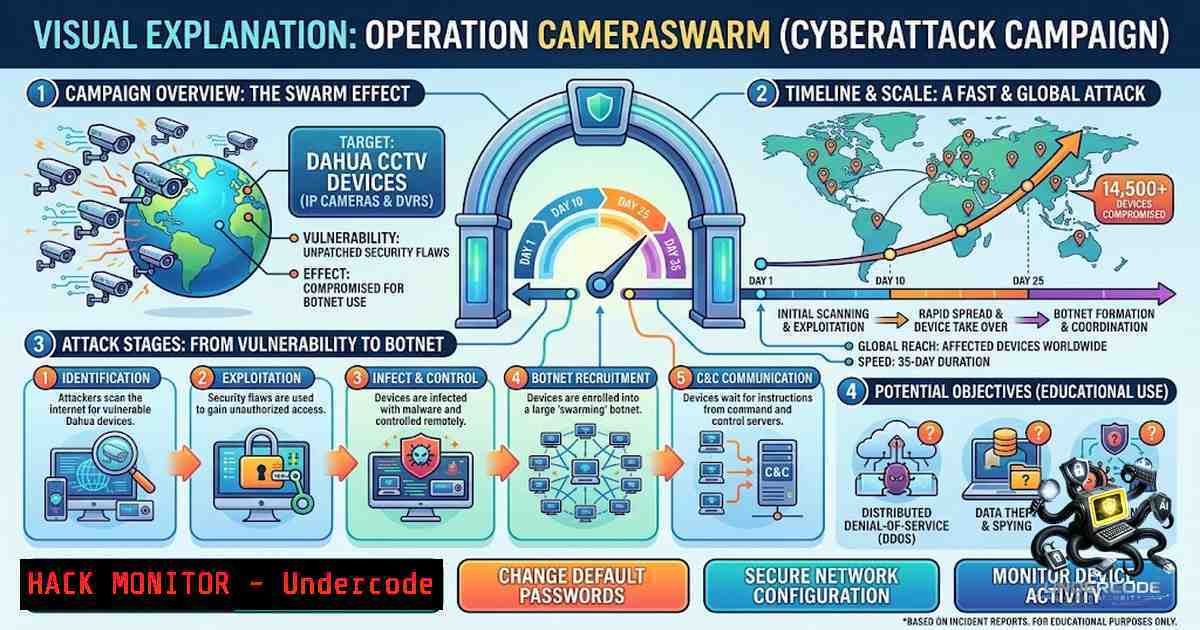
Introduction:
Between June 17 and July 22, 2026, a single threat actor compromised more than 14,530 Dahua IP cameras in a campaign codenamed Operation CameraSwarm. The attack leveraged three parallel exploitation paths: credential brute-forcing against 12,324 unique IP addresses, authentication bypass vulnerabilities (CVE-2021-33044 and CVE-2021-33045) that planted a persistent backdoor account on 1,923 cameras, and a P2P cloud-relay attack that reached 283 cameras behind NAT using only serial numbers. The operation was reconstructed from a 407 MB exposed working directory—2,616 files across 234 subdirectories—that the operator left open on an HTTP server. Both CVE-2021-33044 and CVE-2021-33045 remain listed in CISA’s Known Exploited Vulnerabilities catalog and carry CVSS scores of 9.8. What makes this campaign particularly alarming is not just the scale, but the sophistication of the attack chain—combining brute-force, zero-trust bypasses, and cloud-relay abuse—and the persistence mechanism that survives password changes and factory resets.
Learning Objectives & Secrets:
- Objective 1: Understand the Three Attack Vectors – Master the technical details behind credential brute-forcing (TCP port 37777), authentication bypasses (CVE-2021-33044 NetKeyboard spoofing and CVE-2021-33045 loopback deception), and P2P cloud-relay exploitation using serial numbers and embedded SDK credentials.
-
Objective 2 Secret Tip: Persistent Backdoor Detection – The `p2pwn` backdoor account (password:
p2password) survives password changes and factory resets on most firmware versions. Standard remediation is insufficient; you must audit user accounts, regenerate recovery codes, and verify firmware integrity. Removing the account alone does not invalidate recovery codes generated by the toolkit—they remain usable until Dahua alters the derivation server-side. -
Objective 3 Secret Tip: CVE Misidentification Trap – The operator’s toolkit mislabels techniques with incorrect CVE identifiers. CVE-2024-39943 is referenced for the backdoor technique but actually belongs to an unrelated command-injection flaw in Rejetto HTTP File Server. Similarly, the relay abuse is not CVE-2025-31702, which is a narrower authenticated privilege-escalation flaw. Defenders must not rely on CVE labels for remediation—verify the actual attack techniques.
You Should Know:
1. CVE-2021-33044: The NetKeyboard Authentication Bypass
This critical vulnerability (CVSS 9.8) exploits unconditional trust in clients identifying as NetKeyboard hardware controllers. During authentication, when the `clientType` parameter is set to NetKeyboard, the password field is never evaluated—the device grants full administrative access without validating credentials. The vulnerability affects Dahua IP cameras and related products including IPC-HUM7xxx, IPC-HX3xxx, IPC-HX5xxx, TPC-, VTO-, VTH-, NVR-1xxx/2xxx/4xxx/5xxx/6xx, and XVR-4x/5x/7x series.
Step-by-Step Guide – Detection and Mitigation:
Linux – Scan for vulnerable devices using Nuclei:
 Install Nuclei
go install -v github.com/projectdiscovery/nuclei/v3/cmd/nuclei@latest

Run CVE-2021-33044 template against a target
nuclei -target http://<camera-ip> -t http/cves/2021/CVE-2021-33044.yaml

Mass scan from IP list
nuclei -list targets.txt -t http/cves/2021/CVE-2021-33044.yaml -o vulnerable.txt
Python – PoC authentication bypass (educational use only):
import requests
import json

CVE-2021-33044: NetKeyboard bypass
url = "http://<camera-ip>/cgi-bin/userLogin.cgi"
payload = {
"username": "admin",
"password": "arbitrary",  Not evaluated when clientType=NetKeyboard
"clientType": "NetKeyboard"
}
response = requests.post(url, data=payload)
if "session" in response.text:
print("[!] VULNERABLE: Authentication bypassed")
Mitigation: Apply Dahua firmware version 2.820.x+ for IPC devices or 4.001.x+ for NVR/XVR devices. Refer to Dahua Security Advisory SA-2021-0130.
2. CVE-2021-33045: The Loopback Authentication Bypass
This vulnerability (CVSS 9.8) occurs when the firmware reads the claimed source address from the request body rather than the TCP connection. By specifying a loopback device (127.0.0.1) during authentication, attackers can bypass device identity verification and gain full administrative access. The flaw affects the same product families as CVE-2021-33044.
Step-by-Step Guide – Exploitation Pattern and Detection:
Conceptual exploitation pattern:
 CVE-2021-33045: Loopback bypass
payload = {
"username": "admin",
"password": "arbitrary",
"source": "127.0.0.1"  Device trusts loopback source
}
 Device evaluates source from request body, not TCP connection
Detection using Nmap NSE scripts:
 Scan for Dahua devices with authentication bypass indicators
nmap -p 80,443,37777 --script http-dahua-auth-bypass <target-subnet>/24

Check for open port 37777 (Dahua default TCP port)
nmap -p 37777 --open <target-subnet>/24 -oG dahua_hosts.txt
Windows – Check for backdoor account via ConfigTool:
1. Download Dahua ConfigTool from the official website.
- Launch ConfigTool and scan the local network for devices.
- Select a device and click “Login” → enter credentials.
- Navigate to “Account Management” → check for the `p2pwn` user account.
5. If found, delete the account immediately.
Mitigation: Same firmware update as CVE-2021-33044—Dahua SA-2021-0130 addresses both vulnerabilities.
3. The P2P Cloud-Relay Attack Surface
Perhaps the most insidious attack vector, the P2P relay path allows attackers to reach cameras behind NAT using only serial numbers. Dahua’s cloud relay lets any application reach a camera behind NAT using its serial number, with authentication to the relay running on credentials baked identically into every Dahua client ever shipped. The operator’s own code logs that 89.4 percent of live serials returned an open, no-authentication channel. The device never authenticates the connecting party—it authenticates the session via a token issued by the cloud before the device is contacted. Obtaining that token requires only the fixed SDK credentials shared by every legitimate Dahua application.
Step-by-Step Guide – P2P Risk Assessment and Mitigation:
Linux – Check if P2P is enabled via API:
 Query P2P status (requires authentication)
curl -X GET "http://<camera-ip>/cgi-bin/configManager.cgi?action=getConfig&name=P2P" \
-H "Cookie: session=<session-token>"
Disable P2P via API:
 Disable P2P service
curl -X POST "http://<camera-ip>/cgi-bin/configManager.cgi?action=setConfig&name=P2P.Enable&value=false" \
-H "Cookie: session=<session-token>"
Network segmentation (recommended):
- Place IoT cameras on an isolated VLAN with no internet access.
- Block outbound traffic to Dahua P2P relay domains:
– `p2p.dahuasecurity.com`
– `p2p.dahuatech.com`
– Firewall rule example (iptables):iptables -A OUTPUT -d p2p.dahuasecurity.com -j DROP iptables -A OUTPUT -d p2p.dahuatech.com -j DROP
Disable P2P via device web interface:
- Log in to the camera’s web interface as admin.
- Navigate to Network → P2P (or Cloud Service).
3. Toggle the P2P/Cloud service to Disabled.
4. Click Save and reboot the device.
4. The Persistent Backdoor: p2pwn/p2password
The operator deployed a backdoor account (p2pwn / p2password) via Remote Procedure Call (RPC) after successful authentication bypass. This account is stored independently of the admin password and survives password changes and—on most firmware versions—factory resets. The backdoor was installed on 1,923 cameras. Hunt.io warns that removing the backdoor account does not invalidate recovery codes generated by the toolkit, and they remain usable until Dahua alters the derivation server-side.
Step-by-Step Guide – Backdoor Detection and Eradication:
Linux – Check for backdoor account via API:
 List all users (requires authentication)
curl -X GET "http://<camera-ip>/cgi-bin/userManager.cgi?action=getUserList" \
-H "Cookie: session=<session-token>"

Look for "p2pwn" in the response
Linux – Brute-force detection via failed login logs:
 Check system logs for brute-force attempts on port 37777
grep "login failed" /var/log/dahua/.log | wc -l

Monitor for excessive authentication failures
tail -f /var/log/dahua/auth.log | grep -i "fail"
Windows – Remove backdoor account using ConfigTool:
- Launch ConfigTool and log in to the device.
2. Navigate to Account Management.
3. Identify the `p2pwn` user account.
4. Select and click Delete.
- Critical: After deletion, change the admin password immediately.
- Regenerate recovery codes via Dahua’s official password recovery process.
Verify backdoor removal:
 Re-check user list after deletion
curl -X GET "http://<camera-ip>/cgi-bin/userManager.cgi?action=getUserList" \
-H "Cookie: session=<session-token>" | grep -i "p2pwn"
 Should return no results
5. Credential Brute-Force Attack on Port 37777
The operator’s brute-force engine scanned TCP port 37777 (Dahua’s default service port) and compromised 12,324 unique IP addresses. The engine used a publicly available asyncio framework and captured usable camera snapshots, sending results to Telegram. The scanning was global—first checking Russian address space, then scanning the entire IPv4 range, with the operator’s focus settling on Russian and CIS telecom netblocks.
Step-by-Step Guide – Hardening Against Brute-Force:
Linux – Firewall rules to restrict port 37777 access:
 Allow only trusted IPs to access port 37777
iptables -A INPUT -p tcp --dport 37777 -s <trusted-ip> -j ACCEPT
iptables -A INPUT -p tcp --dport 37777 -j DROP

Rate-limit connections to prevent brute-force
iptables -A INPUT -p tcp --dport 37777 -m state --state NEW -m recent --set
iptables -A INPUT -p tcp --dport 37777 -m state --state NEW -m recent --update \
--seconds 60 --hitcount 5 -j DROP
Windows – Port restriction using Windows Firewall:
 Block port 37777 from all except trusted IPs
New-1etFirewallRule -DisplayName "Block Dahua Port 37777" `
-Direction Inbound -Protocol TCP -LocalPort 37777 -Action Block

 Allow specific IP
New-1etFirewallRule -DisplayName "Allow Dahua Port 37777 - Trusted" `
-Direction Inbound -Protocol TCP -LocalPort 37777 -RemoteAddress <trusted-ip> `
-Action Allow
Change default port:
1. Log in to the camera’s web interface.
2. Navigate to Network → Port settings.
- Change the default TCP port from 37777 to a non-standard port (e.g., 55000–65000).
4. Update any NVR/DVR configurations accordingly.
6. Comprehensive Security Hardening Checklist
Based on Dahua’s security recommendations and the Operation CameraSwarm findings:
Step-by-Step Guide – Device Hardening:
- Update Firmware: Apply Dahua SA-2021-0130 firmware updates (version 2.820.x+ for IPC, 4.001.x+ for NVR/XVR). Check the official Dahua download site for the latest firmware for your specific model.
-
Change Default Credentials: Replace all default passwords with strong, unique passwords (minimum 12 characters, mix of uppercase, lowercase, numbers, and symbols).
-
Disable Unused Services: Turn off UPnP, SNMP, P2P, and any remote services not required for operation.
-
Network Segmentation: Deploy cameras on an isolated VLAN or separate network segment with restricted internet access.
-
Audit User Accounts: Regularly review and remove unused accounts—specifically check for the `p2pwn` backdoor account.
-
Enable HTTPS: Configure HTTPS for web interface access instead of HTTP.
-
Change Default Ports: Modify default HTTP and TCP ports from standard values.
-
Disable Auto-Login: Ensure SmartPSS and other client software do not have auto-login enabled.
-
Physical Security: Physically secure devices to prevent unauthorized local access.
-
Monitor Logs: Enable logging and monitor for authentication failures, unusual login times, and unexpected account changes.
What Undercode Say:
-
Key Takeaway 1: The Operation CameraSwarm campaign demonstrates that old vulnerabilities never die—they just get weaponized. CVE-2021-33044 and CVE-2021-33045 were disclosed in 2021, yet four years later they remain actively exploited and listed in CISA’s KEV catalog. Organizations must treat firmware updates as critical security patches, not optional maintenance.
-
Key Takeaway 2: The P2P cloud-relay attack vector is a systemic design flaw, not a bug. Dahua’s architecture trusts baked-in SDK credentials across all devices, meaning anyone who can guess or harvest a serial number can potentially access any camera. With 89.4% of live serials requiring no authentication, the attack surface is massive. Disabling P2P is not optional—it is a security imperative.
-
Key Takeaway 3: The persistent backdoor (
p2pwn/p2password) represents a new class of threat—accounts that survive factory resets. Traditional incident response procedures (password changes, factory resets) are insufficient. Organizations must audit user accounts, verify firmware integrity, and regenerate recovery codes after any compromise. The fact that recovery codes remain usable even after account removal means the attack surface extends beyond the device itself to Dahua’s cloud infrastructure. -
Key Takeaway 4: The mislabeled CVE references in the operator’s toolkit serve as a warning: attackers don’t care about your CVE taxonomy. Defenders must focus on understanding attack techniques, not just tracking CVE numbers. Relying solely on CVE identifiers for remediation creates blind spots.
-
Key Takeaway 5: The exposed operator directory—a 407 MB treasure trove of tooling, logs, and shell history—reveals that even sophisticated attackers make operational security mistakes. This underscores the importance of threat intelligence and proactive hunting. The same mistake that exposed the operator’s infrastructure can also expose your organization’s sensitive data.
-
Analysis: Operation CameraSwarm is a watershed moment for IoT security. It demonstrates that the convergence of multiple attack vectors—brute-force, authentication bypass, and cloud-relay abuse—can compromise tens of thousands of devices in weeks. The persistence mechanism (accounts surviving factory resets) fundamentally challenges incident response assumptions. The attack’s scale (14,530+ devices) and duration (35 days) suggest either a well-resourced actor or a commoditized attack toolkit sold to third parties. The enterprise-format export pipeline and transferable recovery-code design indicate the toolkit was built for hand-off—potentially signaling a new business model in the cybercrime ecosystem. Organizations must treat IoT devices not as peripheral equipment but as critical infrastructure requiring the same security rigor as servers and workstations.
Prediction:
-
+1 The exposure of the operator’s working directory provides law enforcement and threat intelligence teams with unprecedented forensic artifacts—including tooling, logs, and campaign records—that may lead to attribution and disruption of the operator’s infrastructure.
-
-1 The P2P cloud-relay design flaw is architectural and cannot be patched without a complete redesign of Dahua’s cloud authentication model. Until Dahua fundamentally changes how SDK credentials are managed, the attack surface will persist.
-
-1 The backdoor account surviving factory resets means that devices compromised during Operation CameraSwarm may remain compromised indefinitely, even after standard remediation procedures. Organizations that simply reset and redeploy devices may retain hidden backdoors.
-
-1 The success of Operation CameraSwarm will likely inspire copycat campaigns. The toolkit is assembled from at least six upstream developers, suggesting that similar capabilities are widely available or easy to replicate. Expect a wave of IoT-targeting campaigns in the coming months.
-
+1 The incident has already prompted Dahua PSIRT engagement and national CERT notifications. Increased regulatory scrutiny and industry pressure may accelerate the adoption of mandatory IoT security standards and certification requirements.
-
-1 With 89.4% of live serials exposed without authentication, the potential for large-scale surveillance abuse is significant. Compromised cameras could be used for espionage, reconnaissance, or botnet recruitment. The geopolitical concentration of the attack (Ukraine and Russia) suggests state-aligned or state-adjacent motivations, raising the stakes for international cybersecurity policy.
▶️ Related Video (86% Match):
https://www.youtube.com/watch?v=2O_Wv9Kdbp8
🎯Let’s Practice For Free:
🎓 Live Courses & Certifications:
Join Undercode Academy for Verified Certifications
🚀 Request a Custom Project:
Secure, high-velocity infrastructure and disruptive technological engineering. Contact our engineering team for high-tier development and proprietary systems:
[email protected]
💎 Smart Architecture | 🛡️ Secure by Design | ⭐ Trusted by Thousands
IT/Security Reporter URL:
Reported By: https://lnkd.in/p/erCJZdJc – Hackers Feeds
Extra Hub: Undercode MoN
Basic Verification: Pass ✅


