
Listen to this Post
Introduction:
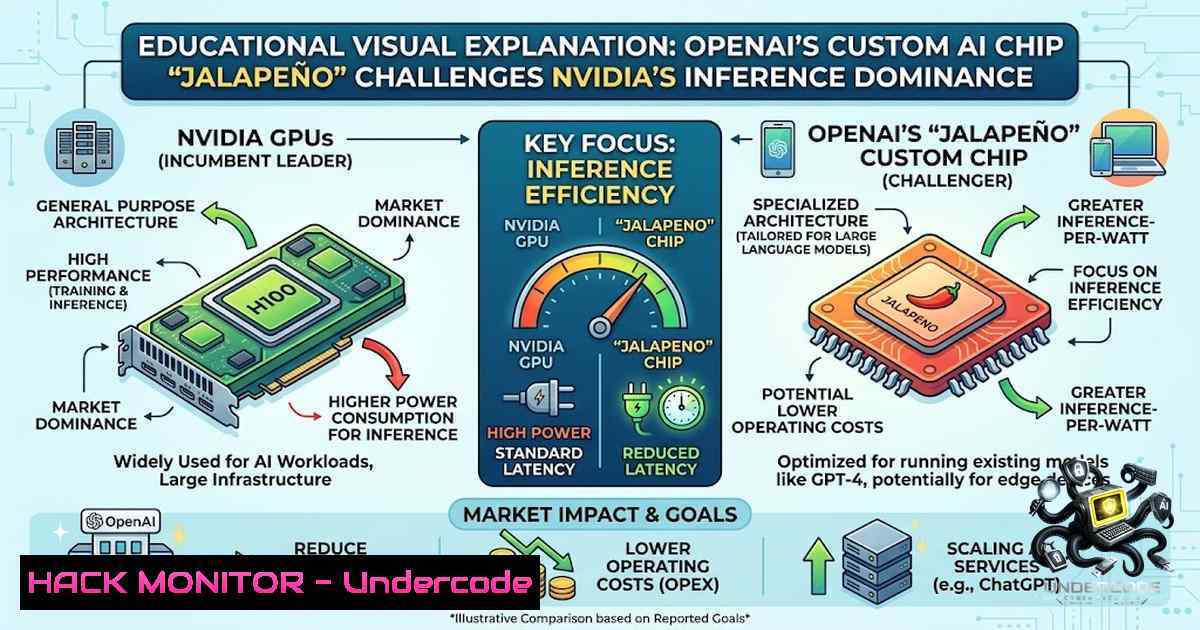
The artificial intelligence industry is witnessing a pivotal shift as major players move beyond relying solely on commercial GPUs to developing bespoke silicon tailored to their specific workloads. OpenAI’s recent unveiling of its in-house inference chip, codenamed “Jalapeno,” developed in partnership with Broadcom, represents a strategic declaration of independence from Nvidia’s hardware ecosystem. This move highlights the escalating computational costs of AI and the industry’s urgent need for specialized, power-efficient solutions that can handle the massive scale of modern machine learning operations.
Learning Objectives & Secrets:
- Objective 1: Understand the Strategic Shift. Learn why major AI companies are transitioning from being solely customers to becoming competitors in the semiconductor space, focusing on cost reduction and performance optimization.
- Objective 2 Secret Tip: Analyze benchmark data critically. Use tools like SemiAnalysis’ InferenceX to validate vendor performance claims. The “secret” is to measure performance-per-watt, not just raw teraflops, as power consumption is the primary driver of operational costs in data centers.
- Objective 3 Secret Tip: Recognize the separation of training and inference. Nvidia’s strength lies in unified architectures, but custom ASICs (Application-Specific Integrated Circuits) like Jalapeno are optimized for specific tasks, often yielding better efficiency at the expense of flexibility—a trade-off that is often beneficial for massive, repetitive workloads.
You Should Know:
1. Benchmarking AI Hardware Performance: Understanding the Metrics
The core of the Jalapeno announcement revolves around performance benchmarks, specifically regarding latency and power consumption. OpenAI’s results indicated that Jalapeno used approximately half the electricity of Nvidia’s Blackwell chips for the same workload while delivering significantly lower latency. To replicate this analysis, one must understand how to measure these metrics in a lab environment. The “secret” to verifying such claims is to standardize the AI workload, usually a common Large Language Model (LLM) inference task, and measure the total system power draw versus throughput (tokens per second). This process involves rigorous A/B testing to ensure software stacks are identical, preventing optimization biases.
Step‑by‑Step Guide:
- Set Up the Environment: On a Linux server, install performance monitoring tools. `sudo apt-get install sysstat nvidia-smi` (for Nvidia) or use Intel’s `rapl` interface for power metrics.
- Run a Standardized Workload: Use a benchmark suite like MLPerf’s Inference benchmark. A command example for a text-to-text model is:
./run_mlperf.sh --model=bert --scenario=SingleStream. - Monitor Power Consumption: Use `nvidia-smi –query-gpu=power.draw –format=csv` to log power draw in real-time. For a custom chip, one might rely on the vendor’s specific SDK.
- Measure Latency: Record the end-to-end time for a set of input prompts. The “secret” is to measure tail latency (p99), as average latency can hide outlier slowdowns.
- Calculate Efficiency: Divide the total number of inferences by the total energy consumed (Joules) to get the performance-per-watt metric.
2. The Economics of AI Inference: Cost-Benefit Analysis
The shift to custom chips is fundamentally an economic decision. Inference costs are skyrocketing, and the gross margins of Nvidia are well-known to be high. By designing their own chips, companies like OpenAI are aiming to reduce their reliance on a single vendor and lower the marginal cost of generating each token. This involves a deep analysis of Total Cost of Ownership (TCO), which includes chip design, manufacturing (via TSMC), and infrastructure integration. The “secret tip” for organizations is to evaluate the trade-off between high upfront NRE (Non-Recurring Engineering) costs of custom chips versus the per-unit cost savings over the chip’s lifecycle.
Step‑by‑Step Guide:
- Calculate Current Costs: Assess your current cloud or data center spending on GPU instances. For example, on AWS, a p4d.24xlarge instance costs approximately $32.77 per hour.
- Project Workload Growth: Estimate future inference traffic. If your application grows 10x, the hardware cost grows proportionally.
- Model Custom Chip Costs: Factor in the development cost (often hundreds of millions) and manufacturing costs. This is speculative but involves calculating break-even points.
- Analyze Power Savings: If a custom chip uses 50% less power, multiply that by the number of servers and local kilowatt-hour prices to calculate annual savings.
- Create a Business Case: Use a tool like `excel` or a Python script to model the Net Present Value (NPV) of the investment. The “secret” is to factor in the opportunity cost of not having to reserve capacity (e.g., Nvidia’s HGX baseboards).
3. Configuring Inference Servers for Maximum Throughput
Regardless of the underlying hardware, optimizing the software stack is crucial. For Nvidia GPUs, this involves configuring the NVIDIA Triton Inference Server or TensorRT. For custom chips like Jalapeno, developers will use Broadcom’s specific software suite. The goal is to maximize throughput (batch size) while staying within latency Service Level Agreements (SLAs). The “secret tip” is dynamic batching, where requests are grouped together to maximize hardware utilization, a technique applicable to both Nvidia and custom silicon.
Step‑by‑Step Guide:
- Install Triton: On Linux, pull the Triton Docker image:
docker pull nvcr.io/nvidia/tritonserver:23.10-py3. - Model Repository: Place your model in a versioned folder structure (e.g., `/models/my_model/1/model.plan` for a TensorRT plan file).
- Configuration: Create a `config.pbtxt` file for the model. Set `dynamic_batching` to `true` and specify
preferred_batch_size. - Launch Server: Run the container:
docker run --gpus all --rm -p8000:8000 -p8001:8001 -v/path/to/models:/models nvcr.io/nvidia/tritonserver:23.10-py3 tritonserver --model-repository=/models. - Optimize: Use the `perf_analyzer` tool to test different batch sizes and concurrency levels:
perf_analyzer -m my_model --concurrency-range 1:10 --input-data random.
4. Security and Isolation in Multi-Tenant AI Clusters
As inference workloads scale, security becomes paramount, especially in multi-tenant environments. Nvidia GPUs and custom chips may be susceptible to side-channel attacks if not properly isolated. The industry is moving towards confidential computing to protect models and data. The “secret tip” is to utilize hardware-level security features, such as Trusted Execution Environments (TEEs), which are becoming available in enterprise GPUs and custom accelerators. This ensures that even if the hypervisor is compromised, the model weights remain encrypted.
Step‑by‑Step Guide:
- Verify TEE Support: Check if your hardware supports SEV-SNP (AMD) or Intel SGX/TDX. For Nvidia, check the H100’s confidential computing support.
- Enable in BIOS: Reboot the server and enable Secure Memory Encryption in the BIOS settings.
- Install Attestation Tools: Use the `kbs-client` to verify the hardware signature.
- Container Configuration: When deploying Triton, ensure the container runtime supports the `–device` flag appropriately to restrict resource access.
- Network Segmentation: Use `iptables` to restrict access to the inference server (port 8000) to only the API gateway. A command to whitelist an IP is:
iptables -A INPUT -p tcp -s 192.168.1.100 --dport 8000 -j ACCEPT.
5. Hardware Profiling and Debugging
Understanding how the chip handles memory bandwidth and compute is essential. Nvidia provides `nvprof` and `Nsight Systems` for GPU profiling. For custom chips, similar debug interfaces will be available via Broadcom. The “secret tip” is to look for memory-bound bottlenecks (where the chip waits for data) versus compute-bound bottlenecks, as this influences future model design (e.g., quantization).
Step‑by‑Step Guide:
- Profiling Nvidia: Install Nsight Systems:
sudo apt-get install nsight-systems. - Run a Trace:
nsys profile --trace=cuda,cublas -o my_report ./your_inference_app. - Analyze: Open the generated `my_report.qdrep` in the Nsight Systems GUI to view the timeline.
- Memory Check: Use `nvidia-smi -a` to check for ECC errors and memory utilization.
- Quantization Analysis: Use TensorRT’s `trtexec` to benchmark FP16 vs INT8 performance. The command `trtexec –onnx=model.onnx –fp16` provides a throughput baseline.
What Undercode Say:
- Key Takeaway 1: The era of a single hardware monopoly is ending. OpenAI’s move signals a future where AI companies must control their chip supply chains to remain competitive, much like Apple transitioned from Intel to its own silicon.
- Key Takeaway 2: The battleground is shifting from raw compute to “compute efficiency” and “inference economics.” While Nvidia remains a vital player for training, the inference market is becoming a multi-vendor race where power consumption dictates profit margins.
- Key Takeaway 3: For developers and IT managers, the rise of custom silicon means a future of fragmented software stacks. Standardization efforts like Triton and PyTorch are crucial to abstracting away hardware differences, allowing teams to switch between Nvidia, Google TPUs, and OpenAI/Broadcom chips with minimal code changes. The challenge for the next three years will be managing this complexity and integrating hardware-agnostic monitoring solutions to truly compare “apples to apples” performance.
Prediction:
- +1 Expect a 30% reduction in inference costs for major AI providers over the next three years, driven by competition and custom silicon, benefiting end-user applications.
- -1 The development of custom chips introduces a significant barrier to entry for smaller AI startups, widening the gap between tech giants and the rest of the industry.
- +1 Nvidia will be forced to innovate faster and lower its GPU pricing, likely by releasing “inference-optimized” SKUs with reduced VRAM and lower costs to compete.
- -1 The complexity of managing multi-vendor hardware (Nvidia, Broadcom, AMD) will lead to increased IT overhead and require a new wave of “hardware-agnostic” orchestration tools.
- +1 The success of Jalapeno will encourage more AI players to develop their own chips, leading to a renaissance in semiconductor architecture focused specifically on transformer-based workloads.
▶️ Related Video (86% Match):
🎯Let’s Practice For Free:
🎓 Live Courses & Certifications:
Join Undercode Academy for Verified Certifications
🚀 Request a Custom Project:
Secure, high-velocity infrastructure and disruptive technological engineering. Contact our engineering team for high-tier development and proprietary systems:
[email protected]
💎 Smart Architecture | 🛡️ Secure by Design | ⭐ Trusted by Thousands
IT/Security Reporter URL:
Reported By: https://lnkd.in/p/e2hkAQgM – Hackers Feeds
Extra Hub: Undercode MoN
Basic Verification: Pass ✅


