Listen to this Post
Introduction:
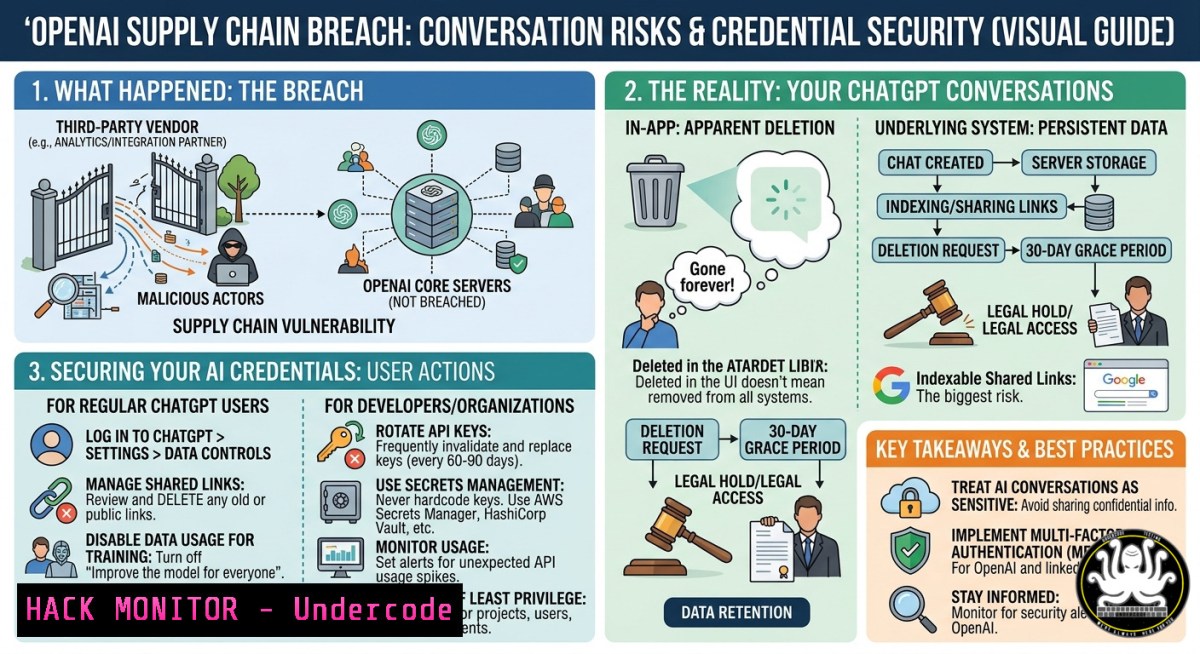
The recent OpenAI data theft linked to a TanStack supply chain attack confirms what security professionals have long feared: your “deleted” AI chat logs and API credentials may still be accessible to attackers. When you paste sensitive code or credentials into Claude or ChatGPT for faster development, you’re not just sharing with an AI – you’re potentially exposing them to a compromised software supply chain. This article extracts technical lessons from the breach, provides actionable commands to audit your systems, and explains why data deletion in AI platforms is rarely permanent.
Learning Objectives:
- Understand the mechanics of the TanStack supply chain attack and how it enabled credential theft from OpenAI systems.
- Apply Linux/Windows commands to detect exposed API keys and monitor AI chat data retention.
- Implement supply chain hardening techniques for npm/pip environments and cloud AI services.
You Should Know:
- The TanStack Supply Chain Attack: What Happened and How to Detect Compromised Packages
On March 26, 2026, OpenAI confirmed a data breach resulting from a supply chain compromise of TanStack – a popular open-source web framework (React Query, Angular, Solid, Vue adapters). Attackers injected malicious code into a published npm package version, which then exfiltrated environment variables, API keys, and chat history from any application (including internal OpenAI tools) that integrated the poisoned dependency.
Step‑by‑step guide to check your projects for TanStack compromise (Linux/macOS/Windows WSL):
1. Audit installed TanStack packages
 List all installed TanStack-related packages
npm list | grep -i tanstack
 For yarn
yarn list --pattern tanstack
 Check for known malicious versions (e.g., 1.3.12-1.3.15)
npm audit | grep tanstack
2. Inspect package integrity
 Verify npm package integrity using shasum
shasum -a 256 node_modules/@tanstack/react-query/package.json
 Compare against official hash (from TanStack GitHub releases)
curl -s https://registry.npmjs.org/@tanstack/react-query | jq '.versions["1.3.14"].dist.integrity'
3. Windows PowerShell alternative
Get-ChildItem -Path node_modules\@tanstack -Recurse -Filter package.json | Get-FileHash -Algorithm SHA256
4. Detect exfiltration patterns in logs
 Search for outgoing requests to suspicious domains (example)
sudo grep -r "tanstack[.]exfil[.]com" /var/log/nginx/access.log
 Or review environment variable dumps
grep -r "OPENAI_API_KEY" ~/.bash_history
Mitigation: Immediately upgrade to TanStack versions >= 1.3.16, rotate all secrets that were present in the environment, and run a full credential audit.
- Why “Deleted” AI Conversations Are Never Truly Erased
Kenza’s question – “if the conversation is deleted, are the data really gone?” – hits a critical truth. Most AI platforms (OpenAI, Anthropic, Google Gemini) retain deleted conversations in backup systems, training datasets, or analytics logs for months or indefinitely. Even if the UI shows deletion, the backend may keep:
– Prompt/response pairs used for model fine‑tuning (often anonymized but reversible).
– Debug logs containing raw inputs, including pasted credentials.
– Compliance archives required by data retention laws (GDPR allows 30 days for erasure requests, but not immediate).
Step‑by‑step guide to verify and request actual deletion:
1. Check platform-specific retention policies
- OpenAI: Deleted chats move to “deleted” status for 30 days, then purged from active systems – but backups may persist longer.
- Anthropic: Claims deletion within 30 days, but logs may be kept for abuse detection.
2. Submit a formal erasure request (GDPR/CCPA)
- Send email to `[email protected]` with subject “Data Erasure Request – Account [your email]”.
- Include: “I request deletion of all chat history, logs, and any derived training data associated with my account ID
 under GDPR 17.”</li>
</ul>

<ol>
<li>Use the API to verify deletion (if you have developer access)
[bash]
List conversations (ChatGPT API)
curl -H "Authorization: Bearer $OPENAI_API_KEY" https://api.openai.com/v1/conversations
After deletion request, re-run – expects empty list or specific error
-
Windows/Linux: Clear local cache of AI web apps
– Chrome/Edge: `chrome://settings/clearBrowserData` → select “Cached images and files”, “Cookies” for platform domain.
– Firefox: `about:preferencesprivacy` → “Clear Data”.
– Linux terminal clear DNS cache: `sudo systemd-resolve –flush-caches`
3. Securing API Keys and Credentials When Using AI Coding Assistants
Never paste raw credentials into ChatGPT or Claude – the supply chain attack proved that even internal OpenAI systems are vulnerable. Instead, use environment variables and secrets scanners.
Step‑by‑step guide to safely handle creds in AI prompts:
1. Use placeholder variables
 Instead of: "Here's my API key sk-abc123..."
 Write: "My API key is stored as ${OPENAI_API_KEY} in .env.local"
2. Mask credentials with a script before pasting
 Linux/macOS
alias paste-safe='pbpaste | sed "s/sk-[A-Za-z0-9]{48}/[bash]/g" | pbcopy'
 Windows PowerShell (clipboard)
Get-Clipboard | ForEach-Object { $_ -replace 'sk-[A-Za-z0-9]{48}', '[bash]' } | Set-Clipboard
- Scan your project for leaked keys using truffleHog
Install
pip install truffleHog
Scan current directory (including .git history)
trufflehog filesystem --directory . --json --only-verified > leaked_keys.json
4. Rotate compromised keys immediately
 OpenAI – revoke via dashboard or API
curl -X POST https://api.openai.com/v1/api_keys/$KEY_ID/revoke \
-H "Authorization: Bearer $ADMIN_API_KEY"
- OSINT Techniques to Find If Your Credentials Were Exposed in the TanStack Breach
Julien Metayer’s OSINT expertise reminds us that attackers dump stolen credentials on public paste sites or dark web forums. Use these commands to hunt for your own exposed data.
Step‑by‑step OSINT audit:
1. Search GitHub for your API keys
 Install GitHub CLI
gh search code "sk-proj-" --limit 100 --json repository,url
 Look for your unique key prefix
2. Check Pastebin and similar sites
curl -s "https://psbdmp.ws/api/search/OPENAI_API_KEY" | jq '.data[] | .title'
- Use dehashed.com (paid) or haveibeenpwned for email-associated breaches
Using haveibeenpwned API (free)
curl -H "hibp-api-key: YOUR_KEY" "https://haveibeenpwned.com/api/v3/breachedaccount/[email protected]"
4. Automated scanning with Recon-ng
recon-ng -m recon/domains-hosts/brute_hosts
 Then use marketplace module for pastebin searches
- Hardening Your CI/CD Pipeline Against Supply Chain Attacks
The TanStack incident highlights the need for integrity checks at every build stage. Implement these steps immediately.
Step‑by‑step guide for pipeline hardening (GitHub Actions example):
1. Enable npm package signature verification
 .github/workflows/audit.yml
- name: npm audit with signature
run: |
npm set audit-level high
npm audit --production --audit-level=critical
npm install -g @sigstore/cli
sigstore verify npm:@tanstack/[email protected]
- Generate and verify SBOM (Software Bill of Materials)
Install syft (Linux/macOS)
curl -sSfL https://raw.githubusercontent.com/anchore/syft/main/install.sh | sh
syft packages . -o json > sbom.json
Check for malicious package names
jq '.artifacts[].name' sbom.json | grep -i "tanstack"
-
Windows CI (Azure DevOps) – restrict package feeds
Use only authenticated feeds
nuget sources Add -Name "InternalOnly" -Source "https://mycompany.pkgs.visualstudio.com"
nuget config -Set dependencyVersion=HighestMinor
4. Enforce environment isolation
- Never store production API keys in CI secrets that are exposed to build logs.
- Use OIDC (OpenID Connect) instead of long-lived secrets for cloud access.
- Incident Response: What to Do If Your AI Credentials Are Leaked
Assume the worst – your pasted credentials are already in an attacker’s database. Activate this runbook.
Step‑by‑step IR actions (Linux/Windows cross-platform):
1. Revoke all API keys
 OpenAI
for id in $(curl -s -H "Authorization: Bearer $ADMIN_KEY" https://api.openai.com/v1/api_keys | jq -r '.data[].id'); do
curl -X POST -H "Authorization: Bearer $ADMIN_KEY" https://api.openai.com/v1/api_keys/$id/revoke
done
2. Regenerate new keys and update .env files
 Using sed to replace keys across all .env files
find . -name ".env" -exec sed -i 's/old_key/new_key/g' {} \;
3. Enable audit logging on all AI platforms
- OpenAI: Settings → Workspace → Audit log → Export to SIEM.
- AWS Bedrock: `aws logs describe-log-groups –log-group-name-prefix /aws/bedrock`
4. Check for unusual API usage
 Python script to detect spikes
import requests
response = requests.get("https://api.openai.com/v1/usage", headers={"Authorization": f"Bearer {NEW_KEY}"})
print(response.json())  Look for unexpected prompt tokens
- Windows Event Log investigation for local credential theft
Get-WinEvent -LogName Security | Where-Object { $_.Message -match "OPENAI_API_KEY" }
What Undercode Say:
- Deleted chats are a myth – AI platforms retain data in backups, training sets, and abuse logs for months. Always assume persistence and never paste credentials.
- Supply chain attacks on AI tooling are rising – The TanStack breach is not isolated; audit every dependency (npm, pip, conda) that touches your LLM workflows.
- Proactive credential hygiene beats reactive IR – Use environment variables, secrets scanners, and OIDC before you need to revoke keys.
Expected Output:
Prediction:
Over the next 12 months, expect a surge in supply chain attacks targeting AI SDKs, vector databases (Chroma, Pinecone), and LLM orchestration layers (LangChain, LlamaIndex). Regulatory bodies will mandate “right to be forgotten” for AI training data, forcing platforms like OpenAI to redesign deletion – but legacy backups will remain a liability. The most impactful mitigation will be the adoption of ephemeral AI workspaces (e.g., GCP Vertex AI’s temporary notebooks) and client‑side encryption of all prompts before they ever reach an API. Start implementing zero‑trust for your AI interactions today.
▶️ Related Video (68% Match):
🎯Let’s Practice For Free:
IT/Security Reporter URL:
Reported By: Jmetayer Tu – Hackers Feeds
Extra Hub: Undercode MoN
Basic Verification: Pass ✅


