Listen to this Post
Introduction:
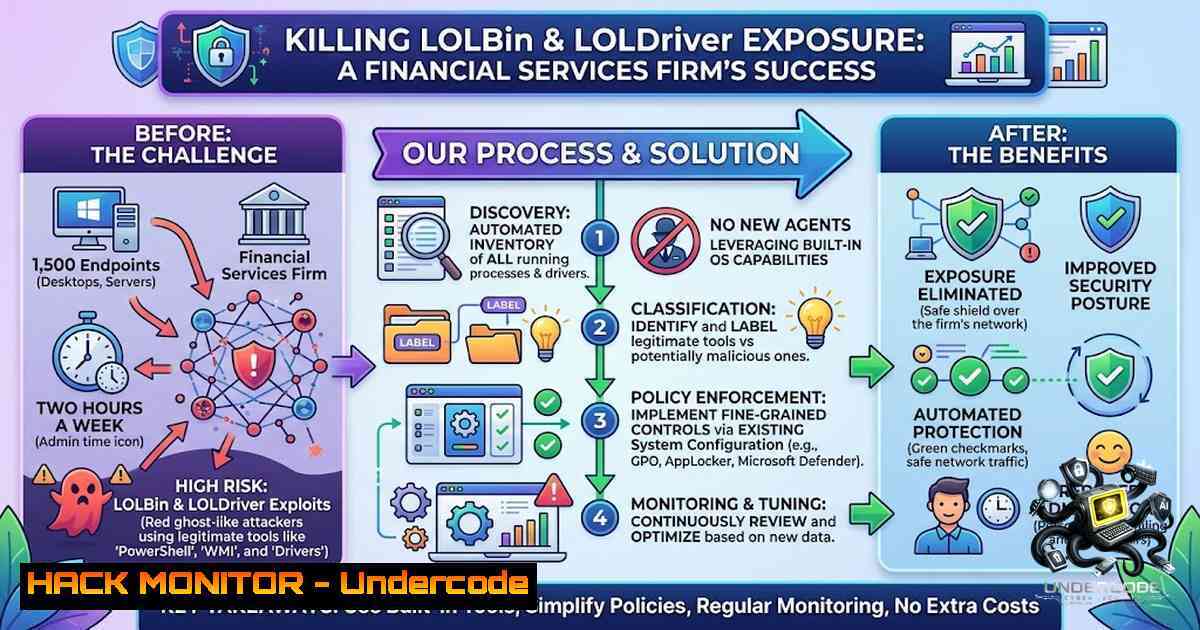
Living Off the Land (LOTL) attacks have become the cornerstone of modern adversarial tradecraft. By weaponizing legitimate, signed binaries (LOLBins), vulnerable kernel drivers (LOLDrivers), and dual-use remote management tools (RMM), attackers can bypass traditional antivirus and EDR solutions entirely. For a U.S.-based financial services firm with 1,500 Windows endpoints and a mature security posture that already included AppLocker and WDAC, the gap wasn’t a lack of tools—it was the operational burden of managing prevention at scale. This article dissects how the organization closed its entire exposure to abused signers, vulnerable drivers, and RMM tools with zero new agents, zero additional headcount, and just two hours of policy work per week. We will explore the technical underpinnings of this achievement, provide actionable commands for Linux and Windows, and outline a step-by-step guide to replicating this success in your own environment.
Learning Objectives:
- Understand the mechanics of LOLBin, LOLDriver, and RMM abuse and why traditional detection fails to stop them.
- Learn how to leverage Windows Defender Application Control (WDAC) and AppLocker as foundational enforcement primitives.
- Master the operational workflow for policy management, including audit mode, log review, and XML policy generation.
- Acquire practical Linux and Windows commands for identifying and mitigating living-off-the-land threats.
- Develop a strategy for closing the prevention gap without increasing team size or operational overhead.
- Understanding the Threat: LOLBins, LOLDrivers, and the Dual-Use Tool Problem
LOLBins are legitimate executables—such as powershell.exe, msbuild.exe, wmic.exe, and rundll32.exe—that are signed by Microsoft and come pre-installed on Windows systems. Attackers exploit these binaries to perform malicious actions like lateral movement, defense evasion, and privilege escalation without dropping custom malware. Similarly, LOLDrivers are signed Windows drivers with known vulnerabilities that can be abused to gain kernel-level privileges or disable security controls. The LOLDrivers project alone catalogs hundreds of such drivers.
The challenge is that you cannot simply delete these files—they are core components of the operating system. Traditional allowlisting approaches like AppLocker and WDAC attempt to solve this by restricting execution to trusted publishers and locations. However, native tooling and manual XML workflows make policy management difficult to scale, especially when tracking an evolving set of abused utilities. This is precisely the gap the financial services firm faced. They already had WDAC and AppLocker in place but struggled to operationalize prevention without assigning more people to low-level policy maintenance.
Linux/Windows Commands for Identifying LOLBins:
On Windows, you can use the following PowerShell commands to audit LOLBin usage:
 List recent LOLBin executions from Windows Event Log (Security log, Event ID 4688)
Get-WinEvent -FilterHashtable @{LogName='Security'; ID=4688} | Where-Object { $<em>.Properties[bash].Value -match 'powershell|msbuild|wmic|rundll32|cscript|wscript' } | Select-Object TimeCreated, @{N='User';E={$</em>.Properties[bash].Value}}, @{N='Process';E={$<em>.Properties[bash].Value}}, @{N='CommandLine';E={$</em>.Properties[bash].Value}}

Check for vulnerable drivers using the LOLDrivers list
 Requires downloading the LOLDrivers JSON from https://www.loldrivers.io/
$LOLDrivers = Invoke-RestMethod -Uri "https://www.loldrivers.io/api/drivers.json"
Get-WindowsDriver -Online | ForEach-Object {
$driver = $_
if ($LOLDrivers -match $driver.ProviderName) {
Write-Host "Vulnerable driver found: $($driver.ProviderName) - $($driver.DriverVersion)"
}
}
On Linux, you can audit for living-off-the-land binaries using:
 Audit recent executions of common LOLBins (e.g., curl, wget, nc, python, perl)
sudo ausearch -m execve -ts recent | grep -E "curl|wget|nc|python|perl|bash|sh" | tail -20

Check for suspicious usage of system binaries via auditd
sudo auditctl -a always,exit -F arch=b64 -S execve -k lolbin_monitor
sudo ausearch -k lolbin_monitor --format text
- The MagicSword Approach: An Intelligence Layer on Top of WDAC
Instead of replacing existing security controls with yet another endpoint agent, MagicSword builds directly on top of Microsoft’s WDAC enforcement primitives. This agentless approach (on Windows) allows organizations to keep using Microsoft’s built-in security features while adding a much-1eeded layer of intelligence, workflow automation, and visibility.
The platform turns observed adversary tradecraft into preventive policies that security teams can review and deploy in minutes. For the financial services firm, this meant they could close exposure across LOLBins, LOLDrivers, and dual-use tools without growing the team. The day-to-day workflow became straightforward: review logs, identify policy changes, update the portal, export the policy, and push it through the firm’s internal approval process.
Step-by-Step Guide to Implementing WDAC with MagicSword:
- Assess Current Environment: Inventory all endpoints and identify existing application control policies (AppLocker, WDAC). Determine the current attack surface by reviewing logs for LOLBin and LOLDriver usage.
- Deploy MagicSword (Agentless): Since MagicSword is agentless on Windows, no new software needs to be installed on endpoints. The platform integrates with existing WDAC policies through the management portal.
- Enable Audit Mode: Before enforcing any new policies, run WDAC in audit mode to understand what would be blocked. Monitor Windows Event Logs for events related to WDAC (Event ID 3076 for audit blocks).
- Review and Tune Policies: Use MagicSword’s intelligence feeds to identify known abused signers, vulnerable drivers, and RMM tools. Update the portal with new allow/block rules.
- Export and Validate: Export the updated WDAC policy as an XML file. Validate the policy structure using the `ConvertFrom-CIPolicy` PowerShell cmdlet.
- Deploy Through Approval Workflow: Push the policy through your internal change management process. Use group policy or Microsoft Intune to deploy the binary policy file (
.p7b) to endpoints. - Monitor and Iterate: Continuously review audit logs and enforcement results. Adjust policies as new threats emerge.
Windows Commands for WDAC Policy Management:
 Create a new WDAC policy from a reference system
New-CIPolicy -FilePath "C:\WDAC\InitialPolicy.xml" -Level Publisher -Fallback Hash

Convert XML policy to binary format for deployment
ConvertFrom-CIPolicy -XmlFilePath "C:\WDAC\InitialPolicy.xml" -BinaryFilePath "C:\WDAC\InitialPolicy.p7b"

Merge multiple policies
Merge-CIPolicy -OutputFilePath "C:\WDAC\MergedPolicy.xml" -PolicyPaths @("C:\WDAC\Policy1.xml", "C:\WDAC\Policy2.xml")

Set rule options (e.g., enable audit mode)
Set-RuleOption -FilePath "C:\WDAC\MergedPolicy.xml" -Option 3  3 = Enabled:Audit Mode

Deploy the policy via Group Policy (copy to appropriate GPO folder)
Copy-Item -Path "C:\WDAC\MergedPolicy.p7b" -Destination "\domain\SysVol\domain\Policies{GPO-ID}\Machine\Preferences\WindowsSettings\WDAC\"
- Closing the RMM Exposure: Blocking Remote Management Tools
Remote Monitoring and Management (RMM) tools are a double-edged sword. While they are essential for IT administration, they are frequently abused by attackers for persistence, lateral movement, and data exfiltration. The financial services firm recognized this risk and used MagicSword to track and block an evolving set of RMM tools without disrupting legitimate administrative workflows.
The key is context-aware policy enforcement. Instead of simply blocking all RMM tools, the platform allows policies based on how the tool is being used—not just what the tool is. For example, a legitimate IT admin using `screenconnect` from a known management subnet would be allowed, while the same binary executed from an unexpected location or user context would be blocked.
Step-by-Step Guide to Securing RMM Tools:
- Inventory RMM Tools: Document all legitimate RMM tools used in your environment (e.g., ScreenConnect, TeamViewer, AnyDesk, Splashtop).
- Define Allow Rules: Create allow rules based on publisher certificates, file hashes, or installation paths for legitimate use cases.
- Implement Contextual Controls: Use WDAC’s path-based and publisher-based rules to restrict RMM execution to authorized users or IP ranges (where possible).
- Audit and Refine: Run in audit mode to identify any unintended blocks. Refine rules before enforcing.
- Enforce and Monitor: Deploy the policy and continuously monitor for anomalous RMM activity.
Windows Commands for RMM Blocking:
 Block a specific RMM executable via WDAC (add as a disallowed rule)
 First, create a file rule for the RMM executable
New-CIPolicyRule -FilePath "C:\Program Files\ScreenConnect\ScreenConnect.exe" -Deny

Alternatively, block by publisher certificate (if the certificate is known to be abused)
 Extract publisher info from the executable
Get-AuthenticodeSignature -FilePath "C:\Program Files\ScreenConnect\ScreenConnect.exe"

Add the publisher to the deny list in the WDAC XML policy
 (Manual XML editing or use Set-RuleOption with custom signer rules)
Linux Command for Monitoring RMM Tools (for cross-platform environments):
 Monitor for network connections from common RMM ports
sudo netstat -tunap | grep -E "8040|8041|5938|12350"  TeamViewer, AnyDesk, etc.

Audit execution of common RMM binaries
sudo auditctl -a always,exit -F path=/usr/bin/anydesk -F perm=x -k rmm_monitor
sudo ausearch -k rmm_monitor
- Hardening Against BYOVD (Bring Your Own Vulnerable Driver)
Bring Your Own Vulnerable Driver (BYOVD) attacks involve attackers loading a known-vulnerable, signed driver to gain kernel privileges and disable security controls. The LOLDrivers project provides a comprehensive list of such drivers. The financial services firm leveraged MagicSword to block these drivers proactively.
Step-by-Step Guide to Mitigating BYOVD:
- Identify Vulnerable Drivers: Use the LOLDrivers database to identify drivers present in your environment.
- Create Block Rules: Add file rules or publisher rules to block these drivers from loading.
- Implement in Audit Mode: Test the rules in audit mode to ensure they don’t block legitimate drivers.
- Deploy and Monitor: Roll out the policy and monitor for attempted driver loads (Event ID 3076 for WDAC blocks).
Windows Commands for Driver Blocking:
 List all loaded drivers
Get-WindowsDriver -Online | Select-Object ProviderName, DriverVersion, Date

Check for known vulnerable drivers using the LOLDrivers list
$LOLDrivers = Invoke-RestMethod -Uri "https://www.loldrivers.io/api/drivers.json"
Get-WindowsDriver -Online | ForEach-Object {
if ($LOLDrivers -match $<em>.ProviderName) {
Write-Warning "Vulnerable driver: $($</em>.ProviderName) - $($<em>.DriverVersion)"
 Create a block rule for this driver
New-CIPolicyRule -Driver -FilePath "C:\Windows\System32\drivers\$($</em>.ProviderName).sys" -Deny
}
}

Deploy the driver block policy
ConvertFrom-CIPolicy -XmlFilePath "C:\WDAC\DriverBlockPolicy.xml" -BinaryFilePath "C:\WDAC\DriverBlockPolicy.p7b"
- The Operational Model: Two Hours of Policy Work Per Week
One of the most remarkable outcomes of this deployment was the reduction in operational overhead. Policy management was delegated to a single person as part of a broader role, requiring roughly two hours per week. This was achieved through:
- Automated Policy Recommendations: MagicSword provides intelligence-driven policy suggestions, reducing the need for manual rule creation.
- Visibility Before Enforcement: The platform allows teams to understand what would break before a policy reaches users, reducing disruption and speeding up deployment.
- Self-Service Maturity: Over time, the team transitioned to a self-service model, requiring less vendor dependency.
Step-by-Step Guide to Optimizing Policy Workflow:
- Centralize Policy Management: Use a single portal (like MagicSword) to manage all WDAC policies across the organization.
- Automate Log Review: Set up automated alerts for critical events (e.g., blocked LOLBin executions, attempted driver loads).
- Implement a Change Approval Process: Use a lightweight approval workflow (e.g., Jira, ServiceNow) to review and approve policy changes.
- Schedule Regular Reviews: Dedicate a fixed time each week (e.g., two hours) to review logs, adjust policies, and deploy updates.
- Monitor and Measure: Track key metrics such as the number of blocked executions, policy change lead time, and incidents avoided.
What Undercode Say:
- Prevention is Operational, Not Just Technical: The financial services firm already had the right technology (WDAC, AppLocker). The breakthrough came from making prevention operational—reducing the burden of policy management to a sustainable level.
- Agentless Matters: Adding yet another endpoint agent was a non-starter. By building on Windows’ native enforcement primitives, the firm avoided the complexity, performance impact, and cost of deploying new agents.
- Visibility Before Enforcement is Critical: Running policies in audit mode first gave the team the confidence to deploy aggressively without breaking business operations.
- Context Over Binary: Blocking based on how a tool is used, not just what it is, is essential for maintaining productivity while closing security gaps.
- Mature Security Teams Seek Self-Service: The firm’s transition to a self-service model reflects a mature approach to vendor relationships—reducing dependency over time.
Analysis: The MagicSword case study underscores a fundamental shift in endpoint security: from “more tools” to “smarter operations.” In an era where EDR solutions are routinely bypassed by living-off-the-land techniques, the ability to enforce application control at scale is no longer optional. However, native Windows tools like WDAC, while powerful, are notoriously difficult to manage. By providing an intelligence layer that automates policy recommendations and simplifies workflow, MagicSword addresses the operational gap that has historically prevented organizations from fully leveraging WDAC. The result is a sustainable prevention program that can be maintained by a single person with minimal weekly effort—a model that is highly replicable across industries.
Prediction:
- +1 Application control will become the primary defense against living-off-the-land attacks by 2027, surpassing traditional EDR in effectiveness for preventing initial access and lateral movement.
- +1 Agentless platforms that layer intelligence on top of native OS controls will gain significant market share, as organizations seek to reduce endpoint complexity and operational overhead.
- +1 The integration of threat intelligence feeds (like LOLDrivers and LOLBAS) directly into policy engines will become a standard feature, enabling real-time protection against newly discovered abused binaries and drivers.
- -1 Organizations that fail to operationalize application control will remain vulnerable to BYOVD and LOLBin attacks, as attackers continue to refine their tradecraft to evade detection-based controls.
- -1 The skills gap in WDAC and AppLocker management will persist, driving demand for platforms that simplify policy creation and maintenance—but also creating a dependency on third-party vendors if not managed carefully.
▶️ Related Video (60% Match):
🎯Let’s Practice For Free:
🎓 Live Courses & Certifications:
Join Undercode Academy for Verified Certifications
🚀 Request a Custom Project:
Secure, high-velocity infrastructure and disruptive technological engineering. Contact our engineering team for high-tier development and proprietary systems:
[email protected]
💎 Smart Architecture | 🛡️ Secure by Design | ⭐ Trusted by Thousands
IT/Security Reporter URL:
Reported By: Cybersecurity Applicationcontrol – Hackers Feeds
Extra Hub: Undercode MoN
Basic Verification: Pass ✅


