
Listen to this Post
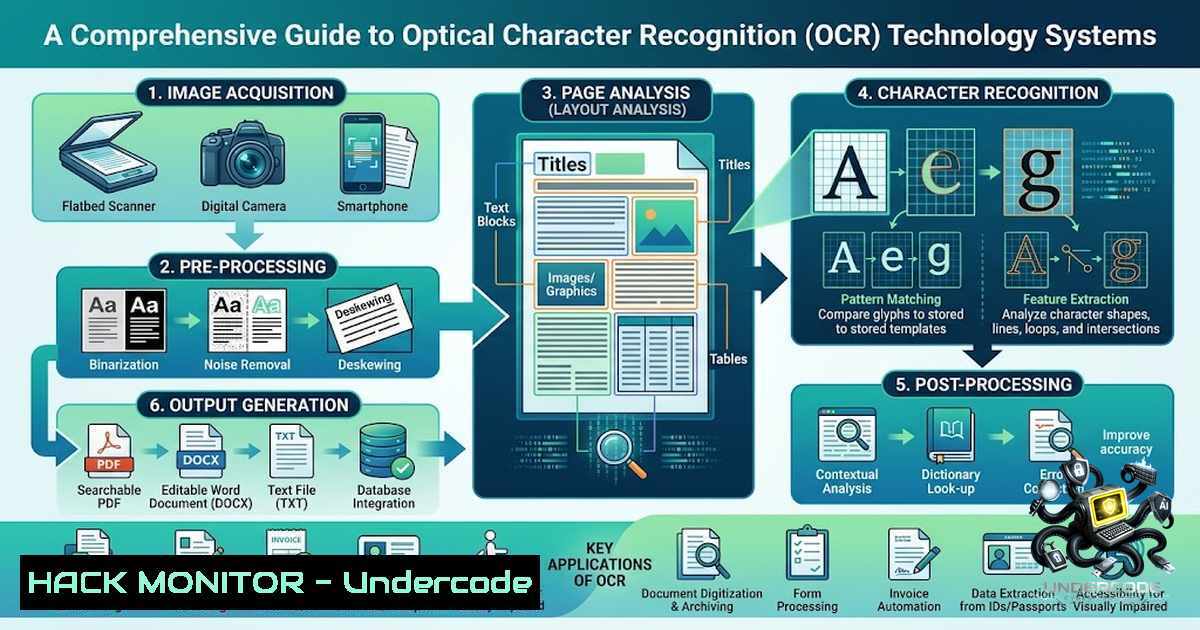
Introduction:
Optical Character Recognition (OCR) technology has revolutionized the way businesses and individuals extract information from images and documents. By leveraging computer vision and machine learning algorithms, OCR systems can convert various types of documents, such as scanned paper documents, PDF files, or digital camera images, into editable and searchable data. Recent projects demonstrate the growing accessibility of OCR technology through open-source tools like Tesseract and OpenCV, enabling developers to implement sophisticated text recognition systems with confidence evaluation mechanisms.
Learning Objectives & Secrets:
- Objective 1: Master the core OCR pipeline including image preprocessing techniques such as grayscale conversion, thresholding, and deskewing to optimize text extraction accuracy.
- Objective 2 Secret Tips: Implement confidence evaluation metrics to validate OCR outputs, using benchmark thresholds to determine the reliability of extracted text. Pro tip: always perform image preprocessing in the proper sequence—grayscale, thresholding, denoising, then deskewing—to achieve optimal recognition rates.
- Objective 3 Secret Tips: Leverage Python libraries like OpenCV and Pytesseract effectively by understanding their parameter configurations. Secret tip: adjust the `–psm` (page segmentation mode) and `–oem` (OCR engine mode) parameters in Tesseract to match your specific text layout and improve accuracy.
You Should Know:
1. Essential OCR Pipeline Components and Setup
A robust OCR system requires careful integration of multiple components. The pipeline begins with image acquisition, followed by preprocessing, text recognition, and post-processing. Here’s the recommended setup:
Linux Installation:
 Install Tesseract and required dependencies
sudo apt update
sudo apt install tesseract-ocr tesseract-ocr-eng
sudo apt install python3-opencv python3-pip
pip3 install pytesseract opencv-python pillow numpy

Install additional language packs if needed
sudo apt install tesseract-ocr-all
Windows Installation:
 Install Chocolatey first, then use it to install Tesseract
choco install tesseract
 Or download from GitHub releases and add to PATH

Install Python packages
pip install pytesseract opencv-python pillow numpy
 Set Tesseract path in Python code
 pytesseract.pytesseract.tesseract_cmd = r'C:\Program Files\Tesseract-OCR\tesseract.exe'
2. Image Preprocessing Techniques for OCR Optimization
Image quality significantly impacts OCR performance. Before sending an image to the OCR engine, apply these crucial preprocessing steps:
Step-by-step preprocessing code:
import cv2
import numpy as np
from PIL import Image
import pytesseract

def preprocess_image(image_path):
 Step 1: Load image
image = cv2.imread(image_path)

Step 2: Convert to grayscale
gray = cv2.cvtColor(image, cv2.COLOR_BGR2GRAY)

Step 3: Apply thresholding (binary inversion)
_, thresh = cv2.threshold(gray, 0, 255, cv2.THRESH_BINARY_INV + cv2.THRESH_OTSU)

Step 4: Denoise using median blur
denoised = cv2.medianBlur(thresh, 3)

Step 5: Deskew image to correct orientation
coords = np.column_stack(np.where(denoised > 0))
angle = cv2.minAreaRect(coords)[-1]
if angle < -45:
angle = -(90 + angle)
else:
angle = -angle
(h, w) = denoised.shape[:2]
center = (w // 2, h // 2)
M = cv2.getRotationMatrix2D(center, angle, 1.0)
rotated = cv2.warpAffine(denoised, M, (w, h), flags=cv2.INTER_CUBIC,
borderMode=cv2.BORDER_REPLICATE)

Step 6: Dilation to connect text components
kernel = np.ones((1, 1), np.uint8)
dilated = cv2.dilate(rotated, kernel, iterations=1)

return dilated

Usage
processed_image = preprocess_image('sample.jpg')
text = pytesseract.image_to_string(processed_image, config='--psm 6 --oem 3')
print(f"Extracted Text: {text}")
3. Advanced Tesseract Configuration and Parameter Tuning
Tesseract offers numerous configuration options that can dramatically improve recognition accuracy for specific use cases. Understanding these parameters is essential for achieving optimal results:
OCR Engine Modes (–oem):
- 0: Legacy engine only
- 1: LSTM engine only
- 2: Legacy + LSTM
- 3: Default (LSTM only is recommended)
Page Segmentation Modes (–psm):
- 3: Fully automatic page segmentation
- 6: Assume a single uniform text block
- 7: Treat image as a single text line
- 11: Sparse text (find as much text as possible)
- 13: Raw line (treat image as a single text line)
Confidence evaluation implementation:
import pytesseract
from pytesseract import Output

def extract_with_confidence(image_path, min_confidence=80):
image = cv2.imread(image_path)
gray = cv2.cvtColor(image, cv2.COLOR_BGR2GRAY)

Get detailed data
data = pytesseract.image_to_data(gray, output_type=Output.DICT, config='--psm 6 --oem 3')

extracted_text = []
confidence_scores = []

for i in range(len(data['text'])):
if int(data['conf'][bash]) > min_confidence:
extracted_text.append(data['text'][bash])
confidence_scores.append(data['conf'][bash])

return ' '.join(extracted_text), np.mean(confidence_scores) if confidence_scores else 0

text, avg_confidence = extract_with_confidence('document.jpg', min_confidence=80)
print(f"Extracted text: {text}")
print(f"Average confidence: {avg_confidence}%")
4. Optimizing OCR for Specific Document Types
Different document types require tailored preprocessing approaches to maximize recognition accuracy:
Handwritten documents:
- Apply more aggressive denoising (e.g., Non-Local Means Denoising)
- Use specialized handwriting recognition models or Tesseract with LSTM trained on handwriting
- Consider using multiple passes with different preprocessing parameters
Scanned PDFs:
- Extract images from PDF using `pdf2image` library
- Apply deskewing and perspective correction
- Use higher DPI settings (300+ for best results)
- Consider batch processing with consistent parameters
Low-quality images:
def enhance_low_quality(image_path):
image = cv2.imread(image_path)
gray = cv2.cvtColor(image, cv2.COLOR_BGR2GRAY)

Apply adaptive thresholding
thresh = cv2.adaptiveThreshold(gray, 255, cv2.ADAPTIVE_THRESH_GAUSSIAN_C,
cv2.THRESH_BINARY, 11, 2)

Sharpening kernel
kernel = np.array([[-1,-1,-1],
[-1, 9,-1],
[-1,-1,-1]])
sharpened = cv2.filter2D(thresh, -1, kernel)

Enhance contrast using CLAHE
clahe = cv2.createCLAHE(clipLimit=2.0, tileGridSize=(8,8))
enhanced = clahe.apply(sharpened)

return enhanced
5. API Security and Deployment Best Practices
When deploying OCR systems as APIs, consider these security and performance considerations:
Rate limiting implementation:
 Using Flask and Flask-Limiter
from flask import Flask, request, jsonify
from flask_limiter import Limiter
from flask_limiter.util import get_remote_address

app = Flask(<strong>name</strong>)
limiter = Limiter(app, key_func=get_remote_address, default_limits=["200 per day", "50 per hour"])

@app.route('/ocr', methods=['POST'])
@limiter.limit("10 per minute")
def ocr_endpoint():
 Validate input file
if 'image' not in request.files:
return jsonify({'error': 'No image provided'}), 400

file = request.files['image']
if file.filename == '':
return jsonify({'error': 'No image selected'}), 400

Process OCR here
 Return results with confidence scores
Cloud deployment considerations:
- Implement API key authentication for external access
- Use secure file handling to prevent path traversal attacks
- Implement input validation (check file size, type, dimensions)
- Consider using AWS Lambda, Azure Functions, or Google Cloud Functions for scalable serverless deployment
- Implement logging and monitoring for performance tracking
6. Training Custom Tesseract Models
For specialized applications with specific fonts or text types, training custom Tesseract models can significantly improve accuracy:
Data preparation:
- Collect at least 100-200 training images per character/font type
- Generate ground truth text files (.gt.txt)
- Create box files for character coordinates
Training workflow:
 Generate training data
tesseract [bash].tif [bash] box.train

Compute character set
unicharset_extractor [bash].box

Create font properties file
echo "font_name 0 0 0 0 0" > font_properties

Training
mftraining -F font_properties -U unicharset -O lang.unicharset [bash].tr
cntraining [bash].tr
combine_tessdata [bash].
What Undercode Say:
Key Takeaways:
- Modern OCR systems can achieve high accuracy (80-90%) with proper preprocessing and configuration, but continuous improvement through iterative tuning is essential for production-grade applications
- The combination of open-source tools (Tesseract, OpenCV) with custom preprocessing pipelines provides a cost-effective alternative to commercial OCR solutions
Analysis:
The recent project demonstrating 83.75% OCR confidence against an 80% benchmark highlights the maturing state of open-source OCR technology. This achievement validates the effectiveness of the preprocessing pipeline, particularly the integration of deskewing and thresholding techniques. The success also underscores the importance of confidence evaluation as a quality metric, enabling users to validate results and implement fallback mechanisms for low-confidence outputs. As computer vision and AI continue to evolve, we can expect OCR systems to handle increasingly challenging use cases, including multi-language documents, complex layouts, and handwritten text with greater accuracy.
Prediction:
+1 AI-powered OCR will become increasingly integrated with LLMs for document understanding and content generation, enabling semantic extraction and natural language processing of recognized text.
+1 Real-time OCR applications will grow exponentially in mobile and edge devices, driven by improvements in lightweight neural network models and GPU acceleration technologies.
-1 Privacy and data security concerns will arise as OCR systems process increasing amounts of sensitive personal and corporate documents, requiring stricter compliance with regulations like GDPR and HIPAA.
-1 The skill gap in implementing and deploying enterprise-grade OCR systems may widen as organizations struggle to find talent with expertise in both computer vision and production deployment practices.
+1 Automated document processing will see significant adoption in healthcare, legal, and financial sectors, reducing manual data entry errors and improving operational efficiency by 40-60%.
▶️ Related Video (90% Match):
🎯Let’s Practice For Free:
🎓 Live Courses & Certifications:
Join Undercode Academy for Verified Certifications
🚀 Request a Custom Project:
Secure, high-velocity infrastructure and disruptive technological engineering. Contact our engineering team for high-tier development and proprietary systems:
[email protected]
💎 Smart Architecture | 🛡️ Secure by Design | ⭐ Trusted by Thousands
IT/Security Reporter URL:
Reported By: https://lnkd.in/p/eZ-hs8hn – Hackers Feeds
Extra Hub: Undercode MoN
Basic Verification: Pass ✅


