
Listen to this Post
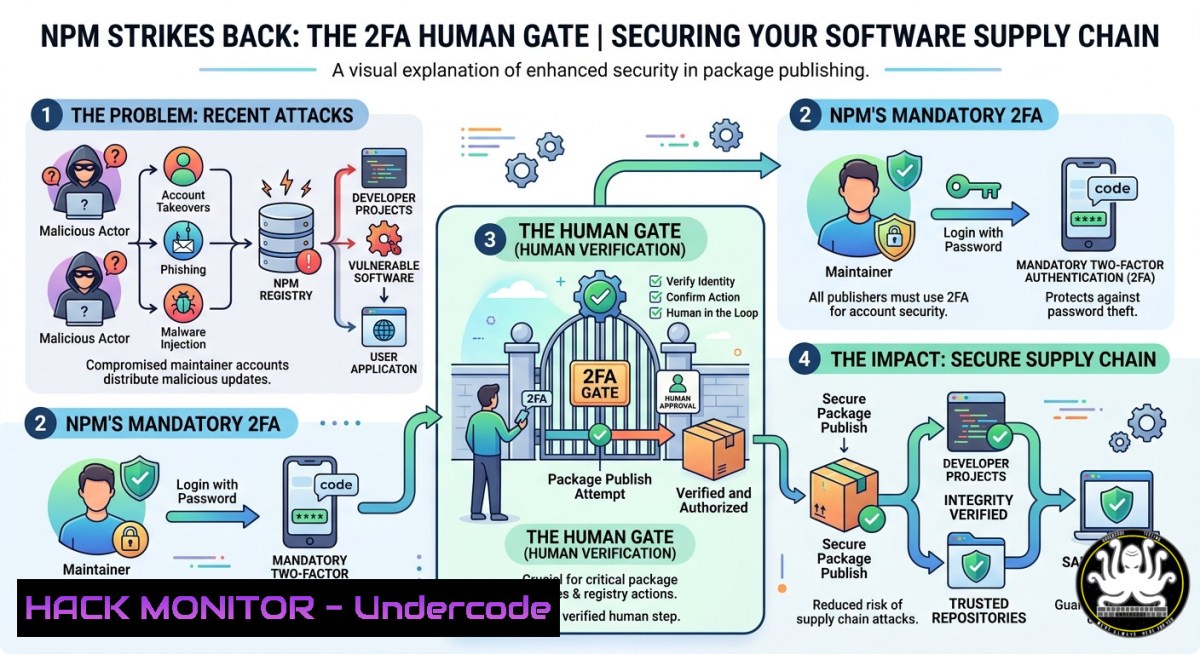
Introduction:
The rise of software supply chain attacks, exemplified by the Shai-Hulud 2.0 campaign and other malicious package injections, has exposed a critical vulnerability in the automated CI/CD workflows that power modern development. To counter this, npm has introduced a game-changing security feature called “staged publishing,” which mandates human approval with two-factor authentication (2FA) before any package version can be released to the public registry. This strategic shift transforms the package publishing process from a fully automated pipeline into a controlled, human-in-the-loop system designed to block compromised code from ever reaching consumers.
Learning Objectives:
- Understand how npm’s staged publishing creates a verifiable “proof of presence” by requiring 2FA-gated human approval for every release.
- Implement new install source control flags (
--allow-file,--allow-remote,--allow-directory) to explicitly lock down where your projects can pull dependencies. - Configure hardened CI/CD pipelines that use trusted publishing with OIDC while enforcing staged-only releases for maximum security.
You Should Know:
1. Implementing Staged Publishing for Your Packages
To enable staged publishing, you must first meet the prerequisites: your package must already exist on the npm registry (brand-new packages cannot be staged), you must have publish access to the package, and 2FA must be enabled for your npm account. Additionally, your development environment requires npm CLI version 11.15.0 or newer and Node.js version 22.14.0 or newer. Once these conditions are satisfied, you can start using the `npm stage publish` command.
Here’s how to integrate staged publishing into your workflow:
Step‑by‑step guide:
- Upgrade your npm CLI: Run `npm install -g npm@latest` to ensure you have version 11.15.0+ installed.
- Update your CI/CD configuration: Replace your existing `npm publish` command with `npm stage publish` in your workflow files (e.g.,
.github/workflows/publish.yml). This change ensures that every automated build submits the package to the staging queue rather than releasing it immediately. - Restrict trusted publishing to stage-only: To prevent direct publishes from bypassing your new security controls, configure your trusted publishing (OIDC) settings to allow only `npm stage publish` and reject any direct `npm publish` attempts from your CI workflows.
- Approve staged releases from the CLI: After a CI run submits a package to the queue, a maintainer can approve it by running `npm stage approve
` or by visiting the queue on npmjs.com. This action requires a successful 2FA challenge, ensuring that a human has authorized the release. - Monitor the queue: View all pending staged packages with `npm stage list` to keep track of what’s awaiting approval.
Key commands to remember:
 Publish to the staging queue instead of directly to the registry
npm stage publish

List all packages currently awaiting approval
npm stage list

Approve a specific staged package (requires 2FA)
npm stage approve <package-name>

Reject a staged package if something looks wrong
npm stage reject <package-name>
2. Hardening Installations with New Source Control Flags
The npm 11.15.0 release also introduces three critical install source flags that allow you to control exactly where your project can pull dependencies from, effectively building an allowlist for non-registry install sources. By default, npm install can pull from local file paths, remote URLs, local directories, and Git sources, creating a broad attack surface that attackers can exploit. The new flags—--allow-file, --allow-remote, and --allow-directory—complement the existing `–allow-git` flag, giving you granular control over each source type.
Step‑by‑step guide for implementing source controls:
- Lock down remote URL installations: To prevent your project from pulling dependencies from arbitrary HTTPS tarballs, set
--allow-remote=none. This blocks installations from sources likehttps://example.com/package.tgz`. Configure this in your `.npmrc` file:allow-remote=none`. - Block local file installations: If your project has no legitimate need to install packages from local file paths or tarballs, set `–allow-file=none` to prevent `npm install /path/to/package.tgz` commands from executing.
- Restrict local directory installations: Similarly, setting `–allow-directory=none` blocks `npm install ./local-package` from working, which can prevent accidental or malicious installations from untrusted local sources.
- Combine flags for comprehensive protection: For maximum security, set all four flags to `none` except for the specific source types your project requires. For example, if your project only installs from the public npm registry, use:
npm install --allow-file=none --allow-remote=none --allow-directory=none --allow-git=none
- Persist configurations: Add these settings to your project’s `.npmrc` file or the global `.npmrc` to ensure every installation honors the restrictions without requiring command-line flags each time.
-
Hardening CI/CD Pipelines with OIDC and Stage-Only Publishing
The true power of staged publishing emerges when combined with npm’s trusted publishing feature, which uses OpenID Connect (OIDC) to establish trust between your CI/CD provider and npm without long-lived tokens. This integration allows your automated workflows to submit packages to the staging queue, but crucially, OIDC tokens cannot approve staged packages—that action requires a human with 2FA.
Step‑by‑step guide for configuring hardened CI/CD pipelines:
- Enable trusted publishing for your package: In your npm package’s settings, configure a trusted publisher that links your specific GitHub repository and workflow to the package. This binds a specific CI/CD identity to your package, preventing spoofed requests from publishing.
- Restrict trusted publishing to stage-only: In the trusted publisher configuration, select the option that allows only `npm stage publish` from that workflow. This setting will reject any direct `npm publish` commands from your CI system, forcing all releases through the staging queue.
- Update your CI workflow YAML: Modify your publish job to use `npm stage publish` instead of
npm publish. For GitHub Actions, your publish step might look like:</li> </ol> <p>- name: Stage package run: npm stage publish env: NODE_AUTH_TOKEN: ${{ secrets.NPM_TOKEN }}4. Implement a review process for approvals: Designate one or more maintainers who will be responsible for reviewing staged packages. This human-in-the-loop process should include checking the package contents, verifying the change log, and ensuring the build artifacts match expectations before running
npm stage approve.
5. Monitor and audit all staging activities: Use the npm CLI and web interface to track who approved which packages and when. This creates an audit trail that can be critical for post-incident analysis.4. Mitigating Supply Chain Risks with Install-Time Hardening
Beyond publishing controls, developers must also protect their projects when installing dependencies. npm’s new source control flags are just one part of a broader defense-in-depth strategy. Other critical practices include using lock files to ensure deterministic installs, blocking post-install scripts where possible, and implementing package provenance verification.
Advanced hardening commands and configurations:
- Enforce deterministic installs in CI: Use `npm ci` instead of `npm install` in your CI pipelines. `npm ci` strictly respects your `package-lock.json` file and fails if there’s any mismatch, preventing unexpected dependency changes.
- Block lifecycle scripts: Add `ignore-scripts=true` to your `.npmrc` file to prevent packages from executing preinstall, postinstall, and other scripts that could run malicious code. This is particularly important when installing untrusted or new dependencies.
- Verify package provenance: After installing packages, you can verify their provenance using the `npm audit signatures` command, which checks that the installed packages match their signed attestations, helping to detect tampering.
- Use minimum release age policies: Consider tools like `pnpm` that offer minimum release age features out of the box, blocking the installation of packages published within the last 24 hours to give malicious versions time to be discovered and removed.
5. Future-Proofing Against Upcoming npm Hardening Features
npm’s development roadmap includes even more stringent security defaults that developers should prepare for now. The next minor CLI release is expected to introduce an `allowScripts` field in `package.json` as an opt-out mechanism for install scripts. More significantly, npm v12 is expected to flip the default behavior, making it so install scripts will not run unless a dependency is explicitly listed in `allowScripts` (an opt-in model).
Preparation steps:
- Start auditing your dependencies’ script usage: Identify which of your dependencies actually require post-install scripts to function, and which could run without them.
- Gradually adopt the `allowScripts` field in your `package.json` as soon as it becomes available to get ahead of the breaking change.
- Review your use of granular access tokens (GATs): npm is considering defaulting GATs to stage-only when they bypass 2FA. Ensure your automation tokens are configured with this future change in mind.
6. Defensive Commands for Everyday npm Usage
Integrate these defensive commands into your daily workflow to immediately reduce your supply chain risk:
 Install a package with all non-registry sources blocked
npm install express --allow-file=none --allow-remote=none --allow-directory=none --allow-git=none

Run a security audit after every install
npm audit

Check signatures of already-installed packages
npm audit signatures

List all packages that have postinstall scripts (potential risk vectors)
npm ls --json | jq '.dependencies | to_entries[] | {name: .key, scripts: .value.scripts}'
What Undercode Say:
- The 2FA human gate is a paradigm shift for open-source security. For years, automation tokens have been the weak link in the supply chain. Staged publishing finally introduces an intentional, auditable human step that can catch compromised code before it spreads.
- The new install flags put developers back in control of their dependency sources. By default, npm’s flexibility is its greatest security risk. The `–allow-` flags transform that flexibility into a controlled, explicit allowlist, forcing developers to consciously approve each non-registry source.
Analysis:
This update represents a fundamental architectural improvement to npm’s security posture. The staged publishing mechanism directly addresses the class of attacks where an attacker compromises a maintainer’s CI/CD token and injects malicious code into an automated publish workflow. By requiring a 2FA challenge for final approval, npm ensures that even if an automated token is stolen, the attacker cannot release a package without also possessing the maintainer’s 2FA mechanism. This “proof of presence” requirement is a massive leap forward. Simultaneously, the new install source flags empower developers to significantly reduce their attack surface on the consumption side. Together, these changes make npm one of the most secure open-source package registries available today, though adoption across the ecosystem will be key to realizing their full potential.
Prediction:
These npm security updates will set a new industry standard for open-source package registries, with other ecosystems like PyPI, RubyGems, and Maven Central likely to announce similar staged publishing and source control features within the next 12–18 months. As automated attacks on CI/CD pipelines become more sophisticated, the human-in-the-loop approval model will become a mandatory requirement for enterprise software development, fundamentally changing how we think about the safety of open-source dependencies. The npm v12 breaking change that flips install scripts to opt-in will be one of the most impactful security migrations in JavaScript history, potentially eliminating an entire class of post-install malware attacks.
▶️ Related Video (76% Match):
🎯Let’s Practice For Free:
IT/Security Reporter URL:
Reported By: Hackermohitkumar Npm – Hackers Feeds
Extra Hub: Undercode MoN
Basic Verification: Pass ✅🔐JOIN OUR CYBER WORLD [ CVE News • HackMonitor • UndercodeNews ]
📢 Follow UndercodeTesting & Stay Tuned:


