Listen to this Post
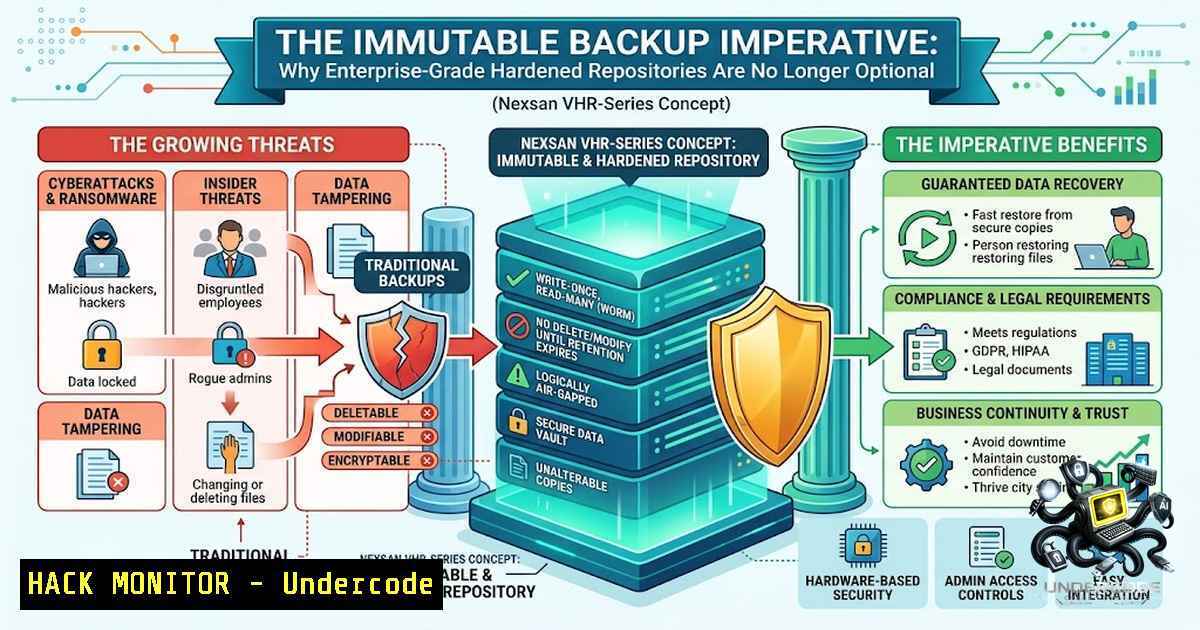
Introduction:
The modern ransomware threat landscape has fundamentally shifted the calculus of data protection. Attackers no longer merely encrypt production data; they systematically target backup repositories to eliminate recovery options, rendering traditional backup strategies obsolete. The Nexsan VHR-Series emerges as a purpose-built enterprise-class immutable backup storage appliance, specifically engineered for Veeam Software environments, combining hardened repository capabilities, ransomware resilience, and DISA STIG-aligned hardening to address this critical vulnerability. As Vincent Phillips, CEO of Nexsan, states, “The VHR-Series delivers the backbone for secure, compliant and resilient Veeam infrastructure at a cost-effective price.”
Learning Objectives:
- Understand the architectural principles and security benefits of immutable backup storage in the context of modern ransomware defense.
- Learn how to configure and deploy a Veeam Hardened Repository using Linux-based immutable storage, including DISA STIG compliance.
- Master practical commands and procedures for verifying immutability, managing backup repositories, and executing rapid recovery.
You Should Know:
- Understanding Immutable Backup Architecture and the Nexsan VHR-Series Value Proposition
Immutable storage ensures that once backup data is written, it cannot be modified, deleted, or encrypted for a defined retention period – even by an administrator with privileged access. The Nexsan VHR-Series operationalizes this principle through a preconfigured appliance that integrates the Veeam Hardened Repository ISO, delivering end-to-end data immutability out of the box. With usable capacity scaling from 64 TB to 3.3 PB, the appliance caters to mid-market businesses through to massive enterprise environments. Its DISA STIG-aligned hardening provides a compliance-ready foundation for regulated sectors, while battery-backed cache protects in-flight data during power interruptions.
Step‑by‑step guide explaining what this does and how to use it:
- Assess Your Environment: Determine your required backup capacity and retention policies. The VHR-Series supports expansion via Nexsan’s E-Series shelves, allowing capacity growth without architectural redesign.
- Deploy the Appliance: Rack and cable the VHR-Series appliance. Connect it to your network infrastructure with dedicated backup VLANs to isolate backup traffic from production networks.
- Initial Configuration: Power on the appliance. It comes preloaded with the Veeam Hardened Repository ISO. Follow the on-screen prompts to configure network settings, hostname, and storage pools.
- Integrate with Veeam: In the Veeam Backup & Replication console, navigate to Backup Infrastructure > Add Backup Repository. Select Direct attached storage > Linux (Hardened Repository).
- Configure Immutability: Specify the path to the directory created for immutable backups and set the immutability period (minimum 7 days). This period defines how long backup files remain protected from modification or deletion.
- Validate Connectivity: Ensure the Veeam server can communicate with the repository via SSH using single-use credentials for enhanced security.
- Test Backup and Restore: Create a test backup job targeting the new repository. Perform a restore to verify functionality and measure Recovery Time Objective (RTO) performance.
-
Building a Veeam Hardened Repository on Linux (Manual Configuration)
While the Nexsan VHR-Series provides a turnkey solution, understanding the underlying Linux Hardened Repository configuration is essential for troubleshooting and customization. A hardened repository typically runs on a locked-down Linux server with immutable file system attributes.
Step‑by‑step guide explaining what this does and how to use it:
- Prepare the Linux Server: Install a supported Linux distribution (Ubuntu 20.04 LTS, RHEL, or Rocky Linux 9). Ensure the file system supports immutable files and extended attributes (
chattrandsetxattr). - Apply DISA STIG Hardening: For RHEL/Rocky, navigate to Security Profile and select the DISA STIG profile. For Ubuntu, apply settings manually or use the Veeam-provided automatic configuration script. This enforces password complexity (15 characters, upper/lower, numeric, special) and disables unnecessary services.
- Create Backup Directory: Create a dedicated directory for backups, e.g.,
/backups/veeam. Set appropriate ownership and permissions:sudo mkdir -p /backups/veeam sudo chown -R veeam:veeam /backups/veeam sudo chmod 750 /backups/veeam
- Enable Immutability with
chattr: Apply the immutable attribute to the backup directory to prevent accidental or malicious modification:sudo chattr +i /backups/veeam
Note: The `+i` flag makes files immutable; they cannot be modified, deleted, or renamed even by root. To remove:
sudo chattr -i /backups/veeam. - Configure Veeam Repository: In Veeam Backup & Replication, add the Linux server as a hardened repository. Specify the path `/backups/veeam` and set the immutability period.
- Disable SSH for the Service Account: For persistent credentials, disable SSH connection for the account used to connect to the Linux server. This reduces the attack surface.
- Verify Immutability: After a backup job runs, attempt to delete a backup file as root to confirm immutability is enforced:
sudo rm /backups/veeam/Backup_Job_Name.vbk
The command should fail with “Operation not permitted”.
3. Configuring DISA STIG Compliance for Enhanced Security
DISA STIG compliance is a cornerstone of the Nexsan VHR-Series security posture. Adhering to these guidelines ensures a hardened baseline that mitigates common vulnerabilities.
Step‑by‑step guide explaining what this does and how to use it:
- Identify Applicable STIGs: For Ubuntu 20.04 LTS, refer to DISA STIG UBTU-20-010455 and others. For RHEL/Rocky, use the built-in security profiles.
2. Apply STIG Settings Manually: Key configurations include:
- Disabling wireless network adapters.
- Configuring password policies (complexity, expiration).
- Enforcing FIPS 140-2 compliant encryption algorithms.
- Limiting outgoing HTTP traffic to essential update servers.
- Use Automation Scripts: Veeam provides scripts to automate STIG application for Ubuntu. Execute the script and review the output for any errors.
- Verify STIG Compliance: Use the `openscap` tool to scan and validate compliance:
sudo apt-get install openscap-scanner
sudo oscap xccdf eval --profile xccdf_org.ssgproject.content_profile_stig --results scan-results.xml /usr/share/openscap/scap-content/ssg-ubuntu2004-ds.xml
- Remediate Findings: Review the scan results and address any non-compliant items. Common remediations include adjusting file permissions, disabling unused services, and updating kernel parameters.
- Document and Monitor: Maintain a record of applied STIG settings and schedule regular compliance scans to ensure ongoing adherence.
4. Implementing Rapid Recovery and Testing RTO
The primary goal of any backup strategy is rapid recovery. The Nexsan VHR-Series is engineered for aggressive Recovery Time Objectives (RTO), enabling organizations to restore critical systems quickly after an incident.
Step‑by‑step guide explaining what this does and how to use it:
- Define RTO/RPO: Establish clear Recovery Time Objective and Recovery Point Objective metrics for each application and data set.
- Perform Regular Restore Tests: Schedule automated or manual restore tests. In Veeam, use the SureBackup feature to automatically verify the recoverability of backups without impacting production.
- Execute a Full Restore: In a test environment, initiate a full VM restore from the hardened repository. Measure the time taken from start to completion.
- Perform File-Level Recovery: Test restoring individual files or folders from the immutable backup to ensure granular recovery capabilities.
- Document Recovery Procedures: Create detailed runbooks for different recovery scenarios (full VM, file-level, application-specific). Include steps for engaging the Nexsan support team if needed.
- Analyze and Optimize: Based on test results, adjust backup schedules, network bandwidth allocation, and storage configurations to improve RTO.
5. Monitoring and Maintaining the Hardened Repository
Ongoing monitoring and maintenance are crucial to ensure the integrity and performance of the immutable backup infrastructure.
Step‑by‑step guide explaining what this does and how to use it:
- Monitor Storage Capacity: Use Veeam’s built-in monitoring or Nexsan’s management tools to track capacity utilization. Plan for expansion when usage exceeds 80%.
- Check Immutability Status: Regularly verify that the immutability attribute is still applied to backup directories:
sudo lsattr /backups/veeam
Look for the `i` flag indicating immutability.
- Review Logs: Monitor system logs (
/var/log/syslog,/var/log/messages) and Veeam logs for errors or warnings. Configure log forwarding to a SIEM for centralized analysis. - Apply Security Patches: Regularly update the Linux operating system with security patches. Use a staging environment to test patches before applying to production.
- Perform Health Checks: Use Nexsan’s diagnostic tools to check hardware health (disks, power supplies, fans). The five-year hardware warranty provides a safety net for hardware failures.
- Review Backup Jobs: Analyze backup job success rates, performance metrics, and retention policy compliance. Adjust as needed to meet evolving business requirements.
6. Leveraging the 3-2-1-1-0 Backup Rule
The Nexsan VHR-Series is a critical component of a comprehensive backup strategy, but it should be integrated within the broader 3-2-1-1-0 framework.
Step‑by‑step guide explaining what this does and how to use it:
- 3 Copies of Data: Maintain at least three copies of your data – one production copy and two backups.
- 2 Different Media: Store backups on two different types of media (e.g., on-premises disk and cloud object storage).
- 1 Offsite Copy: Keep one backup copy offsite to protect against site-level disasters (fire, flood).
- 1 Immutable Copy: Ensure at least one backup copy is immutable, as provided by the Nexsan VHR-Series, to defend against ransomware.
- 0 Errors: Implement automated verification (like Veeam SureBackup) to ensure zero errors in your backups.
What Undercode Say:
- Key Takeaway 1: Immutable backup is rapidly transitioning from a “nice-to-have” security feature to a strategic business necessity, driven by sophisticated ransomware that explicitly targets backup infrastructure. Organizations that fail to implement immutable storage face not only data loss but also higher cyber-insurance premiums and potential regulatory penalties.
- Key Takeaway 2: The integration of purpose-built appliances like the Nexsan VHR-Series with Veeam’s hardened repository capabilities represents a significant shift toward operational simplicity without compromising security. By pre-configuring DISA STIG compliance and Veeam integration, these solutions reduce deployment complexity and accelerate time-to-value for enterprises seeking robust cyber resilience.
Analysis: The Nexsan VHR-Series addresses a critical gap in the enterprise backup landscape by providing a turnkey, scalable, and security-hardened platform specifically designed for Veeam environments. Its DISA STIG alignment and Veeam Ready certification provide assurance for regulated industries and IT teams seeking validated solutions. The appliance’s capacity range from 64 TB to 3.3 PB ensures it can scale alongside organizational growth, while the five-year warranty supports long-term lifecycle planning. However, organizations must complement the appliance with robust operational processes, including regular restore testing, monitoring, and adherence to the 3-2-1-1-0 backup rule, to fully realize its benefits. The convergence of infrastructure resilience and customer experience, as highlighted by CXQuest, underscores that backup integrity is not merely an IT concern but a direct contributor to business continuity and customer trust.
Prediction:
- +1 The adoption of purpose-built immutable backup appliances will accelerate as ransomware-as-a-service (RaaS) groups increasingly target backup infrastructure, driving demand for pre-validated, security-hardened solutions that reduce deployment friction.
- +1 Integration of AI-driven anomaly detection with immutable storage will become a standard feature, enabling proactive identification of suspicious backup modifications and automated threat response.
- -1 Organizations that delay adopting immutable backup strategies will face escalating cyber-insurance costs and potential regulatory fines, as data protection frameworks (e.g., GDPR, NIS2) increasingly mandate recoverable and unalterable backup copies.
- +1 The convergence of backup and cybersecurity teams will intensify, with immutable storage serving as a foundational element of Zero Trust architectures and cyber resilience frameworks.
- -1 The complexity of managing hybrid backup environments (on-premises immutable storage + cloud object storage) may create new operational challenges, requiring enhanced skills and automation to maintain consistency and security across disparate platforms.
▶️ Related Video (78% Match):
🎯Let’s Practice For Free:
🎓 Live Courses & Certifications:
Join Undercode Academy for Verified Certifications
🚀 Request a Custom Project:
Secure, high-velocity infrastructure and disruptive technological engineering. Contact our engineering team for high-tier development and proprietary systems:
[email protected]
💎 Smart Architecture | 🛡️ Secure by Design | ⭐ Trusted by Thousands
IT/Security Reporter URL:
Reported By: Cxquest Customerexperience – Hackers Feeds
Extra Hub: Undercode MoN
Basic Verification: Pass ✅


