Listen to this Post
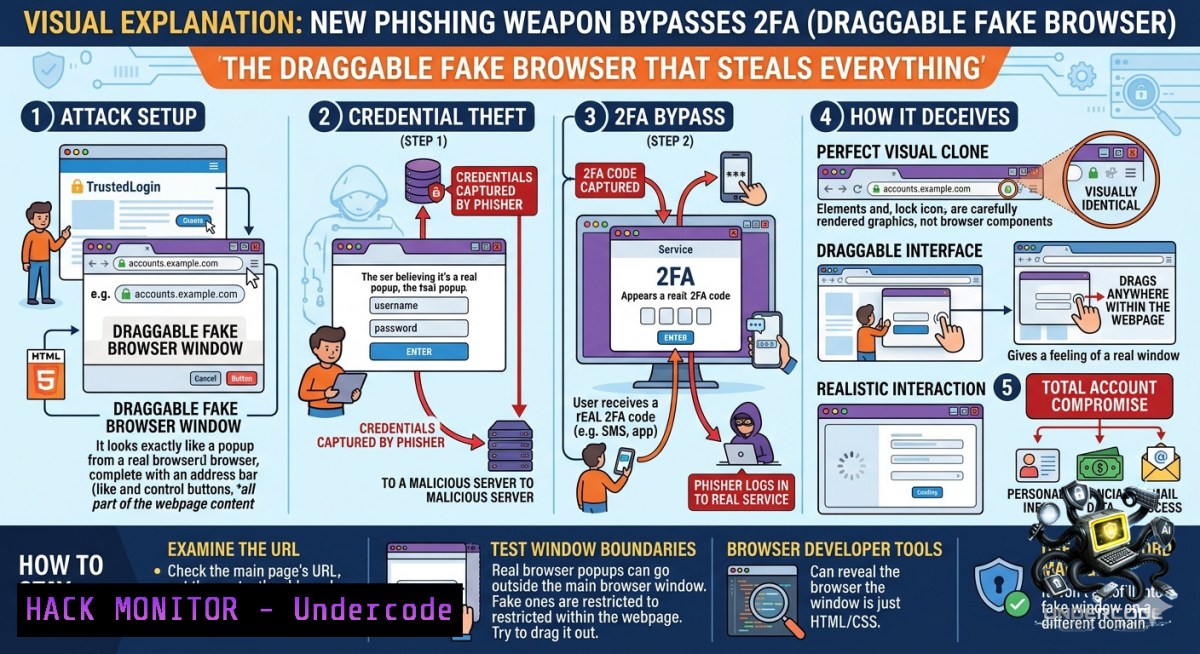
Introduction:
A novel “Browser-in-the-Browser” (BitB) phishing campaign has been discovered by Palo Alto Networks Unit 42, leveraging a draggable, OS-fingerprinted fake browser pop-up that mimics legitimate OAuth login windows with alarming precision. This sophisticated attack evades traditional security controls by hijacking console methods, fragmenting keywords, and redirecting bots, representing a significant evolution in credential harvesting techniques that can bypass multi-factor authentication (MFA).
Learning Objectives:
– Understand the mechanics of Browser-in-the-Browser (BitB) attacks and their evasion techniques, including console hijacking and text fragmentation.
– Learn to detect BitB phishing campaigns using manual inspection methods, browser extensions, and network-level indicators.
– Implement defensive strategies, including OAuth hardening, conditional access policies, and user training to mitigate the risk of BitB-based credential theft.
You Should Know:
1. Dissecting the Draggable Deception: How BitB Attacks Work
The BitB technique exploits the inherent trust users place in browser pop-up windows. Unlike traditional phishing pages that display a fake login form directly on a webpage, BitB creates an HTML/CSS/JavaScript overlay that perfectly replicates an operating system’s native browser window, complete with a forged address bar and window controls.
What makes the Unit 42-discovered campaign particularly dangerous is its use of fingerprinting and anti-debugging to evade both user scrutiny and security analysis. The attackers’ JavaScript code detects the victim’s operating system (Windows, Mac, or Linux) via `navigator.userAgent` and `navigator.platform`, and the browser type (Chrome, Firefox, Edge, or Safari) through a dedicated function. The fake window then applies matching CSS classes, ensuring that the rendered pop-up’s visual style—including buttons, fonts, and spacing—appears native to the victim’s actual environment.
To defeat security researchers and automated scanners, the attackers have implemented multiple evasion layers. All seven console methods (`log`, `warn`, `info`, `error`, `debug`, `table`, `trace`) are overridden to prevent analysis via browser Developer Tools. The page also uses the `Function(‘return (function(){}.constructor(“return this”)()’)` pattern to obtain the global object without directly referencing `window`, bypassing static analysis tools that scan for this common variable.
Step-by-step guide to manually identify a BitB attack in progress:
1. Attempt to drag the pop-up window outside the browser tab’s viewport. A genuine browser window can be dragged anywhere on your desktop. If the pop-up cannot escape the boundaries of the browser tab, it is almost certainly a fake BitB overlay.
2. Inspect the window’s behavior when minimizing or resizing. Try to minimize the suspected fake window using its title bar button or by clicking on your actual OS taskbar. BitB overlays often have non-functional or incorrectly implemented window controls.
3. Right-click inside the pop-up window and select “Inspect” or “Inspect Element.” If the browser’s Developer Tools panel opens and highlights HTML `div` or `iframe` elements instead of the expected page structure, you have identified a malicious overlay.
4. Use your browser’s built-in password manager or a third-party extension like Bitwarden. These tools typically only auto-fill credentials on verified, legitimate domains. If auto-fill does not trigger on the pop-up, it is a strong indicator of a fraudulent page.
5. Copy the URL from the fake address bar and manually paste it into a new browser tab. A real OAuth login URL will load the legitimate service’s page. A BitB attack will either fail to load or redirect to a different, potentially benign-looking page.
6. For security professionals, use a manual detection script in the browser’s console. Copy and paste the following JavaScript code into the Developer Tools Console while the suspicious page is active. It checks for overridden console methods and attempts to detect overlays.
Detection Script (Run in Browser Console):
// BitB Detection Script
function checkConsoleHijacking() {
const methods = ['log', 'warn', 'info', 'error', 'debug', 'table', 'trace'];
let hijacked = [];
methods.forEach(method => {
if (console[bash].toString().includes('[native code]') === false) {
hijacked.push(method);
}
});
if (hijacked.length > 0) {
console.warn(`Possible BitB: Overridden console methods detected: ${hijacked.join(', ')}`);
} else {
console.log("Console methods appear normal.");
}
}

function detectFakeOverlay() {
let overlays = document.querySelectorAll('div[style="position: fixed"], div[style="position: absolute"]');
overlays.forEach(overlay => {
let style = window.getComputedStyle(overlay);
if (style.zIndex > 999 && (overlay.innerText.includes('Sign in') || overlay.innerHTML.includes('iframe'))) {
console.warn("Suspicious high-z-index overlay with login form detected!");
}
});
}

checkConsoleHijacking();
detectFakeOverlay();
2. Text Fragmentation and Obfuscation: Bypassing Content Filters
To evade signature-based detection systems that scan for specific text strings, the attackers employ a clever technique called text fragmentation. Visible keywords like “Adobe Acrobat Reader” or “Sign in required” are split with empty `` tags bearing random class names, rendering as “Ado be Acr obat Rea der Si gn in req uired”. This defeats simple string matching without affecting human readability, as the visual spacing remains normal.
Additionally, the campaign uses a bot/scanner redirection mechanism. If the server detects what it believes to be an automated scanner or security crawler, the victim is redirected via `href.li` (a link anonymizer) to a legitimate Microsoft help page. This makes the URL appear benign during automated analysis, causing the scanner to classify the page as safe. The actual credential harvester is loaded in a sandboxed iframe, separating the BitB shell from the malicious payload to further complicate detection and analysis.
Step-by-step guide to analyzing a suspected BitB page using browser DevTools and network monitoring:
1. Open the page in a dedicated, isolated environment (e.g., a virtual machine or a fresh browser profile) to prevent any potential compromise of your main system.
2. Open the browser’s Developer Tools (F12) before the page fully loads. Navigate to the “Network” tab and ensure recording is enabled. Reload the page to capture all network requests.
3. Look for the creation of an iframe with the `sandbox` attribute. In the “Elements” panel, search for `


