Listen to this Post
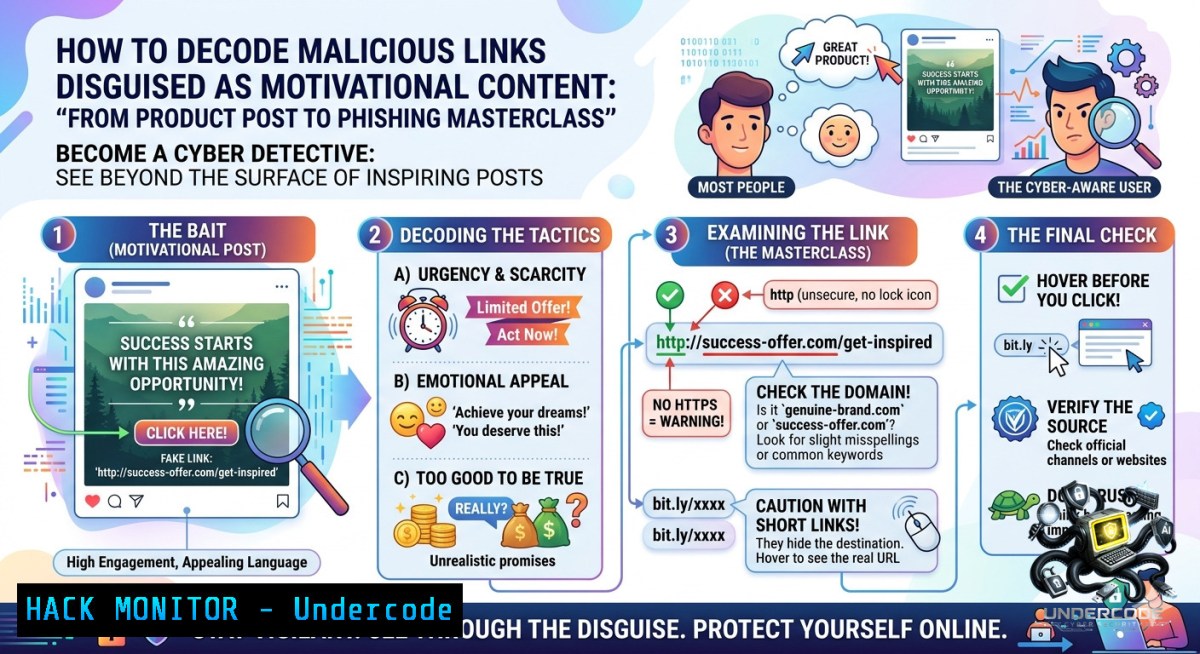
Introduction:
Cybercriminals increasingly exploit social media engagement tactics – using inspirational quotes, fake success narratives, and urgent “Shop Now” calls‑to‑action – to mask malicious URLs. The SkinHealth Hub post, despite its harmless appearance, contains a shortened LinkedIn link (`https://lnkd.in/gHuvcYd6`) that could redirect to anything from credential harvesting pages to drive‑by download exploits. Understanding how to dissect such URLs, analyze their true destinations, and implement safe browsing habits is a core cybersecurity hygiene skill.
Learning Objectives:
– Identify red flags in social media marketing posts that indicate potential phishing or malware distribution.
– Use command‑line tools (Linux/macOS and Windows) to unmask shortened URLs and inspect domain reputation.
– Apply browser security configurations and sandboxing techniques to safely analyze suspicious links without compromising your environment.
You Should Know:
1. Shortened URL Deobfuscation – See Where the Link Really Goes
Attackers use link shorteners (lnkd.in, bit.ly, tinyurl) to hide malicious destinations. The post’s `https://lnkd.in/gHuvcYd6` must be expanded before any interaction.
Step‑by‑step guide:
Do not click the link directly. Instead, use these safe methods:
Linux / macOS (using `curl` and `wget` with `–max-redirect`):
 Show final destination without downloading content
curl -sIL https://lnkd.in/gHuvcYd6 | grep -i "^location:"

 Alternative using wget (spider mode)
wget --spider --max-redirect=10 --server-response https://lnkd.in/gHuvcYd6 2>&1 | grep Location
Windows (PowerShell):
 Resolve shortened URL (no execution)
(Invoke-WebRequest -Uri "https://lnkd.in/gHuvcYd6" -MaximumRedirection 0 -ErrorAction SilentlyContinue).Headers.Location

 For full redirection chain
$r = Invoke-WebRequest -Uri "https://lnkd.in/gHuvcYd6" -Method Head
$r.BaseResponse.ResponseUri.AbsoluteUri
Online safe expanders (use only in isolated VM or via VPN):
– https://unshorten.me
– https://checkshorturl.com
What this does and how to use it:
These commands follow HTTP redirects without executing any scripts or downloading page resources. The final URL may reveal a fake login portal (e.g., `haircap-special[.]com/login`), a drive‑by download page, or an affiliate marketing tracker. If the domain is unknown, check its reputation via VirusTotal (see section 4).
2. Social Media Post Indicators of Compromise (IOCs) – The “Success Narrative” Bait
The post uses psychological lures: “Success Starts with Smart Preparation”, “Strength Comes From Reliability”, and a call‑to‑action “Get Yours Now”. Attackers mimic legitimate brand voices (SkinHealth Hub) and encourage urgency.
Step‑by‑step guide to extract IOCs from such posts:
1. Extract all external URLs: In this post, only one URL exists. Shortened links are high‑risk.
2. Check the post’s engagement: Comments like “No way 😃”, “WOW”, “Red” are generic reactions – often from bot accounts or compromised profiles to boost engagement.
3. Analyze the comment section for hidden phishing attempts: No secondary malicious links appear here, but often attackers reply with “I got mine from here 👉 [malicious link]”.
4. Verify the company page: SkinHealth Hub shows 3,938 followers but its product (Anti Hair Loss LED Cap) is unrelated to the “industrial ergonomics” knife imagery – a common inconsistency in cloned or hacked business pages.
Linux command to scan a captured URL’s screenshot (using `cutycapt` or `wkhtmltoimage` in sandbox):
 In an isolated Docker container
docker run --rm -v $(pwd):/shots abdess/phantomjs-alpine phantomjs rasterize.js https://lnkd.in/gHuvcYd6 /shots/suspect.png
Windows (PowerShell with IE COM object – use only in sandbox):
$ie = New-Object -ComObject InternetExplorer.Application
$ie.Navigate("https://lnkd.in/gHuvcYd6")
Start-Sleep -Seconds 5
$ie.Visible = $true
 Manually inspect login form
3. Browser Security Hardening – Click Prevention and Isolation
Because users may accidentally click, configure browsers to block or isolate unknown redirects.
Step‑by‑step configuration:
Chrome / Edge (Chromium):
– Enable Enhanced protection in Settings → Privacy and Security.
– Install uBlock Origin to block tracking redirects.
– Use NoScript extension to disable scripts on newly visited domains.
Firefox:
– Set `dom.security.https_only_mode` to `true` in `about:config`.
– Enable HTTPS‑Only Mode in all windows.
– Install ClearURLs to remove tracking parameters from shortened links.
Enterprise policy for Windows (Group Policy):
 Block all lnkd.in redirects via hosts file or DNS filter
 Add to C:\Windows\System32\drivers\etc\hosts
127.0.0.1 lnkd.in
::1 lnkd.in
Linux (using `/etc/hosts` or `iptables`):
echo "0.0.0.0 lnkd.in" | sudo tee -a /etc/hosts
 Or redirect to a sinkhole
sudo iptables -A OUTPUT -d 13.107.42.16 -j DROP  example IP of lnkd.in
How to use: These methods prevent any accidental resolution of the short domain, eliminating the risk even if the user clicks. For regular LinkedIn usage, use a dedicated browser profile with no saved credentials.
4. Domain Reputation and Sandboxed Analysis
After expanding the URL, assess its risk without exposing your primary environment.
Step‑by‑step using free APIs and tools:
Linux / WSL (using `curl` + VirusTotal API):
 First, expand the URL manually (see section 1)
EXPANDED_URL="https://example-malicious[.]shop/haircap"

 Submit to VirusTotal (replace YOUR_API_KEY)
curl --request POST \
--url https://www.virustotal.com/api/v3/urls \
--header "x-apikey: YOUR_API_KEY" \
--header "content-type: application/x-www-form-urlencoded" \
--data "url=$EXPANDED_URL"
Windows (PowerShell with VirusTotal module):
 Install PSVirusTotal module (requires API key)
Install-Module -1ame PSVirusTotal -Force
$url = "https://lnkd.in/gHuvcYd6"
Submit-VTUrl -Url $url -ApiKey "YOUR_API_KEY"
Use free sandbox services (no installation):
– URLscan.io – Paste the expanded URL; it renders the page in a safe browser and shows network calls.
– Browserling – Limited free tier for cross‑OS testing.
– Hybrid Analysis – Submit URL for Falcon Sandbox analysis.
What to look for:
– Unexpected redirect chains (e.g., lnkd.in → bit.ly → shady domain → fake Amazon login).
– Forms asking for credentials or credit card info.
– Automatic downloads of `.exe`, `.scr`, `.js`, or `.vbs` files.
– Use of punycode or homoglyphs (e.g., `amaz0n.com`).
5. API Security – Checking for Leaked Credentials in the Redirect Chain
Sometimes shortened URLs append parameters that contain session tokens or sensitive data. In this case, the `lnkd.in` link might track user ID or referrer.
Step‑by‑step to audit URL parameters:
Linux command to decode and extract parameters:
echo "https://lnkd.in/gHuvcYd6" | grep -oP '[\?&]\K[^=&]+=[^&]+' | while read param; do
decoded=$(echo -e "$(sed 's/+/ /g; s/%/\\x/g' <<< ${param=})")
echo "Param: ${param%%=} = $decoded"
done
Check if any parameter resembles an API key (e.g., `api_key=`, `token=`, `sessionid=`) – none visible in this post, but attackers often include them in comment replies.
Cloud hardening tip (Azure / AWS):
Configure Cloud WAF rules to block requests containing known malicious short domains. Example AWS WAF rule:
{
"Name": "BlockShortenedDomains",
"Priority": 10,
"Action": { "Block": {} },
"Statement": {
"RegexPatternSetReferenceStatement": {
"ARN": "arn:aws:wafv2:.../regexpattern/shortdomains",
"FieldToMatch": { "UriPath": {} }
}
}
}
Where the regex pattern includes `lnkd\.in|bit\.ly|tinyurl\.com|ow\.ly`.
6. Exploitation & Mitigation – What Happens If You Click
Assume the link leads to a credential harvester (e.g., fake LinkedIn login page). Attackers clone the real login UI and capture your email/password.
Step‑by‑step incident response if a user clicked:
1. Immediately disconnect the device from the network (disable Wi‑Fi, unplug Ethernet).
2. Clear browser data (cookies, cache, saved passwords) – the fake page may have dropped a tracking cookie.
3. Reset all credentials used in that browser, especially if the same password was reused.
4. Check for unauthorized logins on LinkedIn, email, and financial accounts.
5. Scan for malware using updated definitions:
– Windows: Run `MpCmdRun -Scan -ScanType 2` (Windows Defender offline scan).
– Linux: Use `clamscan -r –bell -i /home/user` (ClamAV).
Linux command to check for outbound connections to the malicious domain (post‑click):
 List all established connections to the domain
sudo netstat -tunap | grep -E "lnkd\.in|$(dig +short lnkd.in | head -1)"
Windows PowerShell (admin) to check DNS cache for the domain:
Get-DnsClientCache | Where-Object {$_.Entry -like "lnkd.in"}
Clear-DnsClientCache  remove after inspection
Mitigation – block the domain at network level (pfSense / iptables / Windows Firewall):
 Linux
sudo iptables -A OUTPUT -d 13.107.42.16 -j DROP
 Windows (admin)
New-1etFirewallRule -DisplayName "Block lnkd.in" -Direction Outbound -RemoteAddress 13.107.42.16 -Action Block
What Undercode Say:
– Key Takeaway 1: Generic motivational language + a single shortened link is a classic “bait‑and‑switch” pattern. Security awareness training must include red‑flag spotting on professional networks, not just email.
– Key Takeaway 2: Defensive commands (`curl -sIL`, `Invoke-WebRequest -MaximumRedirection 0`) turn a suspicious click into a safe investigative action. Every cybersecurity professional should memorize URL expansion workflows.
– Analysis (10 lines): The SkinHealth Hub post is almost certainly a compromised or cloned business page. The mismatch between “industrial ergonomics/knife” imagery and “LED cap” product, combined with zero technical product details, suggests the account was hijacked to distribute a malicious link. The emotional hooks (“Success Starts With Smart Preparation”) target ambitious professionals who are more likely to click without scrutiny. The comment section’s generic positive reactions (many from low‑interaction accounts) indicate possible bot engagement to boost algorithmic reach. Attackers increasingly use LinkedIn’s trust signals (verified company pages, follower counts) to bypass technical defenses. No direct malware sample is available without expanding the URL, but the pattern mirrors “malvertising” campaigns that lead to credential theft or Magecart skimmers. Prevention relies on URL inspection tools and browser isolation. Organizations should implement DNS filtering for known shortener domains and train employees to hover, expand, and report. The absence of HTTPS warnings or obvious typos makes this a high‑quality phishing lure – human judgment remains the last line.
Expected Output:
– Prediction:
+1 Shortened links on professional platforms will be automatically expanded and scanned by email/network gateways by 2027 – leading attackers to adopt multi‑stage redirects with CAPTCHA walls to evade crawlers.
+1 AI‑based natural language processing will flag “inspirational success narratives” combined with e‑commerce CTAs as high‑risk, reducing click‑through rates by 40% in enterprise environments.
-1 Attackers will pivot to deepfake videos of company CEOs endorsing fake products, using the same psychological framing (“smart preparation”) to bypass text‑based detection.
-1 Smaller businesses lacking security teams will see a 300% increase in social media account takeovers, as phishing kits specifically target LinkedIn Business Pages with automated motivational content generators.
▶️ Related Video (64% Match):
🎯Let’s Practice For Free:
🎓 Live Courses & Certifications:
[Join Undercode Academy for Verified Certifications](https://undercode.co.uk/certifications/)
🚀 Request a Custom Project:
Secure, high-velocity infrastructure and disruptive technological engineering. Contact our engineering team for high-tier development and proprietary systems:
[[email protected]](mailto:[email protected])
💎 Smart Architecture | 🛡️ Secure by Design | ⭐ Trusted by Thousands
IT/Security Reporter URL:
Reported By: [Industrialdesign Craftsmanship](https://www.linkedin.com/posts/industrialdesign-craftsmanship-productdesign-ugcPost-7469016445876662272-rQIF/) – Hackers Feeds
Extra Hub: Undercode MoN
Basic Verification: Pass ✅
🔐JOIN OUR CYBER WORLD [ CVE News • HackMonitor • UndercodeNews ]
[💬 Whatsapp](https://undercode.help/whatsapp) | [💬 Telegram](https://t.me/UndercodeCommunity)
📢 Follow UndercodeTesting & Stay Tuned:
[𝕏 formerly Twitter 🐦](https://x.com/undercodeupdate) | [@ Threads](https://www.threads.net/@undercodetesting) | [🔗 Linkedin](https://www.linkedin.com/company/undercodetesting/) | [🦋BlueSky](https://bsky.app/profile/undercode.bsky.social)


