Listen to this Post
Introduction:
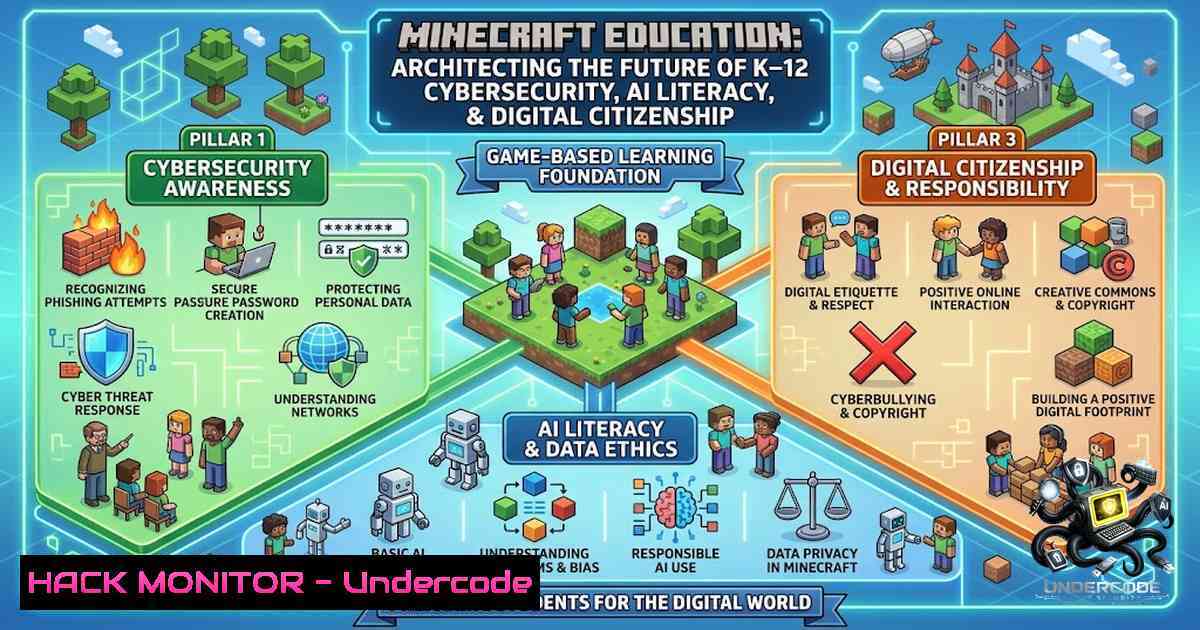
As digital learning becomes the norm, cybersecurity education is no longer a “nice to have”—it’s a necessity. Minecraft Education, now under the expanded leadership of Microsoft and Mojang Studios, has emerged as a critical infrastructure component for K–12 digital readiness, transforming abstract concepts like phishing, encryption, and digital ethics into hands-on, game-based learning experiences that resonate with students of all ages. This article provides a comprehensive technical deep-dive into the platform’s cybersecurity curriculum, AI literacy frameworks, IT deployment architecture, and educator training pathways—equipping IT administrators, curriculum leaders, and security professionals with the actionable intelligence needed to implement and scale this powerful educational tool.
Learning Objectives:
- Understand the technical architecture and deployment requirements of Minecraft Education, including Azure Active Directory integration, network configuration, and cross-platform support.
- Master the cybersecurity and AI literacy curriculum progression, from CyberSafe fundamentals to AI Foundations and responsible AI use.
- Acquire practical Linux and Windows commands for server administration, firewall configuration, and automated deployment.
- Learn to leverage Minecraft Education’s Python API and Code Builder for computational thinking and automation.
- Develop strategies for teacher training, professional development, and scalable implementation across school districts.
1. The CyberSafe Curriculum: A K–12 Cybersecurity Progression
Minecraft Education’s CyberSafe series provides a structured, age-appropriate cybersecurity curriculum that transforms complex digital safety concepts into immersive gameplay experiences. The progression spans from foundational online safety to advanced AI ethics and data literacy.
CyberSafe: Home Sweet Hmm serves as the entry point for learners aged 7–12, introducing fundamental principles of digital identity, online safety, and privacy. Students learn to manage screen time, social interactions, and digital citizenship through a one-hour creative tutorial. The core pedagogical framework emphasizes the “STOP and THINK before you CLICK” methodology, building awareness around personal information privacy and the importance of consulting trusted adults.
CyberSafe: Good Game targets ages 8–18 and focuses on building positive digital footprints, understanding online safety, responsible technology use, and creating communities of belonging. Students draft their own online code of conduct and experience real-world gaming scenarios that demonstrate the consequences of digital actions. The lesson aligns with the K–12 cybersecurity progression and emphasizes digital literacy and digital citizenship skills.
CyberSafe: Bad Connection addresses AI-aware learning for students ages 11–14, covering digital citizenship and helping students practice what to notice, what questions to ask, and what steps to take when something doesn’t feel right online.
CyberSafe AI: Dig Deeper represents the pinnacle of the curriculum, going beyond the surface to explore AI ethics, critical thinking, and data literacy. Students engage with questions of academic integrity, human oversight, data privacy, and deepfakes. The lesson is designed to foster a skillset that promotes responsible AI use that will remain relevant regardless of the ever-changing growth of AI. UNESCO’s AI competency framework for students underpins the curriculum, focusing on four core competencies: a human-centred mindset, ethics of AI, AI techniques and applications, and AI system design.
Educator Resources: Each CyberSafe lesson includes an Educator Guide (aka.ms/CyberSafe_AI_DigDeeper_EduGuide), Classroom Presentation Slides, and a Family Toolkit (aka.ms/cybersafe-ai-familytoolkit) to extend learning beyond the classroom.
2. Technical Deployment: IT Administration and Infrastructure
Deploying Minecraft Education at scale requires careful attention to system requirements, network configuration, and identity management. The platform is supported across Chromebook, iPad, Mac, PC, and mobile (Android and iOS).
System Requirements:
| Platform | Minimum Requirements |
|-||
| Windows | Windows 10 (1703 or later) or Windows 11 |
| Windows Server | Windows Server 2016 or later |
| Linux (Dedicated Server) | Ubuntu 18.04 or later |
| Chromebook | Chrome version 83 or later, 4 GB RAM minimum, ~500 MB free storage per user (1 GB recommended) |
| Processor | 64-bit Intel or AMD with at least two cores |
Network Configuration and Firewall Rules:
Minecraft Education requires specific URLs to be allowlisted through enterprise firewalls, content filters, and virus protection. Key ports that must be opened include:
- UDP/TCP 19132–19133: Bedrock protocol for multiplayer connectivity
- TCP 443: HTTPS for service communication
- TCP 5222: XMPP protocol for real-time collaboration
- TCP 25565: Standard Minecraft client-server communication
Linux Firewall Configuration (UFW):
 Allow Minecraft Education ports
sudo ufw allow 19132/udp
sudo ufw allow 19133/udp
sudo ufw allow 443/tcp
sudo ufw allow 5222/tcp
sudo ufw allow 25565/tcp

Enable firewall and check status
sudo ufw enable
sudo ufw status numbered
Windows Firewall Configuration (PowerShell):
 Add inbound rules for Minecraft Education ports
New-1etFirewallRule -DisplayName "Minecraft Education UDP 19132" -Direction Inbound -Protocol UDP -LocalPort 19132 -Action Allow
New-1etFirewallRule -DisplayName "Minecraft Education UDP 19133" -Direction Inbound -Protocol UDP -LocalPort 19133 -Action Allow
New-1etFirewallRule -DisplayName "Minecraft Education TCP 443" -Direction Inbound -Protocol TCP -LocalPort 443 -Action Allow
New-1etFirewallRule -DisplayName "Minecraft Education TCP 5222" -Direction Inbound -Protocol TCP -LocalPort 5222 -Action Allow
New-1etFirewallRule -DisplayName "Minecraft Education TCP 25565" -Direction Inbound -Protocol TCP -LocalPort 25565 -Action Allow
Azure Active Directory Integration:
Minecraft Education requires a Microsoft 365 school/work account with a license assigned by the institution. The platform integrates with Azure Active Directory (now Microsoft Entra ID) for authentication and single sign-on (SSO). Schools with Microsoft 365 A3 or A5 subscriptions typically have Minecraft Education licenses included, which must be toggled on within the admin portal.
For organizations using Azure AD Connect, education-specific attributes (studentID, teacherID, schoolName) should be synchronized to enable proper license assignment and role-based access control.
Dedicated Server Setup (Ubuntu Linux):
 Update system and install dependencies
sudo apt update && sudo apt upgrade -y
sudo apt install screen unzip wget -y

Download Minecraft Education Dedicated Server (example - check official sources for current version)
wget https://aka.ms/meeserver -O minecraft-server.zip
unzip minecraft-server.zip -d /opt/minecraft-server

Create systemd service file
sudo tee /etc/systemd/system/minecraft-server.service << EOF
[bash]
Description=Minecraft Education Dedicated Server
After=network.target

[bash]
Type=simple
User=minecraft
WorkingDirectory=/opt/minecraft-server
ExecStart=/usr/bin/screen -dmS minecraft /opt/minecraft-server/start.sh
Restart=always
RestartSec=10

[bash]
WantedBy=multi-user.target
EOF

Start and enable the service
sudo systemctl daemon-reload
sudo systemctl enable minecraft-server
sudo systemctl start minecraft-server
3. AI Literacy and Responsible AI Education
The AI Foundations program represents a comprehensive approach to building AI literacy across K–12 education. The curriculum includes multiple learning pathways:
AI 101: Building the Basics introduces students to problem-solving with AI and responsible AI tool usage. Fantastic Fairgrounds develops AI literacy while exploring AI history, ethics, and careers. AI for Earth demonstrates AI principles through wildlife preservation, ecosystem protection, and climate change research. Reed Smart: AI Detective engages students in finding clues, making connections, and evaluating facts in various AI-related cases, building digital literacy, critical thinking, evidence-based reasoning, and ethical decision-making skills.
Hour of AI: Generation AI provides coding and responsible AI activities where students build AI-powered solutions that are fair, inclusive, safe, and reliable. The experience includes generating Minecraft maps with prompts, extending learning through the AI Build Challenge.
Educator Preparation: The AI Foundations for Educators training prepares teachers to deliver AI literacy using Minecraft Education resources and Microsoft Copilot, blending engaging storytelling, practical lesson plans, and interactive activities.
4. Automation and API Integration
Minecraft Education supports programmatic control and automation through several interfaces, enabling advanced classroom scenarios and administrative efficiency.
Python API Integration:
The platform integrates with Python 3.x through the Code Connection server bridge, allowing scripts to manipulate block generation, redstone circuit simulation, and data structure modeling. The `mcedu` Python package provides methods to query Minecraft Education’s discovery API and generate tokens.
Basic Python Script Example:
from mcedu import MinecraftEducation
import time

Initialize connection
mc = MinecraftEducation.create()
player_pos = mc.player.get_pos()

Build a simple structure
for x in range(10):
for z in range(10):
mc.set_block(player_pos.x + x, player_pos.y, player_pos.z + z, "stone")
time.sleep(0.01)

Send a chat message
mc.post_to_chat("Structure complete!")
WebSocket Automation:
For advanced automation, Minecraft Education supports WebSocket connections. Administrators must set “Require Encrypted Websockets” to Off in settings, then use the `/connect` command to establish a connection. The MinecraftConnectionBE library enables command sending for automation and programming learning.
Azure Virtual Machine Deployment:
Microsoft has launched Azure VM solutions for Minecraft Education multiplayer sessions, leveraging Azure’s scalability, performance, and security. This eliminates the need for high-end local machines, allowing entire classes to connect and collaborate.
Azure VM Deployment Steps:
- Log in to Azure Portal and navigate to Virtual Machines
- Click “Create a resource” and select “Virtual machine”
- Choose the operating system (Windows Server or Ubuntu)
- Configure network settings, ensuring ports 19132-19133 are open
5. Install Minecraft Education Dedicated Server software
- Configure Classroom Mode to connect to the local server
5. Teacher Training and Professional Development
The Minecraft Teacher Academy provides a structured professional learning pathway for educators. The program consists of four progressive modules:
- 101: Crafting a Game-Based Learning Classroom – Fundamentals of game-based learning and Minecraft Education integration
- 201: Making Assessment and Learning Mine – Meaningful assessment through projects, presentations, and in-game tools
- 301: Programming Future-Ready Skills – Computational thinking and coding using Code Builder and cyber lessons
- 401: Building Towards Project-Based Learning – Project-based learning strategies, multiplayer engagement, and custom build challenges
Cybersecurity for Educators is a specialized training track that equips educators to teach cybersecurity, online safety, and digital citizenship through immersive, standards-aligned gameplay. Teachers explore a full curriculum progression that includes career pathways.
Minecraft Education Esports Academy helps educators launch and lead engaging esports programs, building student skills in collaboration, creativity, and problem-solving.
Minecraft Student Ambassador Program provides leadership opportunities for students to help peers and teachers get started with Minecraft Education.
- Real-World Implementation: Chandler Unified School District Case Study
Chandler Unified School District (CUSD) in Arizona demonstrates the transformative potential of Minecraft Education’s cybersecurity curriculum. As Shaun Creighton, Director of Instructional Technology, noted: “We see cyber and technology as cross-curricular. There are not many things that our students are doing now that don’t involve technology, and that’s not going away. If anything, it’s going to accelerate as they get older”.
CUSD implemented Minecraft Education’s Cyber & Digital Citizenship curriculum, transforming complex topics like phishing, encryption, and digital ethics into hands-on, game-based learning experiences. The curriculum empowers students to protect their digital identities, recognize and respond to cyber threats, and develop ethical decision-making in digital spaces. The implementation aligns with ISTE and CSTA standards, making it easy to integrate into existing digital literacy or computer science pathways.
7. Licensing and Compliance
Minecraft Education licensing operates through multiple models:
- Microsoft 365 A3/A5: Minecraft Education is included and must be toggled on
- Microsoft 365 A1 for Devices: Device-based licensing model
- Standalone Licenses: Available for families and individual learners
Educational organizations must have a verified Microsoft Entra ID (formerly Azure AD) tenant. License assignment requires administrator rights at the Global, License, or User admin level. Schools should verify their licensing status through the Microsoft 365 admin portal and ensure Minecraft Education is enabled for relevant user groups.
What Undercode Say:
- Key Takeaway 1: Minecraft Education is not merely a game—it is a sophisticated cybersecurity and AI literacy platform built on enterprise-grade infrastructure (Azure AD, dedicated servers, and cross-platform compatibility) that transforms abstract digital safety concepts into immersive, standards-aligned learning experiences.
-
Key Takeaway 2: The platform’s layered curriculum progression—from CyberSafe fundamentals for ages 7–12 to AI ethics and deepfake detection for older students—provides a comprehensive, age-appropriate pathway that addresses the critical shortage of cybersecurity and AI literacy in K–12 education.
Analysis: The integration of Minecraft Education into K–12 curricula represents a strategic alignment of entertainment technology with serious educational outcomes. From an IT administration perspective, the platform’s reliance on Azure Active Directory, specific network configurations, and dedicated server infrastructure requires careful planning but offers scalability and security benefits. The platform’s Python API and WebSocket automation capabilities open doors for advanced computational thinking curricula and administrative automation. The UNESCO-aligned AI competency framework embedded in the CyberSafe AI curriculum ensures that students develop not just technical skills but also the ethical reasoning and human-centred mindset necessary for responsible AI citizenship. The Chandler Unified case study validates the platform’s effectiveness in real-world deployment, demonstrating that game-based learning can successfully deliver complex cybersecurity concepts at scale.
Prediction:
- +1 The Minecraft Education platform will become a de facto standard for K–12 cybersecurity and AI literacy, with adoption accelerating as school districts seek scalable solutions to address mandatory digital citizenship requirements.
-
+1 The platform’s Azure VM deployment model will expand, enabling seamless multiplayer experiences across geographically distributed classrooms and reducing the hardware burden on individual schools.
-
+1 Integration with Microsoft Copilot and generative AI tools will deepen, creating new learning pathways that teach students not just how to use AI, but how to evaluate, audit, and critically engage with AI-generated content.
-
-1 Schools with limited IT resources or legacy network infrastructure may struggle with the platform’s network requirements, potentially creating digital divides between well-resourced and under-resourced districts.
-
-1 The rapid evolution of AI technologies will require continuous curriculum updates to remain relevant, placing ongoing demands on educators and curriculum developers.
-
+1 The Minecraft Student Ambassador Program and Esports Academy will emerge as powerful vehicles for student leadership development, creating peer-to-peer learning ecosystems that extend the platform’s impact beyond the classroom.
▶️ Related Video (76% Match):
https://www.youtube.com/watch?v=2WnRGRf4zK4
🎯Let’s Practice For Free:
🎓 Live Courses & Certifications:
Join Undercode Academy for Verified Certifications
🚀 Request a Custom Project:
Secure, high-velocity infrastructure and disruptive technological engineering. Contact our engineering team for high-tier development and proprietary systems:
[email protected]
💎 Smart Architecture | 🛡️ Secure by Design | ⭐ Trusted by Thousands
IT/Security Reporter URL:
Reported By: Julie Manley – Hackers Feeds
Extra Hub: Undercode MoN
Basic Verification: Pass ✅


