Listen to this Post
Introduction:
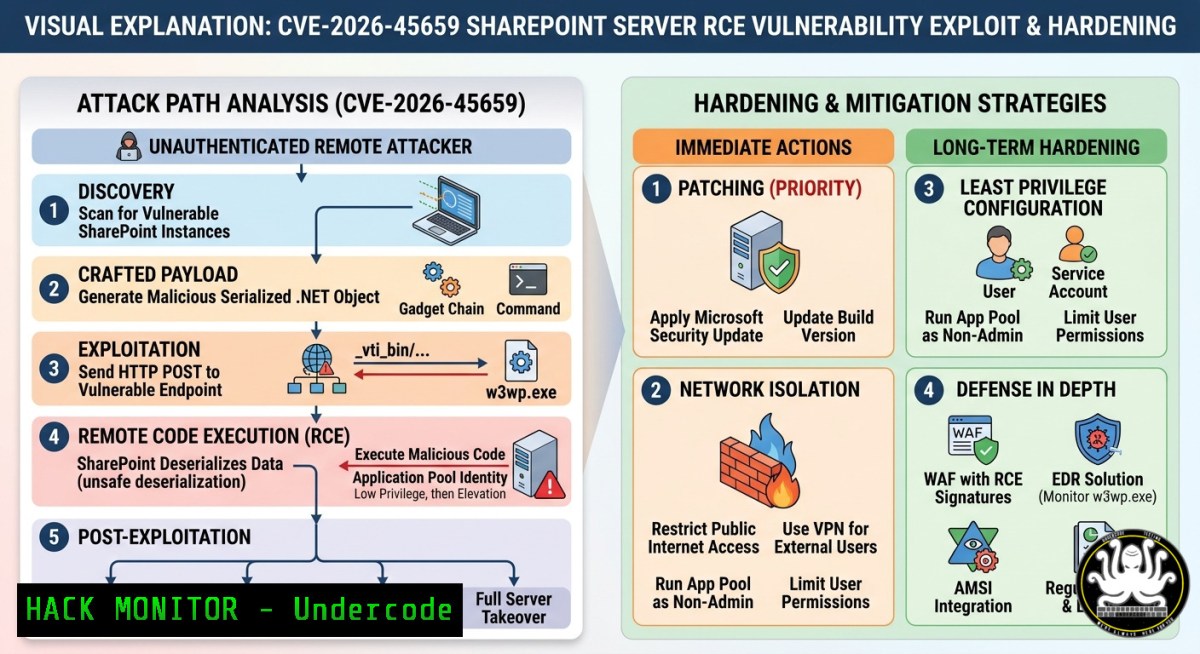
A critical remote code execution (RCE) vulnerability in Microsoft SharePoint Server, tracked as CVE-2026-45659, allows authenticated attackers with only low-level privileges to execute arbitrary code on vulnerable on‑premises servers. This flaw stems from the unsafe deserialization of untrusted data, a dangerous weakness that has historically been exploited by both nation‑state actors and ransomware groups to compromise enterprise collaboration platforms.
Learning Objectives:
- Understand the technical root cause and exploitation chain of the SharePoint deserialization RCE flaw.
- Identify affected SharePoint versions and apply the official security patches.
- Implement detection, mitigation, and hardening measures to protect on‑premises SharePoint environments.
You Should Know:
1. Understanding the Deserialization Flaw (CVE-2026-45659)
Extended explanation: The vulnerability occurs when SharePoint processes untrusted serialized data without proper validation. An attacker who has authenticated to the server—with only Site Member permissions—can send specially crafted payloads to the SharePoint application. When the application deserializes this data, the malicious code is executed at the privilege level of the SharePoint application pool or the underlying OS service account. This can lead to full server compromise, data exfiltration, lateral movement, and ransomware deployment.
Step‑by‑step exploitation chain:
- Authentication: The attacker logs into the SharePoint server using any valid account (e.g., a compromised low‑privilege user).
- Craft payload: The attacker creates a malicious serialized object containing arbitrary code.
- Send request: The attacker sends a crafted HTTP request to the vulnerable SharePoint endpoint.
- Deserialization: SharePoint deserializes the untrusted data without validation, executing the embedded code.
- Post‑exploitation: The attacker gains remote code execution, potentially installing backdoors, exfiltrating data, or moving laterally.
Detection Commands (Windows PowerShell):
 Check if SharePoint Server is running
Get-Service "SP" | Where-Object { $_.Status -eq "Running" }

Search for suspicious deserialization patterns in ULS logs
Select-String -Path "C:\Program Files\Common Files\microsoft shared\Web Server Extensions\16\LOGS.log" -Pattern "deserialization|BinaryFormatter|SoapFormatter" -CaseSensitive
Linux/Windows hardening tip: Block unnecessary outbound traffic from SharePoint servers to limit post‑exploitation capabilities. Use Windows Firewall or a network ACL to restrict egress.
2. Affected Versions & Immediate Patching
Extended explanation: The flaw affects all on‑premises SharePoint Server deployments, including SharePoint Server Subscription Edition, SharePoint Server 2019, and SharePoint Enterprise Server 2016. Microsoft released out‑of‑band patches on May 21, 2026, and updated them on May 26, 2026. Administrators are strongly advised to apply these fixes immediately, even though no public PoC has emerged yet, given SharePoint’s history of rapid weaponization.
Step‑by‑step patching guide (Windows Server):
1. Identify your SharePoint version:
Get-SPFarm | Select-Object BuildVersion
- Download the appropriate update from the Microsoft Security Update Guide:
– SharePoint Server Subscription Edition: KB5002863
– SharePoint Server 2019: KB5002870 (language independent) + KB5002872 (language dependent)
– SharePoint Server 2016: KB5002868 (language independent) + KB5002869 (language dependent)
- If your farm patch level is before September 2025, run the following PowerShell script to correct folder permissions (otherwise installation will fail):
Download and run the permission fix script
Invoke-WebRequest -Uri "https://aka.ms/stefangossner/Fix-SeptemberCU-Permission-Problem.ps1" -OutFile "Fix-SeptemberCU-Permission-Problem.ps1"
.\Fix-SeptemberCU-Permission-Problem.ps1
-
Install the patches on all SharePoint farm servers in the following order:
– Language‑independent update first
– Language‑dependent update second
- Run the SharePoint Products Configuration Wizard to complete the installation.
3. Monitoring & Detection for Active Exploitation
Extended explanation: While Microsoft states that CVE-2026-45659 is not yet exploited in the wild, threat actors may reverse engineer the patch and develop exploits quickly. Proactive monitoring for suspicious deserialization patterns is essential.
Step‑by‑step monitoring setup:
- Enable detailed ULS logging for SharePoint to capture deserialization events:
– Navigate to Central Administration → Monitoring → Configure Diagnostic Logging.
– Set the following categories to “Verbose”:
– `SharePoint Foundation` > `General`
– `Microsoft SharePoint` > `Deserialization`
– Log file location: `C:\Program Files\Common Files\microsoft shared\Web Server Extensions\16\LOGS\`
2. Use Windows Event Logs to detect potential exploitation:
 Check for suspicious process creations (cmd.exe, powershell.exe) from w3wp.exe
Get-WinEvent -FilterHashtable @{LogName='Security'; ID=4688} | Where-Object { $<em>.Message -match "w3wp.exe" -and ($</em>.Message -match "cmd.exe" -or $_.Message -match "powershell.exe") }
- Deploy YARA rules for deserialization payloads in your SIEM/SOAR platform (example rule snippet):
rule sharepoint_deserialization_rce {
strings:
$binary_formatter = "BinaryFormatter" ascii
$soap_formatter = "SoapFormatter" ascii
$los_formatter = "LosFormatter" ascii
condition:
any of them
}
4. Network Segmentation & Access Hardening
Extended explanation: The attack requires only Site Member permissions, making every authenticated user a potential entry point. Restricting SharePoint’s network exposure reduces the attack surface.
Step‑by‑step network hardening:
- Restrict SharePoint access to internal networks and specific trusted IP ranges:
– Use Windows Firewall to allow only private IP ranges (e.g., 192.168.0.0/16, 10.0.0.0/8) on ports 80, 443, and the SharePoint administration port (typically 32843).
 Block all inbound traffic to SharePoint except from internal networks
New-NetFirewallRule -DisplayName "Block SharePoint External Access" -Direction Inbound -Protocol TCP -LocalPort 80,443 -Action Block -RemoteAddress Any
New-NetFirewallRule -DisplayName "Allow SharePoint Internal Access" -Direction Inbound -Protocol TCP -LocalPort 80,443 -RemoteAddress "192.168.0.0/16","10.0.0.0/8","172.16.0.0/12" -Action Allow
- Enable IP restrictions in IIS for SharePoint web applications:
– Open IIS Manager → Select the SharePoint web app → IP Address and Domain Restrictions → Add Allow Entry for internal IP ranges → Add Deny Entry for all others.
- Use a reverse proxy (e.g., Azure Application Gateway, nginx, F5) to enforce additional authentication and filtering before traffic reaches SharePoint.
5. Post‑Exploitation Mitigation & Recovery
Extended explanation: If compromised, an attacker could have executed arbitrary code at the SharePoint app pool identity. Immediate containment is critical.
Step‑by‑step incident response actions:
- Isolate the compromised SharePoint server from the network:
Disable all network adapters remotely Get-NetAdapter | Where-Object { $_.Status -eq "Up" } | Disable-NetAdapter -Confirm:$false -
Reset all SharePoint service account passwords and rotate the app pool identity credentials.
3. Audit for unauthorized accounts and permissions:
-- Run against the SharePoint configuration database
SELECT LoginName, Email, IsSiteAdmin FROM [bash].[bash].[bash]
- Restore from a clean backup taken before the suspected compromise date. Apply the patch immediately after restoration.
What Undercode Say:
- Key Takeaway 1: CVE-2026-45659 is a high‑severity (CVSS 8.8) deserialization RCE flaw affecting all major on‑premises SharePoint versions. Attackers need only Site Member privileges, making it a serious insider threat and a prime target for credential‑based attacks.
- Key Takeaway 2: Proactive patching, network segmentation, and deserialization monitoring are essential defenses. Even though no public exploit exists yet, past SharePoint vulnerabilities show that weaponization often follows disclosure rapidly. Delaying updates is not an option for any organization that values data integrity.
Prediction: The deserialization flaw will likely be weaponized within the next 30–60 days as threat actors reverse engineer Microsoft’s patch. Expect an increase in phishing campaigns targeting SharePoint credentials to obtain the required low‑level access. Organizations that fail to patch will see a surge in ransomware attacks leveraging this vulnerability as an initial foothold, following the same pattern as the ToolShell campaigns of 2025. CISOs should prioritize this update alongside credential hardening and user privilege reviews.
▶️ Related Video (78% Match):
🎯Let’s Practice For Free:
IT/Security Reporter URL:
Reported By: Microsoft Sharepoint – Hackers Feeds
Extra Hub: Undercode MoN
Basic Verification: Pass ✅
🎓 Live Courses & Certifications:
Join Undercode Academy for Verified Certifications
🚀 Request a Custom Project:
Secure, high-velocity infrastructure and disruptive technological engineering. Contact our engineering team for high-tier development and proprietary systems:
[email protected]


