Listen to this Post
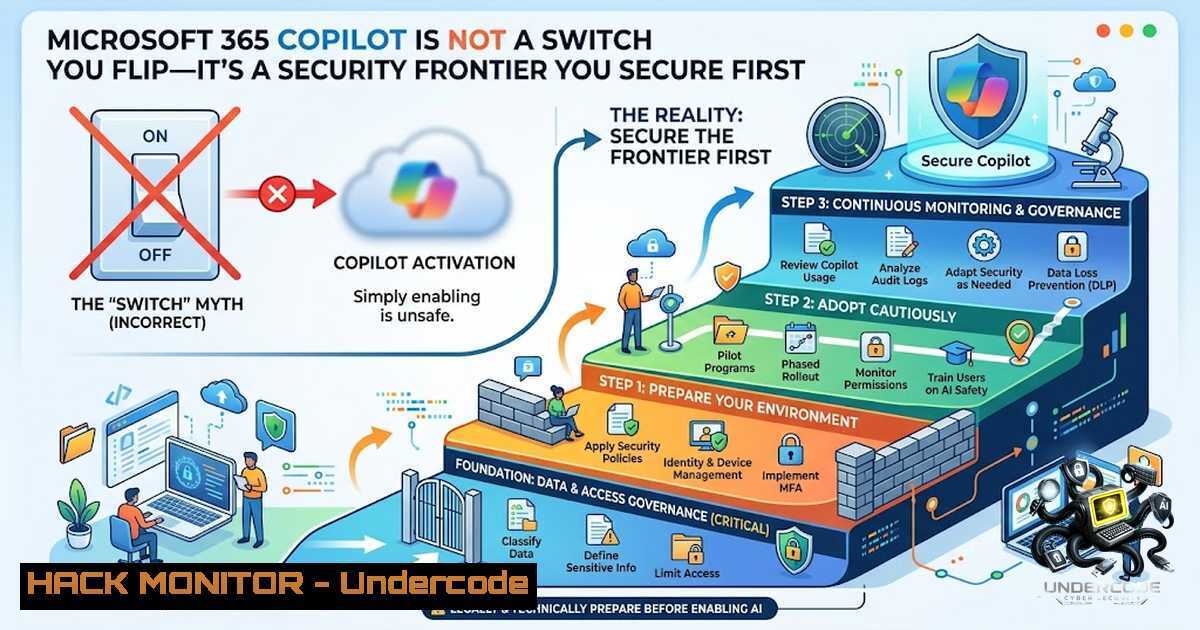
Introduction:
The excitement around Microsoft Copilot and AI-powered automation is palpable, but the reality is that many organizations are attempting to build a skyscraper on a foundation of sand. Before any AI tool can be securely and effectively deployed, the underlying Microsoft 365 environment must be hardened, governed, and resilient. This isn’t just about compliance; it’s about preventing a scenario where your new AI assistant inadvertently exposes sensitive data faster than it can boost productivity, especially in the wake of recent cloud service disruptions that have highlighted the critical need for robust business continuity planning.
Learning Objectives:
- Understand the critical prerequisites and security baselines required for a secure Microsoft 365 Copilot deployment.
- Learn how to implement Zero Trust principles, Conditional Access, and data protection controls to govern AI interactions.
- Master the step-by-step process of remediating oversharing and configuring Microsoft Purview to prevent data leakage.
You Should Know:
- The Zero Trust Imperative for AI: Verify Explicitly, Use Least Privilege
Applying Zero Trust principles to Microsoft 365 Copilot means treating every connection and resource request as if it originated from an uncontrolled network. This requires a shift from implicit trust to explicit verification across seven layers: data, identity, applications, devices, threat protection, collaboration, and user permissions.
Step‑by‑Step Guide:
- Enforce MFA for All Copilot Users: All Copilot-eligible users must have Multi-Factor Authentication (MFA) registered before license assignment. Use Conditional Access policies to require MFA for the “Microsoft 365 Copilot” cloud app specifically.
- Block Unmanaged and Non-Compliant Devices: Restrict Copilot access to only Intune-compliant devices that are threat-clean according to Microsoft Defender for Endpoint. This ensures that devices have active antivirus, encryption (BitLocker/FileVault), and up-to-date OS versions.
- Block Legacy Authentication and Risky Sign-Ins: Create a Conditional Access policy to block legacy authentication protocols (POP, IMAP, SMTP) that cannot enforce MFA. Utilize Microsoft Entra ID Protection to block or challenge sign-ins flagged as medium or high risk.
- Implement Geo-Fencing and Restrict Guest Access: For regulated tenants, block access from non-approved countries. Also, restrict guest users from Copilot grounding to prevent external collaborators from accessing internal data through the AI.
-
Building a Secure and Governed Data Foundation: Remediate Oversharing
Copilot only displays organizational data that an individual user has at least view permissions for. Therefore, oversharing is the single largest risk factor. The foundational deployment blueprint from Microsoft focuses on three pillars: remediate oversharing, set up guardrails, and meet regulations.
Step‑by‑Step Guide:
- Identify High-Risk Sites and Content: Use Microsoft Purview and SharePoint Advanced Management (SAM) to identify sites and files that are overshared, inactive, or contain sensitive data. SAM is included with your Microsoft 365 Copilot license.
- Apply Interim Protections: Temporarily restrict access to high-risk sites to reduce immediate Copilot exposure while you conduct a full remediation.
- Remediate Permissions: Clean up access issues by removing unnecessary permissions and applying the principle of least privilege. Ensure that only the right people have access to the right content.
-
Implement Sensitivity Labels: Publish and apply sensitivity labels (e.g., “Highly Confidential”) to classify data. This allows you to create DLP policies that prevent Copilot from processing content with specific labels.
-
Hardening Microsoft 365 Identity and Access: The First Line of Defense
Microsoft’s telemetry shows that over 99% of Microsoft 365 account compromises involve no malware—attackers simply steal credentials and log in. This makes Entra ID (formerly Azure AD) configuration the primary hardening investment.
Step‑by‑Step Guide (Administrative & PowerShell Commands):
-
Audit Legacy Authentication: Use the following PowerShell command to identify legacy authentication sign-in activity in the last 30 days:
Get-MgAuditLogSignIn -Filter "clientAppUsed ne 'Browser' and clientAppUsed ne 'Mobile Apps and Desktop clients'" -Top 100 | Select-Object UserPrincipalName, ClientAppUsed, AppDisplayName | Sort-Object UserPrincipalName
-
Harden Admin Roles: Assign the Global Administrator role to a minimum of 2 and a maximum of 5 accounts. Use role-specific admin roles (e.g., Exchange Admin, SharePoint Admin) for all other functions.
- Enforce Privileged Identity Management (PIM): Require Just-In-Time (JIT) elevation for all privileged roles, with justification and approval. No standing admin access should exist.
-
Create a Minimum Baseline Conditional Access Policy: Enforce MFA for all users, block legacy authentication, require compliant devices for admin roles, and block access from high-risk sign-ins.
-
Data Loss Prevention (DLP) for AI: Blocking Sensitive Prompts and Grounding
Microsoft Purview Data Loss Prevention (DLP) can protect interactions with Microsoft 365 Copilot in two critical ways. You can restrict Copilot from processing sensitive prompts (preview) and from using sensitive files/emails in its response summarization (generally available).
Step‑by‑Step Guide:
- Create a Custom DLP Policy: In the Microsoft Purview compliance portal, create a new DLP policy with “Microsoft 365 Copilot” as the location.
- Set Conditions to Detect Sensitive Content: Configure rules to detect content containing specific sensitive information types (SITs), such as credit card numbers or social security numbers.
- Block or Restrict Actions: Set the policy to block or limit agent responses when they attempt to process files labeled as “Highly Confidential” or when prompts contain sensitive data.
-
Monitor and Audit: Use the Microsoft Purview AI Hub and Microsoft Sentinel to monitor risky Copilot usage and investigate any incidents.
-
The Missing Layer: Backup, Business Continuity, and Resilience
Recent Microsoft cloud service disruptions have served as a stark reminder that resilience is just as important as prevention. Native Microsoft 365 tools do not constitute a real backup; they faithfully replicate a ransomware-encrypted OneDrive or a mailbox purged by a compromised admin account. Native versions also don’t scale well for large-scale ransomware recovery.
Step‑by‑Step Guide:
- Assess Your Current Strategy: Acknowledge that native M365 protection is for investigation and compliance, not business continuity.
- Implement a Third-Party Backup Solution: For true cyber resilience, implement a third-party backup solution that provides immutable, air-gapped storage with customer-held encryption keys. This protects against platform-level and account-level failures.
- Test Recovery Procedures: Regularly test your ability to rapidly recover Microsoft 365 data following a ransomware attack or account compromise. Ensure your recovery point objective (RPO) is short enough to minimize lost work.
What Undercode Say:
- Key Takeaway 1: Deploying Microsoft Copilot without first securing your M365 environment is a recipe for disaster; it turns your AI into a potential data exfiltration tool. The core prerequisites—licensing, MFA, and data governance—must be in place before any licenses are assigned.
- Key Takeaway 2: The security of Copilot is not a single feature but a layered defense spanning identity, devices, authorization, classification, DLP, and monitoring. Using the CIS Microsoft 365 Benchmark as a foundation for hardening tenant configurations is a practical and testable approach to reducing misconfiguration risks.
Prediction:
- +1: Organizations that proactively build secure, governed foundations for AI will not only mitigate risk but will also unlock the full potential of Microsoft Copilot faster than their competitors, turning compliance into a competitive advantage.
- -1: However, the majority of businesses that rush to deploy AI without proper preparation will face significant data breaches and regulatory fines within the next 12-18 months, as attackers increasingly target AI prompts and grounding data as a new attack vector.
- +1: The market will see a surge in demand for integrated solutions that combine AI deployment with automated security posture management, moving security from a reactive checkpoint to a proactive enabler of AI adoption.
- -1: The complexity of managing permissions, DLP policies, and Conditional Access across thousands of users will overwhelm understaffed IT teams, leading to “security drift” where configurations degrade over time, leaving AI deployments vulnerable.
▶️ Related Video (78% Match):
https://www.youtube.com/watch?v=6_ivkSyo0xY
🎯Let’s Practice For Free:
🎓 Live Courses & Certifications:
Join Undercode Academy for Verified Certifications
🚀 Request a Custom Project:
Secure, high-velocity infrastructure and disruptive technological engineering. Contact our engineering team for high-tier development and proprietary systems:
[email protected]
💎 Smart Architecture | 🛡️ Secure by Design | ⭐ Trusted by Thousands
IT/Security Reporter URL:
Reported By: Microsoft365 Artificialintelligence – Hackers Feeds
Extra Hub: Undercode MoN
Basic Verification: Pass ✅


