Listen to this Post
Introduction:
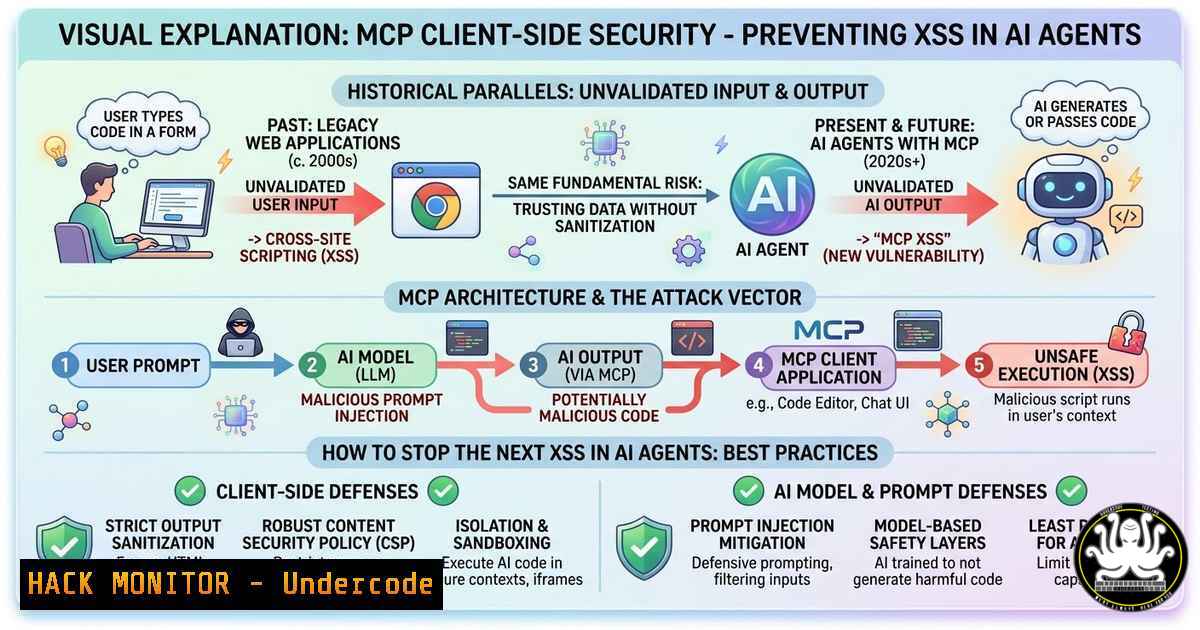
The security community is currently fixated on protecting Model Context Protocol (MCP) servers from prompt injection, mirroring the early 2000s when hardening web servers was the primary focus. Just as the industry learned that browsers (clients) became the most attacked surface—giving rise to XSS, CSRF, and session hijacking—MCP security must evolve to defend the client side before it becomes the primary vector for AI agent compromise. This article explores the emerging client-side attack surface in MCP architectures and the critical defensive techniques needed to secure the agentic ecosystem.
Learning Objectives:
- Understand the historical parallels between early web server hardening and current MCP security gaps.
- Learn the six key client-side defensive techniques from the AIDEFEND H-029 framework.
- Acquire practical commands and configurations to implement MCP client integrity, credential hygiene, and runtime security.
You Should Know:
- The Evolution of Attack Surfaces: From Web Servers to AI Clients
In the early 2000s, the industry consensus was that securing the web server was paramount. Administrators focused on patching IIS and Apache, disabling unnecessary modules, and implementing strict file permissions. However, the real game-changer came with the realization that the client—the browser—was a vast, untamed frontier. Attackers pivoted to Cross-Site Scripting (XSS), Cross-Site Request Forgery (CSRF), and client-side data exfiltration. Today, we stand at a similar crossroads with MCP. The focus is heavily on server-side prompt injection defenses, but the client (the AI agent or the application hosting it) is rapidly becoming the next major battleground.
Step‑by‑step guide explaining what this does and how to use it.
This section outlines the core server-side defenses that laid the groundwork, now extended to the client.
Step 1: Understand MCP Architecture. An MCP setup typically involves an MCP Server (providing tools/resources) and an MCP Client (the AI agent or application consuming these tools). The client initiates connections and processes responses.
Step 2: Review Initial Server Defenses. Before adding client-side controls, ensure server basics:
– Tool Authorization Scoping (AID-H-019): Define which tools a client can access.
– Resolution Integrity (AID-H-025): Verify that the server’s endpoint is not spoofed.
– Ephemeral Sandboxes (AID-I-001.003): Run server-side tool execution in disposable containers.
Step 3: Identify the Gap. The missing piece is client-side hygiene. If an attacker compromises the client, they can manipulate its behavior, steal credentials, or pivot to other systems—similar to how a compromised browser leads to account takeover.
2. Implementing Client-Side Defenses: The H-029 Family
The latest AIDEFEND release introduces the H-029 family, specifically targeting the client-side attack surface. These six sub-techniques transform the client from a passive receiver into a hardened, self-protecting entity.
Step‑by‑step guide explaining what this does and how to use it.
AID-H-029.001 — Server Authenticity Validation & Connection Pinning
- What it does: Ensures the MCP client only connects to a legitimate, expected server.
- How to use it:
- Certificate Pinning: Hardcode the expected server certificate or public key within the client application.
- Linux (using `openssl` to generate a pin):
Extract the public key from the server's certificate
openssl s_client -connect your-mcp-server.com:443 | openssl x509 -pubkey -noout | openssl pkey -pubin -outform der | openssl dgst -sha256 -binary | base64
- Windows (PowerShell):
Get the server certificate and compute the pin $cert = (New-Object System.Net.Sockets.TcpClient('your-mcp-server.com', 443)).GetStream() Implement pinning logic in code to compare against a precomputed hash - Configuration: In the client code, implement a validation function that rejects connections if the presented certificate does not match the pinned hash.
AID-H-029.002 — Credential Secure Storage & Lifecycle Management
- What it does: Prevents leakage of API keys, OAuth tokens, and other secrets stored on the client side.
- How to use it:
- Linux: Use `secret-tool` (libsecret) or the system keyring.
Store a credential
secret-tool store --label='MCP API Key' mcp-server my-server.com
Retrieve it
secret-tool lookup mcp-server my-server.com
- Windows: Use the Credential Manager via PowerShell.
Store a credential $cred = New-Object System.Management.Automation.PSCredential("MCP_Service", (ConvertTo-SecureString "YourAPIKey" -AsPlainText -Force)) $cred.Password | ConvertFrom-SecureString | Set-Content "C:\path\to\cred.xml" Retrieve $secureString = Get-Content "C:\path\to\cred.xml" | ConvertTo-SecureString - Lifecycle Management: Implement token refresh and forced expiration. Do not store secrets in environment variables or local configuration files in plaintext.
AID-H-029.003 — Client-Side Data Hygiene & Leakage Prevention
- What it does: Prevents the client from logging or exposing sensitive data processed during tool interactions.
- How to use it:
- Log Redaction: Configure logging libraries to redact fields like
authorization,password, orapi_key. - Linux (using `grep` to audit logs):
Scan application logs for potential secret patterns grep -E '("password"|"api_key"|"token")' /var/log/my-mcp-client.log - Windows (PowerShell):
Scan for secrets in logs Select-String -Path "C:\logs.log" -Pattern '("password"|"api_key"|"token")' - Memory Hygiene: For languages like C/C++ or Rust, ensure secrets are zeroed out after use. For Python, use `secrets` module and `del` to remove variables.
AID-H-029.004 — Response Parsing & Execution Surface Hardening
- What it does: Protects against injection attacks through server responses, analogous to XSS in browsers.
- How to use it:
- Strict Schema Validation: Always validate server responses against a predefined JSON Schema or Protobuf definition. Reject any response that contains unexpected fields or data types.
- Content Security Policy (CSP) for Agents: If the MCP client renders any output (e.g., a chat interface), implement a strict CSP header to prevent script execution.
- Linux Command (using `jq` to validate JSON):
Validate response against a schema file jq --slurpfile schema response_schema.json 'if . == $schema[bash] then . else error("Invalid schema") end' response.json - Example (Python):
from jsonschema import validate
schema = {"type": "object", "properties": {"status": {"type": "string"}}}
validate(instance=response_json, schema=schema)
AID-H-029.005 — Session & State Lifecycle Security
- What it does: Ensures session tokens and client state are not reused or leaked across different contexts.
- How to use it:
- Nonce Implementation: Generate a unique nonce per request to prevent replay attacks.
- Linux (generate a secure nonce):
Generate a random nonce for a session
openssl rand -hex 16
- Windows (PowerShell):
Generate a random nonce -join ((48..57) + (65..90) + (97..122) | Get-Random -Count 16 | ForEach-Object {[bash]$_}) - Session Binding: Bind the session to the client’s unique identifier (e.g., a device ID or a public key) to prevent token theft and reuse on another machine.
AID-H-029.006 — Distribution, Plugin & Update Integrity
- What it does: Protects against supply chain attacks where the MCP client itself or its plugins are compromised.
- How to use it:
- Code Signing: Sign the client binary and all plugins. Verify the signature before loading.
- Linux (signing a binary):
Generate a GPG key and sign the binary
gpg --detach-sign --armor my-mcp-client
Verify
gpg --verify my-mcp-client.asc my-mcp-client
- Windows (PowerShell, using `SignTool` from Windows SDK):
Sign a binary with a certificate
& "C:\Program Files (x86)\Windows Kits\10\bin\10.0.19041.0\x64\signtool.exe" sign /fd SHA256 /a /tr http://timestamp.digicert.com my-mcp-client.exe
Verify
& "C:\Program Files (x86)\Windows Kits\10\bin\10.0.19041.0\x64\signtool.exe" verify /pa /v my-mcp-client.exe
- Update Integrity: Implement a TUF (The Update Framework) or similar mechanism for automatic updates to ensure updates are cryptographically signed.
What Undercode Say:
- History Repeats: The MCP security community is making the same mistake as early web security by over-prioritizing server hardening while neglecting the client-side attack surface.
- Client-Side is the New Perimeter: As AI agents become more capable and widely deployed, the MCP client will become the primary target for attackers looking to steal credentials, manipulate agent behavior, or pivot into internal networks.
- Proactive Defense: Implementing the six AIDEFEND H-029 techniques transforms the client from a vulnerable endpoint into a resilient, self-defending entity, capable of validating servers, securing secrets, and maintaining integrity.
- Tooling Gap: While server-side MCP security tools are emerging, client-side defenses are still nascent. Developers must embed these principles directly into client code and distribution pipelines.
- The Parallel is Inevitable: Just as XSS and CSRF became the dominant web threats after servers were locked down, we will soon see a wave of client-side exploits targeting AI agents. The time to implement client-side hardening is now, not after the first major breach.
Prediction:
The next 18 months will see a surge in client-side vulnerabilities targeting AI agents, shifting the spotlight from MCP server prompt injections to attacks like client-side credential theft, tool manipulation via malformed responses, and supply chain compromises of agent plugins. This will mirror the web’s evolution from server hardening to browser security. We predict that client-side defense frameworks like AIDEFEND H-029 will become mandatory compliance standards for enterprises deploying AI agents, and tools like MCP client firewalls will emerge as essential components of the security stack. Organizations that fail to adopt a client-inclusive security model will face the same consequences as those who ignored XSS in the early 2000s—data breaches, account takeovers, and severe operational disruption.
▶️ Related Video (74% Match):
🎯Let’s Practice For Free:
IT/Security Reporter URL:
Reported By: Go Edwardlee – Hackers Feeds
Extra Hub: Undercode MoN
Basic Verification: Pass ✅


