
Listen to this Post
Introduction:
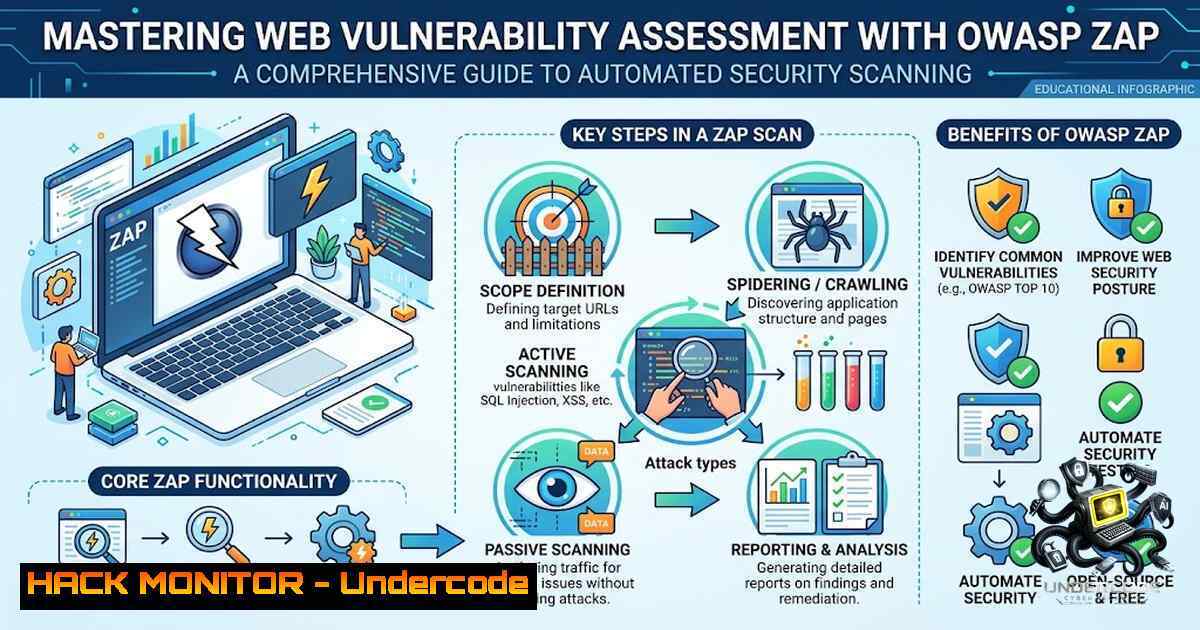
Web application security remains one of the most critical concerns in modern cybersecurity, with vulnerabilities like Cross-Site Scripting (XSS) and SQL Injection consistently ranking among the OWASP Top 10 most critical web application security risks. OWASP ZAP (Zed Attack Proxy) stands as the world’s most popular free security audit tool, maintained by hundreds of international volunteers, offering both manual and automated testing capabilities for security professionals and developers alike. This article provides a comprehensive walkthrough of conducting a web vulnerability assessment using OWASP ZAP, covering installation, automated scanning, vulnerability identification, and remediation strategies—based on a real-world internship project that successfully identified XSS, SQL Injection, missing security headers, and absence of anti-CSRF tokens.
Learning Objectives & Secrets:
- Objective 1: Master OWASP ZAP Installation and Configuration – Learn to deploy ZAP across Linux, Windows, and Docker environments, with proper proxy configuration for intercepting web traffic.
-
Objective 2: Execute Automated Vulnerability Scans – Secret tip: Combine traditional spidering with AJAX spider for comprehensive coverage of modern JavaScript-heavy applications, as the AJAX spider launches actual browsers to interact with dynamic content.
-
Objective 3: Generate Professional Security Reports – Secret tip: Export findings in multiple formats (HTML, JSON, XML) and use tools like `zap-clean-report` to create stakeholder-friendly reports with plain English descriptions grouped by severity.
You Should Know:
1. Setting Up OWASP ZAP for Vulnerability Assessment
Before conducting any security assessment, proper installation and configuration of OWASP ZAP is essential. The tool supports multiple platforms and deployment methods.
Linux Installation (Debian/Ubuntu/Kali):
 Update package repositories
sudo apt update

Install ZAP on Kali Linux or Ubuntu/Debian
sudo apt install zaproxy

Verify installation
zap.sh -version
For Kali Linux users, ZAP can be installed directly via the package manager. On Ubuntu/Debian systems, the same command applies.
Windows Installation:
Download the Windows installer from the official ZAP website (https://www.zaproxy.org/download/). Extract the ZIP archive to a directory of your choice and navigate to the `bin` folder. Double-click `zap.bat` to launch the application—the first launch will initialize configuration settings. Alternatively, use Windows Package Manager:
winget install --id=ZAP
Docker Installation (Recommended for CI/CD):
Docker provides the most repeatable and consistent environment for automated scanning:
 Pull the stable ZAP Docker image
docker pull ghcr.io/zaproxy/zaproxy:stable

Verify the installation
docker run --rm ghcr.io/zaproxy/zaproxy:stable zap.sh -version

Create a working directory for reports
mkdir -p zap-work && chmod 777 zap-work
The `chmod 777` is necessary because the ZAP container runs as a non-root user internally—without world-writable permissions on the mounted volume, report generation will fail.
2. Performing Automated Web Application Security Scans
Once ZAP is installed, you can perform various types of scans depending on your testing requirements. The three primary scan types are baseline (passive), full (active), and API scans.
Baseline Scan (Passive Only):
The baseline scan is ZAP’s passive, time-boxed mode—it spiders the target briefly and checks responses against passive rules without sending attack payloads, making it safe to run against staging or even production environments.
 Quick baseline scan via command line
zap.sh -cmd -quickurl http://target.com -quickprogress -config scanner.disableAttackMode=true

Docker baseline scan with report generation
docker run --rm -v $(pwd)/zap-work:/zap/wrk/:rw \
ghcr.io/zaproxy/zaproxy:stable zap-baseline.py \
-t https://staging.example.com \
-m 5 \
-r baseline-report.html \
-J baseline-report.json
Key flags: `-t` specifies the target URL, `-m` sets spider max time in minutes (5 minutes is a reasonable default for CI), and `-r` / `-J` generate HTML and JSON report outputs.
Full Automated Scan (Active + Passive):
The full scan combines both passive and active scanning, actively sending attack payloads to identify vulnerabilities.
 Quick full scan via command line
zap.sh -cmd -quickurl http://target.com -quickout /tmp/full_scan.html -config api.disablekey=true

Docker full scan
docker run --rm -v $(pwd)/zap-work:/zap/wrk/:rw \
ghcr.io/zaproxy/zaproxy:stable zap-full-scan.py \
-t https://target.com \
-r full-scan-report.html \
-x results.xml
Spider and AJAX Spider Configuration:
For comprehensive coverage, use both the traditional spider and AJAX spider. The AJAX spider launches browsers and interacts with dynamic JavaScript content, making it essential for modern web applications.
 Start ZAP in daemon mode for API access
zap.sh -daemon -host 0.0.0.0 -port 8080 -config api.disablekey=true

Traditional spider via API
curl "http://localhost:8080/JSON/spider/action/scan/?url=http://target.com&maxChildren=10"

AJAX spider for modern web apps
curl "http://localhost:8080/JSON/ajaxSpider/action/scan/?url=http://target.com"
3. Identifying and Analyzing Common Web Vulnerabilities
During the vulnerability assessment project, four critical vulnerability categories were identified. Understanding these vulnerabilities and their remediation is essential for any security professional.
Cross-Site Scripting (XSS):
XSS occurs when unsanitized user inputs are reflected or stored in application pages. Attackers inject malicious scripts that execute in victims’ browsers, potentially stealing session cookies or performing unauthorized actions.
Remediation: Implement context-aware output encoding (e.g., `htmlspecialchars()` in PHP) and implement a strict Content Security Policy (CSP).
 Apache security header configuration for XSS protection
Header set X-XSS-Protection "1; mode=block"
Header set Content-Security-Policy "default-src 'self'; script-src 'self' 'unsafe-inline'"
SQL Injection:
SQL injection occurs when dynamic database queries are executed without proper parameterization. Attackers can manipulate input to execute arbitrary SQL commands.
Remediation: Use prepared statements and parameterized queries (PDO or MySQLi) to separate data from code.
// Vulnerable code (DO NOT USE)
$query = "SELECT  FROM users WHERE username = '" . $_POST['username'] . "'";

// Secure code with prepared statements
$stmt = $pdo->prepare("SELECT  FROM users WHERE username = ?");
$stmt->execute([$_POST['username']]);
Missing Security Headers:
Security headers like X-Content-Type-Options, X-Frame-Options, and `Strict-Transport-Security` protect against MIME-sniffing attacks, clickjacking, and protocol downgrade attacks.
Remediation: Configure defensive security headers in your web server:
 Apache security headers configuration
Header set X-Frame-Options "SAMEORIGIN"
Header set X-Content-Type-Options "nosniff"
Header set X-XSS-Protection "1; mode=block"
Header set Referrer-Policy "strict-origin-when-cross-origin"
Header set Strict-Transport-Security "max-age=31536000; includeSubDomains"
Missing Anti-CSRF Tokens:
Cross-Site Request Forgery (CSRF) occurs when unauthorized state-changing commands are executed on behalf of an authenticated user.
Remediation: Implement unique, cryptographically secure anti-CSRF tokens for form submissions and use `SameSite=Strict` cookies.
<!-- CSRF token in form -->
<input type="hidden" name="csrf_token" value="<?php echo $_SESSION['csrf_token']; ?>">
4. API Security Testing with OWASP ZAP
Modern applications increasingly rely on APIs, making API security testing essential. ZAP supports testing REST, GraphQL, SOAP, gRPC, and WebSocket APIs.
Testing REST APIs with OpenAPI Specification:
 Basic OpenAPI scan
docker run -v $(pwd):/zap/wrk/:rw -t zaproxy/zap-stable zap-api-scan.py \
-t https://api.example.com \
-f openapi \
-d /zap/wrk/openapi.yaml \
-r /zap/wrk/api-report.html
Testing with Authentication:
 Obtain JWT token first
TOKEN=$(curl -X POST https://api.example.com/auth/login \
-H "Content-Type: application/json" \
-d '{"username":"testuser","password":"password"}' \
| jq -r '.access_token')

Scan with authentication
python3 scripts/zap_api_scan.py \
--target https://api.example.com \
--format openapi \
--spec openapi.yaml \
--header "Authorization: Bearer $TOKEN"
Common API Vulnerabilities to Test:
- Broken Object Level Authorization (BOLA): Test access to resources belonging to other users
- Mass Assignment: Send additional fields not in API specification
- Rate Limiting: Send multiple requests rapidly to test for HTTP 429 responses
5. Generating Professional Security Reports
After completing scans, generating structured reports is crucial for analysis and stakeholder communication.
Generating Reports via GUI:
In the ZAP GUI, navigate to Report > Generate Report, select your preferred format (HTML, XML, or JSON), configure options, and click Generate Report.
Generating Reports via CLI:
 Generate HTML report
zap.sh -cmd -quickurl http://target.com -quickout /tmp/report.html

Generate JSON report
zap.sh -cmd -quickurl http://target.com -quickout /tmp/report.json -format json
Using zap-clean-report for Stakeholder-Friendly Reports:
The `zap-clean-report` tool generates clean, non-technical HTML security reports from OWASP ZAP JSON output, making findings accessible to developers, managers, and non-security stakeholders.
 Install the tool
npm install -g zap-clean-report

Generate a clean report
zap-clean-report zap-output.json --output report.html --title "My App - Security Scan"
Features include plain English descriptions for common vulnerability types, findings grouped by risk level (High, Medium, Low, Informational), OWASP Top 10 category badges, and CWE reference badges with clickable links.
6. Integrating ZAP into CI/CD Pipelines
Automated scanning in CI/CD pipelines ensures security testing happens continuously rather than as a one-off exercise before releases.
GitHub Actions Example:
name: ZAP Security Scan
on: [push, pull_request]

jobs:
zap-scan:
runs-on: ubuntu-latest
steps:
- name: Run ZAP Baseline Scan
run: |
docker run --rm -v $(pwd):/zap/wrk/:rw \
ghcr.io/zaproxy/zaproxy:stable zap-baseline.py \
-t https://staging.example.com \
-r baseline-report.html \
-J baseline-report.json

<ul>
<li>name: Upload Scan Results
uses: actions/upload-artifact@v3
with:
name: zap-reports
path: |
baseline-report.html
baseline-report.json
What Undercode Say:
- Key Takeaway 1: Automated vulnerability scanning with OWASP ZAP provides a scalable approach to web application security, but it should complement—not replace—manual penetration testing. The combination of automated scans and manual verification yields the most comprehensive security assessment.
-
Key Takeaway 2: The four vulnerabilities identified—XSS, SQL Injection, missing security headers, and absent anti-CSRF tokens—represent the most common and dangerous web application flaws. Organizations must prioritize fixing these issues through proper input validation, output encoding, prepared statements, and security header configuration.
The internship project successfully demonstrated that OWASP ZAP serves as an invaluable tool for security professionals at all levels. The ability to perform automated scanning, identify critical vulnerabilities, and generate professional reports makes ZAP essential for any security testing toolkit. However, the true value lies not just in finding vulnerabilities but in understanding how to remediate them effectively. Security headers, prepared statements, output encoding, and CSRF tokens are not optional—they are fundamental security controls that every web application must implement. As web applications continue to evolve with complex JavaScript frameworks and API-driven architectures, tools like ZAP must evolve alongside them, with the AJAX spider and API scanning capabilities becoming increasingly critical. Organizations that integrate automated security testing into their development pipelines will consistently ship more secure applications than those relying solely on periodic manual assessments.
Prediction:
- +1 The growing adoption of DevSecOps practices will drive increased integration of OWASP ZAP into CI/CD pipelines, making security testing a standard part of the development lifecycle rather than an afterthought.
-
+1 AI-powered vulnerability analysis tools will emerge that complement ZAP’s scanning capabilities, automatically prioritizing findings based on business context and providing remediation suggestions with higher accuracy.
-
-1 As web applications become increasingly complex with microservices and API-driven architectures, the attack surface expands significantly, potentially overwhelming security teams with false positives if scan policies are not properly tuned.
-
-1 Organizations that fail to implement proper security headers and input validation will continue to suffer from XSS and SQL injection attacks, as these vulnerabilities remain the most exploited web application flaws year after year.
-
+1 The OWASP ZAP community’s continued development of features like the AJAX spider and API scanning capabilities ensures the tool remains relevant for modern web application security testing.
-
-1 Without proper training and understanding of scan results, security teams may misinterpret findings or fail to prioritize critical vulnerabilities, leaving applications exposed to attacks despite having scanning tools in place.
▶️ Related Video (80% Match):
https://www.youtube.com/watch?v=3pqAJSyd29A
🎯Let’s Practice For Free:
🎓 Live Courses & Certifications:
Join Undercode Academy for Verified Certifications
🚀 Request a Custom Project:
Secure, high-velocity infrastructure and disruptive technological engineering. Contact our engineering team for high-tier development and proprietary systems:
[email protected]
💎 Smart Architecture | 🛡️ Secure by Design | ⭐ Trusted by Thousands
IT/Security Reporter URL:
Reported By: https://lnkd.in/p/eBZrDAhH – Hackers Feeds
Extra Hub: Undercode MoN
Basic Verification: Pass ✅


