
Listen to this Post
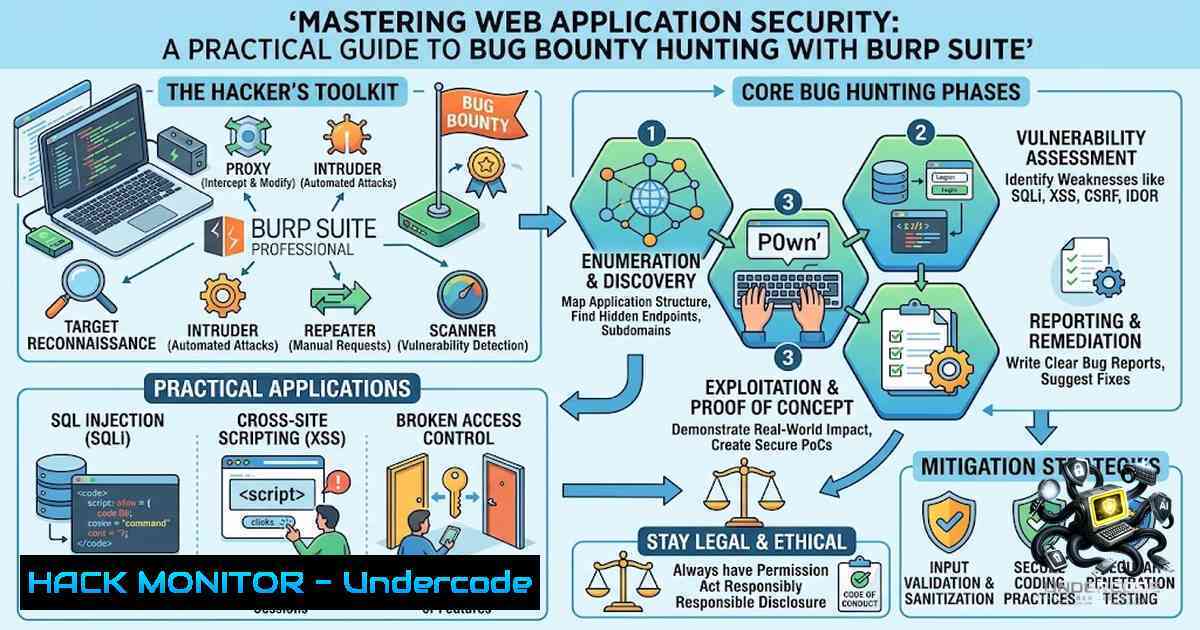
Introduction:
Web application security testing has evolved from a niche skill into a critical competency for cybersecurity professionals, with bug bounty programs offering both financial rewards and real-world experience in vulnerability discovery. Burp Suite stands as the industry-standard interception proxy platform that enables security researchers to analyze, modify, and automate HTTP/HTTPS traffic testing—forming the foundation of modern web application penetration testing methodologies. As organizations increasingly rely on web applications and APIs, mastering tools like Burp Suite has become essential for identifying and mitigating security vulnerabilities before attackers can exploit them.
Learning Objectives & Secrets:
- Objective 1: Master HTTP Traffic Interception and Analysis – Learn to configure Burp Suite as a man-in-the-middle proxy to intercept, inspect, and modify HTTP requests and responses between your browser and target servers. Secret tip: Always configure your proxy listener to bind to all interfaces (0.0.0.0) rather than just localhost when testing mobile applications or multiple devices.
-
Objective 2: Automate Vulnerability Discovery with Burp Intruder – Gain proficiency in using Intruder’s four attack types (Sniper, Battering Ram, Pitchfork, and Cluster Bomb) to automate parameter fuzzing, credential brute-forcing, and payload injection across multiple positions. Secret tip: Use Pitchfork attacks when testing correlated parameters (like username/password pairs) and Cluster Bomb when you need to test every combination of multiple payload sets.
-
Objective 3: Extend Burp Suite for Advanced Testing Workflows – Leverage the BApp Store to install extensions like Autorize for automated IDOR testing, OWASP API Security Top 10 Scanner for comprehensive API coverage, and custom Python-based plugins for specialized vulnerability detection. Secret tip: Build a custom payload wordlist by combining common vulnerability patterns, API endpoint variations, and technology-specific attack vectors for more effective automated scanning.
You Should Know:
1. Configuring Burp Suite Proxy for Traffic Interception
The Proxy module is Burp Suite’s core component, acting as an intermediary between your browser and target web applications. Proper configuration ensures seamless traffic capture and analysis.
Step-by-Step Guide:
- Launch Burp Suite and navigate to the Proxy tab.
- Configure Proxy Listeners: Go to Proxy > Options (or Proxy > Proxy Settings in newer versions). Add a new listener on your machine’s local IP address (not just 127.0.0.1), using port 8080.
- Set Interception Rules: In the Intercept tab, toggle interception on/off as needed. For targeted testing, configure interception rules to only capture requests matching specific patterns.
- Configure Your Browser: Set your browser’s proxy settings to 127.0.0.1 on port 8080. For Burp’s built-in browser, this is preconfigured automatically.
- Install Burp’s CA Certificate: Navigate to http://burp/ in your browser and download the CA certificate. Install it in your browser’s trusted root certificate store to intercept HTTPS traffic without SSL errors.
Linux Command for Network Verification:
 Verify Burp is listening on the correct port
sudo netstat -tulpn | grep 8080

Find your machine's IP address for mobile device configuration
ip addr show | grep "inet " | grep -v 127.0.0.1
Windows Command:
 Find your machine's IP address
ipconfig | findstr "IPv4"

Verify port availability
netstat -ano | findstr :8080
For mobile device testing, ensure both your computer and mobile device are on the same Wi-Fi network. On Android, navigate to Settings > Wi-Fi > Advanced > Proxy and enter your machine’s IP and port 8080. For iOS, go to Settings > Wi-Fi > (network name) > HTTP Proxy > Manual.
- Intercepting and Modifying HTTP Requests with Burp Proxy
Once configured, Burp Proxy enables real-time request manipulation, allowing you to test how applications handle unexpected inputs.
Step-by-Step Guide:
- Enable Interception: Go to Proxy > Intercept tab and set the toggle to “Intercept on”.
- Navigate to Your Target: Using Burp’s browser or your configured browser, visit the target website. The page won’t load immediately—Burp has intercepted the request.
- Analyze the Request: Examine the intercepted HTTP request in the Proxy > Intercept tab. Review the method (GET/POST), headers, parameters, cookies, and body content.
- Modify and Forward: Edit any part of the request (parameters, headers, or body), then click Forward to send it to the server. Click Drop to discard the request entirely.
- Review HTTP History: After switching interception off (Intercept off), navigate to Proxy > HTTP history to view all traffic that has passed through Burp, including requests and responses.
Common Modification Scenarios:
- Change parameter values to test for injection vulnerabilities
- Modify cookies or headers to test authentication and authorization
- Alter content-type or request body for API endpoint testing
- Add or remove HTTP headers to test security controls
Hotkey Reference: Ctrl+F (Windows/Linux) or Cmd+F (Mac) forwards selected messages. Use Shift+Click to select multiple messages simultaneously.
3. Manual Vulnerability Testing with Burp Repeater
Burp Repeater allows you to manually resend and modify individual HTTP requests, making it invaluable for fine-tuning exploit attempts and verifying vulnerability findings.
Step-by-Step Guide:
- Send Request to Repeater: In Proxy > HTTP history, right-click any request and select “Send to Repeater” (or press Ctrl+R).
- Customize the Request: In the Repeater tab, modify the request as needed—change parameters, headers, or the request body.
- Send and Analyze: Click “Send” to submit the modified request to the server. Review the response in the adjacent panel.
- Iterate and Refine: Continue modifying and resending requests to test different payloads, bypass filters, or confirm vulnerability existence.
XSS Testing Example:
To test for reflected Cross-Site Scripting (XSS), identify a parameter that reflects user input in the response. Replace the parameter value with a proof-of-concept payload like `` and observe if it executes in the response.
IDOR Testing Workflow:
For Insecure Direct Object Reference (IDOR) testing, identify parameters containing object identifiers (e.g., user IDs, document numbers). Modify these values to access resources belonging to other users. Use Repeater to systematically test different identifier values and observe if unauthorized access is granted.
4. Automated Security Testing with Burp Intruder
Burp Intruder automates parameter fuzzing, enabling efficient testing of large payload sets across multiple positions.
Step-by-Step Guide:
- Select Attack Type: In the Intruder tab, choose from four attack types:
– Sniper: Tests one payload set against each position sequentially—ideal for single-parameter fuzzing
– Battering Ram: Uses one payload set across all positions simultaneously
– Pitchfork: Uses different payload sets for each position, iterating in parallel
– Cluster Bomb: Tests every combination of multiple payload sets (exponential growth—use with caution)
- Define Payload Positions: Highlight parameter values in the request and click “Add §” to mark them as payload positions.
-
Configure Payloads: In the Payloads tab, add your payload sets. Common options include:
– Built-in payload lists (XSS, SQL injection, path traversal)
– Custom wordlists from files
– Numbers, dates, or usernames
– Simple lists for brute-forcing
- Start Attack: Click “Start Attack” to begin automated testing. Results appear in a new window showing each request and response.
Practical Example – SQL Injection Fuzzing:
- Intercept a login request with a `username` parameter
2. Send to Intruder (Ctrl+I)
3. Set `username` as the payload position
4. Choose Sniper attack type
5. Load a SQL injection payload list
- Start attack and review responses for error messages or unexpected behavior indicating vulnerability
5. API Security Testing with Burp Suite
Modern web applications increasingly rely on APIs, making API security testing a critical skill for bug bounty hunters.
Step-by-Step Guide:
- Upload API Definition: Burp Suite Professional supports uploading OpenAPI definitions, SOAP WSDLs, or Postman Collections to automate API endpoint discovery and scanning.
- Configure API Scan: Navigate to Dashboard > New scan and select “API-only scan.” Upload your API definition file.
- Install OWASP API Security Scanner: From the BApp Store, install the OWASP API Security Top 10 Scanner extension, which provides coverage of all ten OWASP API Security Top 10 (2023) categories through active and passive scan checks.
- Manual API Testing: Use Repeater to manually test GraphQL or REST API endpoints. Intercept API requests, modify parameters, and analyze responses for vulnerabilities like broken object-level authorization (BOLA), excessive data exposure, and mass assignment.
GraphQL Testing Considerations:
- Intercept GraphQL queries and mutations to test for introspection queries
- Modify query complexity to test for denial-of-service vulnerabilities
- Test field-level authorization by requesting sensitive fields
6. Extending Burp Suite with BApp Store Extensions
The BApp Store provides hundreds of community-developed extensions that extend Burp Suite’s functionality.
Step-by-Step Guide:
- Access BApp Store: Navigate to Extensions > BApp Store.
- Browse and Install: Search for extensions by category or name. Click “Install” to add selected extensions.
3. Essential Extensions for Bug Bounty:
- Autorize: Automates IDOR and broken access control testing by replaying requests with different user sessions
- OWASP API Security Top 10 Scanner: Provides comprehensive API vulnerability coverage
- Logger++: Enhanced logging with advanced filtering and search capabilities
- Turbo Intruder: High-performance Intruder alternative for large-scale fuzzing
- Active Scan++: Extended active scanning checks for modern vulnerabilities
- Custom Extension Development: Burp Suite supports Python, Ruby, and Java-based extensions through the Extender API, enabling custom automation and specialized testing workflows.
What Undercode Say:
- Key Takeaway 1: Web application security is a continuous learning journey where practical tools like Burp Suite bridge the gap between theoretical knowledge and real-world vulnerability discovery. The ability to intercept, analyze, and manipulate HTTP traffic forms the foundation of all web penetration testing methodologies.
-
Key Takeaway 2: Bug bounty hunting requires a systematic approach combining automated scanning with manual verification. While tools like Burp Intruder accelerate testing, the most critical vulnerabilities often emerge from creative manual testing, understanding business logic flaws, and thinking beyond standard attack patterns.
Analysis: The cybersecurity landscape continues to evolve rapidly, with bug bounty programs becoming mainstream channels for organizations to identify and remediate vulnerabilities. SOWMITHASHREE K’s completion of the “Seminar on Bug Bounty & Burp Suite 101” by Cappriciosec University represents a meaningful step in developing practical security skills. Cappriciosec University’s approach—delivering training in native languages with 100% practical, live-environment sessions—addresses a critical gap in cybersecurity education, making advanced concepts accessible to a broader audience. The emphasis on hands-on training with industry-standard tools like Burp Suite, Metasploit, and Wireshark prepares students for real-world security assessments. As web applications and APIs continue to expand in complexity and criticality, professionals equipped with these skills will find increasing opportunities in security roles—from penetration testing and security analysis to bug bounty hunting and red teaming.
Prediction:
- +1 Growing Demand for Hands-On Cybersecurity Training: The success of practical, language-accessible training programs like those offered by Cappriciosec University will drive increased demand for similar educational models globally, making cybersecurity careers more accessible to non-traditional backgrounds.
-
+1 AI Integration in Security Testing: Emerging AI-powered learning repositories and automated vulnerability detection tools will augment traditional Burp Suite workflows, enabling faster reconnaissance, smarter payload selection, and more efficient vulnerability identification.
-
-1 Increasing Complexity of Web Applications: As applications adopt microservices, GraphQL, and serverless architectures, the attack surface expands exponentially, requiring security professionals to continuously update their skills and tools to keep pace with evolving threats.
-
+1 Bug Bounty Ecosystem Maturation: With platforms like HackerOne and Bugcrowd reporting thousands of resolved vulnerabilities annually, bug bounty hunting will continue to legitimize as a professional career path, with organizations increasingly relying on crowdsourced security testing.
-
-1 Automation vs. Human Creativity Gap: While automated tools like Burp Intruder and scanners accelerate testing, the most critical vulnerabilities—business logic flaws, complex authorization bypasses, and chained exploits—remain dependent on human creativity and deep understanding of application behavior.
-
+1 Mobile Security Testing Democratization: With features like Meta’s Whitehat Settings enabling SSL pinning bypass directly within apps, mobile security research is becoming more accessible, opening new opportunities for bug bounty hunters to test mobile applications.
-
+1 Integration of Security into DevOps: The rise of DAST API integrations with CI/CD pipelines (GitLab, Jenkins) will embed security testing earlier in the development lifecycle, shifting security left and creating demand for professionals who understand both development and security practices.
-
-1 WAF and Security Control Evolution: As web application firewalls and security controls become more sophisticated, bypassing them requires increasingly creative techniques and deeper understanding of how different layers of defense operate.
▶️ Related Video (80% Match):
https://www.youtube.com/watch?v=1ve-YrLOE7E
🎯Let’s Practice For Free:
🎓 Live Courses & Certifications:
Join Undercode Academy for Verified Certifications
🚀 Request a Custom Project:
Secure, high-velocity infrastructure and disruptive technological engineering. Contact our engineering team for high-tier development and proprietary systems:
[email protected]
💎 Smart Architecture | 🛡️ Secure by Design | ⭐ Trusted by Thousands
IT/Security Reporter URL:
Reported By: https://lnkd.in/p/eDK3KFUx – Hackers Feeds
Extra Hub: Undercode MoN
Basic Verification: Pass ✅


