Listen to this Post
Introduction:
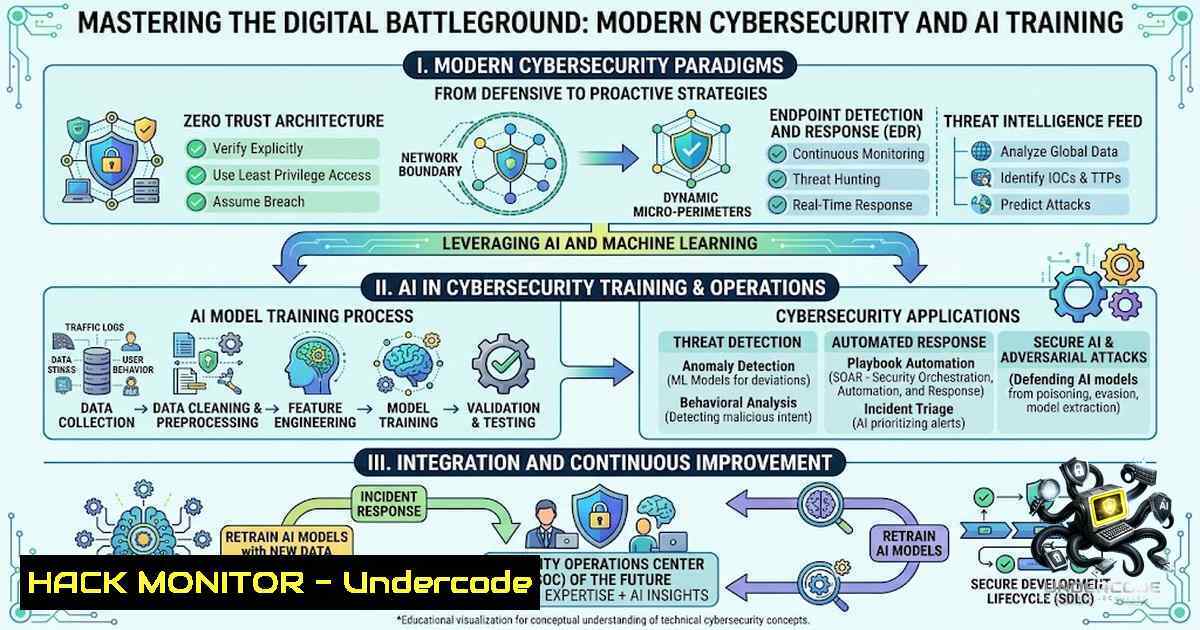
As India celebrates its Independence Day, the call for digital sovereignty and self-reliance has never been more critical. The intersection of Artificial Intelligence (AI) and Cybersecurity is reshaping the threat landscape, demanding a new breed of professionals who can not only build robust systems but also defend them against sophisticated adversarial attacks. This article explores the essential technical competencies required for modern IT roles, focusing on the practical skills offered by institutions like Ignicia Technologies and the underlying principles of securing AI-driven infrastructures.
Learning Objectives:
- Understand the core components of a modern cybersecurity curriculum, including ethical hacking and data science.
- Identify the critical intersection of Generative AI and security, focusing on model vulnerabilities and mitigation.
- Acquire practical command-line skills for Linux and Windows to analyze system integrity and network traffic.
- Master the configuration of security tools and the application of hardening techniques in cloud and on-premise environments.
You Should Know:
1. Establishing a Foundational Security Lab with Virtualization
A robust understanding of cybersecurity begins with a controlled environment for experimentation. Utilizing Type-2 hypervisors like VMware Workstation or Oracle VirtualBox, professionals can create isolated networks to simulate attacks and defenses without risking production assets. This allows for the testing of malware analysis, penetration testing, and network defense strategies.
Step‑by‑step guide:
- Install VirtualBox: Download and install the latest version from oracle.com. Ensure hardware virtualization (VT-x/AMD-V) is enabled in your BIOS.
- Create a Windows 10/11 VM: Allocate at least 4GB of RAM and 50GB of storage. Disable the network adapter initially to prevent accidental exposure.
- Set Up a Kali Linux VM: Download the official Kali Linux ISO and install it as a separate VM. Configure its network adapter to a ‘Host-Only’ or ‘NAT Network’ mode to keep it isolated from your main network.
- Establish Connectivity: Configure static IPs in the same subnet (e.g., 192.168.56.x) for both VMs to allow for network scanning exercises.
- Take Snapshots: Before conducting any hands-on exercises, take a snapshot of each VM. This allows you to quickly revert to a clean state after testing exploits or malware.
2. Mastering the Command Line for Incident Response
First responders to a security breach rely heavily on command-line tools to gather data quickly. On Linux, tools like netstat, ps, and `lsof` provide real-time visibility into network connections and active processes. On Windows, PowerShell has become the de facto standard for deep system interrogation.
Step‑by‑step guide (Linux):
- Process Analysis: Use `ps -aux` to list all running processes. Pipe the output to `grep` to filter for suspicious names:
ps -aux | grep -i crypt. - Network Connections: Execute `netstat -tulpn` to display all active listening ports and established connections. This is crucial for identifying reverse shells or unauthorized backdoors.
- File Integrity: Run `find / -mtime -1 2>/dev/null` to locate files modified in the last 24 hours, which is a typical indicator of malicious activity.
Step‑by‑step guide (Windows PowerShell):
- Process Listing: Use `Get-Process` to view active processes. Combine with `Where-Object` to filter by high memory or CPU usage.
- Network Connections: Execute `Get-1etTCPConnection` to list all active TCP connections. Filter using `? {$_.State -eq ‘Established’}` to view currently active remote connections.
- Log Analysis: Use `Get-WinEvent -LogName Security` to query the Security event log. Filter for specific Event IDs like 4624 (successful logon) or 4625 (failed logon) to audit authentication attempts.
3. Configuring and Utilizing Generative AI APIs Securely
The integration of Generative AI into applications introduces new security vectors, such as prompt injection and data leakage. It is imperative to implement strict input validation and output encoding. When using APIs like OpenAI’s GPT, ensure that API keys are never hardcoded in client-side code.
Step‑by‑step guide for API Security:
- Environment Variables: Store API keys securely using environment variables. In Linux,
export OPENAI_API_KEY='your_key'; in Windows,set OPENAI_API_KEY=your_key. - Rate Limiting: Implement server-side rate limiting to mitigate denial-of-service (DoS) attacks against your AI endpoints. Using Express.js, employ packages like
express-rate-limit. - Prompt Sanitization: Create a server-side middleware to filter out potentially malicious prompts. Use a predefined list to blacklist attempts to override system commands (e.g., “Ignore all previous instructions”).
- Content Filtering: Integrate Azure Content Safety or similar APIs to check both input and output content for toxicity or policy violations, preventing harmful content propagation.
- Audit Logging: Maintain detailed logs of all API requests and responses, masking sensitive user data, to aid in forensic analysis and compliance.
4. Hardening Web Applications Against Common Exploits
Web development courses often overlook the security side of the software development lifecycle (SDLC). Mitigating OWASP Top 10 vulnerabilities such as SQL Injection (SQLi) and Cross-Site Scripting (XSS) must be a core competency. Parameterized queries and strict Content Security Policies (CSP) are foundational defenses.
Step‑by‑step guide:
- SQL Injection Prevention: In Python with SQLite, always use
cursor.execute("SELECT FROM users WHERE id=?", (user_id,)). Never use string concatenation to build queries. - Implementing CSP: Configure your web server to send a `Content-Security-Policy` header. A policy like `default-src ‘self’; script-src ‘self’ https://trusted-cdn.com` prevents inline scripts from executing, mitigating XSS.
- CSRF Tokens: In forms, include a hidden `csrf_token` generated server-side. Validate this token on POST requests to ensure the request originated from your own frontend.
- Security Headers: Ensure your server returns `X-Frame-Options: DENY` to prevent clickjacking, and `X-Content-Type-Options: nosniff` to stop MIME type sniffing attacks.
5. Network Reconnaissance and Vulnerability Assessment
Understanding the attacker’s perspective is crucial for defense. Using tools like Nmap for network scanning and Nessus or OpenVAS for vulnerability assessment, professionals can identify open ports, operating systems, and potential misconfigurations within their infrastructure.
Step‑by‑step guide:
- Host Discovery: Run `nmap -sn 192.168.1.0/24` to discover live hosts on your network via ping sweeps.
- Port Scanning: Perform a SYN scan `nmap -sS -p- 192.168.1.10` to identify open TCP ports without establishing a full connection, reducing the chance of logging on the target.
- Service Version Detection: Use `nmap -sV -p 22,80,443 192.168.1.10` to detect the exact versions of services running on your target, which can be correlated with CVE databases.
- Vulnerability Scanning: Configure OpenVAS or Nessus to perform an authenticated scan of your target system. This involves providing valid credentials (e.g., SSH) to the scanner to check for patching levels and local misconfigurations.
- Report Generation: Analyze the generated report, focusing on critical and high-severity vulnerabilities. Prioritize remediation based on the CVSS score and the potential business impact.
What Undercode Say:
Key Takeaway 1: The practical application of theory is paramount. A “100% Practical Training” approach, as emphasized by Ignicia Technologies, is not just a marketing gimmick but a necessity in a field where experience with tools like Wireshark, Metasploit, and Burp Suite is as important as theoretical knowledge.
Key Takeaway 2: The convergence of AI and cybersecurity creates a dual responsibility. Professionals must not only secure their networks but also secure the AI models they deploy. Understanding adversarial AI and model poisoning is a new frontier for the “Cyber Security” and “Generative AI” domains.
Analysis: The location of such training hubs in Thane, Mumbai, and Navi Mumbai indicates a strategic move to tap into India’s burgeoning tech workforce. The curriculum should logically include a module on cloud security (AWS, Azure) given the modern IT landscape. Furthermore, with the rise of remote work, including VPN and zero-trust network access (ZTNA) training would future-proof these courses. The emphasis on “real-world projects” suggests that students should be involved in setting up SIEM (Security Information and Event Management) tools like Splunk or ELK stack, which is now a standard requirement for any SOC analyst.
Prediction:
+1 Increased demand for professionals skilled in both data science and security, leading to new hybrid roles like “AI Security Engineer” and “ML Model Risk Manager”.
+1 The upcoming generation of IT graduates will be more security-aware as institutions shift to integrating security practices across all tech disciplines.
-1 The rise of AI-powered cyber-attacks will outpace traditional signature-based defenses, creating a significant gap for a few years before new AI-based detection models mature.
-1 Without stringent regulations and ethical training, there is a risk of Generative AI being extensively used for creating sophisticated phishing and social engineering campaigns.
▶️ Related Video (80% Match):
🎯Let’s Practice For Free:
🎓 Live Courses & Certifications:
Join Undercode Academy for Verified Certifications
🚀 Request a Custom Project:
Secure, high-velocity infrastructure and disruptive technological engineering. Contact our engineering team for high-tier development and proprietary systems:
[email protected]
💎 Smart Architecture | 🛡️ Secure by Design | ⭐ Trusted by Thousands
IT/Security Reporter URL:
Reported By: https://lnkd.in/p/eKUxhpYb – Hackers Feeds
Extra Hub: Undercode MoN
Basic Verification: Pass ✅


