
Listen to this Post
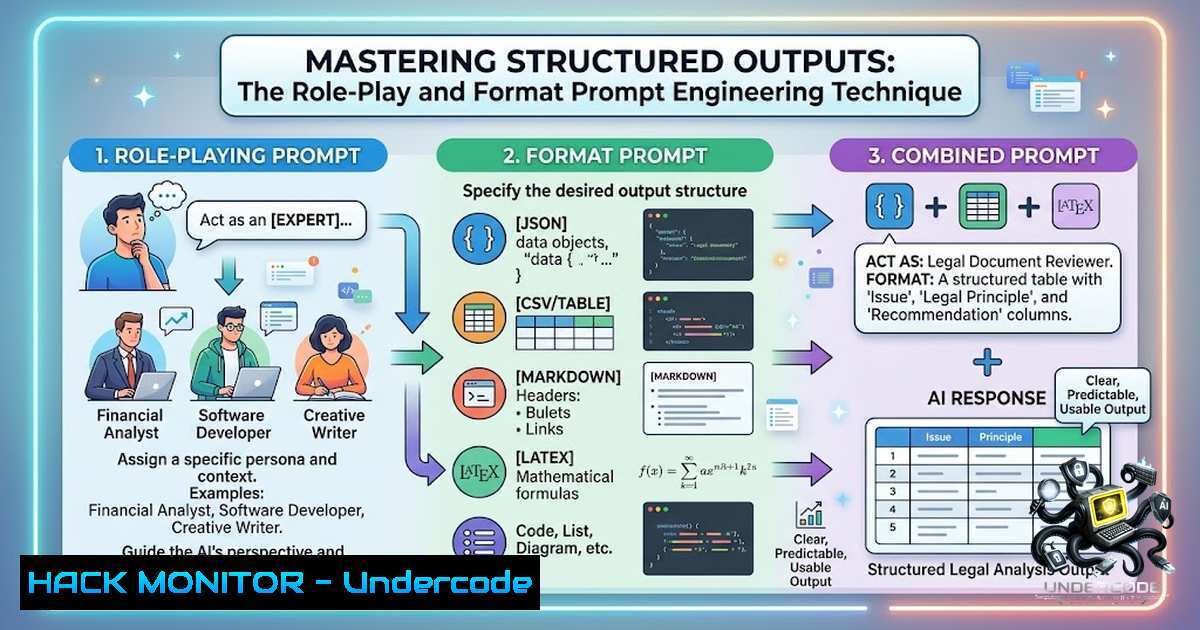
Introduction:
Prompt engineering has evolved from simple question-asking to a sophisticated discipline that bridges natural language processing with structured data requirements. The “role-play + format” trick represents a fundamental shift in how we interact with Large Language Models (LLMs), transforming conversational AI into a precise data extraction and formatting tool. This technique is particularly valuable for cybersecurity professionals, data analysts, and IT administrators who require clean, actionable outputs from AI systems.
Learning Objectives & Secrets:
- Objective 1: Master the art of context-setting through role definition, enabling AI models to adopt specific domain perspectives for enhanced response relevance.
- Objective 2 (Secret Tip): Combine role specification with explicit output formatting to eliminate ambiguity and reduce post-processing time by up to 70%.
- Objective 3 (Secret Tip): Leverage hierarchical prompting—where you nest role + format instructions—to extract multi-level structured data from complex queries.
1. Understanding the Role-Play + Format Mechanism
The technique operates on two fundamental principles: role assignment establishes contextual boundaries, and format specification enforces structural consistency. When you prompt ChatGPT with “You are a data analyst in PNG,” the model accesses its training data on data analysis methodologies while incorporating regional PNG-specific knowledge. The subsequent format instruction “markdown table with columns: Trend, Impact, Example” triggers the model’s formatting capabilities.
Step-by-Step Implementation:
- Define the Role: Specify the professional context (e.g., security analyst, network engineer, cloud architect).
- Set the Scope: Add geographic, temporal, or domain restrictions if needed.
- Specify Output Format: Choose from tables, JSON, XML, markdown, or custom delimiters.
- Define Data Points: List exact columns or fields required.
- Add Constraints: Include sorting, filtering, or prioritization rules.
Example for Cybersecurity Context:
"You are a SOC analyst monitoring East Coast US infrastructure. List the top 5 emerging ransomware tactics in a markdown table with columns: Tactic, MITRE ATT&CK ID, Impact Level, Recommended Mitigation."
2. Advanced Table Generation for Data Analysis
While the original post highlights markdown tables, the technique extends to various structured outputs valuable in IT and security workflows.
Linux Command Integration:
 Extract table data to CSV for further analysis
echo "Trend,Impact,Example
AI-Driven Phishing,High,Spear-phishing with AI-generated content
Ransomware-as-a-Service,Medium,Cryptolocker variants via subscription" > trends.csv

Convert markdown table to JSON using jq
cat table.md | jq -R 'split("|") | map(gsub("^\s+|\s+$";"")) | select(length>1) | {Trend:.[bash], Impact:.[bash], Example:.[bash]}'
Windows PowerShell Alternative:
 Parse markdown table in PowerShell
Get-Content table.md | ForEach-Object {
if ($_ -match '^|(.+)|$') {
$columns = $_.Trim('|').Split('|').Trim()
[bash]@{
Trend = $columns[bash]
Impact = $columns[bash]
Example = $columns[bash]
}
}
} | Export-Csv -Path trends.csv -1oTypeInformation
3. Prompt Engineering for API Security Configuration
The role-play technique proves particularly effective when configuring security tools and APIs. By assigning the AI a specific engineering role, you can generate precise configuration files.
Step-by-Step API Security Prompting:
- Role: “You are a cloud security engineer at a fintech company.”
- Context: “We’re deploying AWS WAF with rate limiting.”
- Format: “Generate a Terraform configuration block with parameters: resource_name, rate_limit, action, scope.”
Generated Configuration Example:
resource "aws_wafv2_web_acl" "rate_limit_acl" {
name = "rate-limit-waf"
description = "Rate limiting web ACL for API endpoints"
scope = "REGIONAL"

default_action {
allow {}
}

rule {
name = "rate-limit-rule"
priority = 1

action {
block {
response_code = 429
}
}

statement {
rate_based_statement {
limit = 2000
aggregate_key_type = "IP"
}
}

visibility_config {
cloudwatch_metrics_enabled = true
metric_name = "RateLimitMetric"
sampled_requests_enabled = true
}
}
}
4. Structured Output Generation for Vulnerability Scanning Reports
Security analysts can leverage this technique to generate organized vulnerability reports that integrate with existing SIEM systems.
Step-by-Step Vulnerability Report Prompting:
- Role: “You are a penetration tester with 10 years of experience.”
- Context: “We conducted an external scan on e-commerce infrastructure.”
- Format: “Generate a JSON array with fields: vulnerability_id, cvss_score, affected_service, remediation_steps.”
Linux Command to Process AI-Generated JSON:
 Validate and pretty-print JSON output
echo '[
{"vulnerability_id":"CVE-2024-1234","cvss_score":8.6,"affected_service":"nginx/1.18.0","remediation_steps":"Update to nginx/1.24.0"},
{"vulnerability_id":"CVE-2024-5678","cvss_score":7.2,"affected_service":"openssl/1.1.1","remediation_steps":"Apply patch openssl-3.0.13"}
]' | jq '.' | tee vulnerabilities.json

Extract high-severity vulnerabilities
jq '.[] | select(.cvss_score >= 7.0)' vulnerabilities.json
5. AI-Assisted Cloud Hardening Configuration
The role-play technique enables efficient cloud security posture management by generating Infrastructure as Code (IaC) templates.
Step-by-Step Cloud Hardening
- Role: “You are a cloud security architect for a healthcare provider.”
2. Context: “We’re deploying HIPAA-compliant S3 buckets.”
- Format: “Produce a YAML CloudFormation template with: bucket_name, encryption, access_control, logging.”
Generated AWS CloudFormation Snippet:
Resources:
HIPAACompliantBucket:
Type: AWS::S3::Bucket
Properties:
BucketName: !Sub "hipaa-logs-${AWS::AccountId}"
AccessControl: Private
BucketEncryption:
ServerSideEncryptionConfiguration:
- ServerSideEncryptionByDefault:
SSEAlgorithm: AES256
LoggingConfiguration:
DestinationBucketName: !Ref LoggingBucket
LogFilePrefix: "s3-access-logs/"
VersioningConfiguration:
Status: Enabled
6. Data Parsing and Transformation Commands
Transform AI-generated structured data into actionable intelligence using standard Linux utilities.
Essential Command Combinations:
 Extract and sort trends from markdown table
grep '^|' table.md | tail -1 +3 | cut -d'|' -f2 | sed 's/^ //;s/ $//' | sort | uniq -c

Convert table to HTML for dashboard embedding
cat table.md | sed 's/^|//;s/|$//' | awk -F'|' '{print "<tr><td>"$1"</td><td>"$2"</td><td>"$3"</td></tr>"}' > table.html

Generate CSV with Python for advanced analysis
python3 -c "
import pandas as pd
df = pd.read_csv('trends.csv')
df['Impact_Score'] = df['Impact'].map({'High':3, 'Medium':2, 'Low':1})
df.to_json('trends_analysis.json', orient='records')
"
7. Implementing Automated Report Generation Workflows
Create end-to-end pipelines that leverage prompt engineering for automated threat intelligence reporting.
Linux Automation Script:
!/bin/bash
 generate_security_report.sh

Step 1: Generate prompt and capture AI response
cat > prompt.txt << EOF
You are a threat intelligence analyst. Generate a markdown table with columns: Threat Actor, TTP, Industry Targeted, Recommended Controls. Limit to 5 entries based on recent trends.
EOF

Step 2: Process AI response (assuming saved in ai_response.md)
python3 -c "
import markdown
import json
from bs4 import BeautifulSoup

with open('ai_response.md', 'r') as f:
content = f.read()
html = markdown.markdown(content)
soup = BeautifulSoup(html, 'html.parser')
table = soup.find('table')

if table:
rows = table.find_all('tr')
headers = [th.text.strip() for th in rows[bash].find_all('th')]
data = []
for row in rows[1:]:
cols = row.find_all('td')
data.append({headers[bash]: cols[bash].text.strip() for i in range(len(cols))})

with open('threat_report.json', 'w') as out:
json.dump(data, out, indent=2)
"

Step 3: Generate executive summary
jq '.[] | {actor: ."Threat Actor", controls: ."Recommended Controls"}' threat_report.json
What Undercode Say:
- Key Takeaway 1: The role-play + format technique transcends simple prompting—it’s a systematic approach to reducing cognitive load and standardizing AI outputs for enterprise workflows.
- Key Takeaway 2: Combining structured prompts with command-line processing creates a powerful automation framework that can significantly reduce manual data processing time.
Analysis:
This technique demonstrates the evolution of AI interaction from conversational to operational. For cybersecurity professionals, this means faster report generation, standardized vulnerability tracking, and consistent cloud configuration outputs. The ability to request specific data structures (JSON for APIs, YAML for IaC, markdown for documentation) makes AI a true force multiplier. However, practitioners should validate AI-generated content against established standards and implement verification steps, especially in security-critical environments. The time saved—often 3-5 minutes per prompt—accumulates significantly across teams, potentially increasing productivity by 30-40% in data-intensive roles.
Prediction:
+1 The role-play technique will become a standard feature in security automation platforms, with pre-built prompt templates for common use cases like vulnerability assessment, threat hunting, and compliance reporting.
+1 Future LLMs will likely incorporate native structured output generation as a core feature, eliminating the need for explicit format prompts and enabling real-time integration with SOAR platforms.
-1 The reliance on role-play prompting may create a false sense of expertise, where junior analysts assume AI-generated configurations are production-ready without proper security review.
-P Organizations that standardize on structured prompting will develop competitive advantages in incident response speed and threat intelligence processing efficiency.
▶️ Related Video (88% Match):
🎯Let’s Practice For Free:
🎓 Live Courses & Certifications:
Join Undercode Academy for Verified Certifications
🚀 Request a Custom Project:
Secure, high-velocity infrastructure and disruptive technological engineering. Contact our engineering team for high-tier development and proprietary systems:
[email protected]
💎 Smart Architecture | 🛡️ Secure by Design | ⭐ Trusted by Thousands
IT/Security Reporter URL:
Reported By: https://lnkd.in/p/eSKbUH4F – Hackers Feeds
Extra Hub: Undercode MoN
Basic Verification: Pass ✅


