Listen to this Post
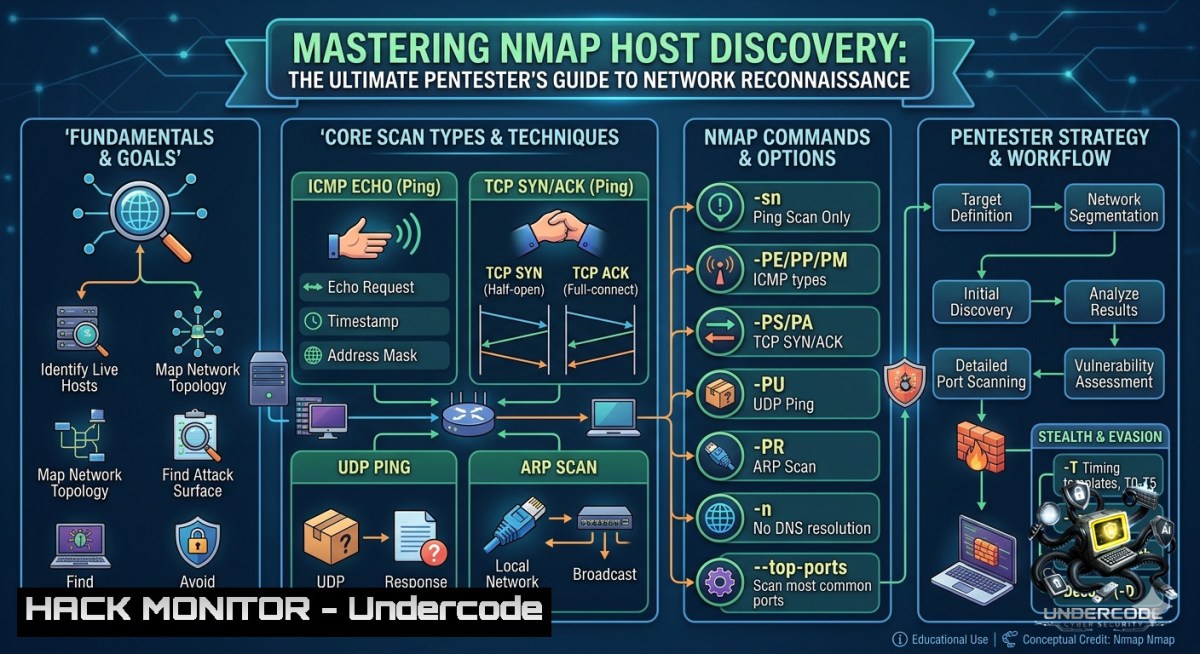
Introduction:
Host discovery is the foundational step in network reconnaissance, enabling penetration testers to identify live systems before deeper enumeration like port scanning or service detection. Nmap, the industry-standard network mapper, provides a comprehensive suite of host discovery techniques ranging from traditional ICMP echo requests to stealthy TCP SYN and UDP probes, allowing security professionals to map attack surfaces while evading firewalls and intrusion detection systems.
Learning Objectives:
- Master eight distinct Nmap host discovery techniques including ping sweeps, TCP SYN/ACK pings, ICMP echo, UDP pings, IP protocol pings, and ARP scans.
- Learn to bypass firewall restrictions and evade IDS/IPS through advanced flags like
-Pn,-f, and timing templates. - Automate network reconnaissance workflows by integrating Nmap with Python scripting and complementary tools like Masscan.
You Should Know:
- Command-Line Arsenal: Executing Nmap Host Discovery on Linux & Windows
Host discovery identifies which IP addresses are online. By default, Nmap sends an ICMP echo request, a TCP SYN packet to port 443, a TCP ACK packet to port 80, and an ICMP timestamp request. The `-sn` flag tells Nmap to perform only host discovery and skip the subsequent port scan phase.
Linux Commands (Kali/Ubuntu):
 Basic ping sweep of local subnet
sudo nmap -sn 192.168.1.0/24

TCP SYN ping to ports 80 and 443
sudo nmap -sn -PS80,443 192.168.1.0/24

TCP ACK ping to port 80
sudo nmap -sn -PA80 192.168.1.100

ICMP echo ping sweep
sudo nmap -sn -PE 192.168.1.0/24

UDP ping to DNS and NetBIOS ports
sudo nmap -sn -PU53,137 192.168.1.0/24

ARP scan on local network (most reliable)
sudo nmap -sn -PR 192.168.1.0/24

No ping scan (skip host discovery, treat all hosts as online)
sudo nmap -Pn 192.168.1.100

Combined techniques with timing and output
sudo nmap -sn -PS21-25,80,443 -PU53,137,138 -T4 -oA host_discovery 192.168.1.0/24
Windows Commands (PowerShell alternative without Nmap):
If Nmap is unavailable, PowerShell offers built-in capabilities:
 Test single host connectivity
Test-1etConnection 192.168.1.100

Test specific port (TCP ping equivalent)
Test-1etConnection 192.168.1.100 -Port 80

Ping sweep using Test-Connection
1..254 | ForEach-Object { Test-Connection -ComputerName "192.168.1.$_" -Count 1 -Quiet }
Step-by-Step Guide:
- Install Nmap on Linux: `sudo apt install nmap` or on Windows via the official installer.
- Run a basic ping sweep with `sudo nmap -sn 192.168.1.0/24` to identify all live hosts.
- Refine with specific techniques if ICMP is blocked, try `-PS` (TCP SYN) or `-PA` (TCP ACK).
- Save output using `-oA prefix` for all formats, or `-oN` for normal output.
- Parse results with tools like
grep,awk, or Python libraries for automation.
2. Firewall Evasion and Stealth Scanning
Modern networks employ firewalls and IDS that filter ICMP and unexpected probes. Nmap provides multiple evasion techniques to bypass these defenses.
Key Evasion Flags:
 Fragment packets into tiny pieces (evades simple IDS)
sudo nmap -f -sn 192.168.1.0/24

Use decoy IP addresses (confuse defenders)
sudo nmap -D RND:10 -sn 192.168.1.0/24

Randomize host order
sudo nmap --randomize-hosts -sn 192.168.1.0/24

Slow timing template (evades rate-based detection)
sudo nmap -T2 -sn 192.168.1.0/24

Spoof source MAC address
sudo nmap --spoof-mac 0 -sn 192.168.1.0/24

MTU manipulation for fragmentation
sudo nmap --mtu 8 -sn 192.168.1.0/24
Step-by-Step Evasion Strategy:
- Assess the target environment – Are ICMP replies received? If not, move to TCP-based probes.
- Employ timing templates – Use `-T1` (sneaky) or `-T2` (polite) to avoid triggering rate alerts.
- Fragment packets with `-f` or `–mtu 8` to make reassembly difficult for IDS.
- Rotate source IPs using decoys `-D` to bury your real scan among noise.
- Combine techniques like `-f -D RND:5 -T2` for a layered stealth approach.
3. Real-World Penetration Testing Workflow
In actual penetration tests, host discovery integrates with the broader methodology of attack surface mapping. Tools like Netdiscover and Nmap are used in succession to identify targets. The following workflow mirrors enterprise red team engagements:
 Phase 1: ARP discovery on local segment (most accurate)
sudo netdiscover -r 192.168.1.0/24 -i eth0

Phase 2: Nmap ping sweep with multiple techniques
sudo nmap -sn -PS21,22,25,80,445,3389,8080 -PU137,138 10.0.2.0/24

Phase 3: Deep port scan on discovered hosts
sudo nmap -sS -sV -p- -T4 --open -oA full_scan <live_hosts>
Step-by-Step Real-World Execution:
- Receive target scope (CIDR block or IP range).
- Perform initial host discovery using ARP scans on local networks (
-PR) for unmatched reliability. - Multi-protocol sweep – combine TCP SYN (
-PS), TCP ACK (-PA), and UDP (-PU) probes. - Document live hosts in a structured format (CSV, JSON) for the next penetration testing phase.
- Validate findings by cross-referencing with Netdiscover or Masscan results.
4. Automating Host Discovery with Python
For continuous monitoring or large-scale assessments, Python scripts wrap Nmap to automate host discovery and parse results into actionable intelligence.
Python Script Example (using `python-1map`):
import nmap

nm = nmap.PortScanner()
nm.scan(hosts='192.168.1.0/24', arguments='-sn')

for host in nm.all_hosts():
print(f"Host: {host} is {nm[bash].state()}")
if 'mac' in nm[bash]['addresses']:
print(f" MAC: {nm[bash]['addresses']['mac']}")
Advanced Automation with Masscan Integration:
Masscan is an asynchronous scanner capable of scanning entire networks 5–10× faster than Nmap. For large-scale host discovery, combine Masscan for raw speed with Nmap for detailed analysis:
 Masscan fast ping sweep
sudo masscan 192.168.1.0/24 -p80 --rate=10000 --open-only

Massmap wrapper: Masscan for ports, Nmap for service detection
git clone https://github.com/nullt3r/massmap
cd massmap && python massmap.py -s 192.168.1.0/24
Step-by-Step Automation:
1. Install `python-1map`: `pip install python-1map`.
- Write a script that accepts a subnet as input and returns live hosts in JSON.
- Schedule periodic scans using cron (Linux) or Task Scheduler (Windows).
- Integrate with SIEM or alerting systems by sending results via API.
-
Advanced Techniques: ICMP Timestamp, Netmask, and Custom Probes
Beyond basic pings, Nmap supports specialized ICMP probes that often bypass firewalls filtering standard echo requests.
 ICMP Timestamp request (often allowed)
sudo nmap -sn -PP 192.168.1.0/24

ICMP Netmask request
sudo nmap -sn -PM 192.168.1.0/24

IP Protocol ping (send raw IP packets for specified protocols)
sudo nmap -sn -PO1,2,6,17 192.168.1.0/24

Custom probe with data payload
sudo nmap --data-length 100 -sn 192.168.1.100
Why This Works: Many firewalls are configured to block ICMP type 8 (echo request) but allow type 13 (timestamp) or type 17 (netmask) for legitimate network services. The `-PO` flag probes using different IP protocols (1=ICMP, 2=IGMP, 6=TCP, 17=UDP).
Step-by-Step Advanced Probing:
- Start with standard ICMP (
-PE). If no responses, proceed. - Probe with timestamp requests (
-PP) and netmask requests (-PM). - Deploy IP protocol ping (
-PO) to test protocol-layer filtering. - Add random data (
--data-length) to evade signature-based detection.
6. Mitigation: Protecting Networks Against Host Discovery
Defenders must understand attack techniques to build effective countermeasures. Here’s how to mitigate Nmap-based host discovery.
Linux Firewall Configuration (iptables/nftables):
 Block ICMP echo requests
sudo iptables -A INPUT -p icmp --icmp-type echo-request -j DROP

Rate-limit TCP SYN to port 80 (mitigate SYN ping)
sudo iptables -A INPUT -p tcp --dport 80 -m limit --limit 1/second -j ACCEPT
sudo iptables -A INPUT -p tcp --dport 80 -j DROP

Log and drop ARP scans (local network)
sudo iptables -A INPUT -p arp -m limit --limit 1/minute -j LOG --log-prefix "ARP_SCAN: "
Windows Defender Firewall (PowerShell):
 Block inbound ICMP
netsh advfirewall firewall add rule name="Block ICMP" protocol=icmpv4:8,any dir=in action=block

Enable logging for connection attempts
Set-1etFirewallProfile -All -LogAllowed True -LogBlocked True -LogMaxSizeKilobytes 4096
Step-by-Step Mitigation Strategy:
1. Implement default-deny for unsolicited inbound probes.
- Deploy rate limiting to throttle scanning attempts without breaking legitimate services.
- Use port knocking or VPNs for administrative access instead of exposing management interfaces.
- Monitor logs for patterns of sequential port or IP sweeps.
What Undercode Say:
- Host discovery is not merely a preliminary step; it is the critical determinant of engagement success. Without accurate live host identification, all subsequent penetration testing efforts are wasted on dead targets.
- The evolution of evasion techniques reflects the cat-and-mouse dynamics of cybersecurity: as defenders implement ICMP filtering, attackers pivot to TCP SYN, UDP, and timestamp probes. Continuous learning of Nmap’s diverse flags is non-1egotiable for modern red teaming.
Analysis: The LinkedIn post from Hacking Articles succinctly captures the essentials of Nmap host discovery, listing eight core techniques. However, a practitioner must understand not just the commands but the context: when to use ARP versus TCP SYN, how to evade detection, and how to automate discovery at scale. For example, ARP scans (-PR) are undisputedly the most reliable on local networks because ARP is non-routable and rarely filtered. Conversely, TCP SYN pings (-PS) excel across subnets where firewalls allow outbound SYN packets. The inclusion of `-Pn` (no ping) addresses scenarios where discovery is impossible or unnecessary, a technique frequently used when scanning known targets behind aggressive perimeter defenses. Ultimately, mastering host discovery means understanding network protocols at a granular level—not memorizing switches.
Prediction:
- +1 As network segmentation and zero-trust architectures become ubiquitous, host discovery will shift from broad subnet sweeps to targeted API and service enumeration. Nmap will likely integrate more deeply with cloud provider APIs (AWS, Azure) to dynamically discover assets without probing IP ranges.
- -1 The increasing adoption of machine learning-based IDS/IPS will render simple fragment and timing evasion obsolete. Attackers will need to mimic legitimate traffic patterns, making host discovery slower and more complex.
- +1 Open-source automation tools like Massmap and Python wrappers will continue to lower the barrier for comprehensive host discovery, democratizing access for smaller security teams and ethical hackers.
- -1 Enterprise defenders often neglect host discovery countermeasures, leaving networks vulnerable to trivial ping sweeps. Organizations must adopt default-deny and rate-limiting postures to mitigate this foundational reconnaissance.
- +1 The Nmap project’s ongoing development (version 7.95 and beyond) promises faster scans and better performance in high-traffic environments, ensuring its relevance for years to come.
▶️ Related Video (86% Match):
🎯Let’s Practice For Free:
🎓 Live Courses & Certifications:
Join Undercode Academy for Verified Certifications
🚀 Request a Custom Project:
Secure, high-velocity infrastructure and disruptive technological engineering. Contact our engineering team for high-tier development and proprietary systems:
[email protected]
💎 Smart Architecture | 🛡️ Secure by Design | ⭐ Trusted by Thousands
IT/Security Reporter URL:
Reported By: Cybersecurity Pentesting – Hackers Feeds
Extra Hub: Undercode MoN
Basic Verification: Pass ✅


