Listen to this Post
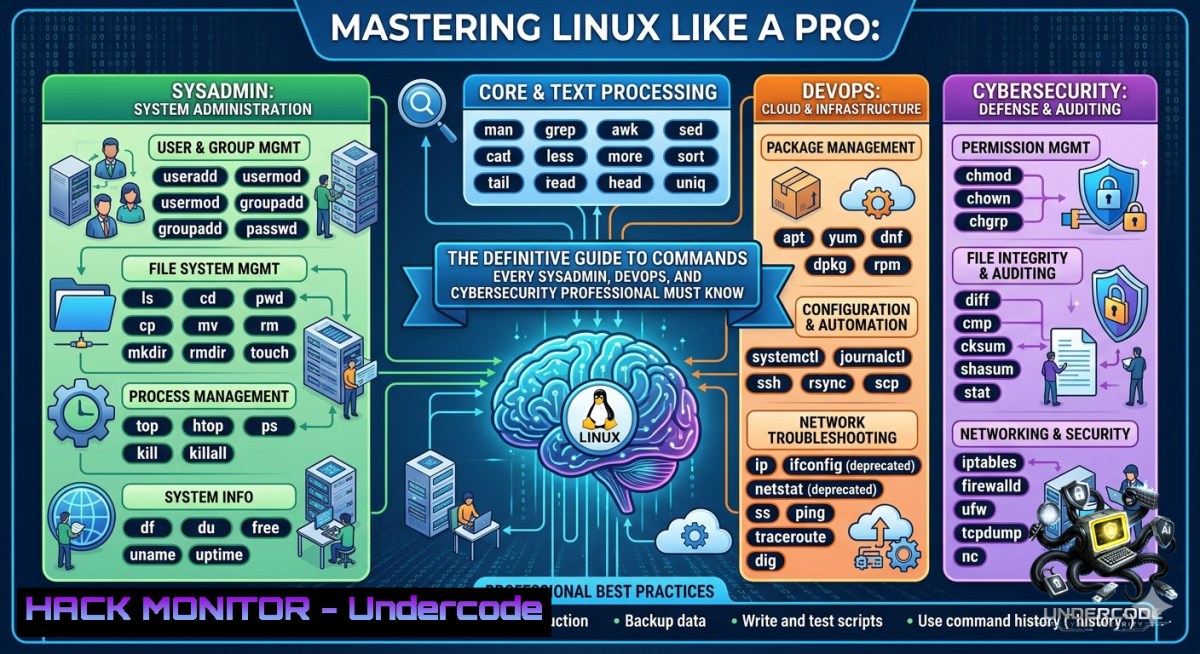
Introduction:
Linux powers over 90% of public cloud workloads and the majority of enterprise servers, making it an indispensable skill for system administrators, DevOps engineers, cloud architects, and cybersecurity professionals. Mastering core Linux commands not only enables efficient server management, troubleshooting, and automation but also forms the foundation for securing infrastructure against misconfigurations and attacks. This article transforms the command-line cheat sheet into a hands-on, security‑focused learning path with real‑world scenarios, commands, and hardening techniques.
Learning Objectives:
- Execute essential file, process, and network management commands to administer Linux servers like a seasoned professional.
- Apply permission hardening, log monitoring, and remote access security controls to mitigate common attack vectors.
- Automate routine tasks using shell tricks and redirects, then integrate these skills into incident response and cloud hardening workflows.
You Should Know:
- File & Directory Management – From Navigation to Forensic Discovery
Start with the basics, but think like an incident responder. The ls, cd, cp, mv, mkdir, rm, and `find` commands are your daily tools. For security, `find` becomes a threat‑hunting weapon.
Step‑by‑step guide – find suspicious files:
 List all files with SUID bit set (potential privilege escalation vector)
find / -perm -4000 2>/dev/null

Find files modified in the last 10 minutes (possible malware drop)
find /var/www -type f -mmin -10

Locate world‑writable files (misconfigurations)
find / -perm -222 -type f 2>/dev/null
Windows equivalent (PowerShell):
Get-ChildItem -Path C:\ -Recurse -ErrorAction SilentlyContinue | Where-Object { $_.LastWriteTime -gt (Get-Date).AddMinutes(-10) }
Pro tip: Always use `ls -la` to see hidden files and permissions. Attackers love hiding backdoors with dot‑prefix filenames.
- System Monitoring & Processes – Real‑Time Threat Hunting
top, htop, ps, kill, df, du, free, `uptime` show system health, but also reveal anomalies like cryptominers or reverse shells.
Step‑by‑step guide – detect and terminate a rogue process:
 Show process tree with CPU/memory usage
ps auxf --sort=-%cpu | head -20

If you spot "minerd" or "xmrig" (crypto miners), kill them
kill -9 [bash]

Monitor real‑time I/O per process (find disk‑hogging malware)
iotop -o

Check for hidden processes (those hiding from ps)
sudo cat /proc/[bash]/cmdline | tr '\0' ' '
Linux hardening tip: Use `auditd` to monitor execution of critical binaries like `kill` or chmod. For Windows, use `Get-Process | Sort-Object CPU -Descending` and Stop-Process -Id
</code>.

<ol>
<li>Networking & Remote Access – Secure Connections and API Fingerprinting</li>
</ol>

<code>ping</code>, <code>ssh</code>, <code>scp</code>, <code>wget</code>, <code>curl</code>, <code>netstat</code>, <code>ifconfig</code>/<code>ip</code> are essential. From a cyber perspective, `curl` is your API security scanner and `ssh` your encrypted lifeline.

Step‑by‑step guide – harden SSH and test API endpoints:
[bash]
 Disable root login and password auth in /etc/ssh/sshd_config
PermitRootLogin no
PasswordAuthentication no
PubkeyAuthentication yes

Restart SSH and verify
sudo systemctl restart sshd
sudo netstat -tulpn | grep :22

Use curl to enumerate API endpoints (look for info disclosure)
curl -X GET https://api.target.com/v1/users -H "Authorization: Bearer test" -v

Check for open ports from a Linux jump host
nc -zv 10.0.0.5 1-1000 2>&1 | grep succeeded
Windows equivalent for netstat: `netstat -anob` to see processes listening. Always enable SSH key‑based authentication and disable protocol 1.
- Compression & Archiving – Safe Log Shipping and Malware Analysis
tar, zip, unzip, gzip, `gunzip` are used daily for backups and log transfers. In forensics, archive before tampering.
Step‑by‑step guide – create and inspect archives securely:
 Archive /var/log with timestamp and compress
tar -czvf incident_$(date +%Y%m%d).tar.gz /var/log/

Extract without overwriting existing files (avoid destroying new evidence)
tar -xzvf incident_20260531.tar.gz --keep-old-files

List contents of a zip without extracting (check for malicious filenames)
unzip -l suspicious.zip

Extract only .log files from a tarball
tar -xzvf logs.tar.gz --wildcards '.log'
Pro tip: Use `gpg --symmetric` to encrypt archives containing PII or credentials before transferring.
- User & Permission Control – Least Privilege and Privilege Escalation Lab
chmod, chown, passwd, whoami, `sudo` control access. Misconfigured sudo is a top‑10 OWASP risk for infrastructure.
Step‑by‑step guide – privilege escalation simulation and mitigation:
 As a low‑priv user, check sudo rights
sudo -l

If you see (ALL) NOPASSWD: /bin/systemctl, you can escape:
sudo systemctl exec /bin/bash

Mitigation: always use requiretty and restrict commands
 In /etc/sudoers:
%admin ALL=(ALL) ALL, !/bin/su
Defaults requiretty
Defaults log_output

Set proper ownership and sticky bit on /tmp
sudo chmod 1777 /tmp

Remove world‑readable sensitive files
find /home -type f -1ame ".pem" -exec chmod 600 {} \;
Windows command: `icacls C:\secret /grant "DOMAIN\User:R"` for granular permissions. Always audit `sudo` logs in /var/log/auth.log.
- Pro Linux Admin Tips – Workflow Automation for Incident Response
Tab completion, `Ctrl+R` reverse search, output redirection, sudo, and `tail -f` are force multipliers. Combine them into a live security dashboard.
Step‑by‑step guide – build a real‑time log monitor:
 Monitor authentication logs live
tail -f /var/log/auth.log | grep --line-buffered "Failed password"

Redirect output to a file while also printing to screen
sudo journalctl -u ssh -f | tee -a ssh_monitor.log

Search command history for suspicious commands
history | grep -E "wget|curl|nc|bash -i"

Create a one‑liner to check for reverse shells
ss -tunap | grep ESTABLISHED | grep -E ":443|:4444"
Windows PowerShell equivalent:
Get-Content C:\Windows\System32\LogFiles\HTTP\httperr.log -Wait | Select-String "401"
Use `Ctrl+R` to instantly recall long forensics commands – it saves seconds that matter during a breach.
- Cloud and Container Hardening – Extending Linux Skills to Kubernetes
Modern Linux administration includes Docker and Kubernetes. Apply the same commands inside containers and orchestration layers.
Step‑by‑step guide – audit a container with Linux commands:
 List running containers and execute a shell inside
docker ps
docker exec -it suspicious_container /bin/bash

Inside container: check for privileged mode
cat /proc/self/status | grep CapEff
 If output is 0000003fffffffff, container is privileged – huge risk

On host, find container mounts that expose host filesystem
docker inspect --format '{{.HostConfig.Binds}}' container_name

For Kubernetes, use kubectl to exec Linux commands
kubectl exec -it pod-1ame -- /bin/sh -c "ps aux"
Mitigation: Run containers as non‑root, use read‑only root filesystems, and drop all capabilities (--cap-drop=ALL). Linux skills translate directly to container security.
What Undercode Say:
- Linux is not about rote memorization; it is about understanding process interaction, permission models, and network stack behavior. The commands listed become powerful only when combined with security mindset – for example, `find` becomes a threat hunter, `netstat` a beacon detector.
- Real mastery comes from scripting these commands into repeatable health checks. A five‑line bash script that checks for SUID binaries, open ports, and recent file changes can serve as a daily compromise assessment tool. Windows administrators should adopt WSL or Cygwin to bring this discipline to mixed environments.
- Analysis: The post correctly identifies that daily real‑world use of Linux commands forms the backbone of infrastructure reliability and security. However, it omits critical defensive counterparts – like
auditd,fail2ban,selinux/apparmor, and `lynis` hardening scripts. Integrating those elevates a command‑level admin to a security engineer. The industry trend toward immutable infrastructure (containers, ephemeral VMs) doesn't eliminate the need for these commands; it moves them into CI/CD pipelines and incident response jump boxes. Future Linux professionals must also master `systemd` unit analysis and eBPF tracing tools like `bpftrace` to detect kernel‑level rootkits. Overall, this list remains evergreen, but the context must shift from "how to run" to "how to detect anomalies."
Prediction:
+1 Growing demand for Linux‑native security tools (e.g., Falco, Tracee) will make command‑line fluency a prerequisite for cloud detection engineering roles.
+1 Linux skill certifications (RHCSA, LFCS) will increasingly include real‑time breach simulation labs, not just syntax recall.
-1 Without concurrent training on container runtimes and orchestration, administrators may apply host‑level commands inside ephemeral pods incorrectly, leading to gaps in forensics.
-1 Attackers are automating privilege escalation using `sudo` misconfigurations and exposed Docker sockets – expect more CVEs targeting `sudo` and `systemctl` escape techniques.
▶️ Related Video (72% Match):
🎯Let’s Practice For Free:
🎓 Live Courses & Certifications:
Join Undercode Academy for Verified Certifications
🚀 Request a Custom Project:
Secure, high-velocity infrastructure and disruptive technological engineering. Contact our engineering team for high-tier development and proprietary systems:
[email protected]
💎 Smart Architecture | 🛡️ Secure by Design | ⭐ Trusted by Thousands
IT/Security Reporter URL:
Reported By: Linux Linuxcommands - Hackers Feeds
Extra Hub: Undercode MoN
Basic Verification: Pass ✅


