Listen to this Post
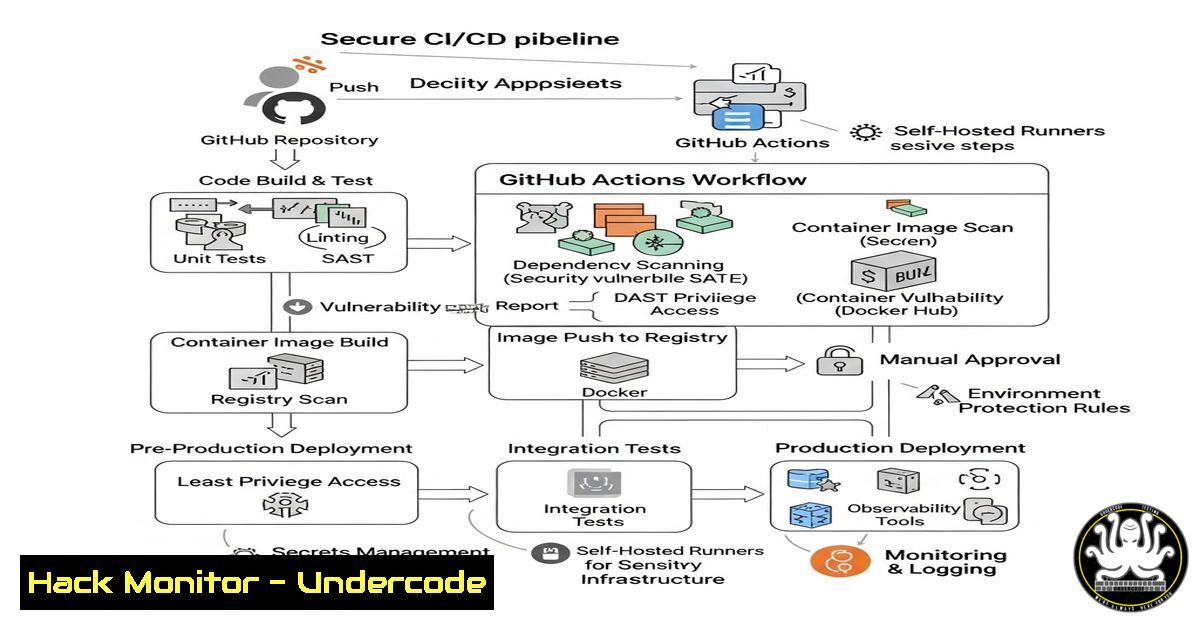
Introduction
GitHub Actions has become a cornerstone of modern CI/CD pipelines, enabling seamless automation from code commit to production deployment. This article explores how to build a secure, production-grade CI/CD workflow using GitHub Actions, integrating security scans, Docker, and industry best practices—just like top tech companies.
Learning Objectives
- Automate CI/CD workflows using GitHub Actions for real-world deployments.
- Implement security-first practices with secrets management, vulnerability scanning, and compliance checks.
- Optimize Docker-based deployments with automated builds and secure image pushes.
You Should Know
1. Setting Up a Basic GitHub Actions Workflow
Command:
name: CI/CD Pipeline
on: [bash]
jobs:
build:
runs-on: ubuntu-latest
steps:
- uses: actions/checkout@v3
- run: echo "Hello, GitHub Actions!"
Step-by-Step Guide:
1. Create a `.github/workflows` directory in your repo.
- Add a YAML file (e.g.,
ci.yml) with the above code.
3. Push changes to trigger the workflow.
4. Monitor execution in the GitHub Actions tab.
2. Integrating Security Scans with GitHub Actions
Command:
- name: Run Trivy Vulnerability Scan
uses: aquasecurity/trivy-action@master
with:
image-ref: 'your-docker-image'
format: 'table'
Step-by-Step Guide:
1. Install Trivy (a lightweight vulnerability scanner).
2. Add this step post-Docker build.
3. Block deployments if critical CVEs are detected.
3. Managing Secrets Securely
Command:
- name: Deploy to AWS
env:
AWS_ACCESS_KEY_ID: ${{ secrets.AWS_ACCESS_KEY }}
AWS_SECRET_ACCESS_KEY: ${{ secrets.AWS_SECRET_KEY }}
Step-by-Step Guide:
1. Store secrets in GitHub Settings > Secrets.
- Reference them in workflows via
${{ secrets.NAME }}.
3. Never hardcode credentials in YAML files.
4. Docker Build & Push to Registry
Command:
- name: Build and Push Docker Image
uses: docker/build-push-action@v4
with:
push: true
tags: user/app:latest
secrets: ${{ secrets.DOCKER_TOKEN }}
Step-by-Step Guide:
1. Log in to Docker Hub/GitHub Container Registry.
- Use a PAT (Personal Access Token) stored in GitHub Secrets.
3. Automate tagging and pushing on every commit.
5. Enforcing Quality Gates with Tests
Command:
- name: Run Unit Tests
run: pytest tests/
- name: Check Code Coverage
uses: codecov/codecov-action@v3
Step-by-Step Guide:
1. Add test scripts (e.g., `pytest`).
- Fail the pipeline if coverage falls below a threshold.
3. Integrate with Codecov for detailed reports.
6. Multi-Stage Deployments (Dev/Prod)
Command:
jobs:
deploy-dev:
if: github.ref == 'refs/heads/dev'
steps: [...]
deploy-prod:
if: github.ref == 'refs/heads/main'
needs: [deploy-dev, security-scan]
Step-by-Step Guide:
1. Use branch conditions (`dev` vs. `main`).
2. Require approvals for production deployments.
3. Chain jobs with `needs` for dependency management.
7. Slack Notifications for Pipeline Status
Command:
- name: Slack Alert
uses: rtCamp/action-slack-notify@v2
env:
SLACK_WEBHOOK: ${{ secrets.SLACK_WEBHOOK }}
Step-by-Step Guide:
1. Create a Slack incoming webhook.
2. Store the URL in GitHub Secrets.
3. Get real-time alerts on failures/successes.
What Undercode Say
- Key Takeaway 1: GitHub Actions simplifies CI/CD but requires strict security practices—always scan for vulnerabilities before deployment.
- Key Takeaway 2: Docker + GitHub Actions = Faster deployments, but image security is non-negotiable.
Analysis:
Adopting GitHub Actions for CI/CD boosts efficiency but introduces risks if misconfigured. Teams must enforce:
– Secrets management (avoid leaks).
– Mandatory vulnerability scans (Trivy, Snyk).
– Immutable deployments (tagged Docker images).
Prediction
By 2026, 75% of CI/CD breaches will stem from misconfigured GitHub Actions workflows. Organizations prioritizing DevSecOps automation will lead in both speed and security.
Ready to automate securely? Implement these steps today to future-proof your CI/CD pipeline. 🚀
🎯Let’s Practice For Free:
IT/Security Reporter URL:
Reported By: Adityajaiswal7 Github – Hackers Feeds
Extra Hub: Undercode MoN
Basic Verification: Pass ✅


