Listen to this Post
Introduction:
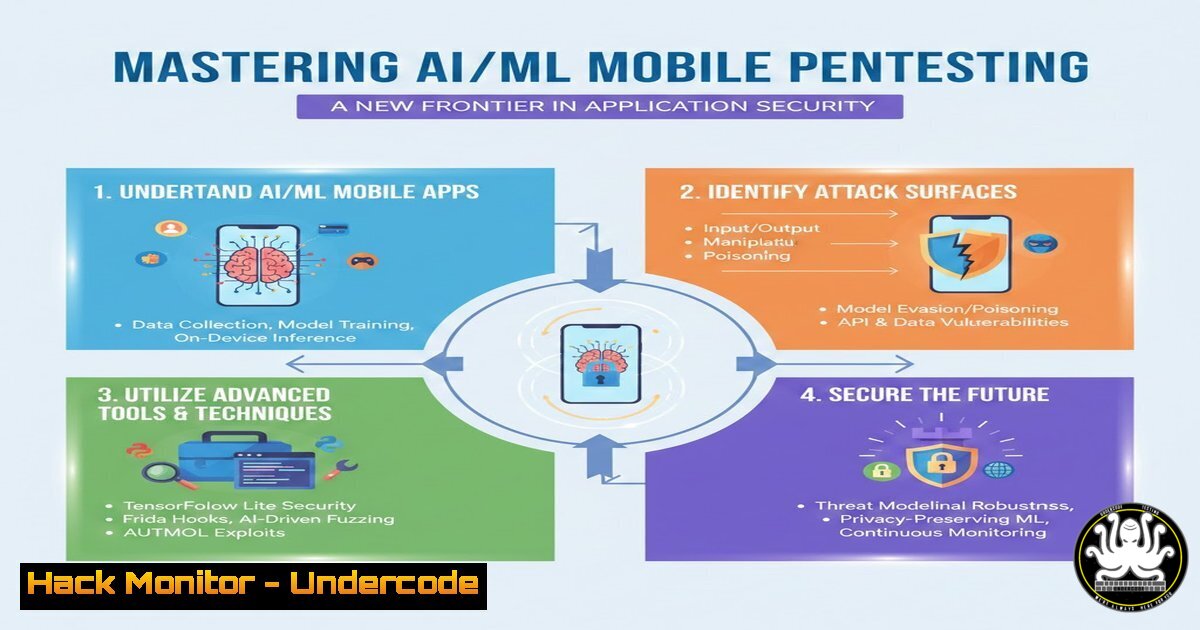
The convergence of artificial intelligence and mobile application development has opened a new attack surface that traditional pentesting methodologies often miss. As AI/ML models are increasingly embedded directly into Android and iOS apps for features like image recognition, natural language processing, and behavioral predictions, these models and their pipelines become prime targets for adversarial attacks. This new discipline—AI/ML Mobile Pentesting—focuses on extracting, manipulating, and exploiting on-device machine learning models to compromise application logic, exfiltrate proprietary data, or cause a denial of service. Following a groundbreaking talk at DEFCON, a comprehensive course on this subject has been developed, and a preview is available at the upcoming Free Mobile Hacking Conference.
Learning Objectives:
- Understand the unique attack vectors introduced by on-device AI/ML models in mobile applications.
- Learn techniques for extracting and reverse engineering embedded ML models (TensorFlow Lite, Core ML, PyTorch Mobile) from Android and iOS apps.
- Master the methodology for crafting adversarial inputs to manipulate model predictions and application behavior.
You Should Know:
1. Reconnaissance: Identifying AI/ML Components in Mobile Apps
Before attacking an AI model, you must first identify that an application is using one and determine the specific frameworks involved. This initial recon phase relies heavily on static analysis of the application package.
Step‑by‑step guide for Android (Linux):
- Obtain the APK: Download the target application APK from a source like APKMirror or extract it from a physical device.
If the app is installed on a connected device/adb
adb shell pm list packages | grep <target_app_name>
adb shell pm path <package_name>
adb pull /data/app/<package_name>-/base.apk
-
Analyze with
apktool: Decompile the APK to inspect its structure and look for model files.apktool d base.apk -o decompiled_app cd decompiled_app
-
Search for Model Artifacts: AI/ML models have specific file extensions and signatures. Use the `find` and `file` commands to locate them.
Find common model file extensions
find . -type f ( -name ".tflite" -o -name ".lite" -o -name ".pt" -o -name ".pth" -o -name ".mlmodel" -o -name ".mlmodelc" -o -name ".onnx" )

Use grep to find framework signatures in libraries or code
grep -r -i "tensorflow" .
grep -r -i "caffe2" .
grep -r -i "coreml" .
-
Examine Native Libraries: Often, ML frameworks are bundled as native libraries (
.sofiles). Check the `lib/` directory within the decompiled APK.ls -la lib/ Look for libraries like libtensorflow_inference.so, libcaffe2.so, etc.
2. Model Extraction and Reverse Engineering
Once a model file is located, the next step is to extract it and understand its architecture, input requirements, and output classes. This information is critical for crafting effective adversarial attacks.
Step‑by‑step guide for working with a TensorFlow Lite model:
1. Extract the Model: Copy the identified `.tflite` file from the decompiled app directory to your working directory.
 Assuming the model is at ./assets/model.tflite
cp ./decompiled_app/assets/model.tflite ./
- Inspect Model Architecture: Use the `tflite_flatbuffer` tools or Python with the TensorFlow library to inspect the model.
!/usr/bin/env python3
import tensorflow as tf

Load the TFLite model and allocate tensors.
interpreter = tf.lite.Interpreter(model_path="model.tflite")
interpreter.allocate_tensors()

Get input and output tensors.
input_details = interpreter.get_input_details()
output_details = interpreter.get_output_details()</p></li>
</ol>

<p>print("Input Details:")
for input in input_details:
print(f" Name: {input['name']}")
print(f" Shape: {input['shape']}")
print(f" Data Type: {input['dtype']}")
print(f" Quantization: {input['quantization']}")

print("\nOutput Details:")
for output in output_details:
print(f" Name: {output['name']}")
print(f" Shape: {output['shape']}")
print(f" Data Type: {output['dtype']}")
This script reveals the expected input dimensions (e.g., a 224×224 pixel image for a classifier) and the structure of the output (e.g., an array of 1000 class probabilities).
- Map Output to Labels: If the model is a classifier, the app likely contains a labels file (e.g.,
labels.txt,dict.txt). Find and extract this file to understand what the model’s predictions mean.find . -name ".txt" -exec grep -l "class_name" {} \; Or manually inspect the contents cat decompiled_app/assets/labels.txt
3. Dynamic Analysis and Adversarial Input Crafting
With knowledge of the model’s inputs and outputs, you can now perform dynamic analysis. This involves running the application, intercepting the data fed to the model, and attempting to manipulate it to cause misclassification—a core tenet of AI red teaming.
Step‑by‑step guide for a basic adversarial attack concept:
- Intercept Model I/O with Frida (Conceptual): While directly hooking into the ML framework’s inference function is complex, you can use Frida to trace data just before it’s passed to the model and just after the result is returned.
// Example Frida script concept to log arguments to a prediction function // (This requires identifying the specific Java method that calls the TFLite interpreter) Java.perform(function() { var TargetClass = Java.use("com.example.app.MLHelper"); TargetClass.runInference.implementation = function(inputData) { console.log("[] Input to model: " + inputData); var result = this.runInference(inputData); console.log("[] Raw model output: " + result); return result; }; }); -
Simulate an Adversarial Input (Python): In a lab environment, once the model is extracted, you can simulate attacks directly. For an image classifier, a simple adversarial technique is the Fast Gradient Sign Method (FGSM), which adds a small, calculated perturbation to an image to fool the model.
import numpy as np
import tensorflow as tf

Assume 'model' is your loaded TFLite model as a tf.keras model for simplicity
and 'image' is your input tensor with requires_grad=True</p></li>
</ol>

<p>def create_adversarial_pattern(model, input_image, input_label):
with tf.GradientTape() as tape:
tape.watch(input_image)
prediction = model(input_image)
loss = tf.keras.losses.sparse_categorical_crossentropy(input_label, prediction)
 Get the gradients of the loss w.r.t the input image.
gradient = tape.gradient(loss, input_image)
 Get the sign of the gradients to create the perturbation
signed_grad = tf.sign(gradient)
return signed_grad

Example usage (conceptual)
 perturbations = create_adversarial_pattern(model, image, label)
 adversarial_image = image + 0.1  perturbations
This demonstrates the principle: by slightly altering the input in a way that is often imperceptible to a human, you can cause the AI to output a completely incorrect classification with high confidence.
What Undercode Say:
- The Shift in Attack Surface: The focus of mobile pentesting is expanding beyond traditional API endpoints and local storage to include the integrity of the AI models themselves. A compromised model can lead to business logic bypasses, content filter evasion, or even the extraction of training data, which is a significant intellectual property leak.
- Proactive Defense is Key: Defenders must start treating AI models as executable code that requires integrity checks, encryption, and runtime monitoring. Techniques like model signing, on-device verification, and input sanitization against adversarial examples will become as critical as preventing SQL injection.
This emerging field requires a hybrid skillset combining mobile reverse engineering, data science, and traditional security testing. The free conference on March 3rd and 4th, 2026, is an excellent starting point for security professionals to get hands-on with these new techniques and understand how to secure the next generation of intelligent applications.
Prediction:
Within the next 18 months, we will see the first high-profile data breaches or application-specific failures directly attributed to the exploitation of on-device AI models. This will force a rapid evolution in mobile security standards, leading to the creation of dedicated “AI/ML Security Testing” checklists in compliance frameworks like OWASP MASVS and the proliferation of automated tools designed to scan for and validate model integrity. The role of the “AI Red Teamer” will become a standard, specialized position within enterprise security teams.
▶️ Related Video (88% Match):
🎯Let’s Practice For Free:
IT/Security Reporter URL:
Reported By: Gabriellebotbol Aiml – Hackers Feeds
Extra Hub: Undercode MoN
Basic Verification: Pass ✅🔐JOIN OUR CYBER WORLD [ CVE News • HackMonitor • UndercodeNews ]
📢 Follow UndercodeTesting & Stay Tuned:
- Map Output to Labels: If the model is a classifier, the app likely contains a labels file (e.g.,


