Listen to this Post
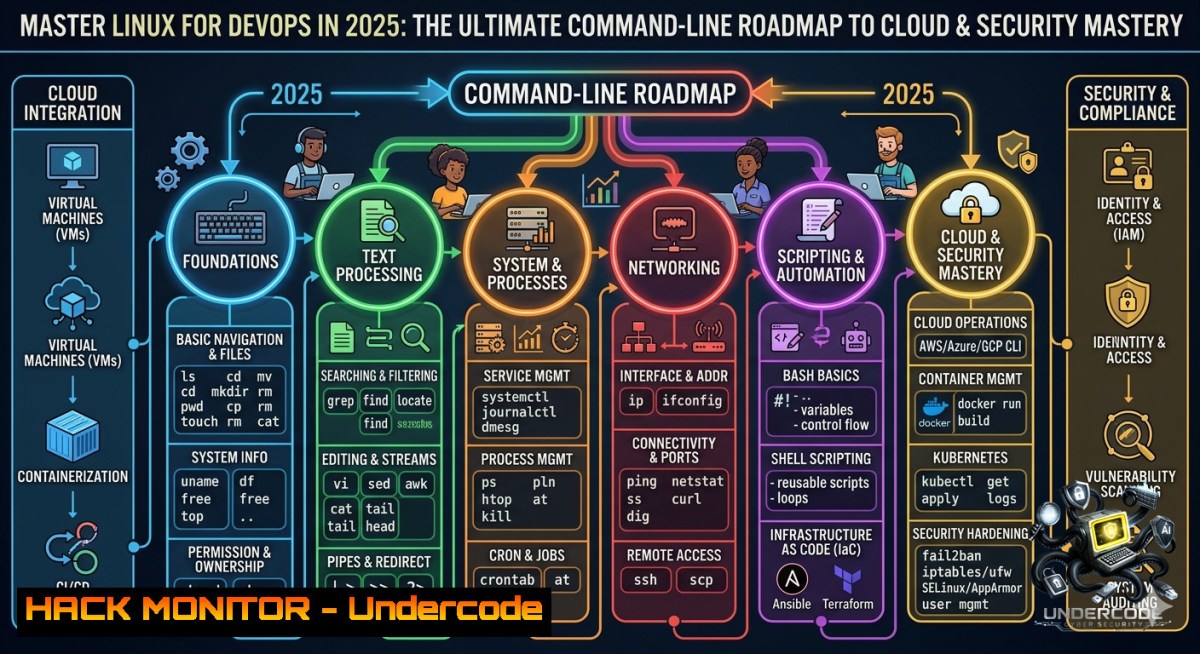
Introduction:
Linux is the backbone of modern DevOps, cloud infrastructure, and cybersecurity operations – from containerized microservices to CI/CD pipelines and incident response. Mastering Linux means gaining the ability to navigate, automate, and secure the systems that power the digital world, making it an indispensable skill for any SRE, cloud engineer, or security analyst.
Learning Objectives:
- Navigate and manipulate the Linux filesystem, manage users/permissions, and monitor system resources using essential shell commands.
- Automate repetitive tasks with shell scripting, cron scheduling, and environment variables to build efficient DevOps workflows.
- Apply Linux security fundamentals including log analysis, process hardening, and network troubleshooting to protect and audit production environments.
You Should Know:
1. File System Navigation & Permission Hardening
Understanding Linux file hierarchy and permission models is critical for both system administration and security. Misconfigured permissions are a top cause of data breaches.
Step‑by‑step guide:
- Navigate using
cd,ls -la,pwd. - Change ownership: `sudo chown user:group file`
- Set permissions: `chmod 750 script.sh` (owner: rwx, group: r-x, others: none)
- For Windows (WSL or Git Bash), use identical commands. For native Windows, use `icacls` for NTFS permissions.
Example security check:
find / -perm -4000 -type f 2>/dev/null Find SUID binaries (potential privilege escalation)
2. Process & Resource Monitoring for Anomaly Detection
Attackers often hide malicious processes. Linux process tools help spot unusual CPU/memory spikes or hidden backdoors.
Step‑by‑step guide:
– `top` or `htop` – real‑time process view.
– `ps aux –sort=-%cpu | head -10` – top CPU consumers.
– `lsof -i :22` – see what’s using SSH port.
– `kill -9
On Windows: `tasklist`, `Get-Process`, `netstat -ano`.
To monitor for new unknown processes:
watch -1 2 'ps -e --forest | grep -v "sshd|systemd"'
3. Networking Tools – Diagnosis and Hardening
Every DevOps pipeline relies on network connectivity. Linux networking commands troubleshoot latency, firewalls, and open ports.
Step‑by‑step guide:
– `ss -tulpn` – list listening ports and associated services.
– `iptables -L -1 -v` – view firewall rules.
– `tcpdump -i eth0 port 443 -c 10` – capture HTTPS traffic.
– `curl -I https://example.com` – test web endpoints.
Cloud hardening: Use `ufw` or `firewalld` to restrict inbound traffic. Example:
sudo ufw default deny incoming
sudo ufw allow from 10.0.0.0/8 to any port 22
sudo ufw enable
4. Shell Scripting for Automation & CI/CD Pipelines
Scripts turn manual tasks into repeatable, version‑controlled automation – essential for DevOps.
Step‑by‑step guide:
Create a script to back up logs and restart a service:
!/bin/bash
LOG_DIR="/var/log/myapp"
BACKUP_DIR="/backup/$(date +%Y%m%d)"
mkdir -p $BACKUP_DIR
cp $LOG_DIR/.log $BACKUP_DIR/
systemctl restart myapp
echo "Backup completed at $(date)" >> /var/log/backup.log
Make executable: `chmod +x backup.sh`
Schedule via cron: `crontab -e` → `0 2 /home/user/backup.sh`
For Windows DevOps (PowerShell):
$date = Get-Date -Format "yyyyMMdd"
Copy-Item "C:\Logs.log" "D:\Backup\$date\"
Restart-Service MyApp
5. Log Management, Journalctl, and Security Auditing
Logs are the eyes and ears of system health and incident investigation. Centralised logging is a must for SOC and SRE teams.
Step‑by‑step guide:
- View systemd logs: `journalctl -xe`
- Follow kernel messages: `dmesg -w`
- Search for SSH failures: `grep “Failed password” /var/log/auth.log`
- Real‑time security monitoring: `tail -f /var/log/syslog | grep -i “error\|fail\|attack”`
Integrate with SIEM: Forward logs using `rsyslog` or systemd-journal-remote.
Example log rotation config (`/etc/logrotate.d/security`):
/var/log/secure {
daily
rotate 7
compress
missingok
notifempty
create 0640 root root
}
- Storage & Disk Management – LVM and Encryption
Managing disk space and encrypting sensitive data are core responsibilities in cloud and on‑prem environments.
Step‑by‑step guide:
- Check usage:
df -h, `du -sh /home/` - LVM basics:
pvs  physical volumes
vgs  volume groups
lvs  logical volumes
lvextend -L +10G /dev/vg0/root && resize2fs /dev/vg0/root
- Encrypt a partition with LUKS:
sudo cryptsetup luksFormat /dev/sdb1
sudo cryptsetup open /dev/sdb1 secret
mkfs.ext4 /dev/mapper/secret
mount /dev/mapper/secret /mnt/secure
Windows equivalent: `manage-bde` for BitLocker.
What Undercode Say:
- Key Takeaway 1: Linux is not just an operating system – it’s the control plane for every major cloud and container platform. Without fluency in basic commands and scripting, you cannot effectively troubleshoot or secure DevOps pipelines.
- Key Takeaway 2: Security and automation go hand‑in‑hand. Many breaches start with misconfigured permissions or unmonitored cron jobs. Integrating simple audit commands (like `auditd` or
fail2ban) into your daily Linux practice dramatically reduces risk.
Analysis (approx. 10 lines):
Undercode emphasises that the post correctly highlights a structured roadmap, but many beginners skip “boring” topics like log rotation or process monitoring until an incident occurs. Real‑world DevOps demands proactive mastery: you should practise breaking and fixing services in a lab environment. The inclusion of cron and shell scripting is vital – without automation, Linux administration becomes a manual bottleneck. Moreover, the synergy between Linux skills and cybersecurity cannot be overstated: tools like tcpdump, iptables, and `journalctl` are the first responders during a compromise. Windows administrators transitioning to cloud roles must embrace Linux, as 90% of public cloud instances run on Linux. Finally, continuous learning through CTF challenges (e.g., OverTheWire Bandit) solidifies both CLI proficiency and security mindset.
Prediction:
- +1 Demand for engineers who combine deep Linux knowledge with DevOps practices (Kubernetes, Terraform, Ansible) will rise by 40% by 2027 as edge computing and AI workloads move to Linux‑based clusters.
- +1 Linux will become the standard training ground for AI/ML operations (MLOps), because most inference servers and training frameworks (PyTorch, TensorFlow) run natively on Linux – creating new roles for Linux‑savvy data engineers.
- -1 As Linux adoption grows in critical infrastructure, so will targeted ransomware and kernel‑level exploits; defenders will need more advanced eBPF and SELinux skills than the roadmap covers.
- -1 Without standardised Linux assessment in DevOps certifications, many self‑taught professionals will remain vulnerable to misconfigurations, leading to repeated cloud data leaks.
▶️ Related Video (78% Match):
🎯Let’s Practice For Free:
🎓 Live Courses & Certifications:
Join Undercode Academy for Verified Certifications
🚀 Request a Custom Project:
Secure, high-velocity infrastructure and disruptive technological engineering. Contact our engineering team for high-tier development and proprietary systems:
[email protected]
💎 Smart Architecture | 🛡️ Secure by Design | ⭐ Trusted by Thousands
IT/Security Reporter URL:
Reported By: Linux Devops – Hackers Feeds
Extra Hub: Undercode MoN
Basic Verification: Pass ✅


