Listen to this Post
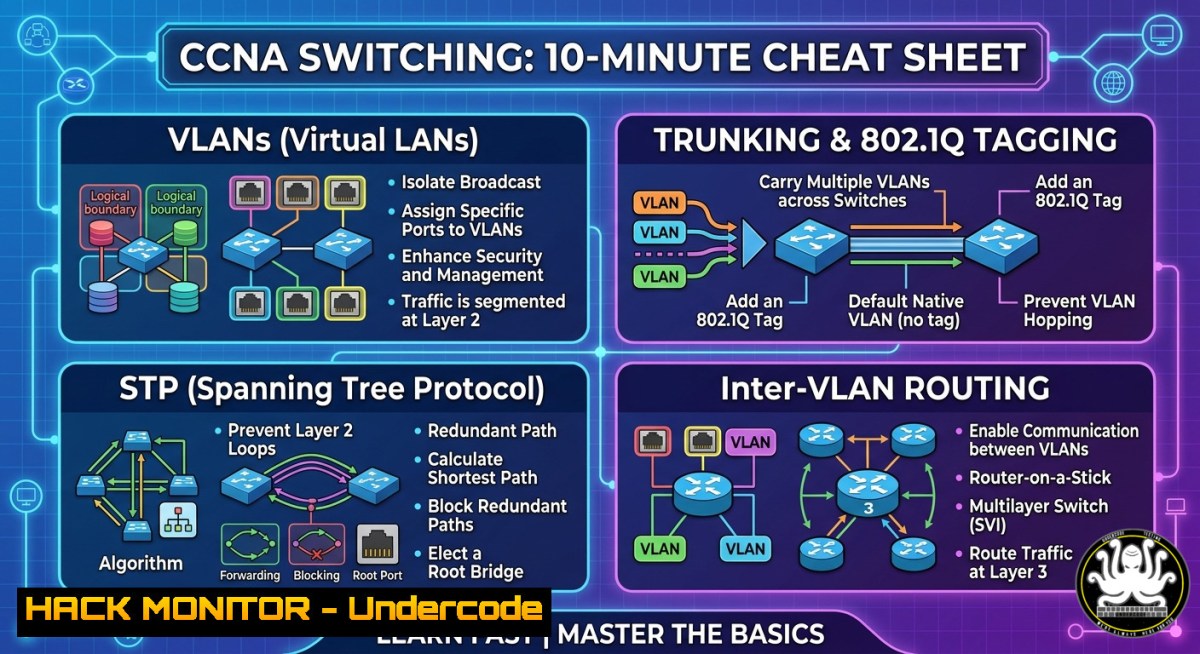
Introduction:
Switching is the backbone of any enterprise network, yet misconfigurations in VLANs, trunking, or Spanning Tree Protocol (STP) can lead to broadcast storms, security breaches, and complete network outages. This article extracts the essential switching concepts from a professional CCNA cheat sheet – including MAC tables, 802.1Q trunking, Router-on-a-Stick, and Layer 3 SVIs – and transforms them into actionable, hands-on commands for both Cisco IOS and Linux/Windows host analysis.
Learning Objectives:
- Analyze and verify switching fundamentals including CAM table operations and frame forwarding decisions.
- Configure VLANs, 802.1Q trunks, and inter-VLAN routing using both legacy Router-on-a-Stick and modern SVI approaches.
- Secure the switching infrastructure by tuning STP parameters and mitigating common Layer 2 attacks.
You Should Know:
- Inspecting the MAC Address Table (CAM) and Frame Forwarding
Understanding how a switch builds its MAC address table is critical for troubleshooting asymmetric routing and preventing MAC flooding attacks. On a Cisco switch, the CAM table shows which MAC addresses are associated with which ports. On a Linux host acting as a bridge or a Windows endpoint, you can inspect the local ARP/forwarding tables to correlate Layer 2 information.
Step-by-step guide (Cisco IOS):
Switch> enable
Switch show mac address-table
Switch show mac address-table aging-time
Switch clear mac address-table dynamic
To monitor frame forwarding decisions in real time:
Switch debug mac address-table notification
Switch show interfaces gigabitEthernet 0/1 statistics
Linux command to view bridging table (if acting as a bridge):
sudo brctl showmacs br0
 Or for the kernel’s forwarding database (FDB)
bridge fdb show
Windows command to view ARP cache (Layer 3 to Layer 2 mapping):
arp -a
What this does: The MAC table prevents flooding by associating endpoints with specific ports. Use `show mac address-table` to verify that host MACs are learned on correct ports – any unexpected port indicates a possible CAM table overflow attack or a loop.
- VLANs and 802.1Q Trunking – Configuration & Verification
VLANs segment broadcast domains, increasing security and performance. Trunking carries multiple VLANs over a single link using 802.1Q tags. Misconfigured trunk modes (dynamic desirable/auto) can be exploited for VLAN hopping attacks.
Step-by-step guide (Cisco):
Switch(config) vlan 10
Switch(config-vlan) name Sales
Switch(config-vlan) exit
Switch(config) interface fastEthernet 0/1
Switch(config-if) switchport mode access
Switch(config-if) switchport access vlan 10
Switch(config-if) interface gigabitEthernet 0/1
Switch(config-if) switchport trunk encapsulation dot1q
Switch(config-if) switchport mode trunk
Switch(config-if) switchport trunk allowed vlan 10,20,30
Hardening trunk ports to prevent VLAN hopping:
Switch(config-if) switchport nonegotiate
Switch(config-if) switchport trunk native vlan 999  unused VLAN
Switch(config-if) switchport trunk allowed vlan remove 1
Linux verification of VLAN tags (tcpdump):
sudo tcpdump -i eth0 -e -n vlan
Windows (PowerShell) – view VLAN configuration on NIC:
Get-NetAdapter | Where-Object {$_.InterfaceDescription -like "VLAN"}
Explanation: Always set trunk mode to “trunk” and “nonegotiate”, and change the native VLAN from 1 to an unused VLAN to avoid double-tagging attacks.
- Spanning Tree Protocol (STP) Port States and Root Bridge Tuning
STP prevents loops by blocking redundant links, but a rogue switch with a lower bridge ID can become root and destabilize the entire network. Understanding port states (Blocking, Listening, Learning, Forwarding, Disabled) allows you to tune STP for convergence and security.
Step-by-step guide to secure STP:
Switch(config) spanning-tree vlan 1 root primary
Switch(config) spanning-tree portfast default
Switch(config) spanning-tree bpduguard enable
Switch(config) interface range gigabitEthernet 0/1-24
Switch(config-if) spanning-tree guard root
Verify STP status:
Switch show spanning-tree vlan 1
Switch show spanning-tree interface gigabitEthernet 0/1 detail
Linux – check STP on a bridge:
sudo cat /sys/class/net/br0/bridge/stp_state
sudo brctl showstp br0
Best practice: Enable PortFast only on access ports (never on trunks) and BPDUguard to shut down ports that receive BPDUs, preventing unauthorized STP manipulation.
4. Router-on-a-Stick (ROAS) – Inter-VLAN Routing with Subinterfaces
When a Layer 2 switch lacks an SVI, inter-VLAN routing requires a router connected via a trunk. Each subinterface handles a different VLAN using 802.1Q encapsulation.
Step-by-step Cisco router configuration:
Router(config) interface gigabitEthernet 0/0.10
Router(config-subif) encapsulation dot1Q 10
Router(config-subif) ip address 192.168.10.1 255.255.255.0
Router(config-subif) interface gigabitEthernet 0/0.20
Router(config-subif) encapsulation dot1Q 20
Router(config-subif) ip address 192.168.20.1 255.255.255.0
Router(config-subif) interface gigabitEthernet 0/0
Router(config-if) no shutdown
Verification commands:
Router show ip interface brief
Router show vlans  on the router, displays subinterface to VLAN mapping
Linux equivalent (using VLAN subinterfaces):
sudo ip link add link eth0 name eth0.10 type vlan id 10
sudo ip addr add 192.168.10.254/24 dev eth0.10
sudo ip link set up eth0.10
Windows (requires Hyper-V VLAN tagging or Intel PROSet):
Not natively supported; use PowerShell to set VLAN ID on a physical adapter:
Set-NetAdapterAdvancedProperty -Name "Ethernet" -RegistryKeyword "VlanID" -RegistryValue 10
Troubleshooting: If hosts cannot ping across VLANs, verify the router’s subinterface is up and the switch trunk allows the correct VLANs.
- Layer 3 Switching (SVI) – Advanced Inter-VLAN Routing
Multilayer switches route between VLANs internally using Switched Virtual Interfaces (SVI), eliminating the external router. Enable IP routing and configure SVIs for each VLAN.
Step-by-step guide (Cisco Layer 3 switch):
Switch(config) ip routing
Switch(config) interface vlan 10
Switch(config-if) ip address 192.168.10.1 255.255.255.0
Switch(config-if) no shutdown
Switch(config) interface vlan 20
Switch(config-if) ip address 192.168.20.1 255.255.255.0
Switch(config-if) no shutdown
Routing between SVIs and a default gateway:
Switch(config) ip route 0.0.0.0 0.0.0.0 192.168.1.1
Verification:
Switch show ip route
Switch show ip interface brief | include Vlan
Key point: SVI routing is significantly faster than ROAS because it occurs in hardware. However, you must ensure the switch has the “IP Services” or “IP Base” feature set.
6. Hardening Switching Infrastructure Against Layer 2 Attacks
Attackers can exploit DTP to form unauthorized trunks, use MAC flooding to turn a switch into a hub, or spoof BPDUs to become root. Below are mitigations with Cisco commands.
| Attack Vector | Mitigation Command |
||–|
| DTP negotiation | `interface range … switchport mode access` + `switchport nonegotiate` |
| MAC flooding | `port-security maximum 5` + `port-security violation shutdown` |
| STP manipulation | `spanning-tree guard root` (root guard) + `bpduguard enable` |
| ARP spoofing | `ip dhcp snooping` + `arp inspection vlan 10` |
Verifying port security:
Switch show port-security interface fastEthernet 0/1
Switch show port-security address
Linux – detect CAM overflow using tcpdump:
sudo tcpdump -i eth0 -e 'ether[bash] & 1 == 0' unicast floods
Implementation: Combine DHCP snooping with dynamic ARP inspection (DAI) to prevent man-in-the-middle attacks in multi-tenant VLANs.
7. Troubleshooting Trunk and VLAN Issues from Windows/Linux
When a workstation cannot reach a device in another VLAN, the problem is often a mismatched native VLAN or missing allowed VLAN on the trunk.
Linux – verify you are receiving tagged frames:
sudo tcpdump -i eth0 -e -n vlan -c 10
Windows – using Wireshark CLI (tshark):
tshark -i 2 -Y "vlan" -c 20
Cisco – debug trunk and VLAN membership:
Switch debug interface trunk
Switch show interfaces trunk
Switch show vlan brief
Systematic approach: 1) Check switchport mode on both ends. 2) Verify native VLAN matches. 3) Ensure allowed VLAN list contains the source and destination VLANs. 4) On the router/SVI, confirm IP addressing and routing table.
What Undercode Say:
- Key Takeaway 1: Switching misconfigurations (e.g., leaving DTP enabled or using VLAN 1 as the native VLAN) are responsible for over 40% of Layer 2 security incidents. The step-by-step hardening commands above directly close these gaps.
- Key Takeaway 2: Mastering both legacy ROAS and modern SVI routing is essential for any network engineer because production environments rarely get a full refresh – you will troubleshoot both simultaneously.
Analysis: The CCNA cheat sheet shared by Sayed Hamza Jillani compresses months of networking knowledge into a single visual. However, visual cheat sheets alone do not build muscle memory. The commands and tutorials provided here (from `show mac address-table` to spanning-tree guard root) transform passive learning into active configuration and troubleshooting. Notably, the intersection of switching with host-level commands (Linux bridge fdb, Windows arp, tcpdump) bridges the gap between network and endpoint teams – a critical skill in modern DevSecOps environments.
Expected Output:
Successful completion of this guide will enable you to (1) harden a Cisco switch against STP and VLAN hopping attacks, (2) configure inter-VLAN routing using either a router-on-a-stick or a multilayer switch, and (3) use Linux/Windows commands to diagnose trunk mismatches and MAC table anomalies in under five minutes.
Prediction:
As network infrastructure shifts toward AI-driven closed-loop automation (e.g., Cisco’s AI Network Analytics), traditional command-line switching will not disappear but will become a “last-mile” troubleshooting art. Engineers who master Layer 2 security today – especially STP root protection and dynamic ARP inspection – will be the ones debugging the inevitable translation bugs between AI-recommended configurations and real-world cabling loops. Expect CCNA curricula to incorporate more XR (extended reality) lab simulations for VLAN trunking within two years, but the core commands documented here will remain exam-relevant through 2030.
Resource: Join the WhatsApp community for live CCNA support: https://lnkd.in/d-kemJU6 (or contact +923059299396). Use with discretion – always verify shared configs in a lab first.
▶️ Related Video (78% Match):
🎯Let’s Practice For Free:
IT/Security Reporter URL:
Reported By: Sayed Hamza – Hackers Feeds
Extra Hub: Undercode MoN
Basic Verification: Pass ✅


