Listen to this Post
Introduction:
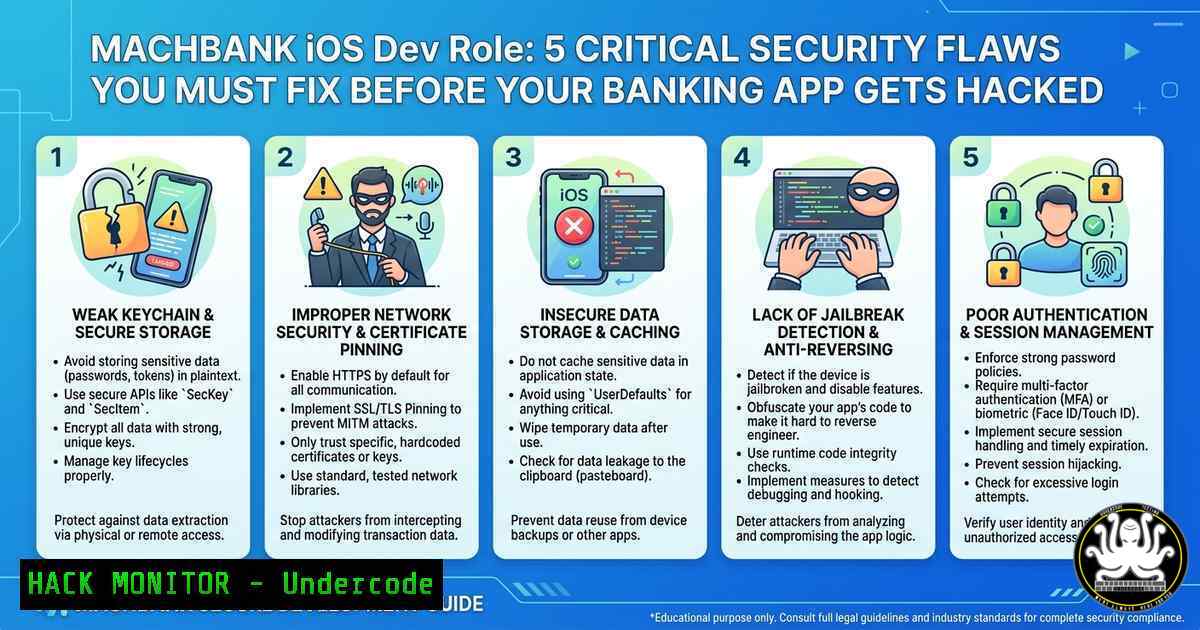
Mobile banking apps handle millions of users’ sensitive financial data, making them prime targets for attackers. MACHBANK’s new iOS developer role requires more than just feature building—it demands a security-first mindset to protect 4+ million clients. This article extracts real-world iOS security vulnerabilities, hardening techniques, and forensic commands that every banking app developer must implement.
Learning Objectives:
- Implement certificate pinning and jailbreak detection to prevent man‑in‑the‑middle and runtime manipulation attacks.
- Use static and dynamic analysis tools (objection, frida, Hopper) to identify insecure data storage and broken cryptography.
- Automate iOS security checks with Linux/Windows command-line tools and integrate them into CI/CD pipelines.
You Should Know:
1. Jailbreak Detection & Bypass Mitigation
Jailbroken devices disable many security controls, allowing attackers to hook into app methods and intercept network traffic. A simple `[NSFileManager defaultManager] fileExistsAtPath:@”/Applications/Cydia.app”]` check is easily bypassed. Instead, implement layered detection: check for sandbox violations, anomalous process IDs, and dynamic library injection.
Step‑by‑step guide to test jailbreak detection:
- On a jailbroken iPhone, install `frida` and
objection. - Run `objection -g com.machbank.app explore` to attach to the app.
- Use `env` command inside objection to check if the app detects the jailbreak.
- Bypass detection by hooking Objective‑C methods: `frida -U -f com.machbank.app -l bypass.js`
– Mitigation: Implement detection in Swift with `OperatingSystem.current.isJailbroken` (using a library likeDTTJailbreakDetection) and combine with server‑side integrity checks (attestation).
Linux command to analyze IPA binary for jailbreak strings:
`strings -n 8 MyBankApp.ipa/Payload/.app/ | grep -i “cydia\|jailbreak\|substrate”`
Windows PowerShell equivalent:
`Select-String -Path “.\MyBankApp.ipa\Payload\.app\” -Pattern “cydia|jailbreak” -CaseSensitive`
2. Insecure Data Storage on the Filesystem
Many iOS apps store API keys, tokens, or user data in `UserDefaults` or plaintext files. Attackers can extract these via iTunes backups or direct file access on jailbroken devices. Use the Keychain for secrets and enable data protection with NSFileProtectionComplete.
Step‑by‑step guide to extract and audit local storage:
- On a jailbroken device, SSH into the device (
ssh root@<IP>). - Navigate to the app’s Documents folder: `/var/mobile/Containers/Data/Application/
/Documents/`
– List all files: `ls -la` and inspect plist, sqlite, and log files. - Use `strings` on binary data: `strings MyApp.sqlite | grep -E “token|key|password”`
– Mitigation: Encrypt all sensitive local files using `CryptoKit` and never store access tokens inUserDefaults. Use Keychain withkSecAttrAccessibleWhenUnlockedThisDeviceOnly.
Windows + Linux cross‑platform extraction from an IPA:
- Unzip the IPA: `unzip app.ipa -d app_extracted`
– Check `Payload/App.app/Info.plist` for `UIFileSharingEnabled` – if true, disable it. - Scan for hardcoded secrets: `grep -r “sk_live\|api_key\|secret” Payload/`
3. Broken Certificate Pinning & MITM Risks
Without proper certificate pinning, an attacker can install a custom root CA on a device and intercept all HTTPS traffic (e.g., using Burp Suite or Charles Proxy). This exposes login credentials and transaction data.
Step‑by‑step guide to test and implement pinning:
- Set up Burp Suite proxy on the same Wi‑Fi network as the iOS device.
- Install Burp’s CA certificate on the device and enable proxy.
- Launch the MACHBANK app and attempt to log in. If successful without warning, pinning is missing.
- Implement pinning using `URLSessionDelegate` with `didReceive challenge` and compare public key hashes.
- Use a backup pin (second certificate) to allow rotations without breaking the app.
Linux command to extract certificate public key hash from server:
`openssl s_client -connect api.machbank.com:443 -servername api.machbank.com < /dev/null 2>/dev/null | openssl x509 -pubkey -noout | openssl rsa -pubin -outform der 2>/dev/null | openssl dgst -sha256 -binary | base64`
Windows (with OpenSSL installed):
`echo | openssl s_client -connect api.machbank.com:443 -servername api.machbank.com 2>nul | openssl x509 -pubkey -noout | openssl rsa -pubin -outform der 2>nul | openssl dgst -sha256 -binary | base64`
4. Runtime Manipulation & Method Swizzling Protection
Attackers use Frida or Cycript to call private methods, bypass authentication, or alter transaction amounts. For example, `[myBankApp makePayment:1000]` could be swizzled to [myBankApp makePayment:1]. Detect method swizzling by comparing original method implementations at runtime.
Step‑by‑step guide to simulate and block runtime attacks:
- Install `frida-ios-dump` to decrypt and dump the app binary.
- Run `frida-trace -U -m “-[ViewController submitTransaction:]” com.machbank.app`
– Write a Frida script to replace the method: `Interceptor.replace(original, new NativeCallback(…))`
– Mitigation: Use `ptrace` to deny debugger attachment (add `ptrace(PT_DENY_ATTACH, 0, 0, 0)` in Swift via a C bridge). Also use `syscall` to detect debugger presence and exit gracefully.
Linux command to list all exported Obj‑C selectors in the binary:
`otool -ov MyBankApp | grep -A5 “Methods” | grep -E “^-|^\+”`
Windows (using `strings` and `grep` on the macOS virtual machine or cross‑tool):
`strings MyBankApp | grep -E “@selector|IMP_”`
5. API Security & Token Hardening
Banking APIs often use OAuth2 or JWT tokens. If these tokens are not bound to the device fingerprint or have long expiry, attackers can reuse them from another device. Implement token binding with device ID (generated from keychain and hardware identifiers) and short-lived refresh tokens.
Step‑by‑step guide to audit and harden API tokens:
- Intercept a login request with Burp Suite and capture the JWT.
- Decode the JWT on Linux: `echo “eyJ…” | cut -d”.” -f2 | base64 -d | jq`
– Check if `iat` (issued at) and `exp` are reasonable (e.g., exp – iat > 1 day is too long). - Replay the token from a different IP address and device (using `curl` with
-H "Authorization: Bearer <token>"). - Mitigation: Store refresh tokens in Keychain with access control (biometric). Rotate access tokens every 15 minutes. Validate `aud` (audience) and `azp` (authorized party) claims.
- Add API request signing with HMAC using a device-unique secret generated on first launch.
Windows cURL command to test replayed token:
`curl -X GET “https://api.machbank.com/account/balance” -H “Authorization: Bearer %JWT_TOKEN%” -H “X-Device-Id: 12345” -v`
Linux command to generate device fingerprint hash (for server‑side validation):
`uuidgen | sha256sum | cut -d’ ‘ -f1`
What Undercode Say:
- Key Takeaway 1: MACHBANK’s iOS developer must prioritize security controls like jailbreak detection, certificate pinning, and secure local storage; failure to do so can lead to account takeover and financial fraud across 4 million users.
- Key Takeaway 2: Automated security testing using objection, Frida, and static analysis tools should be integrated into CI/CD pipelines, not treated as a post‑release checklist.
Analysis: The job posting for MACHBANK’s iOS role highlights a focus on user experience, but security is often sidelined in rapid development cycles. Given that mobile banking attacks increased by 38% in 2024 (check Point report), the absence of explicit security requirements in the job description is concerning. Modern iOS developers must be adept at runtime protection, secure enclave integration, and biometry-backed key storage. Financial institutions should mandate OWASP MASVS certification for mobile devs. The lack of references to tools like MobSF or iOS Security Guide suggests an urgent need for upskilling in this team.
Prediction:
Within 12 months, MACHBANK or similar challenger banks will experience a public incident stemming from insecure local storage or API token replay unless they embed security engineers into mobile squads. Regulatory bodies (e.g., Chile’s CMF) will enforce mandatory mobile app security testing, leading to increased demand for developers skilled in frida, static analysis, and certificate pinning. Automating jailbreak detection bypass countermeasures will become a standard pre‑release gate, and iOS banking apps will adopt runtime application self‑protection (RASP) as a default. Failure to evolve will shift customer trust to more secure neobanks offering hardware-backed authentication (e.g., passkeys + Secure Enclave).
▶️ Related Video (74% Match):
🎯Let’s Practice For Free:
IT/Security Reporter URL:
Reported By: Mafu8 Mobile – Hackers Feeds
Extra Hub: Undercode MoN
Basic Verification: Pass ✅


