
Listen to this Post
Introduction
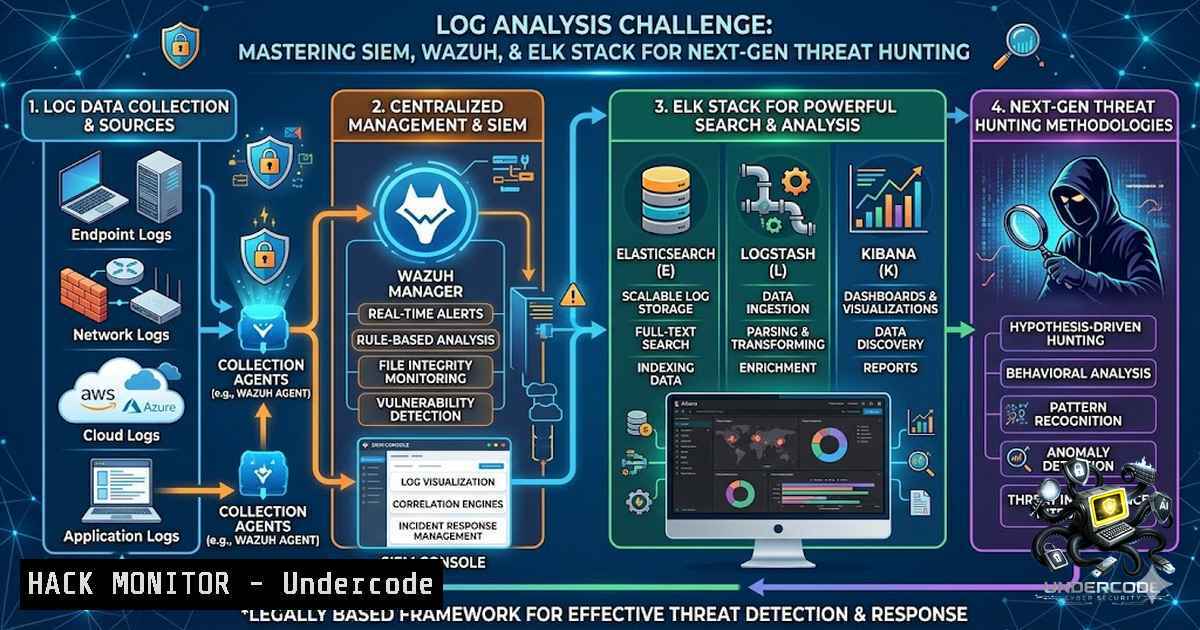
In today’s hyper-connected digital landscape, the ability to analyze logs effectively is the cornerstone of any robust cybersecurity defense strategy. Security Operations Center (SOC) analysts, incident responders, and threat hunters rely heavily on log data from operating systems, applications, and network devices to detect, investigate, and neutralize cyber threats before they escalate into full-blown breaches. The HAXCAMP Log Analysis Challenge represents a pivotal opportunity for cybersecurity professionals and enthusiasts to sharpen their skills in a realistic, high-stakes environment, bridging the gap between theoretical knowledge and practical, hands-on defense.
Learning Objectives
- Master log ingestion, parsing, and analysis using industry-standard SIEM platforms including Wazuh, Splunk, and the ELK Stack (Elasticsearch, Logstash, Kibana).
- Develop practical skills in identifying attack patterns, brute-force attempts, password spray attacks, and post-exploitation activities through event log analysis.
- Learn to configure, deploy, and optimize log monitoring solutions across Linux and Windows environments for proactive threat detection and incident response.
You Should Know
- Understanding the Log Analysis Ecosystem and Core Concepts
Log analysis is the systematic examination of logs generated by operating systems, applications, and network devices to identify security incidents, operational issues, and compliance violations. Modern Security Information and Event Management (SIEM) solutions automate this process by aggregating logs from disparate sources, normalizing the data, and applying correlation rules to detect suspicious activities.
Linux Log Analysis Commands:
 View authentication logs for failed login attempts
sudo tail -f /var/log/auth.log

Search for brute-force patterns in SSH logs
grep "Failed password" /var/log/auth.log | awk '{print $(NF-3)}' | sort | uniq -c | sort -1r

Analyze system logs for critical errors
journalctl -xe -p err -b

Monitor real-time log entries
sudo tail -f /var/log/syslog
Windows Event Log Analysis (PowerShell):
 Get all security event logs
Get-WinEvent -LogName Security

Filter failed logon attempts (Event ID 4625)
Get-WinEvent -LogName Security | Where-Object { $_.Id -eq 4625 }

Extract specific fields from log entries
Get-WinEvent -LogName Security -MaxEvents 100 | Select-Object TimeCreated, Id, Message
Wazuh Log Analysis Setup:
Wazuh employs a three-phase log analysis process: pre-decoding, decoding, and rule matching. The Wazuh agent, installed on monitored endpoints, reads operating system and application logs and forwards them to the Wazuh server for analysis. For example, a rule detecting SSH authentication failures (ID 5716) triggers an alert with level 5 priority and maps to MITRE ATT&CK technique T1110 (Brute Force).
- Setting Up a Comprehensive Log Analysis Lab with ELK Stack
The ELK Stack (Elasticsearch, Logstash, Kibana) provides a powerful, open-source solution for centralized log management and analysis. This step-by-step guide walks you through deploying a complete log analysis lab on a Linux distribution such as Ubuntu.
Step 1: Install Elasticsearch
 Download and install the public signing key
wget -qO - https://artifacts.elastic.co/GPG-KEY-elasticsearch | sudo apt-key add -

Install the APT repository
sudo sh -c 'echo "deb https://artifacts.elastic.co/packages/7.x/apt stable main" > /etc/apt/sources.list.d/elastic-7.x.list'

Install Elasticsearch
sudo apt update
sudo apt install elasticsearch

Start and enable Elasticsearch
sudo systemctl start elasticsearch
sudo systemctl enable elasticsearch
Step 2: Install and Configure Logstash for Log Ingestion
 Install Logstash
sudo apt install logstash

Create a Logstash configuration file
sudo nano /etc/logstash/conf.d/logstash.conf

Add the following configuration for ingesting syslog data
input {
file {
path => "/var/log/syslog"
start_position => "beginning"
}
}

filter {
grok {
match => { "message" => "%{SYSLOGTIMESTAMP:timestamp} %{SYSLOGHOST:hostname} %{DATA:program}(?:[%{POSINT:pid}])?: %{GREEDYDATA:message}" }
}
date {
match => [ "timestamp", "MMM d HH:mm:ss", "MMM dd HH:mm:ss" ]
}
}

output {
elasticsearch {
hosts => ["localhost:9200"]
index => "syslog-%{+YYYY.MM.dd}"
}
}

Restart Logstash to apply the configuration
sudo systemctl restart logstash
Step 3: Install Kibana and Create Index Patterns
 Install Kibana
sudo apt install kibana

Start and enable Kibana
sudo systemctl start kibana
sudo systemctl enable kibana
Once Kibana is running, access the web interface (typically on port 5601), navigate to “Stack Management,” and create an index pattern (e.g., syslog-) to begin visualizing and querying your log data.
- Using Splunk for Advanced Log Analysis and Threat Hunting
Splunk is a widely adopted SIEM platform that enables security professionals to search, monitor, and analyze machine-generated data. In the HAXCAMP Log Analysis Challenge, participants are often required to leverage Splunk’s powerful search processing language (SPL) to uncover malicious activities.
Essential Splunk Commands for Log Analysis:
search: Retrieves events from indexes or filters results of a previous search. Example: `index=main source=/var/log/auth.log “Failed password”`
–stats: Generates summary statistics for specified fields. Example: `index=main | stats count by src_ip`
– `top` andrare: Identify the most and least frequent values of a field. Example: `index=main | top limit=10 src_ip`
–timechart: Creates a time series chart of events. Example: `index=main | timechart count by event_type`
–cluster: Groups events based on similarity to detect patterns
Detecting Password Spray Attacks with Splunk:
Password spray attacks involve attempting a small number of commonly used passwords against many accounts to avoid lockout policies. To detect such attacks, you can use the following Splunk query:
index=main EventCode=4625
| stats count by Account_Name, src_ip
| where count > 5
| sort - count
This query identifies accounts with multiple failed logon attempts, which may indicate a password spray or brute-force attack.
- Windows Log Analysis: Investigating Attack Outcomes and Techniques
Windows Event Logs are a treasure trove of forensic data for incident responders. Key event IDs to monitor include:
- 4624: Successful logon
- 4625: Failed logon
- 4672: Special privileges assigned
- 4688: New process creation
- 4697: Service installation
- 7045: New service installed
Analyzing Windows Security Logs with PowerShell:
 Extract all failed logon attempts
Get-WinEvent -LogName Security -FilterXPath "[System[EventID=4625]]" |
Select-Object TimeCreated, @{n='User';e={$<em>.Properties[bash].Value}}, @{n='SourceIP';e={$</em>.Properties[bash].Value}}

Identify successful logons after multiple failures
Get-WinEvent -LogName Security -FilterXPath "[System[EventID=4624]]" |
Select-Object TimeCreated, @{n='User';e={$_.Properties[bash].Value}}
Using Sysmon for Deeper Visibility:
Sysmon (System Monitor) provides detailed process creation, network connection, and file creation logs that are invaluable for threat hunting. In one HAXCAMP-style challenge, analysts used Sysmon logs to identify:
– The use of `vevutti1.exe` to clear 182 event logs (covering tracks)
– `net.exe` used to perform password spray attacks
– Multiple failed logon attempts that would have locked out accounts in a properly configured domain
- Cloud Security Hardening and API Security Log Analysis
With the proliferation of cloud services, analyzing logs from cloud platforms (AWS, Azure, GCP) and APIs is essential for maintaining a strong security posture.
AWS CloudTrail Log Analysis Commands (AWS CLI):
 Look for unauthorized API calls
aws cloudtrail lookup-events --lookup-attributes AttributeKey=EventName,AttributeValue=UnauthorizedOperation

Identify IAM role assumption events
aws cloudtrail lookup-events --lookup-attributes AttributeKey=EventName,AttributeValue=AssumeRole

Search for specific user activity
aws cloudtrail lookup-events --lookup-attributes AttributeKey=Username,AttributeValue=malicious-user
Azure Activity Log Analysis (Azure CLI):
 List activity log events with specific filters
az monitor activity-log list --max-events 50 --query "[?contains(operationName.value, 'write')]"

Filter security-related events
az monitor activity-log list --query "[?category.value=='Security']"
API Security Logging Best Practices:
- Log all API requests with timestamps, source IPs, user agents, and request/response payloads (sanitizing sensitive data)
- Implement rate limiting and monitor for anomalous request patterns
- Use Web Application Firewalls (WAF) to log and block malicious traffic
- Regularly review API access logs for unauthorized or suspicious activities
- Network Traffic Analysis with Wireshark and PCAP Files
The HAXCAMP Wireshark Challenge demonstrated the importance of network traffic analysis for blue team cybersecurity. Participants analyzed PCAP (packet capture) files to identify suspicious activities, reconstruct sessions, and extract critical intelligence from raw network data.
Essential Wireshark Filters for Threat Hunting:
| Filter | Purpose |
|–||
| `http.request` | Capture all HTTP requests |
| `dns.qry.name` | Monitor DNS queries for suspicious domains |
| `tcp.port == 443` | Isolate HTTPS traffic |
| `icmp` | Identify ping scans and network reconnaissance |
| `arp.duplicate-address-frame` | Detect ARP spoofing attacks |
| `tcp.flags.syn == 1 && tcp.flags.ack == 0` | Identify SYN scans |
Step-by-Step PCAP Analysis:
- Open the PCAP file: Launch Wireshark and navigate to
File > Open, or use the command line: `wireshark -r capture.pcap`
2. Apply initial filters to reduce noise: `ip.addr == 192.168.1.100` to focus on a specific host - Follow TCP streams to reconstruct conversations: Right-click on a packet and select `Follow > TCP Stream`
4. Export objects to extract files transferred over HTTP: `File > Export Objects > HTTP`
5. Analyze DNS queries for domain generation algorithm (DGA) or command-and-control (C2) indicators
7. Vulnerability Exploitation and Mitigation Through Log Analysis
Log analysis is not only about detecting attacks but also about understanding vulnerabilities and implementing effective mitigations. By analyzing logs from compromised systems, security teams can identify the root cause of breaches and strengthen defenses.
Common Attack Patterns Detected Through Log Analysis:
- Brute-force attacks: Multiple failed login attempts from a single IP address
- Password spray attacks: Attempted logins with common passwords across multiple accounts
- Privilege escalation: Unusual use of administrative privileges (Event ID 4672)
- Lateral movement: Unexpected network connections and logon events
- Data exfiltration: Large outbound data transfers or unusual outbound connections
Mitigation Strategies:
- Implement account lockout policies to prevent brute-force attacks
- Enforce strong password policies and multi-factor authentication (MFA)
- Use SIEM solutions to create custom alerts for suspicious patterns
- Regularly review and update firewall rules based on observed attack patterns
- Conduct periodic log audits to ensure logging is enabled and capturing relevant data
What Undercode Say
- Key Takeaway 1: The HAXCAMP Log Analysis Challenge underscores the critical importance of hands-on, practical training in cybersecurity. As threats evolve, the ability to analyze logs effectively is no longer a “nice-to-have” skill but a fundamental requirement for any security professional.
-
Key Takeaway 2: Mastering SIEM platforms like Wazuh, Splunk, and the ELK Stack is essential for modern threat detection and incident response. These tools provide the visibility and automation needed to detect and respond to sophisticated attacks at scale.
-
Analysis: The challenge also highlights the growing demand for blue team skills, particularly in log analysis and threat hunting. As organizations increasingly adopt cloud-1ative architectures and hybrid environments, the complexity of log data will continue to grow, making skilled log analysts invaluable. Professionals who invest in developing these skills will be well-positioned for career advancement in cybersecurity. The hands-on nature of challenges like these provides a realistic simulation of SOC operations, preparing participants for real-world scenarios they will inevitably face.
Prediction
-
+1: The demand for log analysis and SIEM expertise will continue to surge, with organizations investing heavily in security analytics platforms and skilled professionals to operate them. This trend will create significant career opportunities for cybersecurity professionals specializing in threat detection and incident response.
-
+1: The integration of AI and machine learning with log analysis platforms will accelerate, enabling faster detection of anomalous activities and reducing false positives. This will enhance the efficiency of SOC teams and allow them to focus on high-priority threats.
-
-1: The increasing sophistication of cyberattacks, including the use of AI-generated attack patterns and living-off-the-land techniques, will make log analysis more challenging. Attackers will continue to develop methods to evade detection, requiring constant evolution of detection strategies and tools.
-
-1: The complexity of modern IT environments, encompassing multi-cloud, hybrid, and edge computing, will make centralized log management and analysis increasingly difficult. Organizations must invest in scalable solutions and skilled personnel to maintain visibility across their entire infrastructure.
▶️ Related Video (82% Match):
https://www.youtube.com/watch?v=3c7lfCZxEwM
🎯Let’s Practice For Free:
🎓 Live Courses & Certifications:
Join Undercode Academy for Verified Certifications
🚀 Request a Custom Project:
Secure, high-velocity infrastructure and disruptive technological engineering. Contact our engineering team for high-tier development and proprietary systems:
[email protected]
💎 Smart Architecture | 🛡️ Secure by Design | ⭐ Trusted by Thousands
IT/Security Reporter URL:
Reported By: Last Chance – Hackers Feeds
Extra Hub: Undercode MoN
Basic Verification: Pass ✅


