Listen to this Post
Introduction
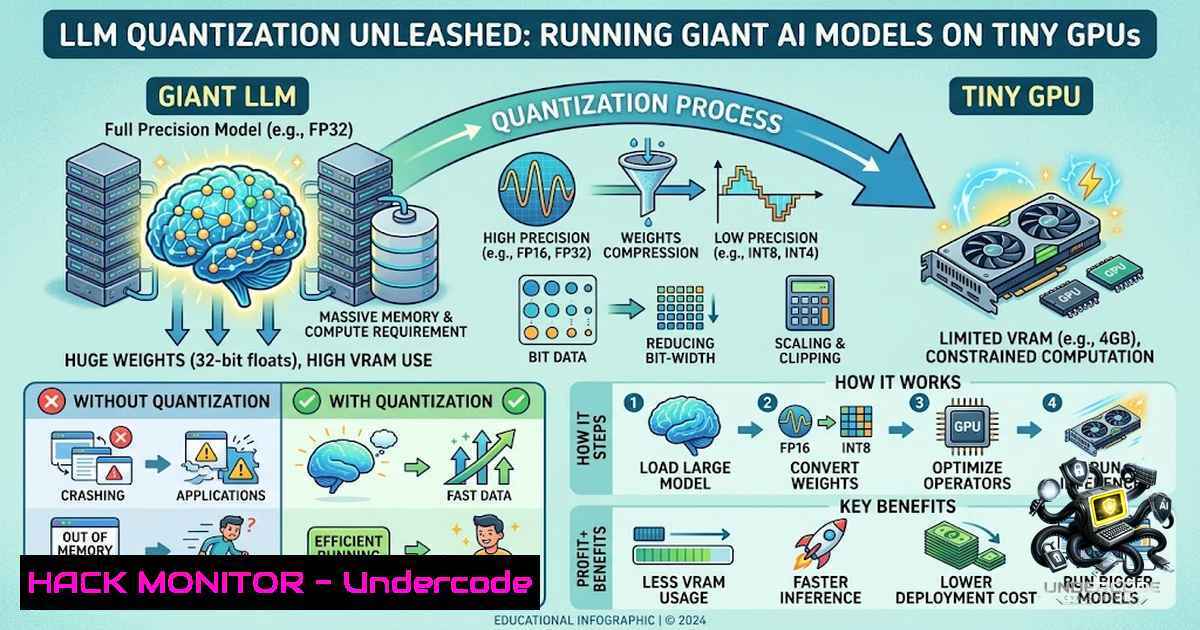
Large Language Models (LLMs) have become the backbone of modern generative AI applications, but their massive size—often exceeding hundreds of gigabytes—creates a significant barrier to deployment. Quantization has emerged as the critical technique that bridges this gap, reducing model weights from high-precision formats like 16-bit or 32-bit floating point to lower-precision representations such as 8-bit or even 4-bit integers. This compression enables organizations and individual developers to run sophisticated open-source models on consumer-grade hardware, dramatically lowering the infrastructure barrier to entry. As Zahraa Mahdi recently highlighted in her LinkedIn post, quantization delivers three core benefits: less VRAM consumption, smaller model size, and faster inference—making local deployment of LLMs more accessible than ever before.
Learning Objectives
- Understand the fundamental principles of LLM quantization and its impact on model performance, memory footprint, and inference speed
- Master the practical implementation of quantization techniques using industry-standard tools including llama.cpp, GPTQ, AWQ, and bitsandbytes
- Evaluate the security and accuracy trade-offs associated with different quantization methods and learn to select the optimal approach for specific use cases
You Should Know
1. Understanding Quantization Fundamentals: From FP32 to INT4
Quantization operates on a simple yet powerful premise: neural network weights and activations can be represented with fewer bits without catastrophic loss of model quality. Think of it like compressing a high-resolution image—you reduce the file size while striving to preserve visual fidelity. In practice, this means converting model weights from 32-bit floating point (FP32) to 16-bit (FP16), 8-bit (INT8), or 4-bit (INT4) representations.
The math behind quantization is straightforward. For a tensor of weights W, quantization maps the floating-point values to a discrete set of integers:
scale = (max_float - min_float) / (2^bits - 1)
zero_point = round(-min_float / scale)
quantized_weight = round(weight / scale + zero_point)
Dequantization reverses this process:
dequantized_weight = scale (quantized_weight - zero_point)
The primary quantization methods include:
- Post-Training Quantization (PTQ): Applies quantization to a pre-trained model without additional training
- Quantization-Aware Training (QAT): Simulates quantization during training to minimize accuracy loss
- Dynamic Quantization: Computes quantization parameters on-the-fly during inference
Linux Command Example – Checking model size before and after quantization:
 Check original model size
du -sh /path/to/original/model/

After quantization with llama.cpp
./llama-quantize /path/to/model-f16.gguf /path/to/model-q4_k_m.gguf Q4_K_M

Compare sizes
du -sh /path/to/model-q4_k_m.gguf
Windows Command (PowerShell):
 Check original model size
Get-ChildItem -Path "C:\path\to\original\model\" -Recurse | Measure-Object -Property Length -Sum

After quantization (using WSL or pre-built binary)
.\llama-quantize.exe C:\path\to\model-f16.gguf C:\path\to\model-q4_k_m.gguf Q4_K_M
2. Practical Quantization with llama.cpp: The Industry Standard
llama.cpp has become the go-to tool for LLM quantization, supporting over 30 quantization formats and providing a robust C++ inference engine. The workflow typically involves two steps: converting a Hugging Face model to the GGUF format, then quantizing it to the desired precision.
Step-by-Step Guide:
1. Install llama.cpp on Linux:
git clone https://github.com/ggerganov/llama.cpp
cd llama.cpp
make -j4 LLAMA_CUDA=1  For NVIDIA GPU support
2. Convert a Hugging Face model to GGUF:
python convert.py /path/to/huggingface/model --outfile model-f16.gguf --outtype f16
3. Quantize the model using the llama-quantize tool:
./llama-quantize model-f16.gguf model-q4_k_m.gguf Q4_K_M
The Q4_K_M quantization type is recommended as the default, offering an excellent balance between model size and quality. For more aggressive compression, options like Q2_K (2-bit) or Q3_K (3-bit) are available.
Windows Installation (using WSL or pre-built binaries):
 Using WinGet (Windows Package Manager)
winget install llama.cpp

Or use the pre-built binary from releases
.\llama-quantize.exe model-f16.gguf model-q4_k_m.gguf Q4_K_M
Validation – Evaluate perplexity to measure quality degradation:
./llama-perplexity -m model-q4_k_m.gguf -f test_dataset.txt
3. Advanced Quantization Techniques: GPTQ and AWQ
While llama.cpp’s GGUF format excels at CPU inference and edge deployment, GPTQ and AWQ are optimized for GPU acceleration, delivering faster inference on NVIDIA hardware.
GPTQ (Generative Pre-trained Transformer Quantization) uses a calibration dataset to find optimal weight approximations, minimizing mean squared error. It’s particularly effective for GPU inference and is supported by vLLM, TensorRT-LLM, and Hugging Face Transformers.
Python Implementation with AutoGPTQ:
from auto_gptq import AutoGPTQForCausalLM, BaseQuantizeConfig
from transformers import AutoTokenizer

quantize_config = BaseQuantizeConfig(
bits=4,  4-bit quantization
group_size=128,  Group size for quantization
desc_act=False  Disable desc_act for faster inference
)

Load and quantize
model = AutoGPTQForCausalLM.from_pretrained(
"meta-llama/Llama-2-7b-hf",
quantize_config=quantize_config
)
tokenizer = AutoTokenizer.from_pretrained("meta-llama/Llama-2-7b-hf")

Quantize with calibration data
model.quantize(calibration_dataset)
model.save_quantized("llama-2-7b-4bit-gptq")
AWQ (Activation-aware Weight Quantization) takes a different approach, identifying and protecting approximately 1% of salient weights that are critical for model accuracy based on activation patterns. This selective protection reduces quantization error without the overhead of mixed-precision computation.
AWQ Implementation:
from awq import AutoAWQForCausalLM

Load and quantize
model = AutoAWQForCausalLM.from_pretrained(
"meta-llama/Llama-2-7b-hf",
quant_config={"zero_point": True, "q_group_size": 128, "w_bit": 4}
)

Quantize and save
model.quantize(calibration_dataset)
model.save_quantized("llama-2-7b-4bit-awq")
Performance Comparison – AWQ offers faster Transformers-based inference compared to GPTQ while maintaining equivalent or better quality.
- 4-Bit Quantization with bitsandbytes: The Hugging Face Standard
The bitsandbytes library, integrated directly into Hugging Face Transformers, provides seamless 4-bit and 8-bit quantization for model loading. This approach is ideal for researchers and developers who want to quickly experiment with quantized models without extensive tooling.
Installation (Linux):
pip install bitsandbytes transformers accelerate
Loading a 4-bit Quantized Model:
from transformers import AutoModelForCausalLM, AutoTokenizer, BitsAndBytesConfig

Configure 4-bit quantization
quantization_config = BitsAndBytesConfig(
load_in_4bit=True,
bnb_4bit_compute_dtype=torch.float16,
bnb_4bit_use_double_quant=True,  Nested quantization for better accuracy
bnb_4bit_quant_type="nf4"  Normal Float 4-bit
)

Load model with quantization
model = AutoModelForCausalLM.from_pretrained(
"meta-llama/Llama-2-7b-hf",
quantization_config=quantization_config,
device_map="auto"
)
8-bit Quantization with LLM.int8() – The library also supports 8-bit quantization using the LLM.int8() method, which handles outliers separately to maintain accuracy:
 8-bit quantization
model = AutoModelForCausalLM.from_pretrained(
"meta-llama/Llama-2-7b-hf",
load_in_8bit=True,
device_map="auto"
)
Platform Support – bitsandbytes supports Linux x86-64, Linux aarch64, and Windows x86-64 platforms.
5. Security Implications: The Hidden Risks of Quantization
While quantization dramatically improves accessibility, recent research has revealed concerning security implications that practitioners must understand. Studies have shown that quantization can be exploited to produce harmful quantized LLMs even when their full-precision counterparts appear benign. This creates a dangerous supply chain vulnerability where attackers could distribute malicious quantized models that behave safely in full precision but exhibit harmful behavior when deployed.
Key security findings include:
- Dynamic Quantization Vulnerabilities: Adversaries can exploit dynamic quantization to steal sensitive user data placed in the same batch as the adversary’s input
- GGUF Quantization Attacks: Basic rounding-based quantization schemes can be exploited to inject malicious behaviors that remain hidden in full precision
- Jailbreaking Risks: Statistically significant differences in safety appear in 4-bit quantized models, with variations based on language and tense
Mitigation Strategies:
- Always verify model provenance – only use quantized models from trusted sources
- Evaluate models in their deployed quantization format, not in full precision
- Implement runtime monitoring to detect anomalous behavior patterns
- Consider using QLoRA or other techniques that combine quantization with fine-tuning for improved safety
-
Inference Optimization: Getting the Most from Quantized Models
Quantization alone doesn’t guarantee optimal inference performance. Combining quantization with other optimization techniques yields the best results:
TensorRT-LLM Optimization – NVIDIA’s TensorRT-LLM provides FP8 quantization support for H100 GPUs, delivering 2× faster inference with 50% memory reduction.
SmoothQuant – This technique migrates quantization difficulty from activations to weights, achieving 2× memory reduction with negligible accuracy loss.
Production Deployment with vLLM – The vLLM inference engine natively supports quantized models through GPTQ, AWQ, and bitsandbytes backends:
 Serve a GPTQ quantized model with vLLM
python -m vllm.entrypoints.openai.api_server \
--model /path/to/gptq-model \
--quantization gptq \
--dtype float16 \
--max-model-len 4096
Calibration Data Quality – The quality of calibration data significantly impacts quantization accuracy. Use representative datasets that reflect your actual use case. For optimal results, consider using importance matrix generation (llama-imatrix) to identify critical weights.
- Making the Right Choice: When to Quantize and When to Abstain
As Zahraa Mahdi noted in her discussion with Lara Wehbe, quantization isn’t always the right answer. Consider these decision criteria:
Use Quantization When:
- Deploying on resource-constrained hardware (edge devices, consumer GPUs)
- Reducing cloud inference costs
- Enabling local, privacy-preserving AI applications
- Achieving faster inference for real-time applications
Avoid Quantization When:
- Working with sensitive applications requiring maximum accuracy (medical diagnosis, financial modeling)
- Fine-tuning models for specific domains where precision is critical
- Deploying in security-sensitive environments without thorough validation
- The model architecture doesn’t respond well to quantization (some models show significant quality degradation)
Testing Your Quantized Model – Always benchmark accuracy before deployment:
 Run inference comparison between FP16 and quantized versions
python benchmark.py --model model-f16.gguf --test-data test.json
python benchmark.py --model model-q4_k_m.gguf --test-data test.json

Compare metrics
python compare_results.py --baseline results_f16.json --quantized results_q4.json
What Undercode Say
- Quantization Democratizes AI: By reducing memory requirements by 75% or more, quantization makes state-of-the-art LLMs accessible to individuals and small teams who previously couldn’t afford the infrastructure. This democratization accelerates innovation but requires careful attention to security and accuracy trade-offs.
-
The Security Gap Must Be Addressed: The research revealing quantization-based attacks underscores a critical gap in the AI security landscape. Organizations must implement validation pipelines that test models in their deployed quantization format, not just in full precision. This represents a fundamental shift in how we think about model safety.
The quantization landscape is evolving rapidly, with new techniques like QLoRA (quantized LoRA) enabling efficient fine-tuning of quantized models, and hardware vendors building native support for low-precision computation. However, the security implications demand vigilance. The convenience of running 70B-parameter models on consumer hardware shouldn’t blind us to the risks of deploying models whose behavior may differ significantly from their full-precision counterparts. As the industry moves toward smaller, more efficient models, the intersection of quantization, security, and performance will define the next generation of AI deployment.
Prediction
+1 Quantization will become the default deployment format for most production LLMs within 24 months, driven by cloud cost optimization and the proliferation of edge AI applications.
+1 Hardware vendors will increasingly build native support for 4-bit and even 2-bit computation, reducing the performance overhead of quantization and making it virtually transparent to developers.
-1 Security vulnerabilities in quantization pipelines will be exploited in high-profile attacks, prompting regulatory scrutiny and the development of mandatory model validation standards.
+1 The combination of quantization with speculative decoding and other optimization techniques will enable real-time LLM inference on mobile devices, unlocking entirely new categories of AI applications.
-1 Organizations that fail to validate quantized models in their deployed format will face significant reputational and financial risks as quantization-based attacks become more sophisticated and widespread.
▶️ Related Video (82% Match):
🎯Let’s Practice For Free:
🎓 Live Courses & Certifications:
Join Undercode Academy for Verified Certifications
🚀 Request a Custom Project:
Secure, high-velocity infrastructure and disruptive technological engineering. Contact our engineering team for high-tier development and proprietary systems:
[email protected]
💎 Smart Architecture | 🛡️ Secure by Design | ⭐ Trusted by Thousands
IT/Security Reporter URL:
Reported By: Zahraa Mahdi – Hackers Feeds
Extra Hub: Undercode MoN
Basic Verification: Pass ✅


