
Listen to this Post
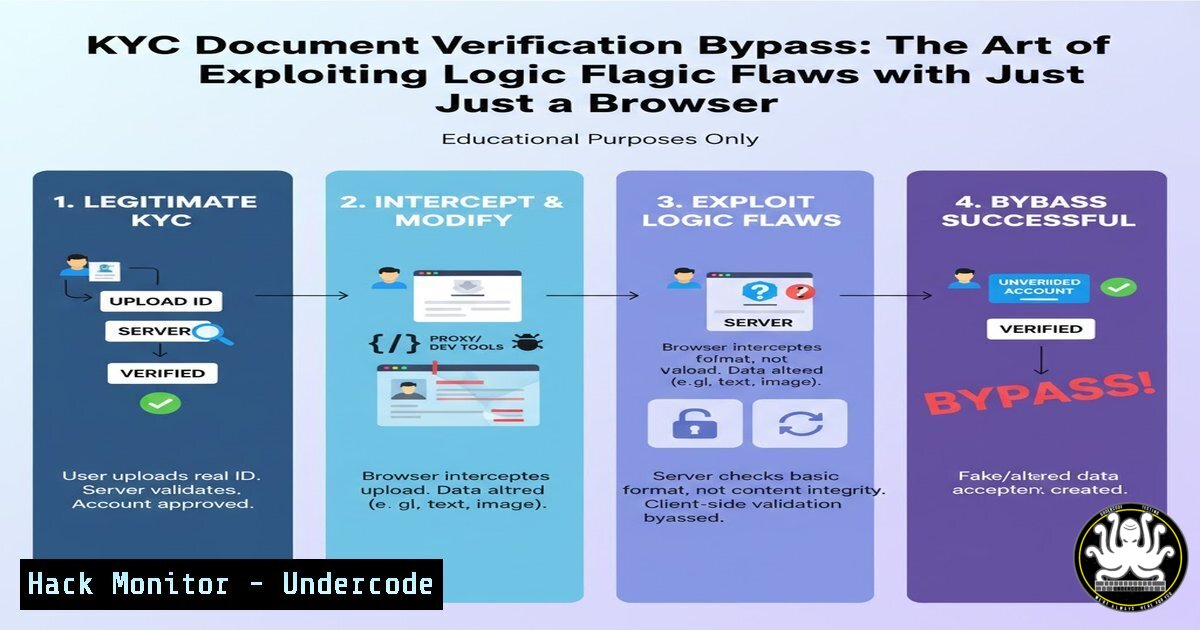
Introduction:
In the high-stakes world of digital identity verification, organizations often invest heavily in complex AI tools and third-party APIs to validate user documents. However, a recent discovery highlighted by a former BlackHat professional exposes a critical vulnerability that bypasses these sophisticated systems using nothing more than a standard web browser. This technique, dubbed “
," underscores a fundamental truth in cybersecurity: the most devastating exploits often target logic and process flow rather than code-level bugs. By manipulating the expected sequence of events in a Know Your Customer (KYC) workflow, an attacker can trick the system into accepting fraudulent or altered documents without triggering any automated alarms.

<h2 style="color: yellow;">Learning Objectives:</h2>

<ul>
<li>Understand the distinction between logic-based vulnerabilities and technical software bugs.</li>
<li>Learn how to manually manipulate client-side data and application workflows using browser developer tools.</li>
<li>Identify common weaknesses in multi-step KYC and document upload processes.</li>
<li>Explore mitigation strategies to secure verification workflows against logic bypasses.</li>
</ul>

<h2 style="color: yellow;">You Should Know:</h2>

<h2 style="color: yellow;">1. Understanding the "Logixflaw" in KYC Workflows</h2>

The essence of this attack lies in the trust placed in the sequence of operations. Standard KYC verification often involves uploading an image of an ID, which the system then processes to extract data or forward to a verification service. A logic flaw occurs when the application fails to re-validate the integrity of the data or the document at critical transition points. In this specific instance, the attacker exploited the gap between the initial upload and the final submission.

Instead of using intercepting proxies like Burp Suite, the attacker relies entirely on the browser's built-in capabilities. This makes the attack deceptively simple and harder to detect, as it mimics legitimate user behavior up until the final moment of manipulation.

<h2 style="color: yellow;">2. Step-by-Step Guide: Client-Side Manipulation for Bypass</h2>

This guide demonstrates the methodology an attacker would use, focusing on the "mindset" rather than a specific tool. This is for educational purposes to understand how to defend against such attacks.

<h2 style="color: yellow;">Step 1: Initial Document Submission</h2>

The attacker begins the KYC process legitimately. They select a valid, government-issued ID document (e.g., a passport or driver's license) to upload to the platform.
- Action: Click the "Upload" button and select <code>legitimate_id.jpg</code>.

<h2 style="color: yellow;">Step 2: Intercepting the Request with Browser DevTools</h2>

Before clicking the final "Submit" or "Confirm" button, the attacker opens the browser's Developer Tools.
- Action: Press `F12` or right-click and select "Inspect".
- Navigation: Go to the "Network" tab. Ensure the recording button (usually a solid grey circle) is red, indicating it's capturing traffic.
- Preparation: Check the "Preserve log" checkbox to ensure data isn't lost after navigation.

<h2 style="color: yellow;">Step 3: Manipulating the Final Submission</h2>

The attacker now has the fraudulent document ready, such as `fake_id.jpg` with altered details (like a different photo or date of birth). They do not use the standard upload button again. Instead, they click the final "Submit" button on the form.
- Observation: In the Network tab, a new request appears (usually a POST request) containing the form data, including the file payload.
- Action: Right-click on this request and select "Copy" -> "Copy as cURL" or "Copy as Fetch". This captures the exact request headers and data structure.

<h2 style="color: yellow;">Step 4: Replaying and Swapping the Payload</h2>

The attacker now needs to modify the captured request. While one could use a terminal with the cURL command, a faster method is using the browser's console.
- Action: Go to the "Console" tab in DevTools.
- Paste and Modify: Paste the copied `fetch` command. Before executing it, locate the part of the code that contains the file data (often as a `Blob` or `File` object within <code>FormData</code>). The attacker must replace the reference to the legitimate file with the fraudulent one. This requires a basic understanding of JavaScript to construct a new `FormData` object pointing to <code>fake_id.jpg</code>.

Example of a modified Fetch API call in the console:
[bash]
// Assuming the original request used FormData
const formData = new FormData();
// Append the FAKE document instead of the legitimate one
// 'document' is the name of the field expected by the server
formData.append('document', document.getElementById('fakeFileInput').files[bash]);

fetch('https://vulnerable-app.com/api/kyc/verify', {
method: 'POST',
body: formData
// Headers like Authorization might be needed, copied from the original request
})
.then(response => response.json())
.then(data => console.log('Success:', data));
By executing this, the attacker sends the fraudulent document to the API endpoint that was intended to receive the already-uploaded and “verified” legitimate file.
3. The Underlying Vulnerability: Broken State Management
The core issue here is that the application failed to maintain a secure state. The server-side logic likely performed a preliminary check on the initially uploaded file (legitimate_id.jpg) and stored a reference to it (e.g., a temporary file path or an object ID) in the user’s session. However, when the final submission request arrived, it blindly accepted the file payload sent with it instead of using the securely stored reference. The system validated the process flow (step 1 -> step 3) but failed to validate the integrity of the data payload at the final step.
4. Defensive Coding: Mitigating the Logixflaw
To prevent this type of browser-based bypass, developers must implement server-side checks that are immune to client-side manipulation.
Checkpoint Validation:
- Use Server-Side Session Tokens: Upon the initial upload, the server should generate a unique, cryptographically secure token representing that specific file. This token should be stored server-side alongside the file’s metadata (hash, path).
- Bind Submission to Token: In the final submission step, the client should only send this token, not the file itself. The server then retrieves the verified file based on the token. Any attempt to send a new file at this stage should be rejected.
File Integrity Hashing:
On the initial upload, calculate a cryptographic hash (e.g., SHA-256) of the file on the server. Store this hash.
On the final submission, recalculate the hash of the file being processed (whether retrieved by token or sent again). If the hashes do not match, the request is invalid.
 Linux command to generate a SHA256 hash of a file
sha256sum fake_id.jpg
 Example output: 7d8f3e4a... fake_id.jpg
- API Security: The Danger of Implicit Trust in File Endpoints
This vulnerability extends to API security, especially in microservices architectures. An API endpoint designed for final KYC verification might implicitly trust that the incoming file has already passed preliminary checks. This is a dangerous assumption.
API Hardening Steps:
- Input Validation: Every API endpoint must treat every input as untrusted, even if it’s deep within a workflow.
- Workflow Validation: Implement a state machine on the server. The API should check if the user’s session is in the correct state (e.g., “DOCUMENT_UPLOADED”) before allowing a call to the verification endpoint.
- Rate Limiting and Anomaly Detection: Monitor for multiple rapid submissions from the same user or session, which could indicate an automated attempt to swap files. Tools like `fail2ban` can be configured on Linux servers to block IPs showing suspicious behavior, though this is a coarse measure.
Example fail2ban regex to catch rapid POST requests to a KYC endpoint
failregex = ^<HOST> .POST /api/kyc/verify HTTP/. 200
What Undercode Say:
- Logic over Tools: This bypass proves that the most dangerous vulnerabilities are often logical, not technical. A “hacker mindset” focused on how a system should work versus how it actually works is more valuable than any software tool.
- Defense in Depth for Workflows: Security cannot stop at the first gate. Every step in a critical process, especially identity verification, must be independently validated. Trusting the client to maintain state is a fundamental architectural flaw.
- Browser as an Attack Surface: The modern browser is a powerful development environment. Attackers are increasingly using its native capabilities (DevTools, Console, Network tabs) to reverse-engineer and exploit applications without needing external tools, making detection harder for traditional security suites.
Prediction:
As AI-generated deepfakes and sophisticated forgeries become more accessible, we will see a surge in “logixflaw” exploitation. Attackers will move away from noisy, tool-based scanning toward silent, logic-based workflow manipulation. This will force a paradigm shift in identity security, moving from simple document verification to continuous, behavioral, and liveness-based authentication integrated directly into the user journey, making session and state management the new frontline of digital defense.
▶️ Related Video (80% Match):
🎯Let’s Practice For Free:
IT/Security Reporter URL:
Reported By: Sans1986 Nevergivesup – Hackers Feeds
Extra Hub: Undercode MoN
Basic Verification: Pass ✅


