
Listen to this Post
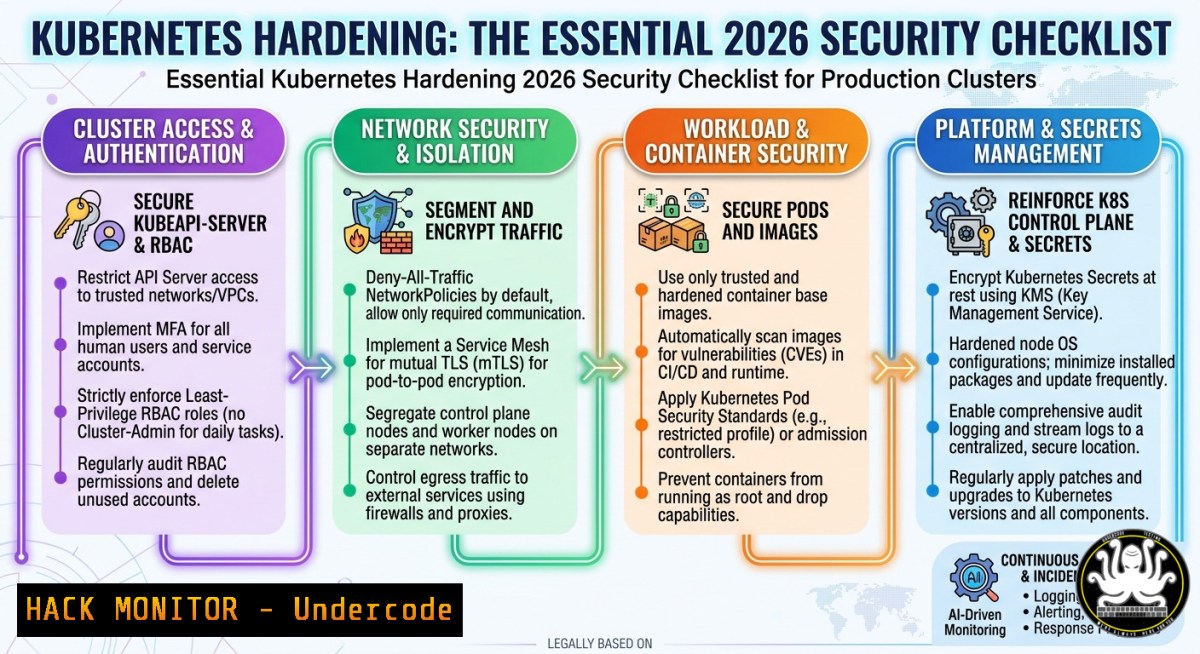
Introduction
Kubernetes has become the de facto orchestration platform for containerized workloads, but its powerful abstractions come with significant security risks if not properly configured. The core building blocks—Pods, Deployments, Services, Ingresses, ConfigMaps, Secrets, Namespaces, Nodes, and the Control Plane—form a complex attack surface that requires a defense-in-depth strategy. This article provides a comprehensive, actionable security hardening guide based on the latest 2026 benchmarks and best practices, moving beyond buzzwords to implement real protection for your clusters.
Learning Objectives
- Implement least-privilege RBAC policies and secure Service Account management.
- Enforce network segmentation using Kubernetes Network Policies to block lateral movement.
- Configure Pod Security Standards (PSS) to replace deprecated PodSecurityPolicies.
- Harden Secrets management with encryption at rest and external integration.
- Automate compliance scanning against the CIS Kubernetes Benchmark using kube-bench.
You Should Know
1. Mastering RBAC: Least Privilege for the API
Role-Based Access Control (RBAC) is the gatekeeper of your Kubernetes API. Misconfigured RBAC is a primary vector for privilege escalation and data breaches. The principle is simple: grant only the permissions required for a user or service account to perform its function.
Step-by-step guide to enforce least-privilege RBAC:
- Assess existing RBAC permissions: Scan your cluster for overly permissive roles.
List all ClusterRoles and Roles
kubectl get clusterroles,roles --all-namespaces

Check permissions for a specific service account
kubectl describe serviceaccount <sa-name> -n <namespace>

Use a tool like 'rbac-lookup' to map subjects to roles
rbac-lookup <subject>
- Create a restrictive Role for a specific namespace: The following YAML defines a role that can only read pods and services.
apiVersion: rbac.authorization.k8s.io/v1
kind: Role
metadata:
namespace: development
name: pod-reader
rules:</li>
</ol>

<p>- apiGroups: [""]  Core API group
resources: ["pods", "services"]
verbs: ["get", "list", "watch"]
3. Bind the role to a specific user or service account using a RoleBinding:
apiVersion: rbac.authorization.k8s.io/v1
kind: RoleBinding
metadata:
name: read-pods-binding
namespace: development
subjects:
- kind: User
name: "[email protected]"
apiGroup: rbac.authorization.k8s.io
roleRef:
kind: Role
name: pod-reader
apiGroup: rbac.authorization.k8s.io
Apply the configurations: `kubectl apply -f role.yaml` and
kubectl apply -f rolebinding.yaml.
4. Verify the permissions: Switch to the user’s context (if possible) or use `kubectl auth can-i` to test.kubectl auth can-i get pods [email protected] -n development Expected output: yes kubectl auth can-i delete pods [email protected] -n development Expected output: no
This approach ensures that even if a workload is compromised, its ability to interact with the API server is severely limited, preventing a widespread cluster takeover.
2. Hardening Pod Security Standards (PSS)
With the removal of PodSecurityPolicy (PSP) in Kubernetes v1.25, Pod Security Admission (PSA) and the Pod Security Standards (PSS) are now the built-in mechanisms for enforcing pod security. PSS defines three policies:
Privileged,Baseline, andRestricted.Step-by-step guide to enforce PSS:
- Enable the PodSecurity admission controller: This is typically done by adding `PodSecurity` to the `–enable-admission-plugins` flag on the API server. For managed Kubernetes services, it’s often enabled by default.
- Enforce a policy at the namespace level: Apply the `Restricted` policy to a critical namespace. This prevents pods from running as root, using host namespaces, or escalating privileges.
apiVersion: v1
kind: Namespace
metadata:
name: production-secure
labels:
pod-security.kubernetes.io/enforce: restricted
pod-security.kubernetes.io/enforce-version: latest
pod-security.kubernetes.io/audit: restricted
pod-security.kubernetes.io/warn: restricted
Apply the namespace: `kubectl apply -f secure-namespace.yaml`.
- Test the enforcement: Try to deploy a pod that violates the `Restricted` policy.
apiVersion: v1
kind: Pod
metadata:
name: bad-pod
spec:
containers:</li>
</ol>

- name: test
image: alpine
command: ["sleep", "3600"]
securityContext:
runAsNonRoot: false  Violates 'Restricted' policy
Attempt to create the pod:
kubectl apply -f bad-pod.yaml -n production-secure. The API server should reject the creation, providing a clear error message.
4. Audit existing workloads: Use the `audit` and `warn` labels (as shown above) to identify non-compliant pods without breaking existing deployments. This allows for a phased migration to a more secure posture.By enforcing PSS, you eliminate a large class of container misconfigurations that could lead to container breakout or host-node compromise.
3. Securing Secrets: Encryption and External Management
By default, Kubernetes Secrets are only base64-encoded, not encrypted, and are stored in etcd. Anyone with access to etcd or the API can potentially decode them. This is a critical risk.
Step-by-step guide to secure Secrets at rest:
- Enable encryption at rest for etcd: This requires configuring the `EncryptionConfiguration` on the API server.
encryption-config.yaml
apiVersion: apiserver.config.k8s.io/v1
kind: EncryptionConfiguration
resources:</li>
</ol>

- resources:
- secrets
providers:
- aescbc:
keys:
- name: key1
secret: <base64-encoded-32-byte-key>
- identity: {}  This fallback allows reading unencrypted secrets
Generate a strong key:
head -c 32 /dev/urandom | base64.
Important: This is a critical control-plane change and requires a cluster restart for the API server to pick up the configuration. For production, always test this in a non-critical environment first.
2. Restrict access to etcd: Use strong authentication and TLS for all etcd communication. This is a standard hardening step recommended by the CIS benchmark.
3. Use an external Secrets Store CSI Driver: For production workloads, integrate with a dedicated secrets management solution like HashiCorp Vault, AWS Secrets Manager, or Azure Key Vault. The Secrets Store CSI Driver allows pods to mount secrets as volumes directly from these external stores.
4. Avoid hardcoding Secrets in manifests: Never commit Secret YAMLs with literal values to source control. Use tools like SealedSecrets, Helm Secrets, or external operators to manage encrypted secret data in Git.
5. Rotate secrets regularly: Implement a rotation policy for all sensitive tokens, certificates, and credentials, both within Kubernetes and in external stores.4. Implementing Network Policies for Micro-Segmentation
By default, all pods in a Kubernetes cluster can communicate with each other without restriction. Network Policies allow you to enforce zero-trust networking by controlling ingress and egress traffic at the IP address or port level.
Step-by-step guide to enforce a default-deny Network Policy:
- Ensure your CNI supports Network Policies: The default Kubernetes network implementations (like
kubenet) do not. You need a CNI that does, such as Calico, Cilium, or Antrea. - Create a default-deny policy for a namespace: This blocks all ingress and egress traffic to/from pods in the namespace unless explicitly allowed.
default-deny.yaml
apiVersion: networking.k8s.io/v1
kind: NetworkPolicy
metadata:
name: default-deny-all
namespace: frontend
spec:
podSelector: {}  Selects all pods in the namespace
policyTypes:</li>
</ol>

- Ingress
- Egress
 No ingress or egress rules means all traffic is denied.
Apply the policy: `kubectl apply -f default-deny.yaml`.
- Create an allow policy for a specific app: Allow ingress traffic from a specific pod (e.g., a web server) to another (e.g., a database).
allow-db-ingress.yaml
apiVersion: networking.k8s.io/v1
kind: NetworkPolicy
metadata:
name: allow-web-to-db
namespace: backend
spec:
podSelector:
matchLabels:
app: database
ingress:</li>
</ol>

- from:
- podSelector:
matchLabels:
app: webserver
ports:
- protocol: TCP
port: 3306  MySQL port
4. Verify the policies: Deploy test pods with labels and attempt to `ping` or `curl` between them. The default-deny policy should block all, and the specific allow policy should only permit the defined traffic.
5. Use staging policies (Calico/Cilium): Advanced CNIs allow you to stage policies for logging without enforcement, enabling safe testing in production.This micro-segmentation drastically reduces the blast radius of a compromise, preventing an attacker from moving laterally across the cluster.
5. Automating Compliance with CIS Benchmarks
The CIS Kubernetes Benchmark provides a comprehensive set of security configuration recommendations. Manually checking each control is tedious and error-prone. `kube-bench` is a Go application that automatically checks your cluster against these benchmarks.
Step-by-step guide to run kube-bench:
- Download kube-bench: Choose the appropriate binary for your operating system from the official GitHub releases.
Example for Linux (adjust URL for latest version)
curl -L https://github.com/aquasecurity/kube-bench/releases/download/v0.8.0/kube-bench_0.8.0_linux_amd64.tar.gz -o kube-bench.tar.gz
tar -xvf kube-bench.tar.gz
- Run a CIS scan on a master node: You need SSH access to your cluster’s nodes. For security, it’s best to run this from a jump box with appropriate credentials.
On the master node (or using SSH)
./kube-bench master
This will run all tests relevant to the Kubernetes control plane.
- Run a CIS scan on a worker node:
On a worker node (or using SSH)
./kube-bench node
- Run a complete cluster scan from a single location (using
--config-dir): For remote clusters (like EKS, AKS, GKE), you can run `kube-bench` from your local machine if you have `kubectl` access.This runs checks for a managed Kubernetes service ./kube-bench run --config-dir cfg/ --benchmark cis-eks-1.3.0
- Parse the output: The tool provides a
[bash],[bash], or `[bash]` for each control. Focus on remediating `[bash]` items, which are direct violations of the benchmark. - Integrate into CI/CD: Run `kube-bench` as part of your infrastructure-as-code pipeline to prevent non-compliant clusters from being deployed.
What Undercode Say
- Shift Left and Shift Right: Kubernetes security cannot be an afterthought. It requires shifting left (embedding security into CI/CD and manifests) and shifting right (runtime observability and policy enforcement).
- Default Settings are Not Secure: Kubernetes is powerful, but its default configurations are not secure by design. Explicitly configuring RBAC, Network Policies, and PSS is non-negotiable for production.
- Automation is Key: Manual configuration checks are unsustainable. Embrace tools like
kube-bench, policy engines (Kyverno, OPA/Gatekeeper), and runtime security tools (Falco) to maintain a secure posture at scale. - Supply Chain Security: The analysis from the search results highlights a growing focus on OS-level image verification and supply chain integrity. This is the next frontier for Kubernetes security. Tools like Cosign and SBOM (Software Bill of Materials) generation are becoming essential.
- Runtime-First Approach: Alert noise from static vulnerability scanners is a major problem. A runtime-first security approach, which prioritizes vulnerabilities that are actually reachable in a running cluster, cuts alert noise and focuses efforts on real risk.
Prediction
The security landscape for Kubernetes is shifting from manual, checklist-driven hardening to automated, intelligent, and runtime-focused protection. By 2027, we will see widespread adoption of “observability-driven security,” where network policies and security rules are automatically generated from observed application behavior, eliminating manual YAML authoring. The role of the Kubernetes administrator will evolve from a configuration expert to a security architect, using policy-as-code and AI-driven anomaly detection to manage security at the speed of DevOps.
▶️ Related Video (88% Match):
🎯Let’s Practice For Free:
IT/Security Reporter URL:
Reported By: Anapedra Kubernetes – Hackers Feeds
Extra Hub: Undercode MoN
Basic Verification: Pass ✅🔐JOIN OUR CYBER WORLD [ CVE News • HackMonitor • UndercodeNews ]
📢 Follow UndercodeTesting & Stay Tuned:
- Download kube-bench: Choose the appropriate binary for your operating system from the official GitHub releases.
- Create an allow policy for a specific app: Allow ingress traffic from a specific pod (e.g., a web server) to another (e.g., a database).
- Ensure your CNI supports Network Policies: The default Kubernetes network implementations (like
- Enable encryption at rest for etcd: This requires configuring the `EncryptionConfiguration` on the API server.


