
Listen to this Post
Introduction:
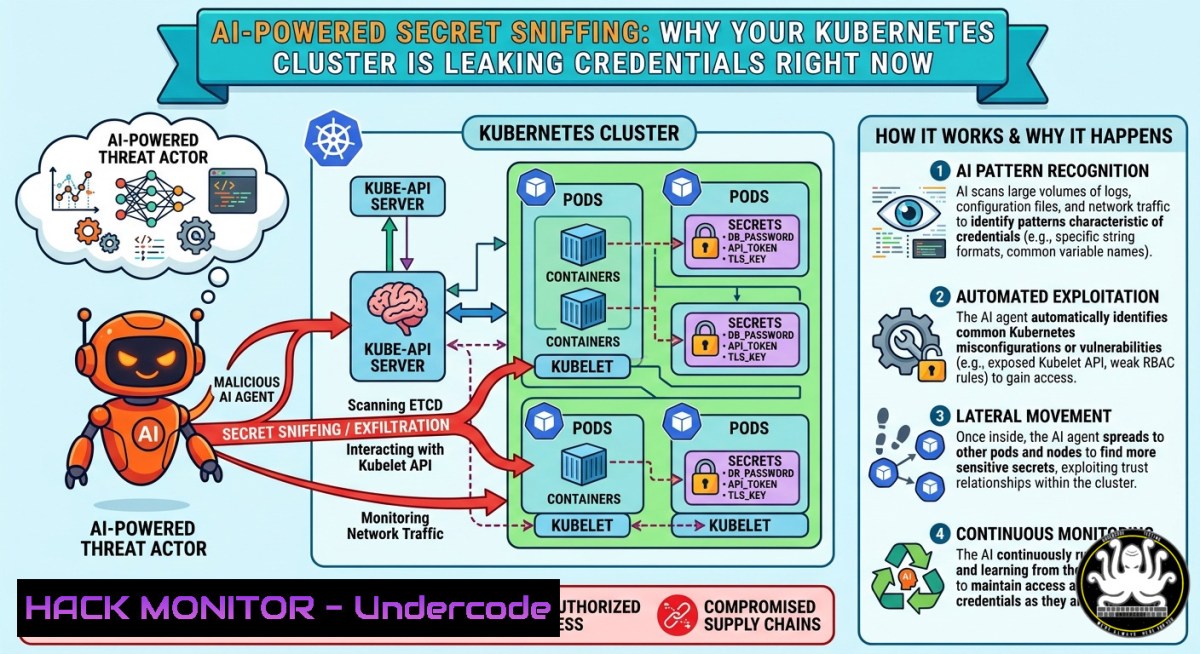
Secrets management failures have become the single largest attack vector in cloud-native environments, with misconfigured Kubernetes clusters, public Git repositories, and verbose CI/CD logs exposing millions of credentials daily. Attackers now leverage large language models (LLMs) to automate secret discovery at scale—no regex patterns, no manual crawling—simply prompting an AI to extract any API key, token, or password from public or leaked data sources.
Learning Objectives:
- Understand how AI-driven scanners exploit exposed secrets in Kubernetes, Git, S3, and CI logs
- Learn practical commands to audit your own infrastructure for Base64-encoded secrets and hardcoded credentials
- Implement defense-in-depth strategies including secret elimination, dynamic secrets, and policy-as-code
You Should Know:
1. How AI-Powered Secret Extraction Bypasses Traditional Detection
Traditional secret scanning relies on regex patterns (e.g., `sk-[a-zA-Z0-9]{32}` for OpenAI keys) or entropy analysis. Attackers now use LLMs to interpret natural language context: a prompt like “Find all credential-like strings in this log file” will identify password=, token:, `apikey=` even if the format is obfuscated or non-standard. The model understands variations like `p@ssw0rd` or base64-encoded YWRtaW46cGFzc3dvcmQ=.
Step‑by‑step guide to simulate an AI secret scanner (for defensive testing):
- Collect potential leak sources (your own repos/buckets with permission):
Clone a repository you own for testing
git clone https://github.com/your-org/test-repo.git
cd test-repo
-
Use an LLM API to analyze suspicious strings (example with OpenAI):
import openai import re Extract all strings resembling secrets (high entropy or keyword-rich) with open("deployment.yaml", "r") as f: content = f.read() candidate_strings = re.findall(r'[\w-+=\/]{20,}', content)</p></li> </ol> <p>response = openai.ChatCompletion.create( model="gpt-4", messages=[{"role": "user", "content": f"Classify which of these are credentials, API keys, or secrets: {candidate_strings}"}] ) print(response.choices[bash].message.content)- Linux/Windows command to search for Base64 secrets in Kubernetes manifests:
Linux: Find any Base64-encoded data in YAML files
grep -E '^[[:space:]][a-zA-Z0-9+/]{40,}={0,2}$' .yaml
Windows PowerShell: Detect potential Base64 strings Select-String -Pattern '[A-Za-z0-9+/]{40,}={0,2}' .yaml
Mitigation: Never store secrets as Base64 in ConfigMaps or Secrets YAML. Use external secrets operators (ESO) with cloud provider KMS.
2. Scanning Git Repositories for Historical Credential Exposure
Attackers routinely scan GitHub, GitLab, and Bitbucket for commits containing accidentally pushed secrets—even if later deleted, they remain in history. AI-enhanced tools like TruffleHog now incorporate LLM validation to reduce false positives.
Step‑by‑step guide to audit your own Git history:
1. Install TruffleHog (Linux/macOS):
python3 -m pip install truffleHog
2. Scan a local repository for exposed secrets:
trufflehog git file:///path/to/your/repo --json | jq '.'
3. For remote GitHub orgs (using API token):
trufflehog github --org=your-org --token=ghp_your_token
4. Remove a secret from Git history (rewrite):
 Install BFG Repo-Cleaner
java -jar bfg.jar --replace-text passwords.txt your-repo.git
git reflog expire --expire=now --all && git gc --prune=now --aggressive
Windows alternative (using Git Bash): Same commands run inside Git Bash or WSL2. For native PowerShell, use
git filter-repo:git filter-repo --force --replace-text <(echo "old_password==>REMOVED")
Pro tip: Set up pre-commit hooks with `gitleaks` to block secrets before they reach remote:
gitleaks protect --source=. --staged --verbose
- Hunting Exposed Credentials in S3 Buckets and CI Logs
S3 buckets with public read access often contain `.env` files, configuration backups, or serverless function logs. CI systems (GitHub Actions, GitLab CI, Jenkins) commonly print environment variables during `set -x` debug runs.
Step‑by‑step guide to detect these exposures:
- Enumerate public S3 buckets (using AWS CLI, configure with read-only role):
List all buckets in an account
aws s3 ls
Check bucket ACL for public access
aws s3api get-bucket-acl --bucket your-bucket-name
Search for sensitive files recursively
aws s3 cp s3://your-bucket-name . --recursive --exclude "" --include ".env" --include "secret" --include "credential"
-
Scan GitHub Actions logs for secrets (using `gh` CLI):
Get recent workflow run IDs
gh run list --limit 50 --json databaseId
Download logs for a specific run
gh run view <run-id> --log > run_logs.txt
Search for common secret patterns
grep -E 'AWS_SECRET|API_KEY|TOKEN|PASSWORD' run_logs.txt
-
Prevent CI log leakage with redaction (GitHub Actions example):
</p></li>
</ol>

<p>- name: Mask secret in logs
run: |
echo "::add-mask::${{ secrets.MY_SECRET }}"
echo "MY_SECRET=${{ secrets.MY_SECRET }}" >> $GITHUB_ENV
Windows command to search for secrets in log files:
Get-ChildItem -Path C:\ci_logs -Recurse -Include .log,.txt | Select-String -Pattern "secret|token|password|key" -CaseSensitive
4. Hardening Kubernetes Secrets Against AI Scrapers
Kubernetes Secrets are only Base64-encoded by default—not encrypted. Anyone with `get secrets` RBAC permissions can decode them. Attackers who compromise a pod or gain `list secrets` access via a misconfigured role can exfiltrate all secrets.
Step‑by‑step guide to secure secrets:
1. Enable encryption at rest for etcd:
 encryption-config.yaml
apiVersion: apiserver.config.k8s.io/v1
kind: EncryptionConfiguration
resources:
- resources:
- secrets
providers:
- kms:
name: myKms
endpoint: unix:///var/run/kmsplugin/socket.sock
- identity: {}
Apply by adding `–encryption-provider-config=/path/to/encryption-config.yaml` to kube-apiserver.
2. Use Sealed Secrets for GitOps:
 Install kubeseal CLI
kubeseal --controller-name=sealed-secrets --controller-namespace=kube-system \
< original-secret.yaml > sealed-secret.json
 Commit only the sealed secret to Git
git add sealed-secret.json
3. Implement OPA Gatekeeper to block weak secrets:
 constraint template to reject secrets without annotation "encrypted=true"
package kubernetes.admission
violation[{"msg": msg}] {
input.review.object.kind == "Secret"
not input.review.object.metadata.annotations["encrypted"]
msg = "All secrets must have annotation encrypted=true"
}
Linux command to detect all Kubernetes secrets in a cluster:
kubectl get secrets --all-namespaces -o json | jq -r '.items[] | .metadata.namespace + "/" + .metadata.name'
5. Eliminating Secrets with Dynamic and Ephemeral Credentials
The most effective defense is to eliminate long-lived secrets entirely. Use workload identity, OIDC federation, and HashiCorp Vault’s dynamic secrets—where credentials are generated on-demand and expire after use.
Step‑by‑step guide to configure AWS IAM roles for service accounts (IRSA):
- Create an IAM OIDC provider for your EKS cluster:
eksctl utils associate-iam-oidc-provider --cluster your-cluster --region us-east-1 --approve
-
Create an IAM role with trust policy for the service account:
{
"Version": "2012-10-17",
"Statement": [
{
"Effect": "Allow",
"Principal": { "Federated": "arn:aws:iam::ACCOUNT:oidc-provider/oidc.eks.region.amazonaws.com/id/..." },
"Action": "sts:AssumeRoleWithWebIdentity",
"Condition": { "StringEquals": { "system:serviceaccount:default:my-sa": "true" } }
}
]
}
3. Annotate the Kubernetes service account:
kubectl annotate serviceaccount my-sa eks.amazonaws.com/role-arn=arn:aws:iam::ACCOUNT:role/my-role
- No secrets needed—pods automatically obtain AWS credentials via the OIDC token.
For Vault dynamic database credentials:
Enable database secrets engine vault secrets enable database Configure database connection vault write database/config/my-db plugin_name=postgresql-database-plugin allowed_roles="readonly" connection_url="postgresql://{{username}}:{{password}}@postgres:5432" Create a role that generates short-lived credentials vault write database/roles/readonly db_name=my-db creation_statements="CREATE USER \"{{name}}\" WITH PASSWORD '{{password}}' VALID UNTIL '{{expiration}}'; GRANT SELECT ON ALL TABLES IN SCHEMA public TO \"{{name}}\";"- Implementing Continuous Secret Scanning with AI Defensive Measures
Turn the attackers’ own AI tools against them by integrating LLM-based anomaly detection into your CI/CD pipeline.
Step‑by‑step guide to build an AI secret detection pipeline:
- Create a GitHub Action that scans every push using a local LLM (Ollama):
name: AI Secret Scanner
on: [bash]
jobs:
scan:
runs-on: ubuntu-latest
steps:</li>
</ol>

- uses: actions/checkout@v4
with:
fetch-depth: 0
- name: Install Ollama
run: curl -fsSL https://ollama.com/install.sh | sh
- name: Pull LLM model
run: ollama pull llama3.2:3b
- name: Run AI detection
run: |
for file in $(git diff --name-only HEAD^ HEAD); do
ollama run llama3.2:3b "Does this file contain any API keys, passwords, or tokens? Respond only YES or NO: $(cat $file)" | grep -q YES && echo "Secret found in $file" && exit 1
done
2. For Windows agents (using WSL2 or Python):
 Invoke a remote LLM API (e.g., Azure OpenAI)
$content = Get-Content .\appsettings.json -Raw
$body = @{
messages = @(@{role="user"; content="Is there a secret in this JSON? $content"})
} | ConvertTo-Json
Invoke-RestMethod -Uri "https://your-openai.cognitiveservices.azure.com/openai/deployments/gpt-4/chat/completions?api-version=2024-02-15" -Method Post -Body $body -ContentType "application/json"
What Undercode Say:
- Secrets elimination, not just encryption: Base64 is not security; adopt dynamic credentials and workload identity to remove long-lived secrets from your codebase entirely.
- AI is a double-edged sword: Attackers already use LLMs to find secrets faster than regex ever could—defenders must deploy the same AI to scan logs, repos, and cloud storage proactively.
- Shift-left secret management: Implement pre-commit hooks, GitLab secret detection, and Kubernetes admission controllers to block secrets before they ever reach a cluster or repository.
- CI/CD pipelines are the new perimeter: Verbose logging and debug mode often leak tokens; enforce log redaction and use masked secrets in every CI step.
Analysis: The post highlights a critical paradigm shift: traditional secret scanning relies on pattern matching, but AI understands context, intent, and obfuscation. A prompt like “extract anything that looks like a credential” will find `password=YmFzZTY0` (Base64 for “base64”), which regex alone might miss if not explicitly looking for encoded variants. Attackers can now crawl millions of GitHub repos, S3 buckets, and Pastebin dumps with LLM-powered agents, drastically reducing the time to find valid secrets. The defense must move from reactive scanning to proactive elimination—using OIDC federation, Vault dynamic secrets, and Kubernetes Secrets Store CSI Driver to ensure credentials never sit on disk or in YAML files. Additionally, organizations should deploy AI-based scanners internally, treating their own logs and repos as potential leak sources. The most practical first step is to run `trufflehog` or `gitleaks` against every Git repository and S3 bucket, then rotate any exposed credentials immediately.
Prediction:
Within 18 months, AI-driven secret extraction will become a standard phase in every penetration test and bug bounty program, rendering current regex-based secret scanners obsolete. Cloud providers will embed LLM agents directly into their security hubs (AWS Inspector, Azure Defender, GCP Security Command Center) to continuously scan all customer artifacts—including private repos, CloudTrail logs, and Lambda environment variables—for contextual secret exposure. Simultaneously, we will see the rise of “secretless” architectures as the default, with SPIFFE/SPIRE and OIDC federation becoming mandatory compliance requirements for SOC2 and ISO 27001. Organizations that fail to eliminate static secrets will face automated AI bots exfiltrating their infrastructure within minutes of any accidental commit.
▶️ Related Video (84% Match):
🎯Let’s Practice For Free:
IT/Security Reporter URL:
Reported By: Aliouche Kubernetes – Hackers Feeds
Extra Hub: Undercode MoN
Basic Verification: Pass ✅🔐JOIN OUR CYBER WORLD [ CVE News • HackMonitor • UndercodeNews ]
📢 Follow UndercodeTesting & Stay Tuned:
- Create an IAM OIDC provider for your EKS cluster:
- Linux/Windows command to search for Base64 secrets in Kubernetes manifests:


