
Listen to this Post
Introduction:
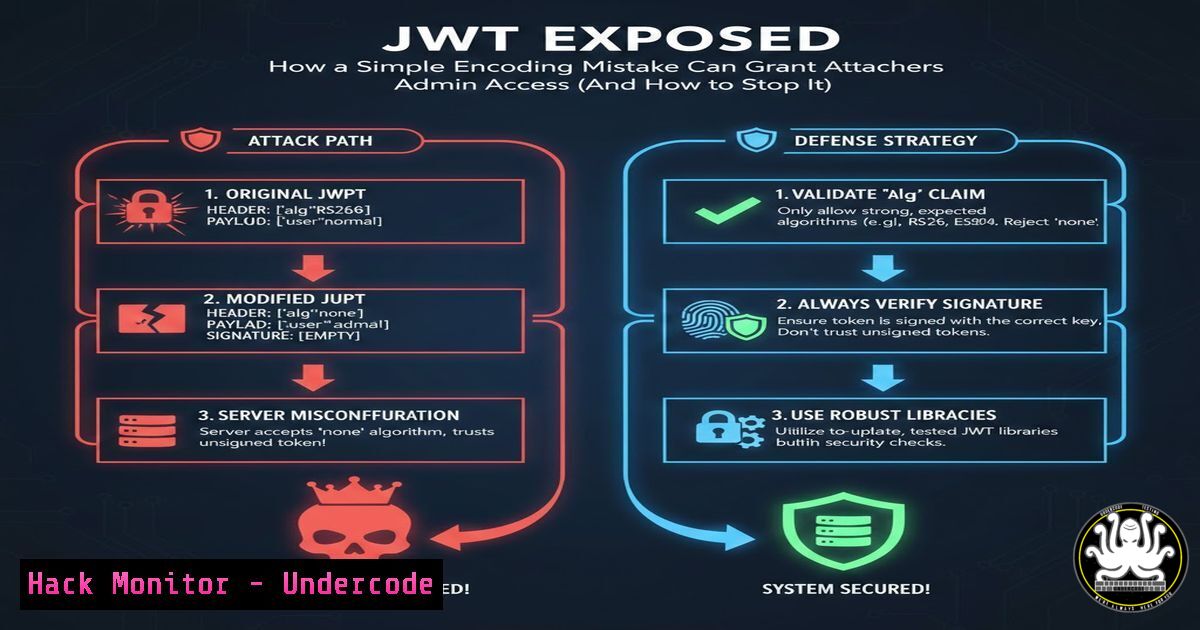
JSON Web Tokens (JWT) are the de facto standard for authentication and authorization in modern web applications. However, a critical and widespread misconception—confusing Base64 URL encoding for encryption—leads to severe security vulnerabilities. When developers mistakenly trust the token’s payload without verification, they open the door to privilege escalation and system compromise, as illustrated by a common flaw where an attacker can forge an `isAdmin: true` claim.
Learning Objectives:
- Understand the fundamental difference between JWT encoding and encryption, and why it matters.
- Learn how to correctly implement JWT signature verification across different backend frameworks.
- Develop secure practices for JWT payload design and token handling to prevent privilege escalation attacks.
You Should Know:
- Decoding the Illusion: JWT is Plain Text, Not a Secret
The JWT structure (Header.Payload.Signature) is merely Base64Url encoded. This encoding is for transport, not confidentiality. Anyone can decode the payload to read its contents. The only security mechanism is the cryptographic signature, which validates the token’s integrity.
Step-by-step guide:
- Obtain a JWT: Capture a token from your application’s HTTP requests using browser developer tools (Network tab) or a proxy like Burp Suite.
- Manual Decoding: A JWT is divided by dots (
.). You can decode any part using standard command-line tools:Linux/macOS: Decode the Header (first part) echo "eyJhbGciOiJIUzI1NiIsInR5cCI6IkpXVCJ9" | base64 --decode | jq Linux/macOS: Decode the Payload (second part) echo "eyJzdWIiOiIxMjM0NTY3ODkwIiwibmFtZSI6IkpvaG4gRG9lIiwiaXNBZG1pbiI6dHJ1ZX0" | base64 --decode | jq Windows (PowerShell): Decode the Payload
-
Online Tool (for analysis only): Use a site like `jwt.io` to paste the entire token. It will instantly decode it, demonstrating how easily the `isAdmin: true` claim is visible.
-
The Exploit: Tampering with Tokens and Signature Bypass
The critical failure occurs when the backend application uses a library that decodes the JWT but does not verify its signature against a secret key (HMAC) or public key (RSA). An attacker can modify the payload (e.g., change `”isAdmin”:false` totrue), re-encode it, and send the forged token.
Step-by-step guide (Exploitation Example):
- Intercept a legitimate user’s JWT in a tool like Burp Suite.
- Decode the payload as shown above and alter the JSON.
{"sub":"1234567890","name":"John Doe","isAdmin":true}
3. Re-encode the modified payload using Base64Url.
 Linux - Note: tr command handles URL-safe base64
echo -n '{"sub":"1234567890","name":"John Doe","isAdmin":true}' | base64 | tr -d '=' | tr '/+' '_-'
4. Replace the original payload section in the JWT with this new string, leaving the original header and signature. The signature is now invalid, but if the server doesn’t check it, the attack succeeds.
3. The Absolute Defense: Enforcing Signature Verification
The backend must cryptographically verify that the signature matches the header and payload. This should be the default, non-optional behavior.
Step-by-step guide (Implementation):
Node.js (using `jsonwebtoken`):
const jwt = require('jsonwebtoken');
const JWT_SECRET = process.env.JWT_SECRET; // Use a strong, environment-based secret

try {
// jwt.verify() THROWS AN ERROR if signature is invalid
const decoded = jwt.verify(tokenFromRequest, JWT_SECRET);
// Only now is the payload trusted
if (decoded.isAdmin) { // Proceed with admin action }
} catch (err) {
// Token is invalid - reject the request
return res.status(401).send('Invalid token');
}
Python (using `PyJWT`):
import jwt
import os

JWT_SECRET = os.environ.get('JWT_SECRET')

try:
decoded_payload = jwt.decode(
token_from_request,
JWT_SECRET,
algorithms=["HS256"]  Explicitly specify allowed algorithms!
)
except jwt.InvalidSignatureError:
 Reject the request
return "Invalid token", 401
4. Secure Payload Design: Never Store Critical Permissions
Treat the JWT payload as untrusted user input. Use it for non-critical identity claims (like user_id), but never as the sole source for authorization decisions.
Step-by-step guide:
1. Store: `userId: “12345”` in the JWT.
- Verify: Upon receiving a valid token, use the `userId` from the trusted payload to look up the user’s current permissions and roles from your secure database or session cache.
// After signature verification const user = await db.users.findUnique({ where: { id: decodedPayload.userId }, select: { isAdmin: true } }); if (!user.isAdmin) { return res.status(403).send('Forbidden'); } - This ensures role changes are effective immediately and an old token with a stale `isAdmin:true` claim is useless.
5. Hardening Your JWT Implementation: Best Practices
- Algorithm Enforcement: Always explicitly specify the expected algorithm (e.g.,
HS256,RS256) in your verification code. This prevents “algorithm confusion” attacks where an attacker forces the use of a weaker algorithm. - Short Expiry: Set short expiration times (
expclaim) for tokens (15-30 minutes) and use refresh tokens to maintain sessions. - Secure Storage: Store JWTs in
HttpOnly,Secure, `SameSite` cookies for web apps to prevent theft via XSS. - Secret Management: Never hardcode secrets. Use environment variables or a dedicated secrets management service (e.g., AWS Secrets Manager, HashiCorp Vault). Use strong, random keys.
What Undercode Say:
- Trust the Signature, Not the Payload: The JWT payload is a billboard, not a safe. The signature is the lock. If you don’t check the lock, anyone can change the message.
- Authorization Lives Server-Side: A JWT should answer “Who is this?” Authentication. The answer to “What can they do?” Authorization must come from a trusted, server-side source on every critical request.
This lesson underscores a foundational principle in security: never trust client-side input. The JWT flaw is not a bug in the specification but a dangerous pattern of misimplementation. As systems grow more distributed, the propensity to treat tokens as self-contained, trusted objects increases, making rigorous verification non-negotiable. It’s a classic example of a “broken object-level authorization” flaw, consistently featured in the OWASP API Top 10.
Prediction:
The evolution of JWTs will lean towards more opaque, verifiable credentials and standardized, signed claim structures to reduce implementation errors. We will see a rise in integrated library and API gateway solutions that enforce signature verification and claim validation by default. Furthermore, with the growth of zero-trust architectures, the pattern of short-lived tokens with backend permission checks will become even more dominant, moving away from storing any authorization data in the token itself. Automated security scanners will increasingly flag JWT decoding without verification as a critical vulnerability, pushing developers towards secure-by-default frameworks.
▶️ Related Video (74% Match):
🎯Let’s Practice For Free:
IT/Security Reporter URL:
Reported By: Arijit Saha77 – Hackers Feeds
Extra Hub: Undercode MoN
Basic Verification: Pass ✅


