Listen to this Post
Introduction
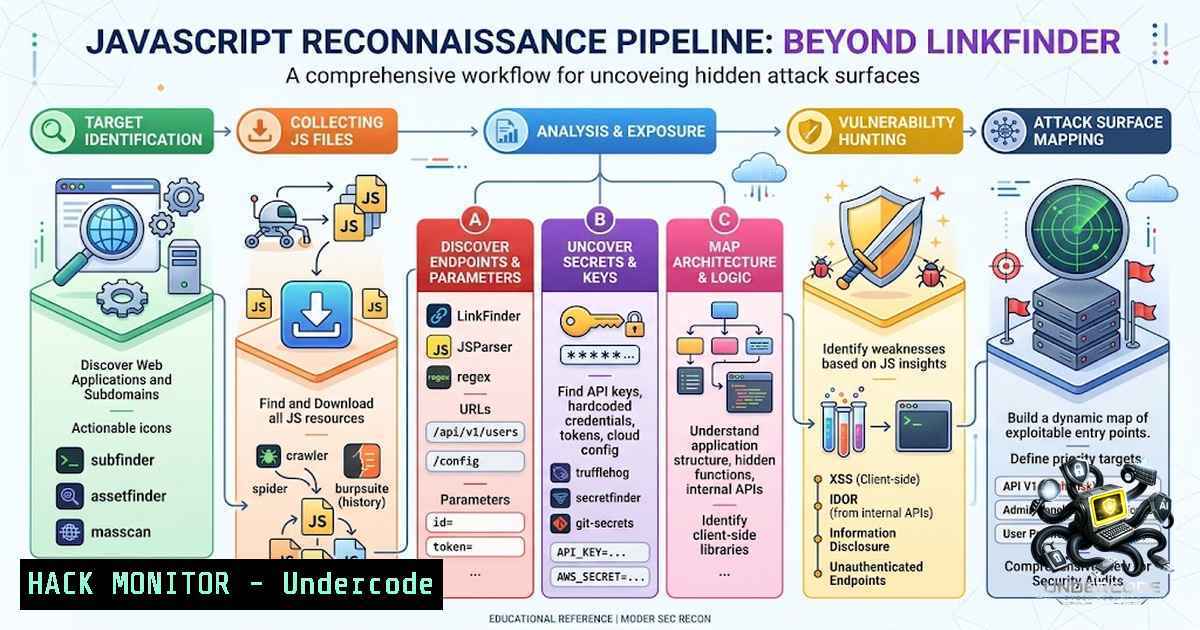
Modern web applications deliver thousands of lines of JavaScript to every visitor, and within these client-side bundles lie some of the most critical attack surfaces available to security researchers. While many bug bounty hunters limit their JavaScript analysis to running LinkFinder for URL extraction, this approach captures only a fraction of the available intelligence—hidden API endpoints, admin panels, feature flags, internal domains, hardcoded secrets, vulnerable third-party libraries, exposed source maps, and configuration files all remain undiscovered without a structured reconnaissance methodology.
Learning Objectives
- Master a complete JavaScript reconnaissance pipeline using hakrawler, waymore, jsluice, TruffleHog, and SourceMapper
- Understand how AST-based parsing outperforms regex for extracting URLs, paths, and secrets from JavaScript
- Learn to verify live credentials and recover original source code from exposed source maps
- Implement automated workflows for continuous JavaScript asset discovery and secret scanning
You Should Know
1. Hakrawler – Automated JavaScript File Discovery
Hakrawler is a fast Golang web crawler designed for quick discovery of endpoints and JavaScript file locations across web applications. Rather than manually browsing a target to locate every JS bundle, hakrawler automates this process by crawling the application and collecting every JavaScript file it encounters.
Installation:
 Install Go (if not already installed)
sudo apt update && sudo apt install golang git -y

Install hakrawler via Go
go install github.com/hakluke/hakrawler@latest

Add to PATH
export PATH="$HOME/go/bin:$PATH"
Basic Usage:
 Crawl a single domain
echo "https://example.com" | hakrawler

Include subdomains in the crawl
echo "https://example.com" | hakrawler -subs

Crawl with custom depth (default is 2)
echo "https://example.com" | hakrawler -d 3

Output results in JSON format
echo "https://example.com" | hakrawler -json

Send all requests through a Burp proxy
echo "https://example.com" | hakrawler -proxy http://127.0.0.1:8080

Crawl multiple URLs from a file
cat urls.txt | hakrawler -subs -t 16
Step-by-Step Guide:
- Identify your target – Start with the primary domain of the web application.
- Run hakrawler with subdomain inclusion – Many applications host JavaScript on subdomains like `static.example.com` or
cdn.example.com. The `-subs` flag ensures these are included. - Filter results for JavaScript files – Pipe the output through `grep` to isolate `.js` files:
echo "https://example.com" | hakrawler -subs | grep ".js$" > js_files.txt
- Save all discovered URLs – The complete output serves as input for subsequent tools in the pipeline.
Pro Tip: If hakrawler returns no results, the domain may be redirecting to a subdomain (e.g., `example.com` → www.example.com). Use the `-subs` flag or specify the final URL in the redirect chain.
2. Waymore – Mining Archived JavaScript Bundles
Waymore is a Python-based reconnaissance tool that discovers archived URLs from the Wayback Machine, Common Crawl, Alien Vault OTX, URLScan, VirusTotal, and Intelligence X. Its key differentiator is the ability to download archived responses, enabling deeper analysis of historical JavaScript files that may have been deleted but still contain valid endpoints.
Installation:
 Install via pip (recommended)
pip install waymore

Or install directly from GitHub
pip install git+https://github.com/xnl-h4ck3r/waymore.git -v

Verify installation
waymore --help
Basic Usage:
 Basic domain search
waymore -i example.com

Download archived responses for deeper analysis
waymore -i example.com -mode R

Search all URLs for a specific keyword (e.g., "admin")
waymore -i example.com -mode U | grep admin

Output results to a file
waymore -i example.com -o output.txt
Step-by-Step Guide:
- Run waymore on the target domain – Provide only the domain (without
www.) to capture all subdomains:waymore -i example.com -mode U > wayback_urls.txt
- Filter for JavaScript files – Extract archived JS files:
cat wayback_urls.txt | grep ".js$" > archived_js.txt
- Download archived responses – Use `-mode R` to download the full response bodies, which can reveal additional links, comments, and parameters not present in the URL alone.
- Search for sensitive keywords – Look for admin panels, internal domains, or API keys within archived responses.
Performance Note: Waymore prioritizes coverage over speed. Be patient—the tool is designed to be thorough.
3. Jsluice – AST-Powered JavaScript Analysis
Jsluice represents a paradigm shift from regex-based extraction to Abstract Syntax Tree (AST) parsing. Rather than matching patterns, jsluice understands how URLs and secrets are used in the code, enabling it to discover dynamically generated endpoints that regex would miss.
Installation:
 Install via Go
go install github.com/BishopFox/jsluice/cmd/jsluice@latest

Verify installation
jsluice --help
Basic Usage:
 Extract URLs from a JavaScript file
jsluice urls script.js

Extract secrets from a JavaScript file
jsluice secrets script.js

Process multiple files via stdin
find . -1ame ".js" | jsluice urls

Output in JSONL format for easy parsing
jsluice urls script.js | jq '.'

Fetch and analyze a remote JS file
jsluice urls https://example.com/static/app.js
Step-by-Step Guide:
- Collect all JavaScript files – Combine hakrawler and waymore outputs to build a comprehensive list:
cat js_files.txt archived_js.txt | sort -u > all_js.txt
- Extract URLs with jsluice – Run the `urls` mode to discover endpoints, including those built through string concatenation:
cat all_js.txt | xargs -I {} jsluice urls {} >> endpoints.txt - Extract secrets – Use the `secrets` mode to find API keys, tokens, and credentials:
cat all_js.txt | xargs -I {} jsluice secrets {} >> secrets_raw.txt - Resolve relative paths – Use the `-r` flag to resolve relative URLs against the base domain:
jsluice urls -r https://example.com script.js
- Custom secret matchers – Extend jsluice with custom patterns for proprietary secrets.
Why AST Matters: Consider this code: document.location = "/login?redirect=" + redirect + "&method=oauth". A regex would likely miss the `method` parameter, but jsluice understands the concatenation and correctly extracts the full URL with both parameters.
4. TruffleHog – Verified Secret Discovery
TruffleHog goes beyond simple secret detection by verifying whether discovered credentials are still active through API validation. Live credentials—such as AWS keys, GitHub tokens, or Slack webhooks—can lead to critical vulnerabilities and high-impact bug bounty findings.
Installation:
 Install via apt (Kali Linux)
sudo apt install trufflehog

Or install via Go
go install github.com/trufflesecurity/trufflehog/v3/cmd/trufflehog@latest
Basic Usage:
 Scan a Git repository for verified secrets
trufflehog git https://github.com/example/repo --only-verified

Scan a file system directory
trufflehog filesystem /path/to/directory

Scan a Docker image
trufflehog docker --image trufflesecurity/secrets --only-verified

Scan with JSON output
trufflehog git https://github.com/example/repo --json
Step-by-Step Guide:
- Collect all JavaScript files locally – Download every JS file discovered in previous steps:
while read url; do curl -s "$url" -o "$(basename $url)"; done < all_js.txt
- Run TruffleHog on the directory – Scan all downloaded files:
trufflehog filesystem ./js_files/ --only-verified --json > verified_secrets.json
- Filter results – Focus exclusively on verified credentials to avoid false positives:
cat verified_secrets.json | jq 'select(.Verified == true)'
- Prioritize high-impact findings – AWS access keys, GitHub tokens, and database credentials should be reported immediately.
Key Flags:
– `–only-verified` – Only output credentials that have been verified as active
– `–json` – Output in JSON format for programmatic processing
– `–concurrency` – Adjust the number of concurrent workers (default: 6)
5. SourceMapper – Recovering Original Source Code
Source maps (.map files) are often inadvertently exposed in production environments, allowing attackers to reconstruct the original, unminified source code. SourceMapper parses these maps and recreates the full source tree, revealing business logic, comments, and variable names that were obfuscated during minification.
Installation:
 Install via Go
go install github.com/denandz/sourcemapper@latest

Verify installation
sourcemapper -help
Basic Usage:
 Extract source from a .map file URL
sourcemapper -url https://example.com/app.js.map -output ./source_code

Extract source from a JavaScript file (auto-detects source map)
sourcemapper -jsurl https://example.com/app.js -output ./source_code

Process a directory of .map files recursively
sourcemapper -dir ./maps/ -output ./source_code

Ignore invalid TLS certificates (for testing)
sourcemapper -url https://example.com/app.js.map -output ./src -insecure
Step-by-Step Guide:
- Search for source map references – Look for comments like `// sourceMappingURL=app.js.map` in JavaScript files:
grep -r "sourceMappingURL" ./js_files/
- Extract the source map URL – The comment typically contains a relative or absolute URL to the `.map` file.
- Run SourceMapper – Download and parse the source map:
sourcemapper -url https://example.com/static/app.js.map -output ./decompiled
- Analyze the reconstructed source – The output directory will contain the original source tree with human-readable code.
What You Might Find:
- Hardcoded API endpoints and credentials
- Business logic flaws and access control mechanisms
- Debugging endpoints and feature flags
- Internal documentation and developer comments
6. Building the Complete Pipeline
The true power of JavaScript reconnaissance lies in chaining these tools together into an automated pipeline.
Linux/MacOS Pipeline Script:
!/bin/bash
 js_recon_pipeline.sh - Complete JavaScript reconnaissance automation

DOMAIN=$1
OUTPUT_DIR="js_recon_$DOMAIN"
mkdir -p "$OUTPUT_DIR"

echo "[] Phase 1: Crawling for JavaScript files with hakrawler..."
echo "https://$DOMAIN" | hakrawler -subs -json | grep ".js" > "$OUTPUT_DIR/hakrawler_js.json"

echo "[] Phase 2: Mining archived JavaScript with waymore..."
waymore -i "$DOMAIN" -mode U | grep ".js" > "$OUTPUT_DIR/waymore_js.txt"

echo "[] Phase 3: Combining and deduplicating JS file list..."
cat "$OUTPUT_DIR/hakrawler_js.json" "$OUTPUT_DIR/waymore_js.txt" | sort -u > "$OUTPUT_DIR/all_js.txt"

echo "[] Phase 4: Downloading all JavaScript files..."
mkdir -p "$OUTPUT_DIR/js_files"
while read url; do
filename=$(basename "$url" | cut -d'?' -f1)
curl -s -k "$url" -o "$OUTPUT_DIR/js_files/$filename" 2>/dev/null
done < "$OUTPUT_DIR/all_js.txt"

echo "[] Phase 5: Extracting URLs and secrets with jsluice..."
find "$OUTPUT_DIR/js_files" -1ame ".js" -exec jsluice urls {} \; > "$OUTPUT_DIR/endpoints.txt"
find "$OUTPUT_DIR/js_files" -1ame ".js" -exec jsluice secrets {} \; > "$OUTPUT_DIR/secrets_raw.txt"

echo "[] Phase 6: Scanning for verified secrets with TruffleHog..."
trufflehog filesystem "$OUTPUT_DIR/js_files" --only-verified --json > "$OUTPUT_DIR/verified_secrets.json"

echo "[] Phase 7: Searching for source maps..."
grep -r "sourceMappingURL" "$OUTPUT_DIR/js_files" > "$OUTPUT_DIR/sourcemap_refs.txt"

echo "[] Recon complete! Results saved to $OUTPUT_DIR/"
Windows (PowerShell) Equivalent:
 js_recon_pipeline.ps1
param($Domain)

$OutputDir = "js_recon_$Domain"
New-Item -ItemType Directory -Path $OutputDir -Force

Write-Host "[] Phase 1: Crawling with hakrawler..."
echo "https://$Domain" | hakrawler -subs | Select-String ".js" | Out-File "$OutputDir\hakrawler_js.txt"

Write-Host "[] Phase 2: Mining archived JavaScript with waymore..."
waymore -i $Domain -mode U | Select-String ".js" | Out-File "$OutputDir\waymore_js.txt"

Write-Host "[] Phase 3: Combining JS file lists..."
Get-Content "$OutputDir\hakrawler_js.txt", "$OutputDir\waymore_js.txt" | Sort-Object -Unique | Out-File "$OutputDir\all_js.txt"

Write-Host "[] Phase 4: Downloading JavaScript files..."
New-Item -ItemType Directory -Path "$OutputDir\js_files" -Force
Get-Content "$OutputDir\all_js.txt" | ForEach-Object {
$filename = Split-Path $_ -Leaf
Invoke-WebRequest -Uri $_ -OutFile "$OutputDir\js_files\$filename" -ErrorAction SilentlyContinue
}

Write-Host "[] Recon complete! Results saved to $OutputDir"
7. Advanced Techniques and Mitigations
For Security Researchers:
- Custom wordlists – Combine jsluice output with tools like `gf` to pattern-match for specific vulnerability types (e.g.,
gf xss). - Diff analysis – Compare JavaScript bundles over time to identify new endpoints or secrets introduced in recent deployments.
- Burp Suite integration – Use jsluice++ as a Burp extension for passive scanning of JavaScript traffic.
- CI/CD integration – Incorporate TruffleHog into your pipeline to automatically block commits containing secrets.
For Defenders (Mitigation Strategies):
- Never hardcode secrets – Use environment variables or secure secret management solutions.
- Remove source maps in production – Source maps should only be available in development environments.
- Implement CSP headers – Restrict which domains can load JavaScript to prevent malicious script injection.
- Regular secret rotation – Even if a secret is exposed, rotation limits the window of opportunity.
- Use `.gitignore` properly – Ensure
.env,secrets.json, and similar files are never committed to version control.
What Undercode Say
- JavaScript is the new attack surface – Every line of client-side code is a potential entry point. Treat JavaScript files with the same scrutiny as server-side code.
- Automation is not optional – Modern applications ship with thousands of lines of JavaScript. Manual analysis is impractical; a structured pipeline is essential.
- AST parsing beats regex – Tools like jsluice that understand code structure will consistently outperform regex-based approaches, especially for dynamically generated content.
- Verification separates hunters from scanners – Finding a secret is one thing; proving it’s live and exploitable is what leads to high-impact bug bounty payouts.
- Source maps are gold mines – Exposed source maps often reveal the entire application architecture, including internal APIs and business logic. Always check for them.
The difference between beginner and expert bug bounty hunters is not the tools they use—it’s the methodology they follow. Running LinkFinder and calling it a day leaves countless vulnerabilities undiscovered. By implementing a comprehensive JavaScript reconnaissance pipeline—hakrawler for discovery, waymore for historical data, jsluice for AST-based extraction, TruffleHog for verification, and SourceMapper for source recovery—you transform JavaScript from an overlooked attack surface into a primary source of critical findings. The tools are free and open-source. The methodology is battle-tested. The only missing piece is your willingness to implement it.
Prediction
+1 The adoption of AST-based JavaScript analysis tools like jsluice will become standard practice in bug bounty programs within 12–18 months, as security teams recognize the limitations of regex-based approaches.
+1 AI-powered JavaScript analysis will emerge as the next evolution, with machine learning models capable of identifying business logic flaws and access control bypasses directly from client-side code.
-1 The increasing sophistication of JavaScript reconnaissance tools will force organizations to adopt more aggressive code obfuscation and source map removal, potentially creating an arms race between defenders and researchers.
-1 As more organizations implement automated secret scanning in CI/CD pipelines, the frequency of hardcoded credentials in production may decline, but legacy applications with historical exposures will remain vulnerable for years.
+1 Community-driven sharing of custom jsluice matchers and TruffleHog detectors will accelerate, creating a rich ecosystem of specialized detection rules for proprietary frameworks and cloud services.
+1 The integration of JavaScript reconnaissance into automated vulnerability assessment platforms will become commonplace, enabling continuous monitoring of client-side attack surfaces without manual intervention.
-1 Organizations that fail to implement proper source map controls and secret management will face increasing regulatory scrutiny and breach risks, as attackers increasingly target the client-side attack surface.
+1 The democratization of these tools—all free and open-source—will level the playing field, enabling independent researchers to compete with well-funded security teams and uncover critical vulnerabilities.
+1 Bug bounty platforms will begin offering specialized bounties for JavaScript-based findings, recognizing the unique value of client-side vulnerability discovery.
-1 The reliance on third-party JavaScript libraries will continue to expand the attack surface, as vulnerabilities in popular packages (e.g., via CDN) can affect thousands of applications simultaneously.
▶️ Related Video (82% Match):
🎯Let’s Practice For Free:
🎓 Live Courses & Certifications:
Join Undercode Academy for Verified Certifications
🚀 Request a Custom Project:
Secure, high-velocity infrastructure and disruptive technological engineering. Contact our engineering team for high-tier development and proprietary systems:
[email protected]
💎 Smart Architecture | 🛡️ Secure by Design | ⭐ Trusted by Thousands
IT/Security Reporter URL:
Reported By: Umertells Bugbounty – Hackers Feeds
Extra Hub: Undercode MoN
Basic Verification: Pass ✅


