Listen to this Post
Introduction:
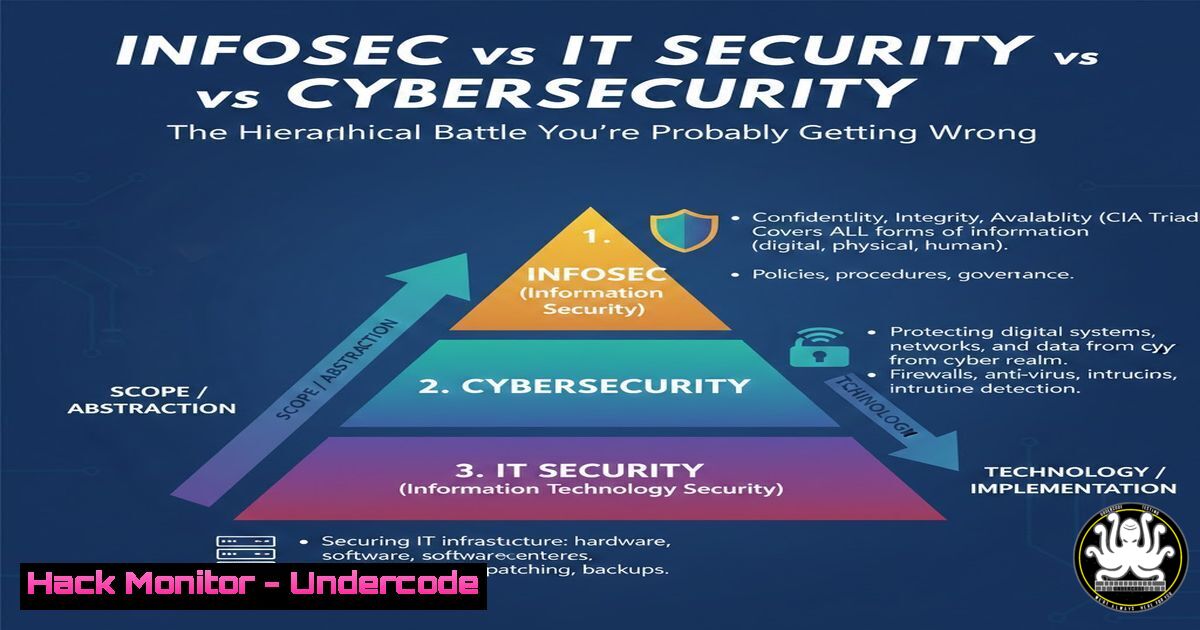
In the digital risk landscape, the terms Information Security, IT Security, and Cybersecurity are often conflated, leading to strategic misalignment and fragmented defenses. Understanding their distinct yet interconnected roles is critical for building a coherent, layered security posture that protects assets from physical theft to sophisticated nation-state cyber-attacks.
Learning Objectives:
- Decipher the hierarchical relationship between InfoSec, IT Security, and Cybersecurity.
- Identify and implement core technical controls unique to each domain.
- Apply practical commands and configurations to enforce security principles across physical, system, and network layers.
You Should Know:
- The Foundational Layer: Enforcing the CIA Triad with InfoSec
InfoSec is the overarching strategy, governed by the CIA Triad—Confidentiality, Integrity, and Availability. It mandates controls for data regardless of its form. This involves physical security policies, data classification schemes, and cryptographic protections for data at rest.
Step‑by‑step guide:
Data Classification & Encryption: Before technical controls, classify data (e.g., Public, Internal, Confidential). For Confidential digital data, encryption is non-negotiable.
On Linux: Use `LUKS` for full-disk encryption or `GPG` for file-based encryption.
 Encrypt a file using GPG
gpg --symmetric --cipher-algo AES256 sensitive_document.txt
 You will be prompted for a passphrase. The output will be sensitive_document.txt.gpg
On Windows: Utilize `BitLocker` via PowerShell for volume encryption.
 Enable BitLocker on the C: drive using a TPM protector
Enable-BitLocker -MountPoint "C:" -EncryptionMethod XtsAes256 -UsedSpaceOnly
Physical Access Control: Implement logical commands that tie into physical security. For instance, configure automatic screen locking to mitigate physical shoulder-surfing risks.
 Linux: Set GNOME to lock the screen after 5 minutes of inactivity
gsettings set org.gnome.desktop.screensaver lock-delay 300
 Windows: Set lock screen timeout to 5 minutes via command line
powercfg.exe /change standby-timeout-ac 5
2. Hardening the Infrastructure: Core IT Security Controls
IT Security operationalizes InfoSec policies for digital systems—servers, networks, and applications. Its goal is system integrity and availability.
Step‑by‑step guide:
System Hardening & Patch Management: Regularly update systems and remove unnecessary services.
 Linux (Debian-based): Update package lists and upgrade all packages
sudo apt update && sudo apt upgrade -y
 List and remove unnecessary services
sudo systemctl list-units --type=service --state=running
sudo systemctl disable <unnecessary-service>
 Windows: Check for and install all available updates
Install-Module -Name PSWindowsUpdate -Force
Get-WindowsUpdate -AcceptAll -Install -AutoReboot
Firewall Configuration: Implement default-deny firewall policies.
 Linux using UFW: Deny all incoming, allow all outgoing by default
sudo ufw default deny incoming
sudo ufw default allow outgoing
sudo ufw allow ssh  Explicitly allow SSH
sudo ufw enable
 Windows: Create a new rule to block a specific port
New-NetFirewallRule -DisplayName "Block Port 445" -Direction Inbound -LocalPort 445 -Protocol TCP -Action Block
3. The Digital Frontline: Proactive Cybersecurity Operations
Cybersecurity is the tactical subset focused on malicious digital threats. It involves active monitoring, threat hunting, and incident response.
Step‑by‑step guide:
Intrusion Detection with Command-Line Tools: Use built-in tools to detect anomalies.
 Linux: Check for unusual listening ports and connections
ss -tulnp  List all listening ports and associated processes
netstat -antp | grep ESTABLISHED  View established connections
 Analyze system logs for failed login attempts (common brute-force indicator)
sudo grep "Failed password" /var/log/auth.log | tail -20
 Windows: Use Netstat and query the Windows Event Log for security events
netstat -ano | findstr LISTENING
Get-WinEvent -FilterHashtable @{LogName='Security'; ID=4625} -MaxEvents 10 | Select-Object TimeCreated, Message
Simulating & Mitigating Phishing (Credential Harvesting): Understand how attackers operate. A mitigation step is to enforce DNS filtering.
 Configure a local hosts file to block known malicious domains (Linux/macOS)
echo "0.0.0.0 evil-phishing-site.com" | sudo tee -a /etc/hosts
- Securing the Modern Stack: Cloud Security & DevOps Integration
Cloud and DevOps practices blur traditional boundaries, requiring controls from all three domains to be integrated into CI/CD pipelines and IaaS configurations.
Step‑by‑step guide:
Infrastructure as Code (IaC) Security Scanning: Scan IaC templates for misconfigurations before deployment.
 Using Checkov to scan a Terraform directory for security issues
pip install checkov
checkov -d /path/to/terraform/code
Hardening Cloud Storage (AWS S3 Example): Enforce encryption and block public access.
 AWS CLI: Ensure an S3 bucket has encryption enabled and no public access
aws s3api put-bucket-encryption \
--bucket my-bucket \
--server-side-encryption-configuration '{"Rules": [{"ApplyServerSideEncryptionByDefault": {"SSEAlgorithm": "AES256"}}]}'

aws s3api put-public-access-block \
--bucket my-bucket \
--public-access-block-configuration "BlockPublicAcls=true,IgnorePublicAcls=true,BlockPublicPolicy=true,RestrictPublicBuckets=true"
- The Human Layer: Security Awareness Training as Code
The most robust technical controls fail due to human error. Security awareness, an InfoSec cornerstone, must be ongoing.
Step‑by‑step guide:
Automated Phishing Simulation: Integrate testing into the operational environment. Tools like `Gophish` (open-source) can be deployed to run controlled campaigns.
 Example: Using Gophish API (conceptual) to schedule a campaign
 This highlights the programmatic integration of training.
curl -X POST -H "Content-Type: application/json" -d '{"name":"Q3 Campaign", "template_id":1, "url":"https://training.yourcompany.com", "launch_date":"2023-10-15T08:00:00Z"}' https://localhost:3333/api/campaigns/?api_key=your_api_key
Enforcing Policy with Technical Measures: Use technical controls to mandate training completion, such as integrating with IAM systems to restrict resource access until training modules are completed.
What Undercode Say:
- Security is a Layered Architecture, Not a Synonym: Confusing these domains creates gaps. Effective strategy requires InfoSec policy, IT Security hardening, and Cybersecurity active defense to work in concert.
- Tools Follow Scope: Your choice of tool—from `BitLocker` (InfoSec/IT) to `Wireshark` (Cyber) to `Checkov` (Cloud IT/Cyber)—is dictated by which layer of the hierarchy you are defending.
A precise understanding of this hierarchy stops teams from talking past each other. An IT Security engineer patching a server is supporting the broader InfoSec goal of Availability, while a Cybersecurity analyst hunting for malware is addressing a specific digital threat vector within that same system. The future of security roles will demand T-shaped professionals—deep specialists in one domain (e.g., cloud cybersecurity) with a broad, operational understanding of the entire hierarchy to enable effective cross-functional collaboration against evolving threats.
▶️ Related Video (82% Match):
🎯Let’s Practice For Free:
IT/Security Reporter URL:
Reported By: Blessingusifoh Informationsecurity – Hackers Feeds
Extra Hub: Undercode MoN
Basic Verification: Pass ✅


