Listen to this Post
Introduction
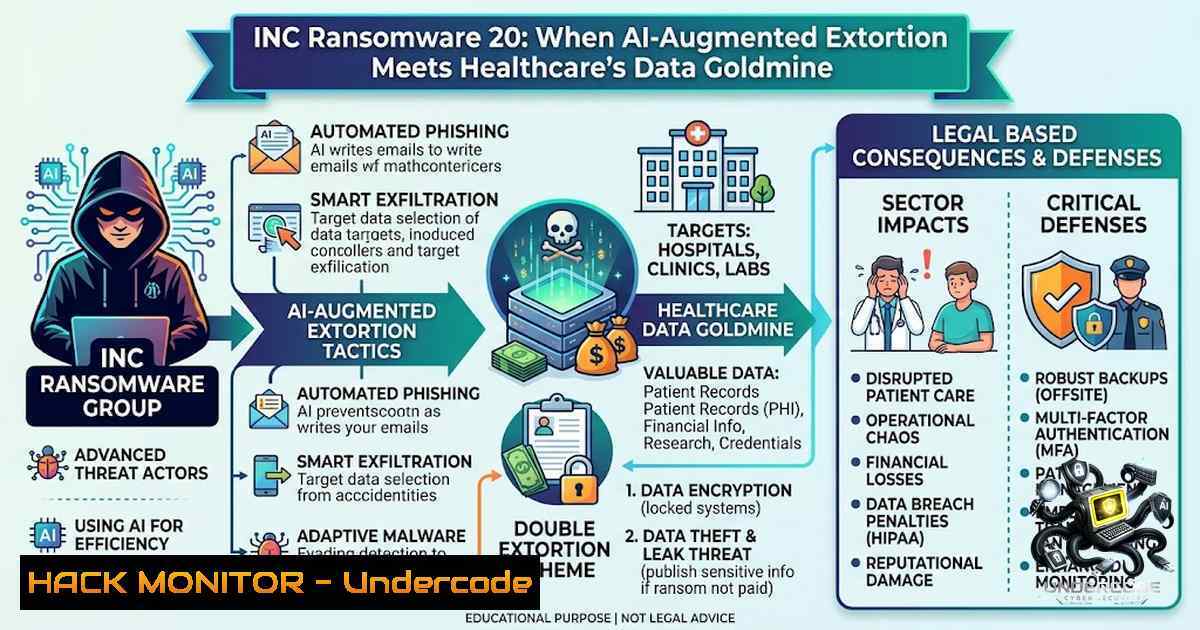
The Australian healthcare sector is under siege. On 23 June 2026, Partnered Health—a network of more than 60 clinics across Australia—discovered that a malicious actor had infiltrated its systems and exfiltrated sensitive patient data including Medicare numbers, consultation notes, pathology results, and private health insurance details. By 30 July, the INC Ransom ransomware group had listed the organisation on its darknet leak site, publishing 11 files as proof of breach. This incident is not isolated; it represents a broader, accelerating crisis where ransomware-as-a-service (RaaS) operators, armed with generative AI tools, are systematically dismantling the defences of critical infrastructure. As Proofpoint’s Adrian Covich warns, “the growing threat of AI-enabled attacks means doing the minimum is no longer enough”.
Learning Objectives
- Understand the technical anatomy of INC Ransom’s attack chain—from initial access via compromised credentials to Rust-based encryption and data exfiltration
- Master defensive strategies against AI-enhanced phishing and social engineering campaigns targeting healthcare organisations
- Implement practical hardening measures for backup infrastructure, identity controls, and email security across Linux and Windows environments
You Should Know
- The Technical Anatomy of INC Ransom’s Attack Chain
INC Ransom first emerged in August 2023 and has since claimed over 885 victims globally. What sets this group apart is its evolution from a conventional ransomware operator to a sophisticated RaaS ecosystem with a distributed affiliate model. The attack chain typically follows a well-defined sequence:
Step 1: Initial Access – Affiliates gain entry through compromised credentials (often purchased from underground markets), phishing campaigns, or exploitation of internet-facing vulnerabilities. The Australian Cyber Security Centre (ACSC) has observed INC Ransom affiliates targeting Australian healthcare entities using compromised accounts since January 2025.
Step 2: Reconnaissance & Lateral Movement – Once inside, attackers perform network enumeration, map Active Directory structures, and identify critical assets including backup servers and domain controllers.
Step 3: Credential Dumping – The group employs credential-dumping utilities capable of extracting credentials from modern environments, including newer Veeam backup systems. This focus on backup infrastructure is deliberate—by compromising recovery systems, attackers neutralise the victim’s ability to restore without paying.
Step 4: Data Exfiltration – Sensitive data is staged and exfiltrated before encryption is deployed, enabling the double-extortion model.
Step 5: Encryption Deployment – The ransomware payload is deployed on selected environments. Notably, both the Windows and Linux/ESXi versions of INC Ransom have been rewritten in Rust, a language that supports cross-platform development and complicates analysis.
Defensive Commands & Configurations
Linux – Detect Suspicious Lateral Movement (SSH Log Analysis)
 Check for unusual SSH authentication attempts
sudo grep "Failed password" /var/log/auth.log | awk '{print $11}' | sort | uniq -c | sort -1r

Identify successful logins from unexpected geographic locations (requires geoip)
sudo last -i | awk '{print $3}' | sort | uniq -c | sort -1r

Monitor for unusual cron jobs (persistence mechanism)
sudo cat /etc/crontab && sudo ls -la /etc/cron./
Windows – Detect Credential Dumping Activity
 Enable PowerShell logging to detect malicious activity
Set-ItemProperty -Path "HKLM:\SOFTWARE\Policies\Microsoft\Windows\PowerShell\ScriptBlockLogging" -1ame "EnableScriptBlockLogging" -Value 1

Monitor for LSASS access attempts (indicative of credential dumping)
wevtutil qe Security /c:50 /f:text | Select-String "4663" -Context 5,5

Review scheduled tasks for persistence
schtasks /query /fo LIST /v | findstr "TaskName"
Hardening Veeam Backup Credentials (Linux/Windows)
 Linux: Restrict Veeam service account permissions
sudo usermod -s /sbin/nologin veeam
sudo setfacl -m u:veeam: /var/backups/

Windows: Enable backup encryption and restrict access
 Set-VBRBackupEncryptionKey -Password (ConvertTo-SecureString "YourStrongPassword" -AsPlainText -Force)
2. AI-Enhanced Phishing: The New Attack Vector
Proofpoint’s research reveals that “the apparent authenticity of the lure was the most cited reason for a successful ransomware attack”. Generative AI has fundamentally altered the phishing landscape, enabling threat actors to automate highly targeted campaigns, spoof clinical communications, and execute attacks at unprecedented speed. Healthcare organisations are particularly vulnerable because patients and staff routinely receive clinical communications—appointment reminders, test results, referral letters—making malicious impersonation difficult to distinguish.
Step 1: Recognise AI-Generated Lures – AI-generated phishing emails exhibit fewer grammatical errors and more convincing personalisation than traditional campaigns. Look for subtle anomalies: slightly mismatched sender domains, urgency-inducing language, and requests for sensitive information that deviate from normal clinical communication patterns.
Step 2: Implement DMARC, SPF, and DKIM – Email authentication protocols are the first line of defence against domain spoofing.
DMARC Configuration (DNS TXT Record)
v=DMARC1; p=reject; rua=mailto:[email protected]; ruf=mailto:[email protected]; fo=1
SPF Record (DNS TXT Record)
v=spf1 mx include:spf.protection.outlook.com -all
DKIM Setup (DNS TXT Record)
v=DKIM1; k=rsa; p=MIGfMA0GCSqGSIb3DQEBAQUAA4GNADCBiQKBgQC...
Step 3: Deploy AI-Based Email Filtering – Traditional rule-based filters are insufficient against AI-generated content. Deploy machine learning-based email security solutions that analyse linguistic patterns, sender behaviour, and contextual anomalies.
Step 4: User Awareness Training – Healthcare staff must be trained to verify sender identity independently—checking email addresses and phone numbers rather than relying on displayed names.
Simulating an AI-Phishing Detection Test
 Simple Python script to detect potential phishing indicators in email headers
import re

def analyze_email_headers(headers):
indicators = []
 Check for mismatched From/Return-Path
if 'From' in headers and 'Return-Path' in headers:
from_domain = re.search(r'@([\w.-]+)', headers['From'])
return_path_domain = re.search(r'@([\w.-]+)', headers['Return-Path'])
if from_domain and return_path_domain and from_domain.group(1) != return_path_domain.group(1):
indicators.append("Mismatched From/Return-Path domains")
 Check for urgent language
if any(word in headers.get('Subject', '').lower() for word in ['urgent', 'immediate', 'critical', 'action required']):
indicators.append("Urgency language detected")
return indicators

Example usage
headers = {'From': '[email protected]', 'Return-Path': '[email protected]', 'Subject': 'URGENT: Patient Data Verification Required'}
print(analyze_email_headers(headers))
3. Hardening Backup Infrastructure Against Ransomware
The INC Ransom group’s systematic targeting of backup systems reflects a critical vulnerability in most organisations’ recovery strategies. By compromising backup credentials and encrypting or deleting recovery points, attackers eliminate the victim’s ability to restore without paying.
Step 1: Implement the 3-2-1 Backup Rule – Maintain three copies of data, on two different media types, with one copy stored offsite (preferably air-gapped or immutable).
Step 2: Enable Immutable Backups – Configure backup repositories to prevent deletion or modification for a defined retention period.
Veeam Immutable Backup Configuration (Linux Repository)
 Create a dedicated backup user with minimal privileges
sudo useradd -m -s /bin/bash backupuser
sudo passwd backupuser

Set immutable flag on backup directories
sudo chattr +i /backup/repository/

Configure Veeam to use Linux Hardened Repository
 In Veeam console: Backup Infrastructure > Linux Servers > Add Server
 Enable "Use as a hardened repository" option
Windows – Enable Volume Shadow Copy and Restrict Access
 Configure VSS to prevent deletion
vssadmin resize shadowstorage /for=C: /on=C: /maxsize=20%

Restrict backup service account permissions
icacls "C:\Backups" /inheritance:r
icacls "C:\Backups" /grant "SYSTEM:(OI)(CI)F"
icacls "C:\Backups" /grant "BUILTIN\Administrators:(OI)(CI)F"
icacls "C:\Backups" /deny "Everyone:(OI)(CI)W"
Step 3: Monitor Backup Integrity – Implement regular backup validation and integrity checks.
 Linux: Verify backup integrity using checksums
find /backup -type f -exec sha256sum {} \; > /backup/checksums.txt

Schedule integrity verification
echo "0 2    /usr/bin/find /backup -type f -exec sha256sum {} \; > /backup/checksums_$(date +\%Y\%m\%d).txt" | sudo crontab -
Step 4: Isolate Backup Networks – Backup infrastructure should reside on a separate network segment with strict access controls. Implement jump hosts for administrative access and require multi-factor authentication.
4. Identity Controls & Multi-Factor Authentication Hardening
The ACSC has responded to 11 INC Ransom incidents in Australia between July 2024 and December 2025, primarily affecting professional services and healthcare organisations. Compromised credentials remain the most common entry point.
Step 1: Enforce Multi-Factor Authentication (MFA) Everywhere – MFA must be mandatory for all administrative accounts, remote access, and email systems. Healthcare organisations should extend MFA to clinical applications and patient portals.
Azure AD Conditional Access Policy (PowerShell)
 Require MFA for all cloud app access
New-AzureADMSConditionalAccessPolicy `
-1ame "Require MFA for All Users" `
-Conditions @{Applications=@{IncludeApplications='All'}} `
-GrantControls @{BuiltInControls='Mfa'} `
-State "enabled"
Step 2: Implement Privileged Access Workstations (PAW) – Administrative tasks should be performed from dedicated, hardened workstations with restricted internet access.
Step 3: Deploy Just-In-Time (JIT) Access – Grant administrative privileges only when needed and for a limited duration.
Linux – Sudo with Time-Limited Access
 Configure sudo to require re-authentication every 5 minutes
echo "Defaults timestamp_timeout=5" >> /etc/sudoers

Implement session recording for privileged commands
echo "Defaults log_output" >> /etc/sudoers
echo "Defaults logfile=/var/log/sudo.log" >> /etc/sudoers
Step 4: Monitor for Credential Theft Indicators – Deploy endpoint detection and response (EDR) solutions that can detect LSASS memory access, Mimikatz execution, and abnormal credential usage patterns.
Windows – Enable Credential Guard
 Enable Credential Guard via Group Policy
 Computer Configuration > Administrative Templates > System > Device Guard > Turn On Virtualization Based Security
 Set to "Enabled with UEFI lock"

Verify Credential Guard status
Get-ComputerInfo -Property "DeviceGuard"
5. Incident Response & Legal Considerations
Partnered Health’s response—engaging specialist cyber experts, obtaining an interim injunction from the Supreme Court of NSW to prevent data publication, and notifying the ACSC, OAIC, and law enforcement—represents a model for healthcare organisations.
Step 1: Activate Incident Response Plan – Immediately engage internal and external incident response teams. Contain the incident by isolating affected systems without destroying forensic evidence.
Step 2: Preserve Evidence – Create forensic images of affected systems. Maintain detailed logs of all response actions.
Linux – Forensic Acquisition
 Create a forensic image using dd
sudo dd if=/dev/sda of=/forensics/sda_image.dd bs=4M conv=noerror,sync

Calculate hash for evidence integrity
sha256sum /forensics/sda_image.dd > /forensics/sda_image.sha256
Windows – Collect Forensic Artifacts
 Collect system information
systeminfo > C:\forensics\systeminfo.txt

Export event logs
wevtutil epl Security C:\forensics\Security.evtx
wevtutil epl System C:\forensics\System.evtx
wevtutil epl Application C:\forensics\Application.evtx

Collect prefetch files for execution history
copy C:\Windows\Prefetch\ C:\forensics\Prefetch\
Step 3: Notify Authorities and Affected Individuals – Compliance with notification requirements under the Privacy Act and Notifiable Data Breaches scheme is critical. Partnered Health identified at least 21 clinics across Melbourne, Sydney, Canberra, Gold Coast, Sunshine Coast, and Coffs Harbour as potentially exposed.
Step 4: Communicate Transparently with Patients – Affected individuals should be advised to exercise extreme caution with unsolicited emails, texts, or calls, and to independently verify any requests for information directly with their healthcare provider.
6. The Rust Rewrite: Analysing INC’s Cross-Platform Evolution
The decision to rewrite INC Ransom’s Windows and Linux/ESXi variants in Rust represents a significant technical shift. Rust’s memory safety features reduce vulnerabilities that security researchers might exploit, while its cross-platform capabilities enable a single codebase to target diverse environments.
Indicators of Compromise (IoCs) to Monitor
| Indicator Type | Example | MITRE ATT&CK Mapping |
||||
| File Extension | .inc, .INCrypted | T1486 (Data Encrypted for Impact) |
| Process Names | inc.exe, inc_linux, inc_esxi | T1059 (Command and Scripting Interpreter) |
| Network Patterns | Connections to .onion domains | T1071 (Application Layer Protocol) |
| Registry Keys | HKLM\Software\INC | T1112 (Modify Registry) |
Linux – Detect Rust-Based Ransomware Activity
 Monitor for unusual file encryption activity
sudo auditctl -w /home -p wa -k encryption_activity
sudo auditctl -w /var/www -p wa -k encryption_activity

Check for renamed files with suspicious extensions
find / -type f -1ame ".inc" -o -1ame ".INCrypted" 2>/dev/null

Monitor for process injection attempts
sudo ausearch -m syscall -k process_injection
Windows – Detect Ransomware Execution Patterns
 Enable Sysmon to monitor for suspicious process creation
 Install Sysmon with configuration: sysmon -accepteula -i

Monitor for volume shadow copy deletion (common ransomware tactic)
wevtutil qe "Microsoft-Windows-1TFS/Operational" /c:50 /f:text | Select-String "1008"

Detect unusual file extensions being created
Get-ChildItem -Path C:\ -Recurse -ErrorAction SilentlyContinue | Where-Object {$_.Extension -match ".(inc|INCrypted|encrypted)"}
What Undercode Say:
- AI is the force multiplier that changes the calculus. The Partnered Health breach exemplifies how AI-enhanced social engineering is making traditional security awareness training obsolete. Threat actors are now able to generate highly convincing, personalised lures at scale that mimic legitimate clinical communications. Organisations must move beyond “awareness” to technical controls—DMARC, AI-driven email filtering, and continuous authentication—that render phishing less effective regardless of how convincing the lure appears.
-
Backup infrastructure is the new crown jewel for attackers. INC Ransom’s focus on credential dumping from Veeam environments reveals a sophisticated understanding of defensive architectures. By compromising backup systems before deploying encryption, attackers neutralise the most common recovery pathway. Organisations must treat backup infrastructure with the same rigour as production systems—immutable storage, network isolation, and strict access controls are non-1egotiable.
-
The Rust rewrite signals a maturing threat landscape. The shift to Rust for cross-platform compatibility and anti-analysis properties indicates that ransomware operators are investing in long-term capability development. Defenders must adapt by deploying behavioural detection that identifies ransomware activity patterns regardless of the underlying programming language.
-
Legal injunctions are a reactive shield, not a proactive defence. While Partnered Health’s court order preventing data publication is innovative, it does not prevent the data from being sold or used in secondary attacks. The long-term consequences—identity theft, medical fraud, and reputational damage—persist regardless of legal measures.
-
Healthcare’s data asymmetry makes it uniquely vulnerable. Unlike financial data, medical records cannot be cancelled and reissued. A patient’s diagnoses, treatment history, and biometric data have permanent value to cybercriminals, creating enduring risk that extends far beyond the initial breach notification.
Prediction:
-
-1 Healthcare ransomware will become fully AI-automated within 24 months. Generative AI will enable end-to-end automation of the ransomware lifecycle—from reconnaissance and phishing to negotiation and payment collection—dramatically lowering the barrier to entry for affiliates and increasing attack volume.
-
-1 The “industrialisation” of healthcare cybercrime will accelerate. Underground marketplaces already offer hospital network login details, insurance data, and even fake credentials. This commoditisation will enable more attackers to target healthcare organisations, regardless of their technical sophistication.
-
+1 Regulatory pressure will force mandatory cybersecurity standards for healthcare. The Partnered Health breach, combined with INC Ransom’s targeting of NHS Scotland and Tonga’s Ministry of Health, will catalyse binding cybersecurity regulations for the healthcare sector, similar to HIPAA’s evolution post-breach.
-
-1 Data exfiltration will eclipse encryption as the primary threat. As AI enables more sophisticated data analysis and targeting, attackers will focus on stealing and weaponising sensitive medical data rather than simply encrypting files. The extortion model will shift toward reputational blackmail and targeted patient exploitation.
-
+1 Zero-trust architectures will become the baseline for healthcare IT. The failure of perimeter-based defences against INC Ransom’s affiliate model will accelerate zero-trust adoption, with continuous authentication, micro-segmentation, and least-privilege access becoming mandatory requirements for cyber insurance and regulatory compliance.
▶️ Related Video (88% Match):
https://www.youtube.com/watch?v=0MZ1O_rSj0I
🎯Let’s Practice For Free:
🎓 Live Courses & Certifications:
Join Undercode Academy for Verified Certifications
🚀 Request a Custom Project:
Secure, high-velocity infrastructure and disruptive technological engineering. Contact our engineering team for high-tier development and proprietary systems:
[email protected]
💎 Smart Architecture | 🛡️ Secure by Design | ⭐ Trusted by Thousands
IT/Security Reporter URL:
Reported By: Nelson Soon – Hackers Feeds
Extra Hub: Undercode MoN
Basic Verification: Pass ✅


