Listen to this Post
Introduction
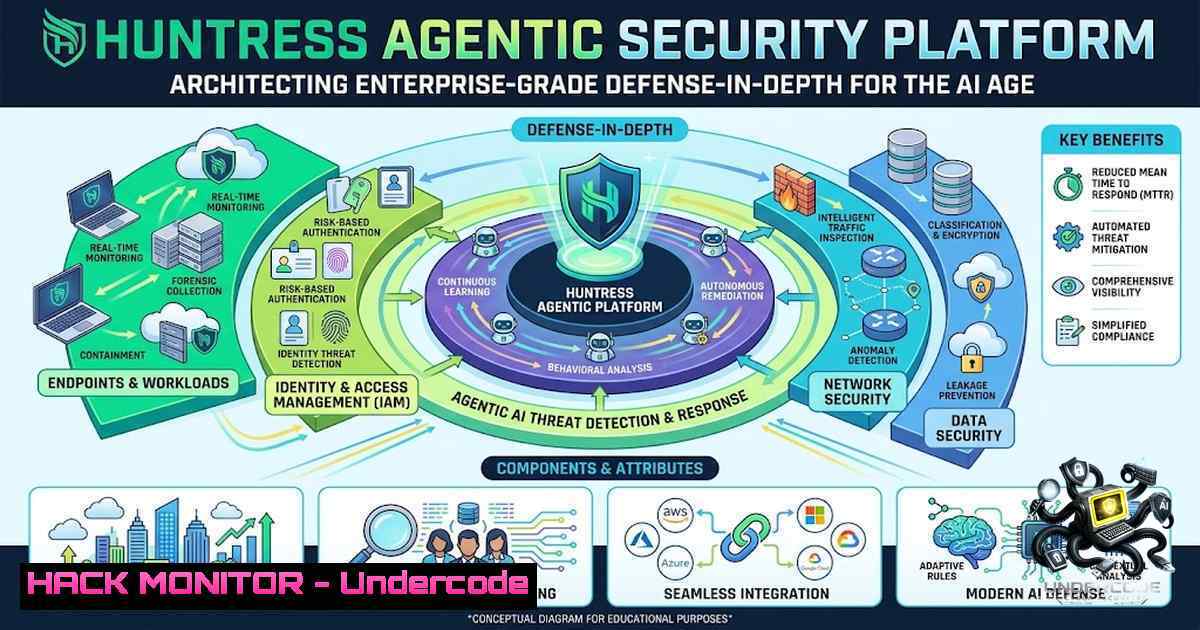
The modern threat landscape has fundamentally shifted—identity is the new perimeter, AI is weaponized by adversaries, and traditional antivirus solutions are no longer sufficient to protect small and mid-sized businesses. Huntress has emerged as a purpose-built cybersecurity platform delivering end-to-end protection through a unified agentic security framework that combines Endpoint Detection and Response (EDR), Identity Threat Detection and Response (ITDR), Security Information and Event Management (SIEM), and Security Awareness Training (SAT) into a single, accessible solution. Backed by a 24/7 AI-centric Security Operations Center (SOC) staffed by elite threat hunters, the platform currently safeguards more than 5 million endpoints and 13 million identities worldwide.
Learning Objectives
- Understand the architecture and deployment methodology of the Huntress Agent across Windows, macOS, and Linux environments
- Master the configuration of Managed EDR, ITDR, and SIEM components for comprehensive threat detection and response
- Implement API security best practices and cloud hardening techniques to prevent credential exposure and privilege escalation
- Develop proficiency in SIEM query building and log source integration for proactive threat hunting
You Should Know
- Deployment and Agent Architecture: Installing Huntress Across Your Infrastructure
The Huntress Agent serves as the foundational telemetry collector for the entire security platform. With support spanning Windows 10/11, Windows Server 2016+, macOS (Sonoma 14, Sequoia 15.1+, Tahoe 26), and Linux distributions (Ubuntu 22.04, 24.04, 25.04) running on kernel 5.14.50+, the agent is designed for minimal resource consumption—typically utilizing about 1% CPU and 20MB of RAM, with memory consumption around 400MB in most cases. The agent communicates with the Huntress Dashboard using TLS 1.2/1.3, ensuring encrypted data transmission.
Step‑by‑Step Agent Installation via PowerShell (Windows):
The preferred deployment method leverages the official PowerShell script for error checking and logging capabilities:
$AccountKey = "YOUR_ACCOUNT_KEY"
$OrgKey = "YOUR_CLIENT_NAME"
(New-Object Net.WebClient).DownloadFile('https://raw.githubusercontent.com/huntresslabs/deployment-scripts/main/Powershell/InstallHuntress.powershellv2.ps1', $env:temp + '/InstallHuntress.powershellv2.ps1')
iex "powershell -executionpolicy bypass -command ''$env:temp\InstallHuntress.powershellv2.ps1 -a $AccountKey -o $OrgKey''"
Step‑by‑Step Agent Installation via Command Prompt (CMD):
SET AccountKey=YOUR_ACCOUNT_KEY && SET OrgKey=YOUR_CLIENT_NAME && powershell -executionpolicy bypass -command "(New-Object Net.WebClient).DownloadFile('https://raw.githubusercontent.com/huntresslabs/deployment-scripts/main/Powershell/InstallHuntress.powershellv2.ps1','%temp%\InstallHuntress.powershellv2.ps1'); iex '%temp%\InstallHuntress.powershellv2.ps1 -a " %AccountKey% " -o " %OrgKey% "'"
Step‑by‑Step Agent Re‑registration and Repair:
For scenarios requiring agent re-registration (incorrect account key, unresponsive agent, or full repair), use the `-reregister` flag:
powershell -executionpolicy bypass -f ./InstallHuntress.powershellv2.ps1 -acctkey <ACCOUNT_KEY> -orgkey <ORG_KEY> -tags "TAGS_LIST" -reregister
The PowerShell script logs all deployment actions to %program files%\Huntress\HuntressPoShInstaller.log, facilitating troubleshooting.
What Undercode Say:
- The agent’s lightweight footprint (1% CPU, ~400MB RAM) enables deployment across legacy and modern infrastructure without performance degradation.
- TLS 1.2/1.3 encryption ensures all telemetry data remains confidential during transmission to the Huntress cloud platform.
- The scripted deployment approach with logging capabilities is critical for MSPs managing hundreds or thousands of endpoints.
- Endpoint Detection and Response: Telemetry, Process Insights, and Threat Hunting
Huntress Managed EDR is powered by comprehensive telemetry collection designed to give the SOC the data needed to detect and respond to top threats targeting SMBs. The platform collects persistent application and autorun details including file paths, metadata (size, timestamps, hashes), user accounts, startup mechanisms (registry values, tasks, services), operating system versions, and network configurations.
Core EDR Components:
The Huntress executables consist of four main components:
- Process Insights – Real-time process monitoring capturing file paths, parameters, PIDs, start/end times, certificates, and parent process relationships
- Persistent Foothold Detection – Identification of autorun and auto-start applications
- Ransomware Canaries – Early warning system for ransomware activity
4. External Recon – Detection of reconnaissance attempts
Step‑by‑Step Process Insights Configuration:
Process Insights is enabled by default. To temporarily exclude specific endpoints, contact Huntress Support via the support portal. The data collected includes:
- Process file path and metadata (parameters, PID, start/end time, certificates, size, hash)
- Process parent data (PID, name, metadata)
- User account under which the process started
Step‑by‑Step Managed Antivirus Integration:
With Managed Microsoft Defender enabled, Huntress collects additional telemetry:
– Infected file details and associated resources (malware artifacts, registry keys)
– Infected file metadata (size, timestamp, path)
– User account under which the infection was discovered
For macOS environments, Huntress accesses logs from XProtect (built-in AV) and Defender Antivirus for macOS, though management capabilities (applying settings, managing exclusions) are currently limited.
What Undercode Say:
- The four-component EDR architecture provides defense-in-depth by addressing different attack vectors—persistence, ransomware, and reconnaissance.
- Process Insights offers granular visibility into process relationships, enabling detection of sophisticated attack chains.
- Integration with Microsoft Defender extends protection without requiring additional agent overhead.
- Identity Threat Detection and Response: Securing the Human Layer
Identity is now the primary attack surface, with credential theft behind one in five data breaches and total compromised credentials rising 160% in 2025. Huntress Managed ITDR delivers enterprise-grade identity protection against credential theft, session hijacking, and rogue OAuth apps. The solution achieves a <5% false positive rate and a 3-minute mean time to respond (MTTR).
Core ITDR Capabilities:
- Session Hijacking Detection: Identifies attackers who steal session tokens and import them into their own browsers, bypassing MFA
- Credential Theft Prevention: Detects stolen or shared passwords, privilege escalation, and suspicious token usage
- Rogue OAuth App Discovery: Full visibility into malicious OAuth apps installed across tenants
- Location‑Based Anomaly Detection: Exposes unusual login locations and VPN usage
- Shadow Workflow Protection: Spots Business Email Compromise (BEC) activity and unusual inbox behavior
Step‑by‑Step ITDR Data Collection and Monitoring:
Huntress collects Microsoft 365 event logs from connected tenants and user session details:
- Inbox rule names and actions (stored while active)
- Tracked events (stored for 14 days)
- Session information: ID, browser names, country, OS, tunnels
- Identity data: Microsoft GUID, UPN, most recent event, access locations, licenses
Step‑by‑Step ITDR Escalation Management:
Recent updates to Managed ITDR introduce a precise per-identity escalation model designed to reduce alert noise and eliminate false positives. Every identity receives a dedicated Huntress Escalation, notification, and corresponding PSA ticket.
What Undercode Say:
- The 3-minute MTTR and <5% false positive rate are industry-leading metrics that reduce alert fatigue and enable rapid incident response.
- ITDR’s focus on the human identity layer addresses the most common attack vector in modern breaches.
- The per-identity escalation model ensures that suspicious activity is investigated with context, not noise.
- Security Information and Event Management: Centralized Log Aggregation and Threat Hunting
Huntress Managed SIEM centralizes, indexes, and monitors log data from boundary devices, internal infrastructure, and SaaS tenants. The platform supports multiple log source types including Windows and Linux OS logs, syslog (firewalls), and API/HTTP sources.
Step‑by‑Step SIEM Log Source Configuration:
Phase 1: Scope and Connect Log Sources
Identify high-value assets including domain controllers, critical application/file servers, boundary firewalls, VPN appliances, and active SaaS tenants. Configure each device to forward event data using:
- Syslog sources: Requires configuration of an endpoint with the Huntress Agent for data collection
- API sources: Follow the API Device Configuration Guide for vendor-specific setup
- HEC sources: HTTP Event Collector configuration
- OS logs: Operating System Log Configuration Guide
Phase 2: Verify Logging Coverage
Confirm initial data sources are connected and actively streaming events. Deployment milestone: at least 50% of contracted data sources successfully transmitting data. Navigate to the SIEM data sources management page to review active log entries.
Phase 3: Perform Search and Reporting Function Check
Validate indexed records are searchable using the Query Builder or ES|QL queries. Examples include:
- Recent admin logon events
- Failed authentication attempts
- Firewall deny rules
- VPN connection anomalies
Step‑by‑Step Windows Auditing Configuration via Intune (JSON Import Method):
{
"settings": [
{
"id": "EventLog-Security-MaxSize",
"settingInstance": {
"settingDefinitionId": "EventLog_Security_MaxSize",
"choiceSettingValue": {
"value": "2097152"
}
}
},
{
"id": "Audit-AccountLogon-CredentialValidation",
"settingInstance": {
"settingDefinitionId": "Audit_AccountLogon_CredentialValidation",
"choiceSettingValue": {
"value": "Success and Failure"
}
}
}
]
}
Manual Configuration Steps:
- In Microsoft Intune admin center: Devices → Windows → Configuration profiles → Create profile
- Select platform: Windows 10 and later, profile type: Settings catalog
- Add settings for Event Log (Security, Setup, System) – configure maximum log size and retention behavior
- Search for “Audit” and configure categories including Account Logon, Account Management, and Detailed Tracking
- Set each audit category to Success, Failure, or both as required
- Assign the policy to all devices or targeted Microsoft Entra groups
Critical Audit Categories:
| Category | Subcategory | Audit Setting |
|-|-||
| Account Logon | Audit Credential Validation | Success and Failure |
| Account Logon | Audit Kerberos Authentication Service | Success and Failure |
| Account Management | Audit Computer Account Management | Success and Failure |
| Account Management | Audit Security Group Management | Success and Failure |
| Account Management | Audit User Account Management | Success and Failure |
What Undercode Say:
– The phased SIEM rollout approach (Scope → Verify → Search) ensures methodical deployment without overwhelming security teams.
– JSON-based Intune configuration enables scalable, repeatable Windows auditing policy deployment across enterprise environments.
– ES|QL query support provides powerful, structured threat hunting capabilities for advanced security analysts.
- API Security and Cloud Hardening: Protecting the Platform Itself
The Huntress platform exposes REST APIs for integration, automation, and partner management. However, API security requires careful attention to prevent credential exposure and privilege escalation.
Step‑by‑Step Huntress MCP Server Connection:
claude mcp add huntress https://api.huntress.io/v1/mcp -t http -s user -H "Authorization: Basic <base64_credential>"
Step‑by‑Step API Security Hardening:
Issue 1: Dynamic API Scoping
A reported security concern involves dynamic API scoping where an attacker who obtains client ID and secret can elevate permissions by modifying scopes at runtime. For example, a client with `learners:manage` scope could be elevated to `assignments:learner-activity` to access training results and target phishing campaigns.
Mitigation Strategy: Implement scope restrictions at client creation time rather than runtime. While Huntress has acknowledged this issue, they have indicated that changing scope will remain as-is given the structure of their JSON API. Organizations should:
- Rotate API credentials regularly
- Implement least-privilege access principles
- Monitor API activity logs for anomalous scope changes
Issue 2: Client Secret Visibility
Client secrets are viewable at any time in the dashboard, creating a persistence risk if credentials are compromised. Huntress has committed to implementing a limit on viewing secrets.
Mitigation Strategy: Until this is implemented:
- Store secrets in secure vaults (e.g., Azure Key Vault, AWS Secrets Manager)
- Implement API key rotation policies (e.g., every 90 days)
- Use service principals with managed identities where possible
Step‑by‑Step Firewall and Network Hardening:
Required firewall settings for Huntress Agents include port exclusion and allow-listing configurations. Ensure:
- Outbound TLS 1.2/1.3 traffic to Huntress cloud endpoints is permitted
- No conflicting antivirus solutions are present (Huntress requires Defender to be enabled, up-to-date, scanned recently, and no conflicting AV detected)
- Host file tamper protection is enabled to prevent attackers from redirecting API traffic
Step‑by‑Step Unwanted Access Rules API Configuration:
The Unwanted Access Rules API exposes endpoints to list, create, update, and delete rules governing how Huntress responds to identity access attempts by country or VPN:
 List all unwanted access rules
curl -X GET "https://api.huntress.io/v1/unwanted-access/rules" \
-H "Authorization: Bearer <API_TOKEN>"

Create a new rule to block access from specific country
curl -X POST "https://api.huntress.io/v1/unwanted-access/rules" \
-H "Authorization: Bearer <API_TOKEN>" \
-H "Content-Type: application/json" \
-d '{"country": "RU", "action": "block"}'
What Undercode Say:
– The dynamic API scoping issue highlights the importance of least-privilege architecture in API design—scopes should be immutable after creation.
– Client secret visibility is a fundamental security antipattern; organizations should treat any secret as potentially compromised and rotate accordingly.
– The Unwanted Access Rules API provides programmatic control over geographic access restrictions, enabling automated response to threat intelligence.
6. Security Awareness Training: The Human Firewall
Huntress Managed SAT provides REST API using the JSON:API standard, designed for channel partners to manage training campaigns and learner data. The platform integrates security awareness training as a core component of the defense-in-depth strategy.
Step‑by‑Step SAT API Integration:
 Authenticate to SAT API
curl -X POST "https://api.huntress.io/v1/sat/auth" \
-H "Content-Type: application/json" \
-d '{"client_id": "YOUR_CLIENT_ID", "client_secret": "YOUR_CLIENT_SECRET"}'

Retrieve learner training progress
curl -X GET "https://api.huntress.io/v1/sat/learners/{learner_id}/progress" \
-H "Authorization: Bearer <ACCESS_TOKEN>"

Assign training campaign
curl -X POST "https://api.huntress.io/v1/sat/campaigns" \
-H "Authorization: Bearer <ACCESS_TOKEN>" \
-H "Content-Type: application/json" \
-d '{"name": "Q4 Phishing Awareness", "learners": ["[email protected]", "[email protected]"]}'
What Undercode Say:
– SAT API integration enables automated campaign management and reporting, reducing administrative overhead for MSPs.
– The API’s JSON:API standard compliance facilitates integration with existing partner dashboards and reporting tools.
– Security awareness training addresses the human element—the most unpredictable variable in any security program.
7. Incident Response and Forensic Acquisition
The Huntress agent has forensic acquisition capabilities that expand upon routine data collection. These forensic tasks can be initiated manually by SOC analysts during investigations or occur as part of automated response workflows.
Step‑by‑Step Incident Response Workflow:
- Detection: EDR, ITDR, or SIEM alerts are generated based on telemetry analysis
- Triage: SOC analysts investigate the alert, utilizing forensic acquisition if needed
- Containment: Automated or manual response actions are executed (e.g., host isolation, account lockdown)
4. Eradication: Threat removal through managed response capabilities
5. Recovery: System restoration and verification
6. Post‑Incident: Root cause analysis and security improvements
Step‑by‑Step Host Isolation:
Host Isolation capability is supported on Windows 10 & 11, Server 2016+, macOS, and Linux systems. When triggered, the isolated host loses network access until remediation is complete.
Managed Response Pre‑approval:
Partners can pre-approve Huntress SOC to perform automated remediation actions, reducing response time from hours to minutes. The platform achieves a <1% false positive rate with an 8-minute MTTR.
What Undercode Say:
– The forensic acquisition capability provides SOC analysts with on-demand deep-dive investigation tools without requiring additional agent deployment.
– Host isolation is a critical containment mechanism that prevents lateral movement during active incidents.
– Pre-approved automated response reduces the gap between detection and remediation—often the difference between a contained incident and a full-blown breach.
What Undercode Say
- The Huntress platform’s unified agent architecture (EDR + ITDR + SIEM + SAT) provides a comprehensive security stack that eliminates the complexity of managing multiple point solutions, making enterprise-grade security accessible to SMBs and MSPs.
- The 24/7 AI-assisted SOC with human threat hunters strikes the optimal balance between automated detection and human judgment, achieving <1% false positives and sub-10-minute MTTR—critical metrics for effective threat response.
- The platform’s commitment to real-time tradecraft analysis and community advisories ensures that customers benefit from collective intelligence, not just their own telemetry.
- API security concerns (dynamic scoping, secret visibility) underscore the importance of treating API credentials as highly sensitive assets and implementing defense-in-depth around API access.
- The SIEM’s support for multiple log sources (syslog, API, HEC, OS logs) and ES|QL querying provides the flexibility needed for complex threat hunting scenarios.
- Integration with Microsoft Defender and Intune demonstrates Huntress’s pragmatic approach to augmenting, rather than replacing, existing security investments.
Prediction
- +1 The democratization of enterprise-grade security through platforms like Huntress will continue to close the gap between large enterprises and SMBs, reducing the overall attack surface across the global economy.
- +1 The convergence of EDR, ITDR, and SIEM into unified agentic platforms will drive operational efficiency for MSPs, enabling them to deliver comprehensive security services at scale without exponential staffing increases.
- -1 The reliance on AI-assisted detection introduces new attack vectors—adversaries will increasingly target the AI models themselves through data poisoning and adversarial machine learning techniques.
- -1 API security will emerge as a critical vulnerability surface as more security platforms expose programmatic interfaces; without standardized API security frameworks, credential exposure will remain a primary attack vector.
- +1 The shift toward per-identity escalation models in ITDR will reduce alert fatigue and improve detection accuracy, enabling security teams to focus on genuine threats rather than noise.
- -1 The increasing sophistication of identity-based attacks (session hijacking, token theft, rogue OAuth apps) will outpace traditional security controls, driving demand for purpose-built ITDR solutions that specifically address the human identity layer.
- +1 Community-driven threat intelligence sharing, as demonstrated by Huntress’s real-time advisories, will become the industry standard, accelerating collective defense against emerging threats.
▶️ Related Video (86% Match):
🎯Let’s Practice For Free:
🎓 Live Courses & Certifications:
Join Undercode Academy for Verified Certifications
🚀 Request a Custom Project:
Secure, high-velocity infrastructure and disruptive technological engineering. Contact our engineering team for high-tier development and proprietary systems:
[email protected]
💎 Smart Architecture | 🛡️ Secure by Design | ⭐ Trusted by Thousands
IT/Security Reporter URL:
Reported By: Gbpo Solutions – Hackers Feeds
Extra Hub: Undercode MoN
Basic Verification: Pass ✅


